GitBook is a documentation platform that syncs with your repository for docs-as-code workflows, proactively flags content that no longer matches your product, answers user questions through an AI assistant, and connects to Claude, ChatGPT and Cursor through MCP so agents can read your docs directly.
Documentation rarely fails because it was written badly. It fails because it was written correctly two years ago and the product changed, and nobody noticed the page describing a flow that no longer exists.
That decay is invisible from the inside. The team that wrote the docs knows the current product too well to notice the discrepancy, and the reader who hits it does not file a bug — they leave, or open a support ticket that nobody connects back to the page that caused it.
GitBook's more interesting features are aimed at exactly that problem rather than at authoring. And there is now a second audience worth taking seriously: your documentation is being read by AI agents on behalf of your users, which changes what good documentation has to do.
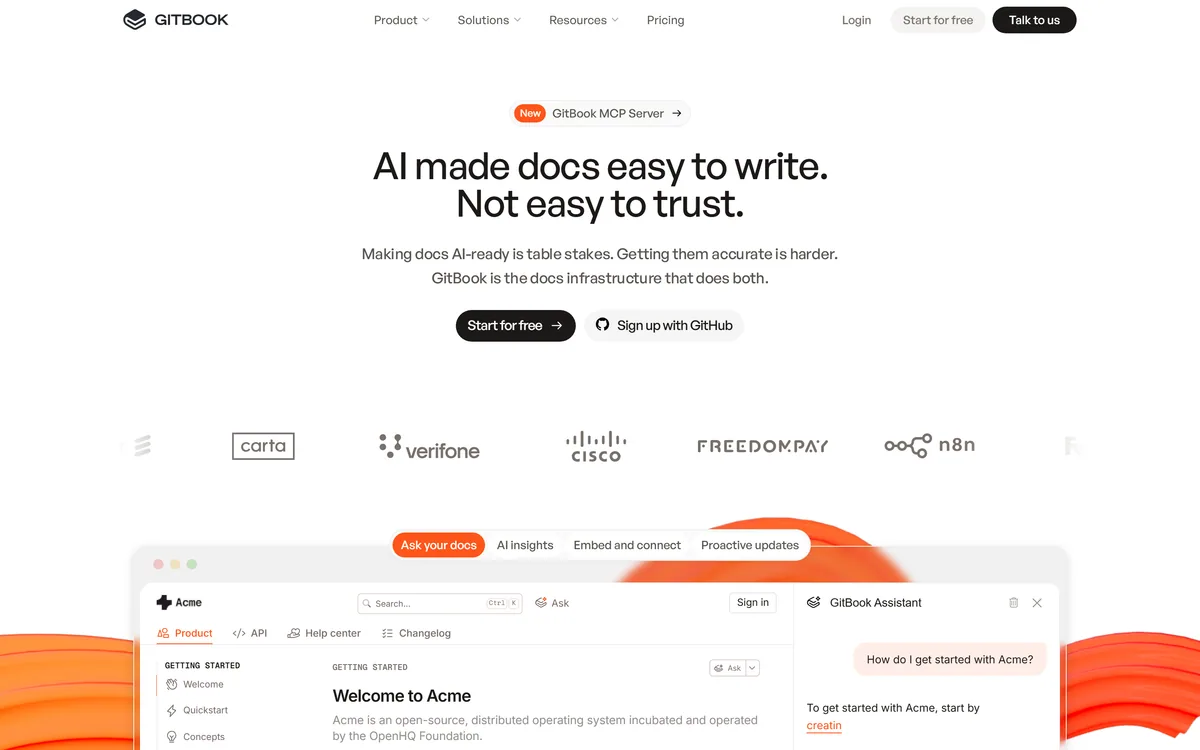
GitBook's homepage, captured 9 September 2026. The positioning is a knowledge platform connecting docs, product and users rather than a publishing tool.
Your Docs Are Now Read By Agents Too
GitBook offers MCP integration with Claude, ChatGPT and Cursor, and its AI Insights tracks where users get stuck — explicitly including agents alongside humans.
That is a genuine shift in what documentation is for, and most teams have not adjusted to it. A meaningful share of the people using your product now ask an assistant how to do something rather than reading your docs, and the assistant reads your docs on their behalf.
This changes the quality bar in a specific way. A human reader tolerates ambiguity, infers from context, and works out that a screenshot is out of date. An agent takes the text literally, and a page that says one thing while the product does another produces a confidently wrong answer delivered to your user in your name.
MCP makes the relationship explicit rather than incidental. Instead of an assistant having absorbed whatever it happened to crawl at some point, it queries your current documentation directly — which means corrections propagate rather than persisting in a model's memory.
The practical implication is that documentation accuracy has become an operational concern rather than a hygiene one. A wrong page used to mislead the people who read it; now it misleads everyone who asks an assistant about you.
This is a genuine change in audience. Documentation used to compete for a reader's attention; it now competes to be the source an agent quotes, which rewards the same plainness that ContentMonk and every other content tool has been pushing writers towards.
A human reader works out that a screenshot is out of date. An agent takes the page literally and tells your customer the wrong thing in your name.
Docs-As-Code Is The Right Workflow
GitBook syncs with your repository so you can branch, review and merge documentation like a pull request.
That workflow solves the oldest problem in technical documentation: docs live somewhere else, so they get updated separately from the change they describe, which means later or never.
When documentation lives beside the code and moves through the same review process, updating it becomes part of shipping rather than a follow-up task that competes with the next feature. A reviewer can also require it, which is the only mechanism that reliably works.
The trade is that non-engineers find Git workflows genuinely off-putting, and product managers, support leads and technical writers are frequently the people best placed to notice a doc is wrong. A platform that only supports the Git path excludes them; GitBook offers an editor alongside, which is the right compromise.
Which GitBook Feature Actually Stands Out?
The GitBook Agent proactively detects stale content by scanning docs that no longer match your product, and flags them for review.
This is the most valuable thing on the page and the least visible in a demo, because its output is a list of problems rather than something impressive to look at.
The reason it matters is that nobody audits documentation. There is no natural trigger — no error, no failing test, no complaint that identifies the page responsible. Docs rot silently and continuously, and the only conventional remedy is an annual review that everyone dreads and nobody completes.
Automated detection converts that into a queue. A flagged page is a small, actionable task rather than a project, which is the difference between documentation that gets maintained and documentation that gets rewritten every three years.
The obvious question is accuracy, and it is not answered on the site. False positives waste attention and false negatives leave the stale page in place. The realistic expectation is that this catches clear divergences — a removed feature, a renamed field — rather than subtle drift in emphasis, which is still worth having. Test it against pages you already know are wrong.
Staleness is the failure mode of every knowledge store, general workspaces like Notion AI included, where nothing ever tells you a page has stopped being true.
Test stale detection against pages you already know are out of date, and count what it misses.
Treat flagged pages as a queue rather than a project; small tasks get done.
Combine it with AI Insights, since a stale page users hit often should be fixed first.
Do not expect it to catch subtle drift in emphasis or tone — it finds divergence, not decay of usefulness.
Re-run it after any significant release, when divergence is highest.
AI Insights Makes Documentation Measurable
GitBook's AI Insights tracks where users — human and agent — get stuck and shows which content to fix first.
Documentation has historically had almost no feedback loop. You publish, and unless somebody complains you have no idea whether a page worked. Page views tell you what was visited, not what was understood, and a heavily visited page may be popular or may be confusing enough that people keep returning.
Measuring where readers get stuck inverts that. It identifies the page that failed rather than the page that was read, which is the actionable version of the same data.
Including agents in that measurement is the more forward-looking part. If assistants repeatedly fail to answer a question from your docs, that is a gap you would otherwise never learn about — the user asked the assistant, got a poor answer, and never visited your site at all.
Combined with stale detection, this gives a documentation team something it has rarely had: a prioritised list. Fix the stale page that many people hit before the stale page nobody reads, which is obvious advice that was previously impossible to follow.
If your documentation ships in several languages, a localisation platform such as Lokalise handles the part where staleness multiplies fastest.
Auditing Your Own Documentation In An Afternoon
The fastest way to judge a documentation platform is to point its diagnostic features at docs you already suspect are wrong.
The bar is step two. A stale-detection feature that misses pages you know are wrong is a feature you cannot rely on to find the ones you do not know about.
Import a real section of your existing documentation, ideally one that has not been reviewed in a year.
Run stale detection and compare its flags against three pages you already know are out of date. Count what it caught and what it missed.
Connect one repository and make a documentation change through the Git workflow, checking that branch, review and merge behave as your engineers expect.
Ask the AI Assistant five questions your support team actually receives, and judge whether the answers would have prevented a ticket.
Connect it to Claude or ChatGPT through MCP and ask the same five questions there. That is how a growing share of your users will experience your docs.
Leave AI Insights running for two weeks and look at where people get stuck — the list is usually not what the team expected.
The Seat Question GitBook Leaves Open
No pricing details or seat costs appear on the pages we read; the site mentions free tier availability without specifics.
That is a notable gap for a documentation platform, because the buying decision is unusually sensitive to seat structure. Documentation is written by engineers, product managers, support staff and technical writers — a per-seat model that makes it expensive for occasional contributors quietly ensures that only the dedicated writers update anything, which is precisely the failure mode the product is otherwise built to prevent.
Also missing is any accuracy data for the stale-content detection or the AI Assistant, which is the same absence found across the whole AI tooling category.
What is published is unusually specific for a software company: a legal name of GitBook INC., a full US address and an EIN, alongside terms of service, a privacy statement, a security and compliance page and a status page.
We do not publish amounts. Establish how contributors are counted before committing, since that determines whether the people who notice documentation errors can actually fix them.
What Does GitBook Solve?
Docs-as-code with Git sync — branch, review and merge documentation like a pull request, in the workflow engineers already use.
Proactive stale-content detection: the GitBook Agent scans for docs that no longer match your product and flags them for review.
An AI Assistant answers user questions directly from your documentation rather than sending readers to search it themselves.
AI Insights tracks where users get stuck — both humans and agents — and shows which content to fix first.
MCP integration with Claude, ChatGPT and Cursor, so AI tools can read your docs directly as a source.
GitBook: Features, Company And Coverage
Product type
Documentation and knowledge platform
Positioning
Connects docs, product and users; answers user questions and identifies knowledge gaps
Docs-as-code
Repository sync with branch, review and merge like a pull request
Stale content
GitBook Agent proactively scans for docs that no longer match the product
AI Assistant
Users can ask your docs directly and get personalised support
AI Insights
Tracks where users and agents get stuck, and which content to fix first
MCP integration
Official plugins for Claude, ChatGPT and Cursor
Publishing
Custom domains, authenticated access, tiered roles and permissions
Extensibility
Custom components and built-in extensions
Named customers
Roboflow and FreedomPay quoted on the site
Legal entity
GitBook INC., 440 N Barranca Ave #7171, Covina, CA 91723, USA, EIN 320502699
Pricing model
Free tier mentioned; no amounts published on the pages we read
Published links
Terms of service, privacy statement, security and compliance, status page
Key features of GitBook
Repository sync with branch, review and merge documentation workflows
Proactive stale-content detection flagging docs that no longer match the product
AI Assistant answering user questions directly from your documentation
AI Insights showing where human and agent readers get stuck
MCP plugins connecting Claude, ChatGPT and Cursor to your docs
Custom domains and authenticated access for gated content
Tiered roles and permissions for contributor management
Custom components and built-in extensions
Pros & cons
Pros
7
Treats AI agents as a real documentation audience rather than an afterthought
MCP means assistants read your current docs rather than a stale crawl, so corrections propagate
Stale-content detection addresses documentation's actual failure mode rather than its authoring
AI Insights turns docs into something measurable — which page failed, not which page was viewed
Docs-as-code makes updating documentation part of shipping rather than a competing task
An editor alongside the Git path keeps non-engineers able to contribute
Unusually complete company disclosure, including a registered address and EIN
Cons
6
No pricing or seat structure published, and seat cost determines who can actually contribute
No accuracy data for stale detection or the AI Assistant
Stale detection realistically catches clear divergence rather than subtle drift
Security certifications sit behind a separate compliance page rather than on the main pages
Repository provider support and file-format limits are not enumerated
Overkill for a handful of pages that rarely change
Best For
Teams publishing product or API documentation external users depend on
Organisations whose docs have quietly drifted from the product
Companies whose users increasingly ask AI assistants about them
Engineering teams wanting docs-as-code without excluding writers
Anyone who wants to know which documentation pages actually fail readers
GitBook Against Other Knowledge Tools
Documentation, internal knowledge and content publishing overlap but solve different problems. What the audience is decides the right tool.
Tool
Audience
Git workflow
AI role
GitBook
External users and AI agents reading your product docs
Yes — branch, review and merge like a PR
Stale detection, assistant, insights and MCP access
You publish product or API documentation that external users depend on.
Your docs have quietly stopped matching your product and nobody has time to audit them.
Your engineers want docs-as-code and your writers do not want Git — you need both paths.
Users increasingly ask assistants about your product, and you want agents reading current docs rather than stale crawls.
You want to know which pages actually fail readers rather than which pages get views.
The wrong platform when
You need internal team knowledge and collaboration, which is a workspace tool rather than a docs platform.
Your documentation is a handful of pages that rarely change, where the maintenance features solve nothing.
Per-seat costs would stop occasional contributors from editing, which defeats the point — check this before buying.
You need a marketing site with a blog rather than product documentation.
You want published accuracy data for the AI features before committing, since none exists.
Other Knowledge And Content Tools
Compare on audience first — external documentation, internal knowledge and marketing content are three different jobs.
Notion AI — internal team knowledge rather than external product documentation
Cleve — personal thinking and drafting rather than published docs
ContentMonk — if the goal is visibility in AI answers rather than accurate documentation
Gamma — presentations, for when documentation needs to be pitched rather than read
Lokalise — translating documentation once it exists and needs to reach other markets
Confirming What GitBook Publishes
Last checked . Read from gitbook.com, including the footer, with the screenshot above captured in the same session.
Positioning read from the site as a knowledge platform that connects docs, product and users, answers user questions and identifies knowledge gaps
Docs-as-code confirmed: sync your repo, then branch, review and merge documentation like a pull request
Stale content detection confirmed as proactively scanning docs that no longer match products
GitBook Agent described as flagging outdated content for review
GitBook Assistant confirmed as letting users ask your docs directly and get personalised support
AI Insights described as tracking where users, both human and agent, get stuck and showing which content to fix first
MCP integration confirmed with official plugins for Claude, ChatGPT and Cursor
Publishing features confirmed as custom domains, authenticated access and tiered role and permission controls
Named customers quoted on the site include Roboflow and FreedomPay
Company details published as GitBook INC., 440 N Barranca Ave #7171, Covina, CA 91723, USA, with EIN 320502699
Footer read directly and confirmed to carry terms of service, privacy statement, security and compliance, and a status page
What we could not confirm: no pricing details or seat costs appear on the pages we read, and seat structure matters unusually much here because it determines whether occasional contributors can edit; no accuracy data is published for stale-content detection or the AI Assistant; the number of supported repository providers and any file-format limits are not stated; specific security certifications sit behind a separate compliance page rather than being stated on the pages we read; and we did not use the product, so nothing here reflects tested detection quality.
Editor's Verdict
4.2/5
GitBook scores well because it identified the change that matters in documentation and acted on it: docs are now read by agents as well as people, and MCP connections to Claude, ChatGPT and Cursor make that a first-class capability rather than a side effect. Proactive stale-content detection addresses the real failure of documentation — not that it is badly written but that it quietly stops being true — and AI Insights showing where readers get stuck turns docs from a publishing exercise into a measurable one. It loses ground because no pricing appears on the pages we read and the stale-detection accuracy is unquantified. AInexfinder Editor Score: 4.2/5.
GitBook pricing
AInexfinder does not list plan prices or billing details. For current pricing, plans, and trials, visit the official GitBook website.
Vendor pricing, credits, and billing policies change over time. Always confirm on the official site before you buy.
Frequently asked questions
What is GitBook?
GitBook is a documentation and knowledge platform. It syncs with your repository so docs can be branched, reviewed and merged like code, proactively flags content that no longer matches your product, answers user questions through an AI assistant, and connects to Claude, ChatGPT and Cursor through MCP so agents can read your docs directly.
Why does MCP integration matter for documentation?
Because a growing share of your users ask an assistant rather than reading your docs, and the assistant reads your docs on their behalf. MCP means it queries your current documentation directly rather than relying on whatever it crawled once — so when you fix a page, the correction propagates instead of persisting in a model's memory.
How does GitBook detect stale documentation?
The GitBook Agent scans your docs for content that no longer matches your product and flags it for review. This matters because nobody audits documentation — there is no error, no failing test and no complaint that identifies the responsible page. Automated detection turns silent rot into a queue of small, actionable tasks.
Is GitBook free?
The site mentions free tier availability but publishes no pricing details or seat costs on the pages we read. Seat structure matters unusually much for a docs platform: if occasional contributors cannot afford a seat, only dedicated writers update anything — which is exactly the failure the product otherwise prevents. Establish how contributors are counted before committing.
What is docs-as-code, and do I need it?
It means documentation lives in your repository and moves through the same branch, review and merge process as code. That solves the oldest problem in technical writing: docs updated separately from the change they describe get updated late or never. You need it if engineers write your docs; you also need an editor path for those who do not.
What does AI Insights actually tell me?
Where readers get stuck, including AI agents — which is the actionable version of analytics. Page views tell you what was visited, not what was understood, and a heavily visited page may be popular or may be confusing enough that people keep returning. Insights identifies the page that failed rather than the page that was read.
Does GitBook work for internal documentation?
It supports authenticated access and tiered permissions, so gated internal docs are possible. But its distinctive features — stale detection, the AI assistant, MCP access, insights on where users get stuck — are aimed at external product documentation. For general internal team knowledge, a workspace tool such as Notion is usually the better fit.
How accurate is the stale content detection?
No accuracy data is published. The realistic expectation is that it catches clear divergence — a removed feature, a renamed field — rather than subtle drift in emphasis or usefulness. Test it against three pages you already know are out of date and count what it missed; that tells you how much to trust it on pages you have not checked.
Can non-engineers contribute to GitBook docs?
Yes — there is an editor alongside the Git workflow, which is the right compromise. It matters because product managers, support leads and technical writers are frequently the people who notice a doc is wrong, and a platform that only supports Git workflows quietly excludes exactly the people best placed to fix things.
Who uses GitBook?
The site quotes Roboflow and FreedomPay as customers, with named individuals in marketing and developer experience roles. The company publishes unusually complete details for a software vendor — a legal name, a full US registered address and an EIN — which is more corporate transparency than most tools in any category offer.
Daniel reviews AI tools the slow way — by actually using them on real projects. His reviews cover what works, what breaks, and who each tool is genuinely a good fit for.
Daniel and the AInexfinder editorial team research GitBook using public product information, listing evidence, and (when available) hands-on checks. Scores reflect listing completeness and transparency — not paid placement.
Listings may include affiliate or sponsored placements, which are labeled when present. Editorial scores and cons are not sold. See our affiliate disclosure and review methodology.
Dosu captures knowledge automatically from coding agent sessions, keeps documentation updated when source code changes, and connects GitHub, Confluence, Notion and Slack into one source of context. It states 50% fewer tokens burned, 2x faster agent performance and 200k+ engineers using it.
Theneo is an AI-powered API documentation and developer-portal platform where engineers, writers, PMs and AI agents co-edit API references, guides and changelogs in real time, with generation from any spec, MCP and llms.txt for agents, and private per-customer portals.
Stainless generates idiomatic client libraries in seven languages, documentation that tracks the API, and MCP servers, all derived from an OpenAPI specification. Its homepage announces that the company is joining Anthropic.
GitHub Copilot is an AI coding assistant that spans completion, chat, agent mode, automated code review, and a cloud agent that opens pull requests, working across VS Code, Visual Studio, JetBrains, Xcode, Neovim, Eclipse, the CLI, and github.com.