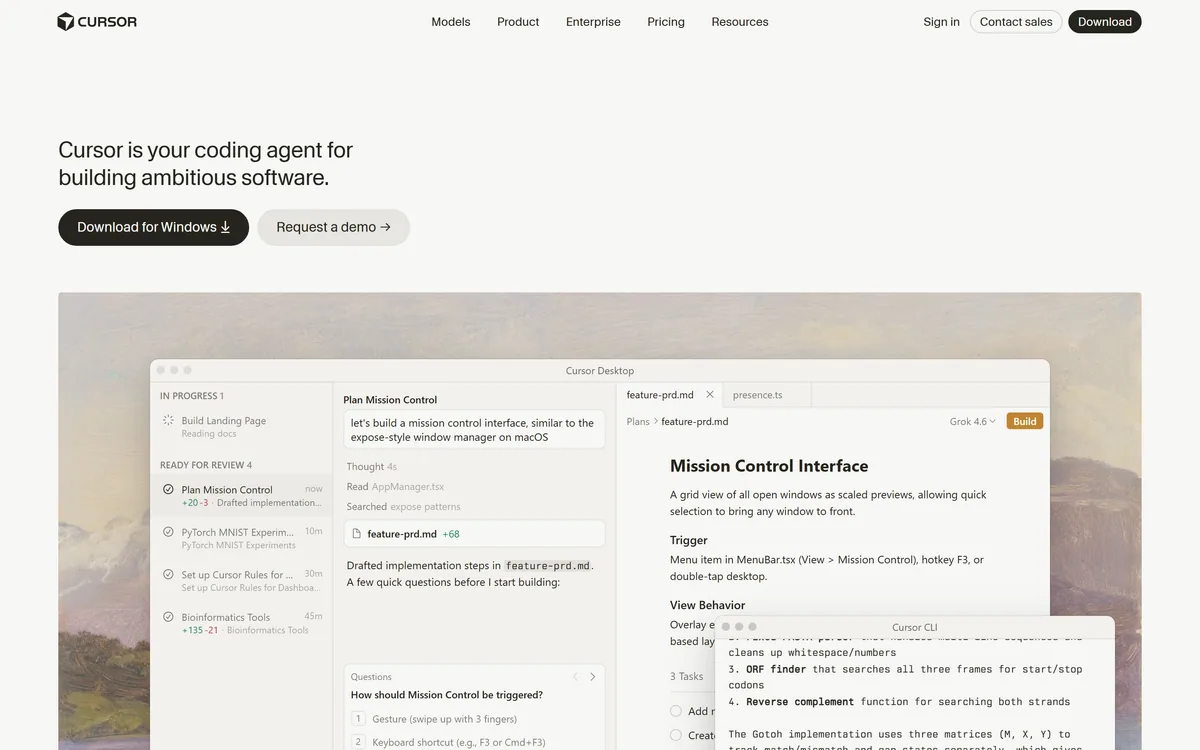
Cursor is an AI-first code editor and agent platform from Anysphere — now a SpaceX subsidiary — that plans, writes, tests, and reviews code across your repository from the desktop editor, a CLI, the web, and Slack.
Anyspherecursor.com94,021 viewsAdded November 27, 20252M+ visitors
Cursor is an AI code editor built around agents that can plan, write, test, and review code across a whole repository. It started as a fork of a familiar desktop editor with unusually good autocomplete, and has grown into something closer to a development platform.
The pitch today is not "finish my line" but "build this feature". Agents run in the editor, on the command line, in the cloud, and from Slack, and they can open pull requests when the work is done.
This review covers the pieces that matter in daily use, the ownership change that reshaped the company in 2026, and the failure modes worth knowing before a team standardises on it.
Cursor's homepage now leads with autonomous agents rather than the autocomplete that first made it popular.
Cursor Specifications
Maker
Anysphere, Inc., a wholly owned SpaceX subsidiary under the SpaceXAI division
Acquired
SpaceX completed its all-stock acquisition of Anysphere on 14 August 2026
Category
AI code editor and autonomous coding agent
Surfaces
Desktop editor, CLI, web, Slack, GitHub, mobile
Model providers
OpenAI, Anthropic, Google Gemini, and SpaceX models
Review tooling
Bugbot for automated code review and GitHub pull request review
Certifications
SOC 2, ISO 27001, ISO 42001, AIUC-1
Deployment options
Secure codebase indexing and self-hosted machines
Now A SpaceX Company: What That Means
On 14 August 2026 SpaceX completed its acquisition of Anysphere, Cursor's maker, in an all-stock deal valued at roughly $60 billion — widely reported as the largest startup acquisition on record. Cursor now operates as a wholly owned subsidiary inside a division branded SpaceXAI.
For day-to-day users the editor did not change overnight. What did change is the strategic context: Cursor is now funded and directed by a company with its own compute and its own model ambitions, and SpaceX models sit alongside OpenAI, Anthropic, and Gemini in the provider list.
If your organisation has procurement opinions about vendor ownership, this is the fact to surface early rather than discover during a security review.
Tab: The Feature People Actually Stay For
Tab is Cursor's inline prediction, and it remains the reason many developers switch. It predicts multi-line edits and, more usefully, the next place you were going to change — following a rename or a signature change through a file rather than completing one line at a time.
It is the least dramatic feature in the product and the one that compounds. Agents get the demos; Tab is what makes the editor feel faster within an hour of installing it.
Because it is inline and instant, it also carries none of the review burden that agent output does. You accept or ignore each suggestion as you type, so a wrong guess costs a keystroke rather than a code review.
The Agent Modes, And When Each Earns Its Keep
Cursor exposes several ways to hand work to a model. Picking the wrong one is the most common reason people conclude that "AI coding does not work".
In-Editor Agent
The Agent reads across your repository, edits multiple files, runs commands, and iterates on failures. This is the right mode for a scoped change you can review in one sitting — adding an endpoint, threading a new field through a stack, fixing a failing suite.
It works best with a clear acceptance test. Given a command that proves success, it will keep going until the command passes.
Composer
Composer handles larger generation work, where you are describing a chunk of functionality rather than editing existing code. It suits greenfield files and scaffolding better than surgical changes in a mature codebase.
Cloud Agents And Automations
Cloud Agents run outside your machine, in parallel, which is what makes fanning several independent tasks out at once practical. Automations trigger agents on a schedule or an event rather than a keystroke.
These are the features that separate Cursor from an editor plugin. They are also the ones that need the firmest review discipline, because work arrives finished rather than as you watch.
Bugbot For Review
Bugbot reviews code and comments on pull requests on GitHub. Treating it as a first reviewer that catches obvious defects — rather than an approver — is the use that holds up.
Steering Cursor With Rules
Cursor Rules are persistent instructions the agent reads on every run: your conventions, the libraries you have standardised on, the patterns you do not want reinvented.
Teams that write real rules get noticeably better output than teams that do not, and the gap widens as a codebase grows. A repository with no rules file gets generic code; one with a good rules file gets code that looks like the surrounding project.
This is the highest-leverage hour of setup available in the product, and it is the step most teams skip.
Security Posture And Enterprise Controls
Cursor lists SOC 2, ISO 27001, ISO 42001, and AIUC-1 certifications. ISO 42001 is the AI management standard specifically, which is still uncommon and matters if your compliance team asks about AI governance rather than general infosec.
For code residency concerns, Cursor offers secure codebase indexing and self-hosted machines. Adoption is broad — the company cites more than half of the Fortune 500, with named users including NVIDIA and Stripe.
Any tool that indexes a private repository is still a data decision. Route it through review before a wide rollout rather than after.
Where Cursor Frustrates Teams
Agent output degrades on very large or unusual codebases. The more your architecture diverges from mainstream patterns, the more the model guesses, and confident wrong code costs more to review than no code at all.
Cost is genuinely hard to predict. Agent-heavy workflows consume far more than autocomplete-heavy ones, and usage varies enormously between developers on the same team, which makes budgeting awkward.
There is also a real skill curve. Handing an agent a vague task produces sprawling diffs; the developers who get the most from Cursor are the ones who scope tightly and verify hard.
Should You Move Your Team To Cursor?
Cursor is the strongest general-purpose AI coding environment available right now, and the gap is widest for teams willing to use agents rather than autocomplete alone. Tab justifies the switch on its own; the agent layer is what changes how work gets planned.
Adopt it if your codebase follows recognisable patterns, your review culture is solid, and someone will own the rules file. Be more careful if your code is unusual, your budget is fixed, or reviews are already a bottleneck — agents produce diffs faster than a stretched team can read them.
Check cursor.com for current plans and limits before committing a team, and confirm the ownership change sits comfortably with your procurement process.
Key features of Cursor
Tab inline prediction that follows multi-line and next-edit changes
In-editor Agent that edits across files and runs commands until tests pass
Composer for larger code generation and scaffolding
Cloud Agents and Automations that run tasks in parallel, off your machine
Bugbot automated code review with GitHub pull request comments
Cursor Rules for persistent, repository-specific conventions
Model choice across OpenAI, Anthropic, Gemini, and SpaceX models
Pros & cons
Pros
5
Tab prediction is the best inline coding autocomplete in wide use
Agents genuinely complete scoped features, not just snippets
Runs where the work is — editor, CLI, web, Slack, and GitHub
Unusually strong certification list, including ISO 42001 for AI governance
Self-hosted machines and secure indexing for code-residency requirements
Cons
5
Agent quality drops sharply on large or architecturally unusual codebases
Agent-heavy usage makes spend hard to forecast across a team
Fast-arriving diffs can overwhelm teams whose review capacity is already tight
Vendor pricing, credits, and billing policies change over time. Always confirm on the official site before you buy.
Frequently asked questions
Who owns Cursor now?
SpaceX. It completed an all-stock acquisition of Anysphere, Cursor's maker, on 14 August 2026 in a deal valued at about $60 billion. Cursor operates as a wholly owned subsidiary within a division branded SpaceXAI.
What is the difference between Cursor's Agent and Composer?
Agent edits across an existing repository, runs commands, and iterates until a task passes — best for scoped changes in live code. Composer suits larger generation work such as new files and scaffolding, where you are describing functionality rather than modifying existing behaviour.
Which AI models can Cursor use?
Cursor supports models from OpenAI, Anthropic, and Google Gemini, alongside SpaceX models added after the acquisition. You choose the model per task rather than being locked to one provider.
Is Cursor safe for private company code?
Cursor lists SOC 2, ISO 27001, ISO 42001, and AIUC-1 certifications, and offers secure codebase indexing plus self-hosted machines. Indexing a private repository is still a data decision, so run it through your security review before a wide rollout.
What is Bugbot?
Bugbot is Cursor's automated code reviewer. It reviews changes and comments on GitHub pull requests, and works best as a first pass that catches obvious defects before a human reviewer reads the diff.
How much does Cursor cost?
AInexfinder does not publish plan prices because vendor pricing changes frequently. Check cursor.com for current plans, usage limits, and team options — and note that agent-heavy use consumes far more than autocomplete alone.
Do Cursor Rules actually matter?
Yes, more than most setup steps. Rules are persistent instructions the agent reads on every run, so a repository with well-written rules gets code matching its own conventions, while one without them gets generic output.
Daniel reviews AI tools the slow way — by actually using them on real projects. His reviews cover what works, what breaks, and who each tool is genuinely a good fit for.
Daniel and the AInexfinder editorial team research Cursor using public product information, listing evidence, and (when available) hands-on checks. Scores reflect listing completeness and transparency — not paid placement.
Listings may include affiliate or sponsored placements, which are labeled when present. Editorial scores and cons are not sold. See our affiliate disclosure and review methodology.
GitHub Copilot is an AI coding assistant that spans completion, chat, agent mode, automated code review, and a cloud agent that opens pull requests, working across VS Code, Visual Studio, JetBrains, Xcode, Neovim, Eclipse, the CLI, and github.com.
Replit AI turns a written description into a working application — the Agent writes the code, and Replit supplies the database, authentication, hosting, and monitoring, so a prototype goes live without a local setup or a deployment pipeline.
Tabnine is an enterprise AI coding assistant offering context-aware code completion, chat and agents with private deployment and a codebase-wide context engine. In July 2026 it was acquired by Tricentis, and tabnine.com now routes to the Tricentis agentic quality engineering platform.
Zencoder is an AI orchestration platform for engineering work: agents plan with one model, build with another and review with a third, across multi-repo indexing and full dependency mapping, inside VS Code and JetBrains. It adds scheduled automation and a work layer spanning Jira, Slack and Notion.
Cline is an open-source AI coding agent that works in your editor as a VS Code extension, in the terminal as a CLI, as a desktop app and through an SDK, using any model including open-weight ones, with a plan-and-act workflow where you approve its actions.
Pieces runs in the background on your computer forming a searchable memory of your work, capturing what you see and what you copy by default and what you hear only if you opt in. It builds a chronological timeline across Gmail, Outlook, browsers and Slack, and generates standups, briefs and recaps from real context.