Zencoder is an AI orchestration platform for engineering work: agents plan with one model, build with another and review with a third, across multi-repo indexing and full dependency mapping, inside VS Code and JetBrains. It adds scheduled automation and a work layer spanning Jira, Slack and Notion.
zencoder.ai8 viewsAdded December 23, 20252K visitors
There is a quiet assumption inside most AI coding tools that deserves questioning: that one model should do the whole job.
It does not match how the work actually divides, and single-model tools such as Cursor inherit that assumption. Planning a change is a reasoning task — understanding a system, weighing approaches, deciding what to touch. Writing the code is a generation task. Reviewing it is an adversarial task, where the useful skill is finding what is wrong rather than producing something plausible. Models have measurably different strengths across those three.
Zencoder's argument is that you should therefore use three, and route each stage to whichever is best at it. That is a more interesting proposition than another assistant, and the enterprise posture underneath it is stronger than most of the category can offer.
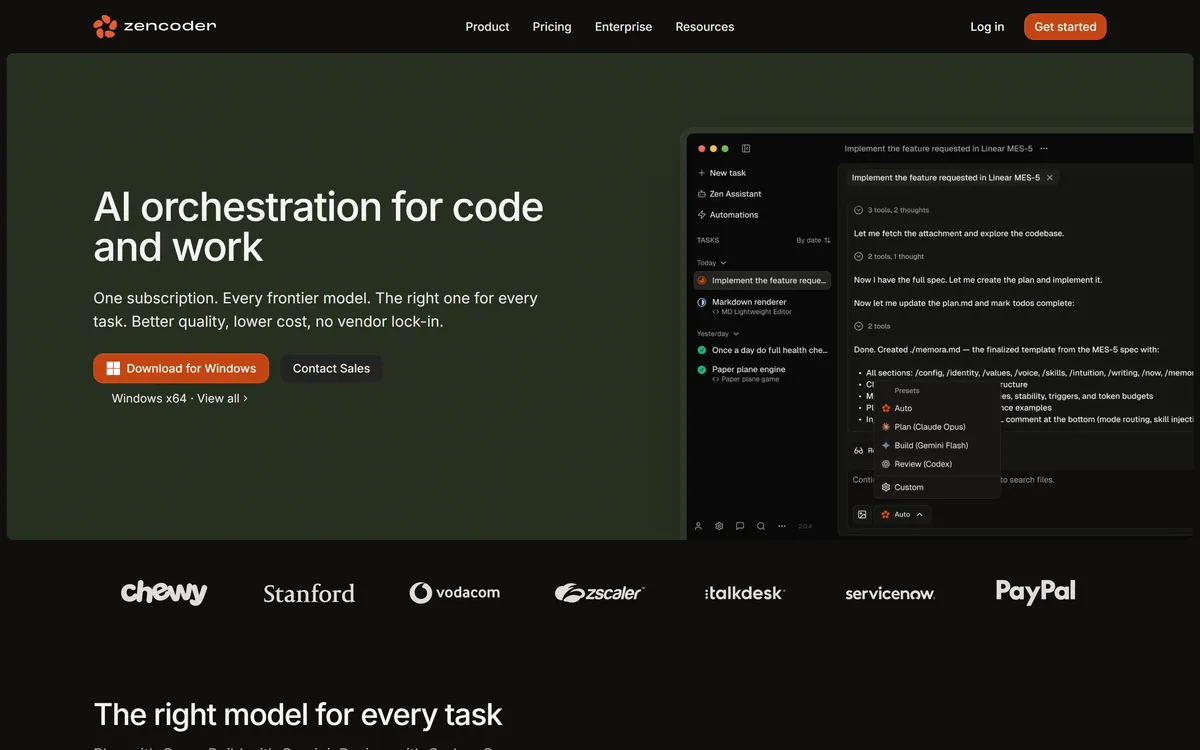
Zencoder's homepage, captured 9 September 2026. The pitch is orchestration across models rather than a single assistant, which is the substantive difference.
Zencoder, In One Paragraph
Different models for different stages — the site names Claude Opus for planning, Gemini for building and OpenAI Codex for review, under a single subscription.
Agents plan before they write, drafting a specification first rather than generating code from a prompt and hoping.
Multi-repo indexing with dependency mapping, which is what lets it work across a real service architecture rather than one repository.
Tests, linting and code review run on every change, so the verification step is part of the loop rather than left to you.
Enterprise deployment is genuinely covered: SOC 2 Type II, ISO 27001, ISO 42001, zero code storage, no training on your data, and cloud, on-premise or hybrid hosting.
Why Route Planning, Building And Review Separately?
The site is specific about the division: Claude Opus for planning, Google Gemini for building, OpenAI Codex for review. Naming which model does what is more transparency than most orchestration products offer, and it makes the claim checkable.
The reasoning holds up. A planning model benefits from long-context reasoning over an existing system. A building model benefits from throughput and code fluency. A review model benefits most from a different perspective than the one that wrote the code — which is the oldest principle in software review and applies to models for the same reason it applies to people.
That last point is the strongest part of the design. A model reviewing its own output tends to confirm it, because the reasoning that produced the code is the reasoning being applied to check it. A different model with different training brings genuinely independent judgement, and it catches things self-review does not.
The practical benefit of bundling this is commercial rather than technical. Buying frontier access to three providers separately is expensive and administratively tiresome; one subscription that routes between them removes both problems.
The corresponding risk is the aggregator risk that applies across this whole category: Zencoder does not control the models it routes to, so upstream capability, pricing and availability changes pass through to you.
A model reviewing its own code applies the same reasoning that produced it. Independent review needs a genuinely different reviewer — that has always been true of people, and it is true of models.
Multi-Repo Indexing Is The Enterprise Feature
Zencoder states multi-repo indexing, architectural awareness and full dependency mapping. For anyone working in a small codebase this sounds like a detail; for anyone working in a real organisation it is the whole question.
Serious systems are not one repository, which is where single-repo agents such as Aider reach their limit. They are a service, its client libraries, a shared schema, an infrastructure repo and three internal packages — and the changes that actually take time are the ones that cross those boundaries. Changing an API contract means finding every caller, which is precisely the work a single-repo tool cannot help with because it cannot see them.
Dependency mapping is the substantive part of the claim. Knowing that a change to one module affects four consumers is the difference between a complete change and a broken deployment discovered on Thursday.
The question to press in evaluation is scale rather than existence. Indexing works differently at five repositories and five hundred, and index freshness matters as much as index coverage — a map that is a week stale will confidently point an agent at code that has moved.
Scheduled Automation Changes What An Agent Is
Alongside the interactive agents, Zencoder offers scheduled automation for things like daily bug triage, pull request reviews and dependency updates.
This is a more significant shift than it appears. An interactive agent waits to be asked, which means it only ever helps with work you already decided to do. A scheduled agent works on the things nobody gets round to — and in most engineering organisations that backlog is where the real cost sits.
Dependency updates are the clearest case, and the kind of maintenance GitHub Copilot was never designed to initiate. Everyone knows they should happen, almost nobody prioritises them, and the consequence is a codebase that eventually cannot be upgraded without a project. Something that opens those pull requests every week, with tests run, changes that from a project into a routine.
Bug triage is similar: unglamorous, valuable, and the first thing dropped when a team is busy.
The governance question this raises is real and worth settling before switching it on. An agent that opens pull requests unattended needs a defined review path, permissions narrow enough that it cannot merge unreviewed, and someone accountable for what it produces. The technology is ready for this; most teams' process is not, and that gap is where trouble arrives.
Start scheduled automation on dependency updates, where the change is mechanical and tests carry the risk.
Require human review on every agent-opened pull request, and make merge permissions enforce it.
Give the agent its own identity in version control, so its commits are attributable at a glance.
Add bug triage second, and measure whether the triage is actually correct before trusting it.
Keep production-affecting changes out of unattended scope until you have months of evidence.
Is The Enterprise Posture Real?
Zencoder states SOC 2 Type II, ISO 27001 and ISO 42001, zero code storage, no model training on your data, and deployment as cloud, on-premise or hybrid. That is a materially stronger set than most AI coding tools publish.
ISO 42001 is the one worth noticing, because it is the AI management systems standard rather than a general security certification. Holding it says something specific about how the company governs AI systems, which is exactly the question a regulated buyer now asks and which SOC 2 does not answer.
Zero code storage is the claim that unblocks the most conversations. The reason many organisations forbid AI coding tools is not model quality; it is that source code is the asset, and sending it to a third party who retains it is a governance problem no engineering argument overcomes. A tool that processes without retaining changes that discussion.
On-premise and hybrid deployment closes the remaining gap for defence, finance and healthcare, where data residency is a hard requirement rather than a preference.
The diligence to do is the same as with any vendor: ask for the reports rather than the badges, confirm what zero code storage means in practice for prompts and telemetry as well as source, and get the subprocessor list — because a router that calls three model providers has at least three subprocessors seeing your code.
Proving It On Your Own Codebase
Multi-model orchestration is impossible to judge from a demo, because the demo repository has none of the properties that make your codebase hard.
The bar is step three. If the cross-repo change misses a caller, the dependency map is not doing the thing you are buying it for.
Index more than one repository from the start. A single-repo trial tests none of what distinguishes this product.
Give it a change you know spans repositories — an API contract, a shared type, a renamed field — and one you have already made yourself.
Check whether it found every caller. Missing one is the failure mode that matters, and it is invisible until deployment.
Read the plan before the code. If the planning stage produces a specification you would have written, the routing is working.
Turn on scheduled dependency updates for one week on a low-risk repository, with review required, and judge the pull requests it opens.
Run your security review in parallel — request the SOC 2 and ISO reports, and get written confirmation of what zero code storage covers.
The Breadth Question
Zencoder spans a lot: IDE agents, Zenflow Code workflows, Zenflow Work automations across Jira, Slack, Notion, Gmail and Calendar, scheduled automation, and a marketplace.
Breadth is a genuine benefit when the pieces reinforce each other, and a genuine risk when they do not. A tool that indexes your repositories and also reads your Jira tickets can connect a requirement to the code that implements it, which no single-purpose tool can. That is a real advantage.
The risk is that a platform doing seven things rarely does all seven as well as the best single-purpose tool does one, and evaluating breadth is hard because a demo can only show you the good parts.
The way through is to pick the one capability you would buy this for and evaluate that alone. If multi-repo agentic coding is the reason, judge it on that and treat the work layer as a bonus you may never use. If the cross-tool automation is the reason, judge that.
Buying a platform for its second-best feature is how teams end up paying for surface area they never touch — and with a subscription rather than credits, unused surface area is pure cost.
Key features of Zencoder
Task-specific model routing across Claude Opus, Google Gemini and OpenAI Codex
Agents that draft a specification before implementing
Multi-repo indexing with architectural awareness and full dependency mapping
Automatic tests, linting and code review on every change
Zenflow Code workflows for features, bugs and refactors
Zenflow Work automations across Jira, Slack, Notion, Gmail, Calendar and 100+ tools
Scheduled automation for bug triage, PR reviews and dependency updates
Cloud, on-premise or hybrid deployment with zero code storage
Pros & cons
Pros
7
Routing planning, building and review to different models matches how the work actually divides
Independent review by a different model catches what self-review structurally cannot
Multi-repo dependency mapping addresses the changes that genuinely cost time in real systems
Enterprise posture is unusually complete, including ISO 42001 for AI management specifically
Zero code storage and on-premise deployment unblock organisations where policy forbids cloud AI tools
One subscription instead of frontier accounts with three separate providers
Scheduled automation reaches the maintenance work nobody prioritises
Cons
6
Broad surface — IDE agents, workflows, scheduled automation and a work layer — risks doing many things adequately
No benchmarks, accuracy or acceptance-rate figures are published anywhere we could read
No published pricing, so cost cannot be assessed without a sales conversation
As a router it inherits upstream model changes in capability, price and availability
What zero code storage covers for prompts and telemetry is not spelled out
Scheduled agents opening pull requests need governance most teams have not built yet
Best For
Engineering teams working across multiple repositories
Organisations whose security policy has blocked cloud AI coding tools
Teams that want independent model review rather than self-review
Groups drowning in deferred dependency updates and bug triage
Companies preferring one subscription over three frontier provider accounts
Zencoder Against The Coding Platforms
The differences that matter here are how many models a tool uses, how much of your codebase it can see, and whether it can be deployed where your policy requires.
Starts from production errors rather than the repository
Cloud
Zencoder: The Enterprise Specification
Product type
AI orchestration platform for coding and engineering work
Model routing
Claude Opus for planning, Google Gemini for building, OpenAI Codex for review
IDE support
VS Code and JetBrains
Codebase context
Multi-repo indexing, architectural awareness, full dependency mapping
Verification
Tests, linting and code review run on every change
Products
Zenflow Code, Zenflow Work, IDE Agents, Marketplace
Work integrations
Jira, Slack, Notion, Gmail, Calendar and 100+ tools
Automation
Scheduled runs for bug triage, PR reviews and dependency updates
Certifications
SOC 2 Type II, ISO 27001, ISO 42001
Data handling
Zero code storage; no model training on your data
Deployment
Cloud, on-premise or hybrid
Legal entity
For Good AI Inc.
Pricing model
Subscription; amounts not published on the pages we read
Which Engineering Teams Zencoder Suits
Worth evaluating when
Your work spans several repositories and the expensive changes are the ones that cross them.
Your security policy has blocked AI coding tools, and zero code storage plus on-premise deployment changes that conversation.
You want independent review — a different model checking the code than the one that wrote it.
Dependency updates and bug triage keep slipping, and scheduled automation would actually get them done.
You would rather hold one subscription than frontier accounts with three separate providers.
Not the right platform when
You work in one repository, where the multi-repo indexing you are paying for does nothing.
You want the model choice yourself rather than routed for you, in which case a bring-your-own-key tool fits better.
You are an individual developer — the enterprise features are most of the price and none of your need.
Your team has no review process for agent-opened pull requests, which scheduled automation requires.
You would buy it for the work-layer automation rather than the coding, which is buying a platform for its second feature.
Other Coding Agents Worth Comparing
Compare on codebase scope and deployment before features — those two decide whether a tool is usable in your organisation at all.
Cursor — deeper editor context in a single repository, with a bundled model
GitHub Copilot — the incumbent, with enterprise controls and the widest editor support
Aider — open source and model-agnostic, and the only option if code cannot leave your machine
Sentry Seer — debugging that starts from production errors rather than from your repository
Snyk Code — security review as a dedicated concern rather than part of a general agent
Zencoder's Claims, Checked
Last checked . Read from zencoder.ai, including the footer, with the screenshot above captured in the same session.
Positioning confirmed as AI orchestration for code and work, with one subscription covering multiple frontier models
Model routing named on the site: Claude Opus for planning, Google Gemini for building, OpenAI Codex for review
Agent behaviour described as drafting specifications before implementation, with parallel execution across files, modules and repositories
Multi-repo indexing, architectural awareness and full dependency mapping stated on the site
Tests, linting and code review described as running on every change
Products confirmed as Zenflow Code, Zenflow Work, IDE Agents and a Marketplace
IDE support confirmed for VS Code and JetBrains
Work-layer integrations listed as Jira, Slack, Notion, Gmail, Calendar and more than 100 tools
Scheduled automation described for daily bug triage, pull request reviews and dependency updates
Certifications stated as SOC 2 Type II, ISO 27001 and ISO 42001, with zero code storage and no model training on customer data
Deployment options stated as cloud, on-premise or hybrid
Legal entity given as For Good AI Inc.; footer confirmed to carry Docs, Blog, Changelog, Community, Careers, Contact, Status and Trust Center
What we could not confirm: no pricing is published on the pages we read; no benchmark, accuracy or acceptance-rate figures are given for the agents; the certification reports themselves are not public, so scope and any exceptions are unknown; what zero code storage covers for prompts and telemetry as distinct from source is not spelled out; the subprocessor list is not published, which matters because routing to three model providers implies at least three; and we did not use the product.
Editor's Verdict
4.2/5
Zencoder scores well because it acts on something most coding tools ignore: planning, building and reviewing are different cognitive tasks, and the best model for each is not the same model. Routing them separately under one subscription is a sounder architecture than picking a favourite. The enterprise posture is unusually complete — SOC 2 Type II, ISO 27001, ISO 42001, zero code storage, no training on your data, and on-premise or hybrid deployment — which clears procurement in places most rivals cannot. It loses ground because the surface is broad enough to be diffuse, spanning IDE agents, workflows, scheduled automation and a work layer, and because nothing about real-world quality is published. AInexfinder Editor Score: 4.2/5.
Zencoder pricing
AInexfinder does not list plan prices or billing details. For current pricing, plans, and trials, visit the official Zencoder website.
Vendor pricing, credits, and billing policies change over time. Always confirm on the official site before you buy.
Frequently asked questions
What is Zencoder?
Zencoder is an AI orchestration platform for coding and engineering work. Rather than using one model for everything, it routes each stage to a different one — the site names Claude Opus for planning, Google Gemini for building and OpenAI Codex for review — across multi-repo indexing, inside VS Code and JetBrains, under a single subscription.
Why does Zencoder use three different AI models?
Because planning, building and reviewing are different tasks and models have different strengths across them. The most valuable part is review: a model checking its own output applies the same reasoning that produced it, so it tends to confirm rather than catch. A different model brings genuinely independent judgement, which is why human code review works the same way.
Does Zencoder work across multiple repositories?
Yes — multi-repo indexing with architectural awareness and full dependency mapping is one of its main claims. That matters because real systems are not one repository, and the expensive changes are the ones crossing boundaries. Test it by making a change you know spans repos and checking whether it found every caller.
Is Zencoder safe for enterprise code?
Its published posture is stronger than most of the category: SOC 2 Type II, ISO 27001, ISO 42001, zero code storage, no model training on your data, and cloud, on-premise or hybrid deployment. Ask for the reports rather than the badges, confirm what zero code storage covers for prompts and telemetry, and request the subprocessor list.
What is ISO 42001, and why does it matter here?
ISO 42001 is the AI management systems standard, as distinct from general information security certifications like SOC 2 or ISO 27001. Holding it says something specific about how a company governs its AI systems — which is exactly the question regulated buyers now ask and which a security certification does not answer.
Can Zencoder run on-premise?
Yes. The site states cloud, on-premise and hybrid deployment options. Combined with zero code storage, that is what makes it viable in defence, finance and healthcare environments where source code cannot leave the network — settings where most cloud-only coding assistants are simply not permitted regardless of quality.
Is Zencoder free?
No pricing is published on the pages we read; the site carries only a generic pricing link. Given the enterprise positioning, expect a subscription negotiated per organisation. Because it is a subscription rather than credits, unused capability is pure cost — so decide which single feature you are buying it for before you commit.
What is scheduled automation used for?
Daily bug triage, pull request reviews and dependency updates — the maintenance work everyone agrees matters and nobody prioritises. Dependency updates are the best starting point because the changes are mechanical and tests carry the risk. Require human review on everything the agent opens, and enforce that with merge permissions rather than convention.
How does Zencoder compare with Cursor?
Cursor is an editor with deep single-repository context and a bundled model. Zencoder works inside VS Code and JetBrains, indexes multiple repositories with dependency mapping, and routes tasks across three named models. If your work is one codebase, Cursor's ambient context wins; if it spans services, Zencoder's cross-repo view is the reason to look.
How good is Zencoder's generated code?
No benchmarks, accuracy figures or acceptance rates are published anywhere we could read, so there is no external basis for an answer. The only reliable test is your own codebase: give it a change you have already made yourself, read the plan before the code, and check whether the cross-repo work found every affected caller.
Daniel reviews AI tools the slow way — by actually using them on real projects. His reviews cover what works, what breaks, and who each tool is genuinely a good fit for.
Daniel and the AInexfinder editorial team research Zencoder using public product information, listing evidence, and (when available) hands-on checks. Scores reflect listing completeness and transparency — not paid placement.
Listings may include affiliate or sponsored placements, which are labeled when present. Editorial scores and cons are not sold. See our affiliate disclosure and review methodology.
GitHub Copilot is an AI coding assistant that spans completion, chat, agent mode, automated code review, and a cloud agent that opens pull requests, working across VS Code, Visual Studio, JetBrains, Xcode, Neovim, Eclipse, the CLI, and github.com.
Replit AI turns a written description into a working application — the Agent writes the code, and Replit supplies the database, authentication, hosting, and monitoring, so a prototype goes live without a local setup or a deployment pipeline.
Tabnine is an enterprise AI coding assistant offering context-aware code completion, chat and agents with private deployment and a codebase-wide context engine. In July 2026 it was acquired by Tricentis, and tabnine.com now routes to the Tricentis agentic quality engineering platform.
Cline is an open-source AI coding agent that works in your editor as a VS Code extension, in the terminal as a CLI, as a desktop app and through an SDK, using any model including open-weight ones, with a plan-and-act workflow where you approve its actions.
Kiro is an agentic software-engineering toolset, an IDE, a CLI and cloud sessions, that turns prompts into executable specs, validates code correctness, and works across large codebases with parallel agents, positioned as a step beyond basic AI code completion.
Pieces runs in the background on your computer forming a searchable memory of your work, capturing what you see and what you copy by default and what you hear only if you opt in. It builds a chronological timeline across Gmail, Outlook, browsers and Slack, and generates standups, briefs and recaps from real context.