Aider is an open-source AI pair programming tool that runs in your terminal, builds a map of your whole repository for context, works with almost any LLM including local models, and commits each change to git with a written message so every edit can be diffed and undone.
The awkward question about AI coding tools is not whether they write usable code. It is what happens to the code they write when you were not watching closely.
Most agents — Cursor and GitHub Copilot included — answer this with a proprietary review panel: a diff view inside their own interface, an undo stack you have to trust, and a history that lives in the tool rather than in your project. That works until you close the tool, or until three of its changes need untangling from two of yours.
Aider's answer is older and considerably better. It commits each change to git as it makes it, with a message describing what it did. The review interface is `git diff`. The undo button is `git revert`. Nothing about the AI's work is special, because it has been converted into ordinary version control history that every tool you already own understands.
What Is Aider, And Who Is It For?
Aider is an open-source AI pair programmer that runs in your terminal, not in an editor — you point it at a repository and describe the change you want.
Every edit is committed to git automatically with a written commit message, so you review AI changes with `git diff` and undo them with `git revert`.
It maps your entire codebase, which is what lets it work in large projects rather than only in the file you happen to have open.
It is model-agnostic — it works with Claude, GPT, DeepSeek and o-series models, and connects to almost any LLM including local ones.
It is free software with bring-your-own-key billing: no subscription to Aider, but you pay your model provider for tokens.
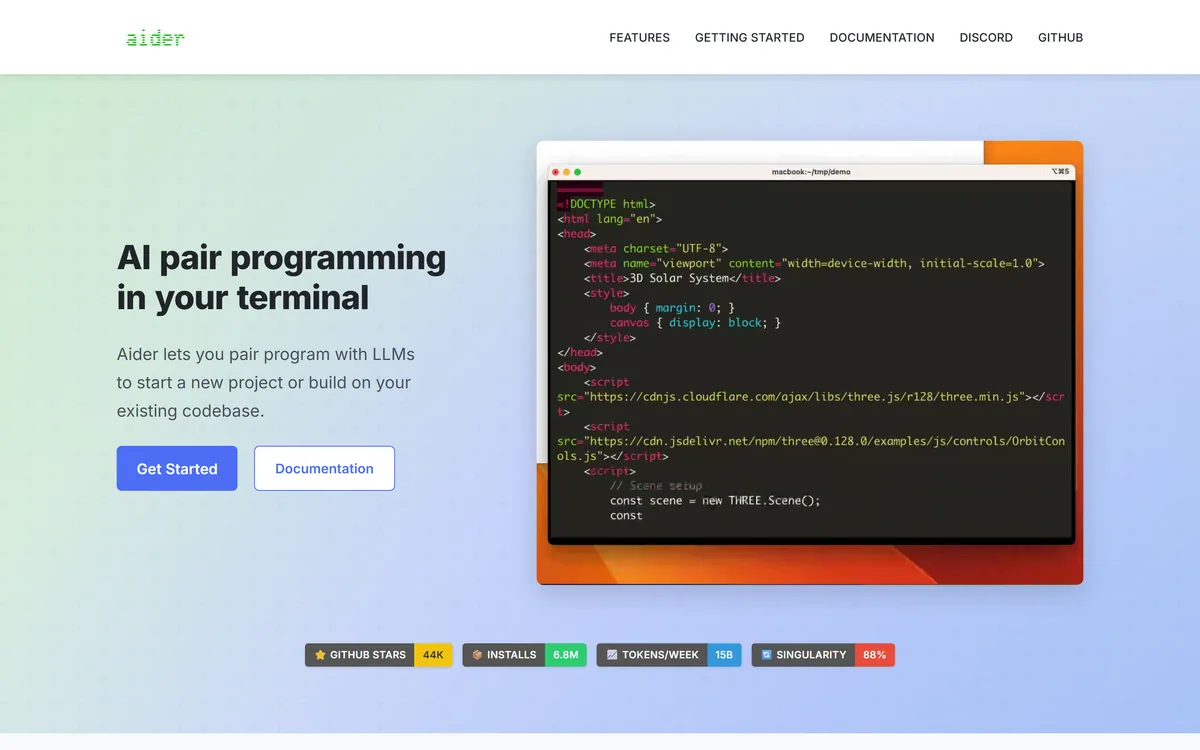
Aider's homepage, captured 9 September 2026. The install command and the git framing lead the page, which is an accurate summary of the product.
Why Does Aider Commit To Git Automatically?
Aider commits each change with a sensible commit message so you can use familiar git tools to diff, manage and undo AI changes. That single design decision resolves the biggest practical problem with agentic coding.
The problem is granularity. An agent asked to add a feature may touch nine files. If it gets seven right and two wrong, you need to keep seven and discard two — and a tool with one undo button forces you to throw away the good work with the bad.
Committing per change turns that into ordinary version control. You revert the two bad commits and keep the seven good ones. You can cherry-pick, rebase, or open a branch and throw the whole session away without losing anything you did yourself.
It also produces something valuable by accident: a readable history of what the AI actually did, in your repository, permanently. Six months later the commit log tells you which changes came from a model and what it was asked for, which is exactly the provenance that matters when you are debugging something odd.
The habit this rewards is working in a branch. Start a branch, let Aider work, review the commits as a set, then merge or discard. That is the same workflow you would use with a junior colleague, and it is the right mental model for the tool.
An AI edit you can review with git diff and undo with git revert is not a special kind of change. That is the point.
The Repo Map Is The Real Engineering
Aider builds a map of your entire codebase, which is what lets it work well in larger projects.
This is the part that separates a serious tool from a chat window with file access. Language models have finite context, and a real repository does not fit. The naive approach — paste in the current file and hope — fails the moment a change requires knowing what a function elsewhere expects.
A repository map is a compressed structural summary: which files exist, what they define, how they relate. The model gets an index of the codebase rather than its full text, then requests the specific files it needs. That is roughly how a human joins an unfamiliar project.
The practical consequence is that Aider degrades gracefully as a codebase grows, where context-window approaches degrade sharply. It also means the quality of its work depends on how legible your code is to a structural reader — clear module boundaries and honest naming help it for the same reasons they help a new colleague.
Which LLMs Work Best With Aider?
Aider states it works best with Claude 3.7 Sonnet, DeepSeek R1 and Chat V3, and OpenAI's o1, o3-mini and GPT-4o, but can connect to almost any LLM including local models.
Model-agnosticism is a more valuable property than it looks, and the reason is timing. Frontier coding ability has changed hands several times in the past two years. A tool welded to one provider inherits that provider's bad quarter; a tool that takes a key and a model name does not.
It also gives you a cost lever no subscription tool offers. You can run an expensive frontier model for a genuinely hard refactor and a cheap one for mechanical edits, deciding per task rather than per month.
Local model support is the option most people overlook and some people require. If your employer forbids sending source code to a third-party API — which is common in finance, defence and healthcare — an agent that runs against a model on your own hardware is the difference between using this technology and not.
Expect a real quality gap when you do that. Local models good enough to run on a workstation are not equivalent to frontier hosted models, and the honest framing is that self-hosting buys you permission rather than parity.
Frontier hosted model — best results, highest token cost, source code leaves your machine.
Mid-tier hosted model — usually enough for mechanical edits, test writing and small features.
Local model — no data leaves your network, materially weaker output, and the only option under some policies.
Switch per task rather than per subscription; that flexibility is the main advantage of bring-your-own-key.
Whatever you pick, review the commits — the model choice changes quality, not your responsibility for what ships.
Is A Terminal Agent Better Than An IDE One?
This is the real decision for most people, and the answer genuinely depends on how you work rather than on which tool is better.
A terminal agent composes, which is the shared argument for OpenCode too. It sits alongside your existing editor, whatever that is, and it scripts — you can run it in a loop, in CI, or over SSH on a remote machine. It does not ask you to change editors, and it will still work if your editor's plugin ecosystem moves on.
An IDE agent sees more. It knows what you have selected, what your language server is complaining about, which tests just failed and where your cursor is. That ambient context makes small, local edits faster and more accurate, and it is genuinely useful in a way a terminal cannot replicate.
The dividing line in practice is task size. For a change spanning several files with a clear description, a terminal agent working against a repo map is excellent. For a fiddly fix in a function you are currently looking at, an IDE agent wins easily.
Plenty of developers use both, and there is no penalty for doing so — Aider changes nothing about your repository except its commits, so it coexists with anything.
Getting A Real Answer In Half An Hour
Aider is free and installs with pip, so evaluation costs only tokens and time. This sequence tells you whether the workflow suits you.
The bar is step five. If reviewing the commits feels like less work than making the change yourself, the tool is earning its keep; if not, it is not.
Install with `python -m pip install aider-install` and then `aider-install`, and set an API key for a model you already trust.
Create a branch first. Never evaluate an agent on your main branch — the whole point is that the work is disposable.
Pick a real task you were going to do anyway, spanning two or three files. A toy task tells you nothing about the repo map.
Let it work without interrupting, then read the commits with `git log -p` rather than looking at the final state. The sequence shows you how it reasoned.
Ask whether reviewing those commits was less work than writing the change. That is the entire value proposition, and it is a yes-or-no answer.
Check your provider's token spend for the session, and multiply by a realistic week. Bring-your-own-key means the bill is invisible until you look.
What Aider Costs To Run
There is no subscription. Aider is open source and installed from PyPI; you supply an API key and pay your model provider for the tokens it uses.
That structure has two consequences worth planning for. The good one is that there is no floor: a week you do not use it costs nothing, which no seat-based tool can match. The awkward one is that there is no ceiling either, and an agent working through a large refactor can consume a surprising number of tokens without telling you.
Cost is driven by the model you choose and by how much of the repository ends up in context. The repo map keeps this far lower than pasting whole files would, but a long session on a large project is still real spend.
The discipline that keeps it sane is scoping. Ask for one change at a time, add only the files that are relevant, and start a fresh session between unrelated tasks rather than accumulating context.
We do not publish amounts, since every provider prices differently and rates change. Watch your provider's usage dashboard for the first week; that number, not any published estimate, is what this costs you.
Aider: What The Project Publishes
Product type
Open-source AI pair programming tool for the terminal
Interface
Command line, alongside any editor
Version control
Commits each change automatically with a written commit message
Context method
Repository map — a structural index of the whole codebase
Recommended models
Claude 3.7 Sonnet, DeepSeek R1 and Chat V3, OpenAI o1, o3-mini and GPT-4o
Model flexibility
Connects to almost any LLM, including local models
Languages
Python, JavaScript, Rust, Ruby, Go, C++, PHP, HTML, CSS and dozens more
Extra inputs
Voice-to-code, plus images and web pages for context
GitHub stars
44K
Installations
6.8M via pip
Stated usage
15B tokens per week
Self-written code
88% of the code in its most recent release, per the project's own figure
Install
python -m pip install aider-install, then aider-install
Pricing model
Free and open source; you pay your own LLM provider for tokens
Key features of Aider
Automatic git commits for every change, with a generated commit message
Repository map giving the model structural context across the whole codebase
Works with Claude, GPT, o-series and DeepSeek models, and almost any other LLM
Local model support for environments where source code cannot leave the network
Support for dozens of languages including Python, JavaScript, Rust, Go, Ruby and C++
Voice-to-code input for describing changes aloud
Images and web pages accepted as additional context
Installs from PyPI and runs alongside any editor
Pros & cons
Pros
7
AI changes become ordinary git history — diffable, revertible and cherry-pickable with tools you already trust
Per-commit granularity means you can keep the good changes and discard the bad ones separately
The repo map degrades gracefully in large codebases where context-window approaches fail
Model-agnostic, so a provider's bad quarter does not become your problem
Local model support makes it usable under policies that forbid sending code to third parties
Free and open source, with no subscription and no vendor holding your workflow
Composes with anything — it changes nothing about your repository except adding commits
Cons
6
Terminal-only, which is a real barrier for developers who work primarily in a GUI
Cannot see your selection, cursor, failing tests or language server errors the way an IDE agent can
Bring-your-own-key billing has no floor and no ceiling, so spend is invisible until you check
Local models are materially weaker than frontier hosted ones — self-hosting buys permission, not parity
No managed support, as with any open-source project
Output quality depends on how legible your codebase is to a structural reader
Best For
Developers who want AI edits recorded as reviewable git commits
Anyone unwilling to switch editors to get an agent
Teams under policies that forbid source code leaving the network
Multi-file changes that can be described in a sentence
Developers with uneven usage who would rather pay per token than per month
Where Aider Sits Among Terminal Coding Tools
Coding agents differ on where they run and who pays for the model. Both questions matter more than raw capability, because they decide whether the tool fits your constraints at all.
You want AI changes recorded as ordinary git commits you can diff, cherry-pick and revert.
You are attached to your editor and will not switch to a different one to get an agent.
Your work is multi-file changes described in a sentence, rather than fiddly edits in the file you are looking at.
Your employer will not allow source code to leave the network, and you need an agent that can run against a local model.
You would rather pay per token than hold another subscription, especially if your usage is uneven.
Choose an IDE agent when
You want the agent to see your selection, your failing test and your language server errors without being told about them.
You are uncomfortable working in a terminal, where this tool lives entirely.
You need predictable monthly costs — bring-your-own-key has no floor and no ceiling.
You want a managed product with support, since this is an open-source project.
Your codebase is small enough that context is never the problem, in which case the repo map buys you little.
More Coding Agents And Assistants
Compare on where the agent runs and who supplies the model, not on feature lists — those two facts decide whether it fits your constraints.
OpenCode — the closest comparison — open source, terminal-based, bring your own key
Cursor — the editor-first alternative, with ambient context Aider cannot see
GitHub Copilot — an extension for the editor you already use, on a per-seat subscription
Zencoder — IDE agents plus scheduled automation, if you want a managed product
marimo — for the analysis side of a Python codebase, with the same git-friendly philosophy
Checking Aider Against Its Own Docs
Last checked . Read from aider.chat, with the screenshot above captured in the same session.
Product described as pair programming with LLMs to start a new project or build on an existing codebase, run from the terminal
Automatic git commits with generated commit messages confirmed, described as letting you use familiar git tools to diff, manage and undo AI changes
Repository mapping confirmed, described as making a map of the entire codebase to work well in larger projects
Recommended models listed on the site as Claude 3.7 Sonnet, DeepSeek R1 and Chat V3, and OpenAI o1, o3-mini and GPT-4o, with support for almost any LLM including local models
Language support listed as Python, JavaScript, Rust, Ruby, Go, C++, PHP, HTML, CSS and dozens more
Voice-to-code, image and web page context confirmed as supported inputs
Published figures read from the site: 44K GitHub stars, 6.8M pip installations, 15B tokens per week, and 88% of the code in its latest release written by Aider itself
Installation confirmed as python -m pip install aider-install followed by aider-install
No subscription or pricing page found; the model is bring-your-own-key against your chosen provider
What we could not confirm: the specific open-source licence is not stated on the homepage, so check the repository if licence terms matter to you; the 88% self-written figure is the project's own measurement with no published methodology, and it counts lines rather than judgement; token cost cannot be estimated in advance because it depends on your model choice and session length; and we did not run the tool, so nothing here reflects measured output quality.
Editor's Verdict
4.5/5
Aider scores highly because it made one decision the rest of the category avoided: every change is committed to git with a written message as it happens, so an AI edit is reviewable, diffable and revertible with tools you already trust rather than through a proprietary undo stack. The repo map gives it real context in large codebases, it is model-agnostic down to local weights, and being open source with a bring-your-own-key model means no subscription and no vendor holding your workflow. It loses ground because a terminal interface asks more of the user than an IDE agent does, and because bring-your-own-key makes spend unpredictable until you have watched a week of real use. AInexfinder Editor Score: 4.5/5.
Aider pricing
AInexfinder does not list plan prices or billing details. For current pricing, plans, and trials, visit the official Aider website.
Vendor pricing, credits, and billing policies change over time. Always confirm on the official site before you buy.
Frequently asked questions
What is Aider?
Aider is an open-source AI pair programming tool that runs in your terminal. You point it at a repository and describe a change; it maps your codebase for context, edits the relevant files, and commits each change to git with a written commit message so the work is reviewable and revertible with ordinary git tools.
Is Aider free?
Aider itself is free and open source, installed from PyPI with no subscription. You pay your own LLM provider for the tokens it consumes, which means a week you do not use it costs nothing — but also that a long session on a large refactor can run up real spend without warning. Watch your provider's usage dashboard for the first week.
How does Aider work with git?
It commits every change automatically with a generated commit message. That makes an AI edit an ordinary piece of version control history: you review it with `git diff`, undo it with `git revert`, and cherry-pick the good commits while discarding the bad ones. Work in a branch, and the whole session becomes disposable.
Which LLM should I use with Aider?
The project recommends Claude 3.7 Sonnet, DeepSeek R1 and Chat V3, and OpenAI's o1, o3-mini and GPT-4o, but it connects to almost any model. The practical approach is to switch per task — a frontier model for a hard refactor, a cheaper one for mechanical edits — which is the main advantage of bring-your-own-key over a subscription.
Can Aider run with a local model?
Yes. Aider connects to local models, which matters if your employer forbids sending source code to a third-party API — common in finance, defence and healthcare. Expect a real quality gap: local models that run on a workstation are not equivalent to frontier hosted models, so self-hosting buys you permission rather than parity.
What is Aider's repo map, and why does it matter?
It is a compressed structural index of your whole codebase — which files exist, what they define, how they relate. Because a real repository does not fit in any model's context window, the map lets the model request the specific files it needs rather than being handed whatever file you had open. It is why Aider works in large projects.
Is Aider better than Cursor?
They solve different halves of the problem. Cursor sees your selection, your failing tests and your language server errors, which makes small local edits faster. Aider runs alongside any editor, records its work as git commits, and lets you choose the model. For multi-file changes described in a sentence, Aider; for a fiddly fix in the file you are looking at, Cursor.
Which programming languages does Aider support?
The site lists Python, JavaScript, Rust, Ruby, Go, C++, PHP, HTML and CSS, and states dozens more. In practice its language coverage is largely whatever your chosen model handles well, since Aider supplies context and manages git while the model writes the code.
How do I install Aider?
Run `python -m pip install aider-install` followed by `aider-install`, then set an API key for whichever model provider you want to use. The project reports 6.8 million installations via pip and 44,000 GitHub stars.
Is it safe to let Aider commit directly to my repository?
It is safe in the sense that nothing is unrecoverable — every change is a commit you can revert. The sensible habit is to work in a branch, let it run, review the commits as a set with `git log -p`, then merge or discard the branch entirely. That is the same workflow you would use with a junior colleague, and it is the right one here.
Daniel reviews AI tools the slow way — by actually using them on real projects. His reviews cover what works, what breaks, and who each tool is genuinely a good fit for.
Daniel and the AInexfinder editorial team research Aider using public product information, listing evidence, and (when available) hands-on checks. Scores reflect listing completeness and transparency — not paid placement.
Listings may include affiliate or sponsored placements, which are labeled when present. Editorial scores and cons are not sold. See our affiliate disclosure and review methodology.
GitHub Copilot is an AI coding assistant that spans completion, chat, agent mode, automated code review, and a cloud agent that opens pull requests, working across VS Code, Visual Studio, JetBrains, Xcode, Neovim, Eclipse, the CLI, and github.com.
Replit AI turns a written description into a working application — the Agent writes the code, and Replit supplies the database, authentication, hosting, and monitoring, so a prototype goes live without a local setup or a deployment pipeline.
Tabnine is an enterprise AI coding assistant offering context-aware code completion, chat and agents with private deployment and a codebase-wide context engine. In July 2026 it was acquired by Tricentis, and tabnine.com now routes to the Tricentis agentic quality engineering platform.
Zencoder is an AI orchestration platform for engineering work: agents plan with one model, build with another and review with a third, across multi-repo indexing and full dependency mapping, inside VS Code and JetBrains. It adds scheduled automation and a work layer spanning Jira, Slack and Notion.
Cline is an open-source AI coding agent that works in your editor as a VS Code extension, in the terminal as a CLI, as a desktop app and through an SDK, using any model including open-weight ones, with a plan-and-act workflow where you approve its actions.
Kiro is an agentic software-engineering toolset, an IDE, a CLI and cloud sessions, that turns prompts into executable specs, validates code correctness, and works across large codebases with parallel agents, positioned as a step beyond basic AI code completion.