OpenCode is an open source AI coding agent built for the terminal, with desktop and IDE clients alongside. It connects to 75+ model providers, configures language servers automatically, runs parallel agent sessions, keeps conversations locally in SQLite, and is built by the team behind SST.
opencode.ai11 viewsAdded September 16, 2025201K visitors
The AI coding agent market consolidated fast around a small number of closed products, each tied to a specific model provider, each sending your code to a service you do not control.
For a large share of developers that is entirely fine. For anyone working under a client NDA, in a regulated industry, on proprietary code with strict handling rules, or simply unwilling to bet their workflow on one vendor's pricing decisions, it is not.
OpenCode is the credible open source answer to that, and it has become one of the most starred projects on GitHub in the process. This review covers what model-agnosticism actually buys you, why the client-server architecture is more interesting than it sounds, how the free-and-paid split works, and where Cursor remains the better tool.
Nobody chooses their coding agent on the model any more. They choose on who controls it.
Open Source, Terminal-Native
OpenCode is an open source AI coding agent that runs in your terminal, with desktop and IDE clients available, released under the MIT licence.
It is model-agnostic by design — over 75 providers, including Claude, GPT, Gemini and local models, with the option to authenticate through an existing GitHub Copilot or OpenAI subscription.
Privacy is architectural rather than promised. Conversations are stored locally in SQLite, and the vendor states no code or context is retained on their side.
It is built by the team behind SST, with the project's own counter showing well over 195,000 GitHub stars, 950 contributors and 13,000+ commits at the time of this check.
The core is free. A separate paid service, Zen, offers a curated set of models benchmarked for coding agents, plus an enterprise tier.
Model Agnosticism Is The Whole Design
Support for 75+ providers is the headline number and it understates the point, which is not choice for its own sake.
Coding agents are now competent enough that the model is no longer the deciding factor for most work. What differs is cost, latency, context window, and how each model behaves on your particular codebase — and those change every few months as new releases land.
A tool locked to one provider means you re-evaluate your entire workflow whenever the landscape shifts. A tool that treats the model as a swappable component means you change a setting.
There are three specific cases where this matters more than convenience. Local models mean code never leaves the machine, which is the only acceptable configuration in some environments. Cost control means routing routine work to a cheap model and hard work to an expensive one. Continuity means a provider outage or a pricing change is an inconvenience rather than a crisis.
The ability to authenticate through an existing GitHub Copilot or OpenAI subscription is a practical touch worth noticing. It means developers whose employers already pay for one of those can use this agent without a second procurement conversation, which is often the real barrier to adoption inside a company.
The trade-off is that a tool supporting everything is optimised for nothing. A closed product tuned tightly to one model can extract more from it than a general client will.
The model stopped being the differentiator two years ago. What you are actually choosing now is who controls the tool and where your code goes.
Local Storage And The Client-Server Split
Two architectural decisions do more for real-world usefulness than any feature on the list.
Conversations are stored locally in SQLite. That is a meaningful difference from a promise about data handling — there is no server holding your session history because the history is a file on your disk. For anyone whose code cannot leave the building, an architecture that makes retention impossible is worth more than any policy page.
It also means your history is yours: greppable, backup-able, and not subject to a retention schedule someone else sets.
The client-server split is the more interesting one. The agent runs where your code is and can be driven from elsewhere — a mobile client, another machine, a shared session link.
That enables things a locally-bound tool cannot. Starting a long-running task on your workstation and checking it from a phone. Running the agent on a remote development machine while driving it from a laptop. Sharing a session with a colleague so they can see what the agent did rather than being told about it.
Other open source agents — Aider and Cline — make different trade-offs on this. Automatic LSP configuration is the quieter quality signal. Language server integration is what gives an agent real understanding of types, definitions and references rather than treating code as text — and configuring it manually is exactly the friction that makes people abandon a tool in week one.
What MIT Licensing Actually Changes
Open source is used loosely in this market, so it is worth being precise about what is on offer here.
MIT is a genuinely permissive licence. You can read the code, modify it, run it on your own infrastructure, fork it, and use it commercially without asking anyone. There is no source-available licence with a non-compete clause, and no free tier that becomes a paid one at a certain company size.
The practical consequences are concrete rather than ideological. Auditability: a security team can read exactly what the agent does with your code, which is frequently the condition for approval in a regulated environment. Self-hosting: the whole thing can run inside your own network. Longevity: if the company changes direction or disappears, the code continues to exist and can be forked.
That last point deserves weight given how this market has behaved. Developer tools have been acquired, repriced and discontinued repeatedly, and a workflow built on a closed tool is exposed to all of that. A permissive licence is insurance against decisions made by other people.
The counterweight is the ordinary open source one: support is community-based rather than contractual. There is a paid enterprise tier for organisations that need more, and for individual developers the answer to a problem is a GitHub issue rather than a support ticket with an SLA.
Install it alongside your current tool rather than replacing anything.
Point it at a model you already pay for, via an existing Copilot or OpenAI subscription if you have one.
Give it a task in a real repository, not a toy one — agents diverge most on unfamiliar codebases.
Check that LSP configured itself correctly for your language before judging quality.
Try a local model on something confidential, since that is the capability closed tools cannot offer.
Free, And What Is Not
This site does not publish plan prices. OpenCode's structure is unusual and worth setting out clearly, because free here means several different things.
The agent itself is free and open source under MIT. There is no paid tier of the tool, no seat limit, and no feature held back.
Model usage is not free, and this is the part people miss. You bring your own provider credentials and pay whoever serves the model — or point it at a local model and pay nothing but electricity. Agentic coding consumes tokens heavily, because the agent reads files, plans, revises and retries. Budget for the API bill rather than assuming free software means free operation.
Zen is the paid service, offering a curated set of models the team has tested and benchmarked specifically for coding agents. That is a genuinely sensible product: choosing between 75 providers is a burden, and paying someone to have done the evaluation is a reasonable trade.
An enterprise tier exists for organisations with privacy-sensitive requirements, which is where support commitments and deployment assistance live.
The honest budgeting comparison against a closed competitor is not licence against licence. It is your model spend plus zero licence cost, against a flat subscription with model usage included — and which wins depends entirely on how heavily you use it.
Where A Closed Tool Still Wins
Being specific here is more useful than advocacy, and the honest answer is that plenty of developers should use something else.
Integrated editing experience. Cursor and similar tools are built around the editor, with inline diffs, tab completion and a visual review flow that a terminal agent does not replicate. If you think visually about code changes, that difference is substantial.
Zero configuration. A closed product like Windsurf, with one model and one account, is simpler. OpenCode's flexibility is configuration, and configuration is work.
One bill, one vendor. Bringing your own keys across multiple providers means managing credentials and reconciling several invoices. A single subscription is administratively simpler, which matters more in a company than to an individual.
Contractual support. Community support is genuinely good on a project this size, and it is not an SLA.
The reasonable position is that these are complementary rather than competing. Many developers run a terminal agent for long-running autonomous tasks and an editor-integrated tool for interactive work, and there is no reason to pick only one.
Cursor and editor-first tools win on inline diffs and visual review
Closed products win on zero configuration and a single bill
OpenCode wins on local models, self-hosting and auditability
OpenCode wins on not being exposed to one vendor's pricing decisions
Running both is a perfectly reasonable answer
Licence, Providers And Project Scale
Category
Open source AI coding agent
Built by
The team behind SST
Licence
MIT
Primary interface
Terminal, with desktop application and IDE extensions
Model providers
More than 75, accessed through Models.dev, including Claude, GPT, Gemini and local models
Existing subscriptions
Can authenticate via GitHub Copilot or OpenAI accounts
Language support
Automatic LSP configuration
Sessions
Multiple parallel agent sessions, with shareable session links
Architecture
Client-server, so the agent can run on one machine and be driven from another
Data handling
Conversations stored locally in SQLite; vendor states no code or context data is stored on their side
Project scale at time of check
Vendor's counter showed over 195,000 GitHub stars, 950 contributors and more than 13,000 commits
Stated reach
Approximately 16 million developers monthly, per the vendor
Installation
curl, npm, brew and paru
Charging model
Core is free and open source; Zen is a paid curated-model service, with a separate enterprise tier. Model usage is billed by your own provider; no prices published here
Other Coding Agents Worth Trying
Most developers end up running two of these — one for interactive editing, one for longer autonomous tasks.
Cursor — the editor-first alternative, with a stronger visual review flow
Aider — the other established open source terminal agent
Your code cannot leave your machine, and local models are the only acceptable answer
A security team needs to audit exactly what the agent does before approval
You want to switch models freely as the landscape changes
You live in the terminal and an editor-first tool fights your workflow
You already pay for Copilot or OpenAI and want to reuse that access
Stay With Your IDE If
You want inline diffs and visual review inside your editor
You would rather have one bill and one vendor than manage provider keys
Configuration time is a cost you are unwilling to pay
You need contractual support with an SLA on the free tier
You do not work in a terminal and have no wish to start
Project Claims And Checks
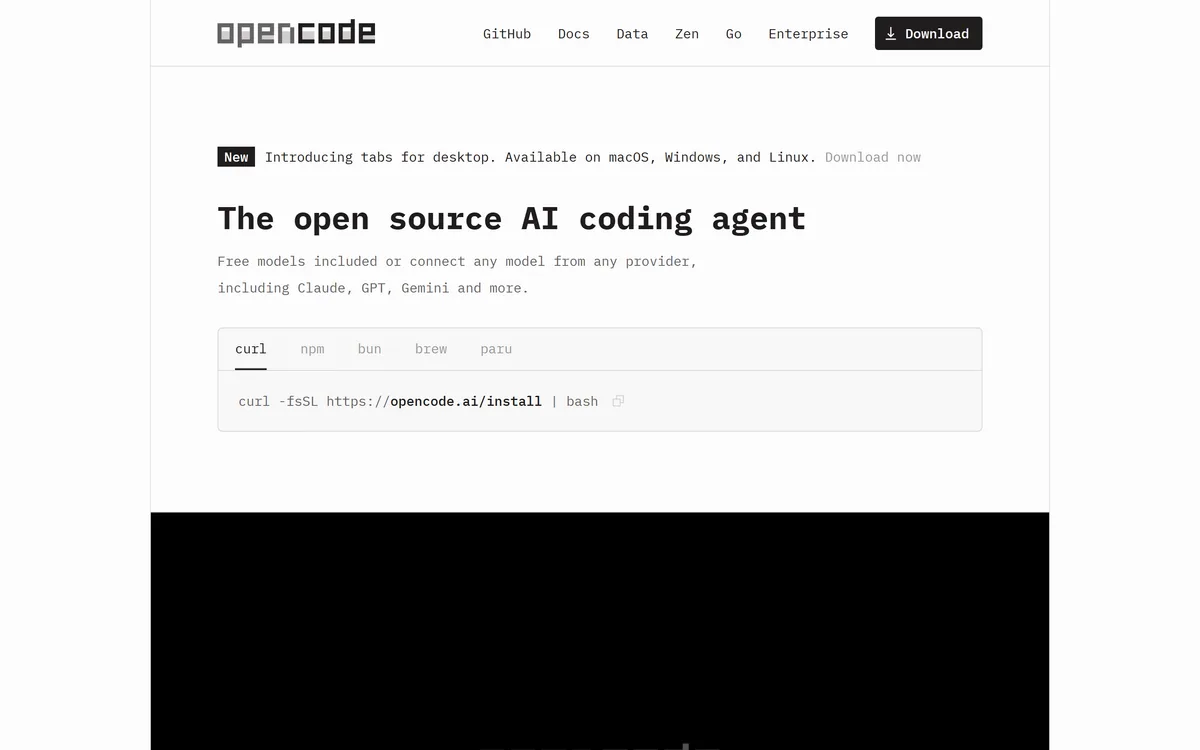
Last checked . Read from opencode.ai during this check, with the screenshot above captured at the same time and project details corroborated against independent coverage.
Described on site as an open source AI coding agent for terminal, desktop and IDE
Provider support stated as more than 75, accessed through Models.dev, including Claude, GPT, Gemini and local models
Authentication via existing GitHub Copilot or OpenAI accounts stated on site
Automatic LSP configuration, multi-session parallel operation and shareable session links stated on site
Privacy described as storing no code or context data, with conversations kept locally in SQLite
Installation methods stated as curl, npm, brew and paru
Project counter on site showed over 195,000 GitHub stars, 950 contributors and more than 13,000 commits at the time of this check
Stated reach of approximately 16 million developers monthly
Built by the team behind SST, corroborated in independent coverage
MIT licensing corroborated in independent coverage
Zen offered as a separate paid service with models tested and benchmarked for coding agents, plus an enterprise tier for privacy-sensitive organisations; no prices published here, in line with this site's pricing policy
Star counts, contributor numbers and monthly developer figures are the project's own and move quickly — treat the figures above as a snapshot taken on the date shown rather than a current number. The software is free; model usage is not, and agentic coding consumes tokens heavily, so budget for your provider's bill separately from the licence.
Editor's Verdict
4.5/5
OpenCode has an AInexfinder Editor Score of 4.5/5.
OpenCode pricing
AInexfinder does not list plan prices or billing details. For current pricing, plans, and trials, visit the official OpenCode website.
Vendor pricing, credits, and billing policies change over time. Always confirm on the official site before you buy.
Frequently asked questions
Is OpenCode free?
The agent is free and open source under MIT, with no paid tier of the tool itself. Model usage is separate — you bring your own provider credentials and pay whoever serves the model, or run a local model and pay nothing beyond your own hardware.
Which AI models does OpenCode support?
More than 75 providers through Models.dev, including Claude, GPT, Gemini and local models. You can also authenticate through an existing GitHub Copilot or OpenAI subscription, which is often the easiest route inside a company.
Does OpenCode send my code anywhere?
Conversations are stored locally in SQLite and the project states it retains no code or context. Your code does go to whichever model provider you configure — unless you use a local model, in which case it never leaves your machine at all.
OpenCode vs Cursor — which is better?
They are built for different workflows. Cursor is editor-first with inline diffs and a strong visual review flow; OpenCode is terminal-native, model-agnostic and open source. Many developers run both — one for interactive editing, one for longer autonomous tasks.
What is OpenCode Zen?
A separate paid service offering a curated set of models the team has tested and benchmarked specifically for coding agents. Given that choosing between 75 providers is itself a burden, paying for that evaluation is a reasonable trade.
Can I run OpenCode entirely offline?
With a local model, yes — that is one of the main reasons to choose it. This is the capability closed, single-provider tools cannot offer, and for some regulated and NDA-bound work it is the only acceptable configuration.
Who builds OpenCode?
The team behind SST. The project is MIT-licensed with a large contributor base, which matters practically: if the company changed direction tomorrow, the code can be forked and continued by anyone.
Daniel reviews AI tools the slow way — by actually using them on real projects. His reviews cover what works, what breaks, and who each tool is genuinely a good fit for.
Daniel and the AInexfinder editorial team research OpenCode using public product information, listing evidence, and (when available) hands-on checks. Scores reflect listing completeness and transparency — not paid placement.
Listings may include affiliate or sponsored placements, which are labeled when present. Editorial scores and cons are not sold. See our affiliate disclosure and review methodology.
GitHub Copilot is an AI coding assistant that spans completion, chat, agent mode, automated code review, and a cloud agent that opens pull requests, working across VS Code, Visual Studio, JetBrains, Xcode, Neovim, Eclipse, the CLI, and github.com.
Replit AI turns a written description into a working application — the Agent writes the code, and Replit supplies the database, authentication, hosting, and monitoring, so a prototype goes live without a local setup or a deployment pipeline.
Tabnine is an enterprise AI coding assistant offering context-aware code completion, chat and agents with private deployment and a codebase-wide context engine. In July 2026 it was acquired by Tricentis, and tabnine.com now routes to the Tricentis agentic quality engineering platform.
Zencoder is an AI orchestration platform for engineering work: agents plan with one model, build with another and review with a third, across multi-repo indexing and full dependency mapping, inside VS Code and JetBrains. It adds scheduled automation and a work layer spanning Jira, Slack and Notion.
Kiro is an agentic software-engineering toolset, an IDE, a CLI and cloud sessions, that turns prompts into executable specs, validates code correctness, and works across large codebases with parallel agents, positioned as a step beyond basic AI code completion.
Cline is an open-source AI coding agent that works in your editor as a VS Code extension, in the terminal as a CLI, as a desktop app and through an SDK, using any model including open-weight ones, with a plan-and-act workflow where you approve its actions.