Cline is an open-source AI coding agent that works in your editor as a VS Code extension, in the terminal as a CLI, as a desktop app and through an SDK, using any model including open-weight ones, with a plan-and-act workflow where you approve its actions.
cline.bot7 viewsAdded December 18, 202512K visitors
Coding agents have become one of the most practical uses of AI, and Cline is one of the most popular open-source options. It works inside your project, reading files, editing code and running commands, with you approving each step.
Cline runs as a VS Code extension, a terminal CLI, a native desktop app and an embeddable SDK, and it lets you choose any model, from leading APIs to open-weight models. It sits alongside agents like Aider, with a strong emphasis on openness and choice.
This review covers how Cline works through a coding task, where it fits a developer's workflow, how it is free and where model costs come in, and when it needs closer supervision.
Cline is an open-source coding agent that runs in your editor, terminal or desktop.
Cline, The Open-Source Agent Brief
Cline is an open-source coding agent: it reads, writes and runs code in your project, step by step.
It runs where you work: VS Code extension, terminal CLI, desktop app and an SDK to embed it.
Open choice of model: use frontier APIs or open-weight models, so you control cost and data.
You approve its actions: that control is the point; review changes and watch model spend.
Cline Coding-Agent Facts
What it is
An open-source AI coding agent
Surfaces
VS Code extension, CLI, desktop app, SDK
Models
Any model, including open-weight models
Workflow
Plans, then acts, with your approval
Desktop
New desktop app aimed at open-weight models
Community
Large open-source following (70K GitHub stars shown)
Reach claim
11M+ developers (vendor-stated)
Cost
Open source; you pay model costs
An Open-Source Coding Agent In Your Editor, Terminal Or Desktop
Cline is designed to be an agent you can trust because you stay in control. It takes a task, explores your codebase, proposes what it will do and then reads files, writes code and runs commands, asking for your approval along the way.
Its openness is the defining feature. Cline is open source, and it works with whichever model you choose, from frontier APIs to open-weight models you can host yourself, so you are not tied to one provider's pricing, data policy or capabilities.
It also meets developers wherever they work: as a VS Code extension in the editor, as a CLI in the terminal, as a native desktop app that needs no editor, and as an SDK for embedding the agent runtime in your own products.
That flexibility makes it popular with individual developers and teams that want an agent they can inspect, configure and run on their own terms.
The honest framing is that Cline is a powerful, transparent agent, but agents still make mistakes, and running commands on your machine carries risk. Approving actions thoughtfully, using version control and watching model costs are part of using it well.
Cline is a powerful, transparent coding agent, but approving its actions thoughtfully is part of using it well.
How Does Cline Work Through A Coding Task?
Cline works through tasks step by step and lets you choose the model behind it.
Any Model, Including Open Weights
You can connect leading model APIs or use open-weight models, and Cline's new desktop app is aimed at running open-weight models without an editor. That choice lets you balance capability, cost and data control for each project.
For a spec-driven IDE workflow, Kiro structures work around specifications, while Aider is a lean terminal pair-programmer; Cline spans editor, terminal and desktop.
Where Cline Fits A Developer's Workflow
Cline fits developers who want an open, configurable coding agent in VS Code or the terminal, and who like seeing and approving what the agent does rather than handing over control.
It fits teams with data or cost constraints, since bring-your-own-model and open-weight support let them choose cheaper or self-hosted models for sensitive code.
It also fits builders who want to embed an agent runtime in their own tools through the SDK, and developers exploring open-weight models locally via the desktop app.
It fits less well people who want a fully managed product with predictable flat pricing, since costs depend on the model you use, and anyone uncomfortable letting an agent run commands on their machine.
On large or production codebases, keep changes small, review diffs and run tests, because an agent can produce changes that look right but break edge cases.
How Cline Is Free, And Where Model Costs Come In
Cline itself is open source and free to use; your main cost is whatever model you connect, billed by that provider or by your own infrastructure. Cline also offers paid options such as a ClinePass. We do not publish prices, which change; check the site.
Model costs can climb quickly on large tasks with frontier models, so track token usage per task and consider cheaper or open-weight models for routine work.
Teams should agree which models are approved for which code, since sending proprietary code to a third-party API is a policy decision, not just a technical one.
The sensible approach is to try Cline on a small, real task with a model you are allowed to use, note the cost and quality, and then decide which models fit which kinds of work.
Letting Cline Tackle One Real Ticket
Because Cline acts on your machine, give it one real ticket with version control and approvals in place.
Commit your work so you can revert anything Cline changes.
Pick one well-scoped ticket, such as a small bug fix or refactor.
Choose a model your team is allowed to use for this code.
Let Cline plan the task, then review each proposed action before approving.
Run tests and review the final diff carefully.
Pass/fail: Cline is worth adopting if it saves time with acceptable cost and quality.
Track model spend per task, especially with frontier models.
Cline Open-Agent Terms
Coding agent
An AI that takes a task and works through a codebase, editing files and running commands, rather than only suggesting code.
Open-weight model
An AI model whose weights are published, so it can be run locally or self-hosted instead of only through a vendor API.
Plan and act
A workflow where the agent first proposes a plan, then carries it out step by step with approval.
Agent runtime
The engine that executes an agent's loop of reasoning and tool use, which Cline exposes through its SDK.
Should Cline Run In Your Editor?
Developers Cline Serves Well
Developers wanting an open, configurable agent
VS Code and terminal users
Teams choosing models for cost or data control
Builders embedding agents via the SDK
Developers exploring open-weight models
When Cline Needs Closer Supervision
People wanting flat, predictable pricing
Anyone uncomfortable with agents running commands
Teams without model-usage policies
Large changes merged without tests
Those expecting zero supervision
Key features of Cline
Open-source coding agent
VS Code extension
Terminal CLI
Desktop app
Agent SDK
Any-model support
Plan and act workflow
Approval-based actions
Pros & cons
Pros
5
Open source and transparent
Free choice of model
Runs in editor, terminal or desktop
Approval steps keep you in control
Large, active community
Cons
5
Model costs can climb
Agent actions carry risk
Requires supervision on big changes
Costs less predictable than flat plans
Quality depends on chosen model
Best For
Open-source coding agents
VS Code workflows
Terminal workflows
Model-flexible teams
Embedding agents
Cline Compared With IDE And Terminal Agents
The useful comparison is with other coding agents and assistants.
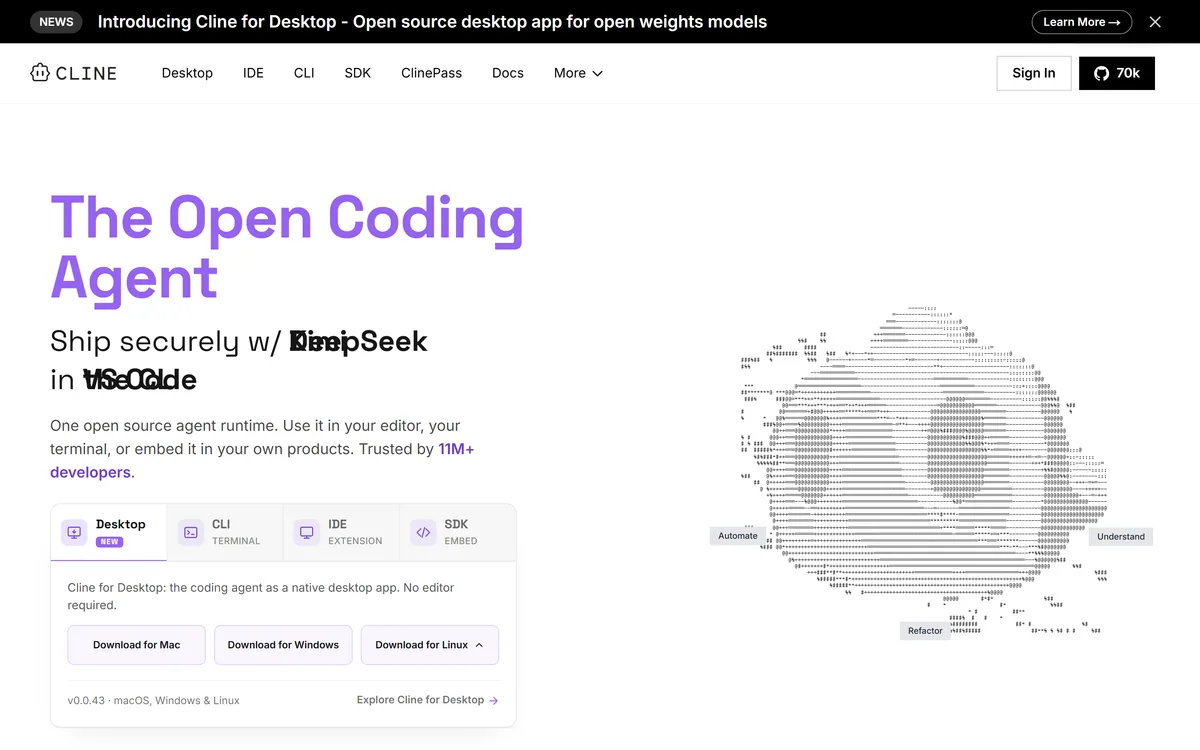
Last checked . Read from cline.bot during this check, with the screenshot above captured at the same time.
VS Code extension, CLI, desktop app and SDK
Support for any model, including open-weight models
A new desktop app announced for open-weight models
Plan-and-act workflow with user approval
A large open-source following shown on the site
A vendor-stated 11M+ developers
Paid options such as ClinePass alongside free open source
No prices reproduced here, in line with this site's pricing policy
Cline runs commands and edits code on your machine; use version control, approve actions carefully and run tests. Model costs depend on the provider you choose. Popularity figures are vendor-stated or community metrics, not proof of fit.
Coding Tools To Weigh Beside Cline
A terminal pair-programmer, an agentic coding assistant and a spec-driven IDE to weigh alongside Cline.
Cline earns 4.3 as one of the best open-source coding agents available: it plans and acts on real coding tasks with your approval, runs as a VS Code extension, CLI, desktop app and SDK, and works with any model, including open-weight ones, giving developers unusual control over cost and data. Its approval-based workflow is a strength. Model costs can climb on big tasks, agents still make mistakes, and running commands on your machine needs care, so use version control, tests and sensible model policies. AInexfinder Editor Score: 4.3/5.
Cline pricing
AInexfinder does not list plan prices or billing details. For current pricing, plans, and trials, visit the official Cline website.
Vendor pricing, credits, and billing policies change over time. Always confirm on the official site before you buy.
Frequently asked questions
What is Cline?
Cline is an open-source AI coding agent that works in your project as a VS Code extension, a terminal CLI, a desktop app or via an SDK, reading and editing code and running commands with your approval.
Is Cline free?
Cline is open source and free to use; you pay for the model you connect, through that provider or your own infrastructure. Paid options such as ClinePass also exist. Check the site for details.
Which models does Cline support?
Cline works with any model, including leading model APIs and open-weight models, and its desktop app is aimed at running open-weight models.
Does Cline run commands on my computer?
Yes, it can run terminal commands as part of a task, with approval steps. Use version control and review actions carefully, especially in important projects.
How does Cline's plan and act work?
Cline proposes a plan for a task, then carries it out step by step, asking for approval so you can review changes before they happen.
Can I use Cline outside VS Code?
Yes. Beyond the VS Code extension, Cline offers a terminal CLI, a native desktop app for macOS, Windows and Linux, and an SDK for embedding the agent.
Is Cline safe for proprietary code?
That depends on the model you choose. Self-hosted or approved models keep code under your control; sending code to third-party APIs should follow your organisation's policy.
Who is Cline best for?
Developers who want an open, configurable coding agent in their editor or terminal, and teams that want to choose models for cost, capability or data control.
How does Cline compare to Aider?
Both are open-source agents. Aider is a lean terminal pair-programmer; Cline spans an editor extension, CLI, desktop app and SDK with approval-based actions.
How can I control Cline's costs?
Track token usage per task, use cheaper or open-weight models for routine work, and reserve frontier models for complex tasks where they add clear value.
Daniel reviews AI tools the slow way — by actually using them on real projects. His reviews cover what works, what breaks, and who each tool is genuinely a good fit for.
Daniel and the AInexfinder editorial team research Cline using public product information, listing evidence, and (when available) hands-on checks. Scores reflect listing completeness and transparency — not paid placement.
Listings may include affiliate or sponsored placements, which are labeled when present. Editorial scores and cons are not sold. See our affiliate disclosure and review methodology.
GitHub Copilot is an AI coding assistant that spans completion, chat, agent mode, automated code review, and a cloud agent that opens pull requests, working across VS Code, Visual Studio, JetBrains, Xcode, Neovim, Eclipse, the CLI, and github.com.
Replit AI turns a written description into a working application — the Agent writes the code, and Replit supplies the database, authentication, hosting, and monitoring, so a prototype goes live without a local setup or a deployment pipeline.
Tabnine is an enterprise AI coding assistant offering context-aware code completion, chat and agents with private deployment and a codebase-wide context engine. In July 2026 it was acquired by Tricentis, and tabnine.com now routes to the Tricentis agentic quality engineering platform.
Zencoder is an AI orchestration platform for engineering work: agents plan with one model, build with another and review with a third, across multi-repo indexing and full dependency mapping, inside VS Code and JetBrains. It adds scheduled automation and a work layer spanning Jira, Slack and Notion.
Pieces runs in the background on your computer forming a searchable memory of your work, capturing what you see and what you copy by default and what you hear only if you opt in. It builds a chronological timeline across Gmail, Outlook, browsers and Slack, and generates standups, briefs and recaps from real context.
Aider is an open-source AI pair programming tool that runs in your terminal, builds a map of your whole repository for context, works with almost any LLM including local models, and commits each change to git with a written message so every edit can be diffed and undone.