Great content is ruined by bad audio, hiss, echo, a noisy room, and re-recording isn't always an option. Audo's pitch is to rescue it: AI that cleans up and enhances voice recordings automatically.
It removes noise, reduces echo and boosts clarity, available via web and an API. It sits among audio tools like Auphonic, focused on cleanup and enhancement.
This review covers how Audo cleans up audio, which creators it suits, how it's priced, and the limits of AI cleanup to keep in mind.
AI Cleanup And Enhancement For Your Audio
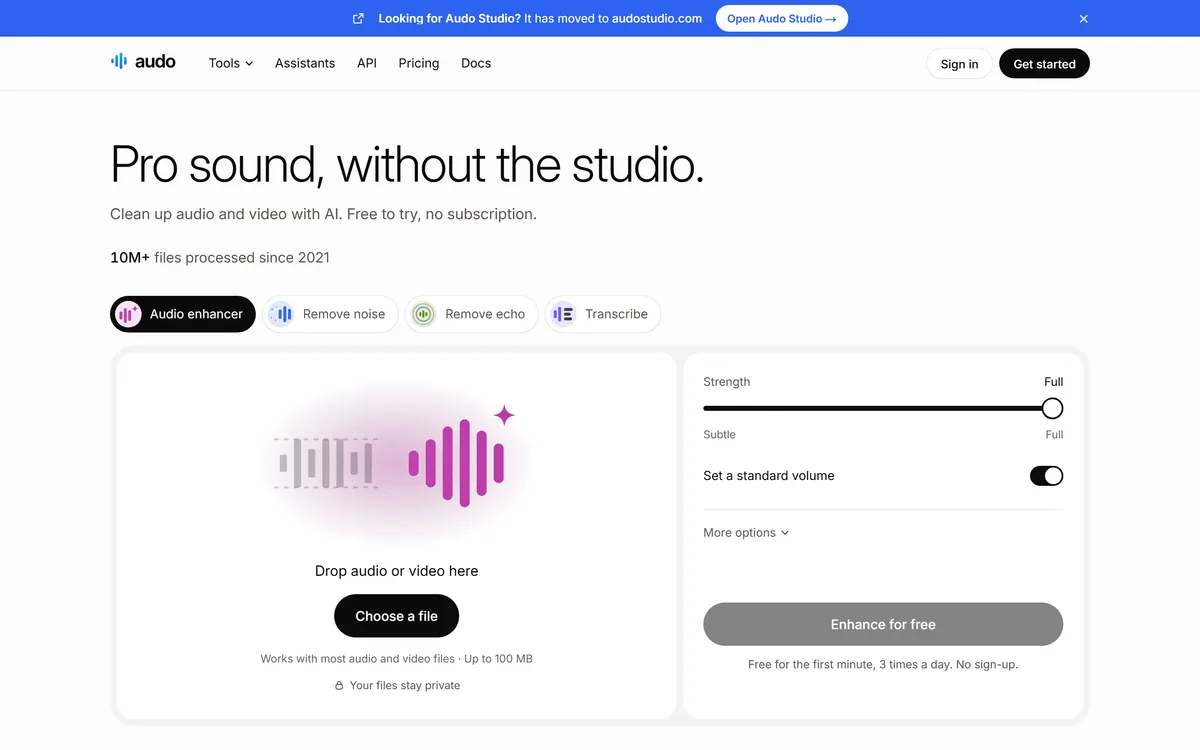
Audo's core job is to make imperfect voice audio sound clean. You upload a recording, and its AI strips out background noise, reduces echo and boosts the clarity of the voice, so a recording made in a less-than-ideal room sounds closer to studio quality.
The appeal is speed and simplicity. Instead of fiddling with EQ, noise gates and manual cleanup, you get usable audio back quickly, which is ideal for creators who aren't audio engineers.
It fits different workflows via a web app for one-off cleanup and an API for developers who want to automate audio enhancement in their own products.
The honest framing is that Audo is a handy, practical tool for cleaning up voice audio. The caveats are modest and physical: AI cleanup helps a great deal but has limits, truly terrible source audio (heavy clipping, severe distortion) can't always be fully rescued, and aggressive cleanup can introduce artefacts; results vary with the recording; and its quality claims are vendor-stated.
Audo is a handy voice-audio cleanup tool; AI cleanup has limits, and very poor source audio can't always be rescued.
How Does Audo Clean Up Audio?
Audo pairs automatic noise removal with enhancement, via web and API.
Noise Removal And Enhancement
It removes background noise, reduces echo and boosts voice clarity automatically, turning a rough recording into usable audio quickly.
A tool like Trint focuses on transcription and a media workflow; Audo's angle is the audio cleanup itself, making the recording sound clean rather than turning it into text.
Audo's Web App And API
A web app handles one-off cleanup and an API lets developers automate enhancement in their own tools.
A notes tool like AudioNotes turns voice into organised notes; Audo focuses on making the audio itself clean, so match it to whether you want clean audio or notes.
Which Audio Creators Audo Suits
Audo suits podcasters, video creators, course makers and anyone recording voice in imperfect conditions who wants clean audio without being an audio engineer.
It suits people who value fast, automatic cleanup over manual editing, and developers who want to automate audio enhancement via API.
It suits less well audio professionals who need fine manual control, anyone with source audio so poor that cleanup can't rescue it, and those for whom re-recording in a better environment is the real fix.
A fair way to place it: if you record voice in real-world conditions and want it cleaned up fast, Audo is a practical, useful tool; if you're a pro needing fine control, or your source audio is badly damaged, weigh it accordingly, and remember that good audio starts with a decent recording, cleanup is a rescue, not a substitute.
It helps to understand what the cleanup actually does. Audo's AI separates speech from background noise and evens out levels, which is exactly the fiddly work that makes raw voice recordings sound amateurish, and for podcasters, course creators and anyone recording in an untreated room, getting that done in one pass is a real time-saver. The results on typical real-world audio, a bit of room echo, some fan or street noise, are often genuinely impressive.
The honest limit is physics: cleanup is a rescue, not a miracle. Audio that's badly clipped, heavily distorted or recorded with speech buried under noise can only be improved so far before the processing itself starts to sound artificial, hollow or watery. So treat Audo as a way to lift a decent recording to a polished one, not as insurance against a bad one, and put the effort into capturing clean source audio first, because every minute spent on a quiet room and a decent mic pays off more than any amount of processing afterwards.
How Audo Charges For Cleanup
Audo's model is unusual and worth noting: its site stresses 'no subscription'. There's a free way to try it (a short free allowance, no sign-up), then pay-as-you-go/usage-based pricing, with an API for developers. We do not publish prices, which change; check the site and confirm the current free allowance and per-use rates.
The value question is time saved versus quality: automatic cleanup that's good enough saves real editing time, but if your audio needs a pro's touch or re-recording, the value is limited.
The sensible approach is to use the free allowance on your real recordings, judge whether the cleanup is good enough for your content, and only pay per use if it reliably rescues the audio you actually produce.
Testing Audo On Real Recordings
Because AI cleanup has limits, test Audo on your real recordings first.
- Upload your real recordings, including a noisy or echoey one.
- Judge whether the cleaned audio is good enough for your content.
- Listen for artefacts from aggressive cleanup.
- Test the API if you want to automate enhancement.
- Remember badly-damaged source audio can't always be rescued.
- Pass/fail: Audo is worth it if it reliably cleans up the audio you produce.
- Treat quality claims as vendor-stated.
Audo, The Audio-Enhance Brief
- Audo cleans up audio: remove background noise and boost voice clarity with AI.
- It's fast and simple: upload a recording and get cleaner audio back.
- It fits workflows: web and an API for developers.
- Mind the limits: AI cleanup helps a lot, but very poor source audio can't always be rescued.
Audo Audio-Cleanup Facts
| What it is | An AI audio cleanup and enhancement tool |
|---|
| Company | Audo (audo.ai) |
|---|
| Core | Remove noise, reduce echo, boost voice clarity |
|---|
| Enhance | Clarity and levelling for voice audio |
|---|
| Access | Web app and an API |
|---|
| Audience | Podcasters, creators, anyone with imperfect audio |
|---|
| Sensitive | None major (audio is processed by the tool) |
|---|
| Pricing model | Free to try (no sign-up, no subscription); pay-as-you-go / usage-based |
|---|