Productivity & Automation Review

Reviewed by Daniel Reed· Senior AI Tools ReviewerLast verified How we review
Morgen logo

Morgen Review

Verified

Morgen is an AI daily planner that brings your calendars and to-do lists into one view and uses its AI Planner to schedule and time-block your day (a separate, newer assistant called 'Kai' handles email and meetings). It suits people juggling multiple calendars and task apps who want their day planned in one place, with the considerations that it connects to your calendar and email data and that automated scheduling still needs your judgement.

4.0Editor Score
Visit website
morgen.soAdded November 21, 2025
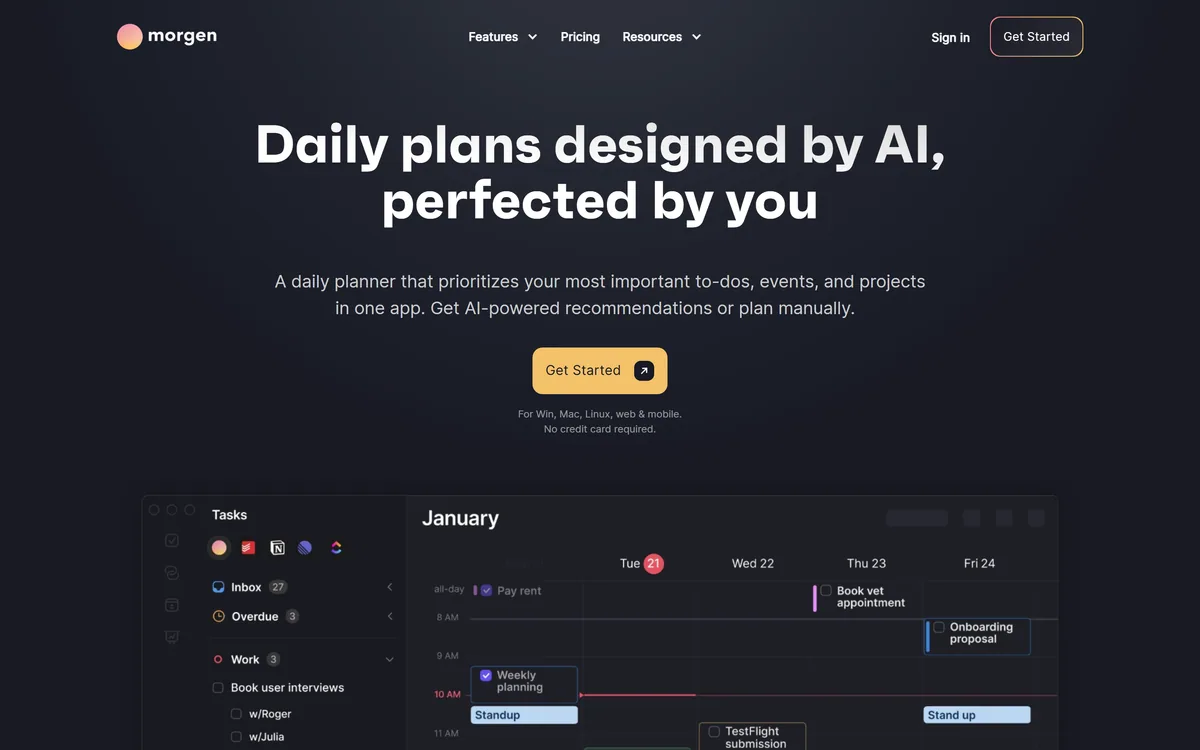
Morgen screenshot
4.0/5

Quick Verdict

Very good

Morgen earns 4.0 as a well-liked, genuinely useful AI daily planner for people whose time is scattered across several calendars and task apps. Bringing them into one honest view, then using its AI Planner to schedule tasks and time-block the day, is a real step beyond a bare calendar, and unifying your existing tools rather than replacing them lowers the friction. The considerations are modest: it connects to your calendar and often email data, so confirm the privacy terms; its ADHD-friendly framing is a design angle, not a medical claim; and the AI's schedule is a proposal you still steer. For multi-calendar professionals who'll keep a planning habit it's an excellent choice; anyone happy with a single calendar, or who won't use it daily, should weigh it accordingly. AInexfinder Editor Score: 4.0/5.

Best for: Unifying scattered calendars; Time-blocking the day

Pricing:
Freemium
Last verified:
October 21, 2026
Official site:
morgen.so

The visit link goes to morgen.so, the official site. Paid placements on AInexfinder are always labelled. How we make money

Most people's time is scattered across several calendars and a couple of task apps, so no single view shows the real day. Morgen's pitch is to fix that: one planner that unites your calendars and tasks.

It brings them together, then uses its AI Planner to schedule tasks and time-block your day. It sits among planning tools like Motion, at the unify-and-time-block end.

This review covers how Morgen plans your day, which planners it suits, how its plans work, and the data and judgement considerations to weigh first.

Morgen Daily-Planner Facts

What it isAn AI daily planner uniting calendars and tasks
CompanyMorgen (morgen.so)
CoreOne view of all calendars plus tasks, with time-blocking
AIAn AI Planner schedules and time-blocks (guided by 'Frames'); a newer 'Kai' assistant handles email/meetings
IntegratesMultiple calendar and task/to-do apps
AudienceMulti-calendar professionals, planners, focus-seekers
AccessFree to start (no card); paid plans
SensitiveConnects to calendar and email data (privacy)

Morgen, The Daily-Planner Brief

  • Morgen plans your day: calendars and tasks united in one view.
  • Its AI Planner schedules for you: it time-blocks tasks into your day.
  • It unifies your tools: multiple calendars and task apps together.
  • Consider: it connects to your calendar/email data, and auto-scheduling needs your judgement.

An AI Planner Uniting Your Calendars And Tasks

Morgen's core job is to give you one honest view of your day. It connects your calendars (work, personal, several accounts) and your task apps into a single interface, so you see every commitment and to-do together rather than switching between apps and missing things.

On top of that its AI Planner helps schedule tasks into your free time and time-block your day, you guide it with 'Frames' (templating your ideal week), and it adapts in real time, turning a to-do list into an actual plan on the calendar, which is where many planners stop short. Separately, Morgen is launching 'Kai', an AI executive assistant for email and meetings (it sorts mail, drafts replies and turns meeting decisions into tasks), which is a distinct feature from the day-planning engine.

It's cross-platform and integration-heavy, pulling in the calendars and task tools you already use, so it unifies rather than replaces them, and it leans into focus and intentional planning (it markets to people who struggle with focus, including an ADHD-friendly framing).

The honest framing is that Morgen is a well-liked, genuinely useful planner for people whose time is fragmented, and the unify-plus-time-block approach is a real improvement over a bare calendar. The considerations are modest: it connects to your calendar and (often) email data to work, so confirm the privacy terms suit you; its ADHD-friendly framing is a design and marketing angle, not a clinical or medical claim, so treat it as a focus aid, not a treatment; and automated scheduling still needs your judgement, the AI proposes a plan, but you decide what's realistic. Its claims are vendor-stated.

Morgen unifies your calendars and tasks and time-blocks with AI; it connects to your calendar/email data, and its focus framing is a design angle, not a medical claim.

How Does Morgen Build Your Schedule?

Morgen pairs a unified calendar-and-task view with an AI scheduling assistant.

Calendars, Tasks And Scheduling

It brings every calendar and task app into one view, so you see your whole day in one place.

A planner like Mosaic plans resources across a services firm; Morgen's angle is a personal daily planner, uniting your own calendars and tasks, a smaller, individual-focused job.

The Kai Assistant And Your Data

Morgen's AI Planner schedules tasks and time-blocks your day, turning a list into a plan on the calendar; the newer, separate 'Kai' is an AI executive assistant for email and meetings (sorting mail, drafting replies, filing commitments as tasks).

An automation tool like Make wires up workflows generally; Morgen's AI is purpose-built for planning your day (and, with Kai, your inbox), so match it to whether you want personal time-blocking or general automation.

Which Planners Morgen Suits

Morgen suits professionals, freelancers and anyone juggling multiple calendars and task apps who wants a single, honest view of their day and help turning tasks into a time-blocked plan.

It suits people who value intentional, focus-oriented planning (including those who find time-blocking helps them concentrate) and who want to unify their existing tools rather than migrate to a new one.

It suits less well people happy with a single built-in calendar, those who won't maintain a planning habit (the AI can only plan what you put in), and anyone uneasy connecting calendar and email data to another app.

A fair way to place it: if your time is split across tools and you want it unified and time-blocked, Morgen is a genuinely helpful, well-designed planner, provided you're comfortable connecting your calendar data and you treat the AI Planner's schedule as a proposal to adjust; if a single calendar already works for you, or you won't keep a planning habit, weigh it accordingly, because the tool organises your day well only if you feed and steer it. Put plainly, Morgen rewards the person who plans deliberately and does little for the one who won't open it each day.

How Morgen Charges For Planning

Morgen is free to start (it states no credit card), with paid plans unlocking more of the AI and integration features. We do not publish prices, which change; check the site and confirm what the free tier includes and the data-handling terms.

The value question is time reclaimed versus a modest subscription: if uniting your calendars and time-blocking genuinely makes your days calmer and more productive, that's cheap for the outcome, but only if you actually use it daily.

The sensible approach is to use the free tier for a week or two, connect your real calendars and tasks, judge whether the unified view and the AI Planner's time-blocking genuinely help, read the privacy terms, and upgrade only once the habit is sticking.

Trying Morgen For A Week Of Planning

Because it connects your data and AI plans need steering, trial Morgen for a week.

  1. Connect your real calendars and task apps into one view.
  2. Let the AI Planner schedule and time-block, then adjust what isn't realistic.
  3. Judge whether the unified view genuinely reduces missed commitments.
  4. Read the privacy terms for your calendar and email data.
  5. Treat the focus/ADHD framing as a planning aid, not a treatment.
  6. Pass/fail: Morgen is worth it if it makes your days calmer and planned.
  7. Treat productivity claims as vendor-stated.
Key Features of Morgen

  • Unified calendars

  • Task integration

  • AI Planner

  • Time-blocking

  • Scheduling

  • Cross-platform

  • Multiple accounts

  • Kai (email assistant)

Pros & Cons

Pros

5
  • One view of all calendars and tasks
  • AI time-blocks your day
  • Unifies existing tools
  • Cross-platform
  • Free to start

Cons

5
  • Connects calendar/email data
  • AI plans need your steering
  • Needs a daily planning habit
  • Focus framing isn't medical
  • Claims vendor-stated

Who Morgen Is For

A Good Fit For

  • Unifying scattered calendars
  • Time-blocking the day
  • Intentional planning
  • Freelancer scheduling
  • Focus and productivity

Morgen Among Planning Apps

The useful comparison is with other planning tools.

ToolToolApproachBest for
MorgenAI daily plannerUnify calendars + time-blockMulti-calendar individuals
MotionAI calendar/tasksAuto-schedulingPersonal productivity
MosaicAI resource planningFirm-wide capacityServices firms
MakeAutomation platformWorkflow automationOps automation

Is Morgen The Right Daily Planner?

Busy Professionals Morgen Serves

  • Professionals juggling many calendars
  • Freelancers planning their own time
  • People who want tasks time-blocked
  • Focus-oriented, intentional planners
  • Those unifying existing tools

When Morgen's Automation Isn't Enough

  • People happy with one built-in calendar
  • Anyone who won't keep a planning habit
  • Those uneasy connecting calendar/email data
  • Teams needing firm-wide resource planning
  • People wanting general automation

What Morgen's Planner Pages State

Last checked . Read from morgen.so during this check, with the screenshot above captured at the same time.

  • Unites multiple calendars and task apps in one view
  • An AI Planner that schedules and time-blocks (plus a newer 'Kai' email/meeting assistant)
  • Cross-platform, integration-heavy
  • Aimed at multi-calendar individuals
  • Free to start (no card); paid plans
  • Connects to calendar and often email data (privacy)
  • Its ADHD-friendly framing is design/marketing, not medical
  • Automated scheduling still needs your judgement
  • Operated by Morgen (morgen.so)
  • No prices reproduced here, in line with this site's pricing policy

Morgen connects to your calendar and (often) email data to work, so confirm the privacy terms suit you. Its ADHD-friendly framing is a design and marketing angle, not a clinical or medical claim, treat it as a focus aid, not a treatment. Automated scheduling still needs your judgement: the AI proposes a plan, but you decide what's realistic. Claims are vendor-stated.

Planner Apps To Weigh Beside Morgen

An AI scheduler, a firm-wide resource planner and an automation tool to weigh beside Morgen.

  • Motion — an AI calendar and tasks for auto-scheduling
  • Mosaic — AI resource planning for services firms
  • Make — an automation platform for workflows

Morgen Pricing

AInexfinder does not list plan prices or billing details. For current pricing, plans, and trials, visit the official Morgen website.

Visit official website for pricing

Vendor pricing, credits, and billing policies change over time. Always confirm on the official site before you buy.

Frequently Asked Questions

What is Morgen?
Morgen is an AI daily planner that brings your calendars and to-do lists into one view and uses its AI Planner to schedule and time-block your day, aimed at people juggling multiple calendars and task apps (a separate, newer 'Kai' assistant handles email and meetings).
Is Morgen free?
It's free to start (it states no credit card), with paid plans unlocking more of the AI and integration features. We do not publish prices; check the site and confirm the free tier and data-handling terms.
What is Kai?
Kai is a separate, newer AI executive assistant Morgen is launching for email and meetings, it sorts your mail, drafts replies and turns meeting decisions into tasks. The day scheduling and time-blocking itself is done by Morgen's 'AI Planner' (which you guide with 'Frames'); you still adjust what it proposes.
Does Morgen connect to my calendar and email?
Yes, it connects to your calendars (and often email) to unite everything in one view and plan around it, which is a privacy consideration, so confirm the data-handling terms suit you.
Is Morgen good for ADHD?
Morgen markets a focus-friendly, ADHD-friendly design, but that's a design and marketing angle, not a clinical or medical claim. Treat it as a planning and focus aid, not a treatment.
Does Morgen replace my calendar?
No, it unifies your existing calendars and task apps rather than replacing them, so you keep your current tools but see and plan everything in one place.
Who is Morgen for?
Professionals, freelancers and anyone juggling multiple calendars and task apps who wants a single view of their day and help turning tasks into a time-blocked plan.
Does Morgen's AI plan my day automatically?
Its AI Planner can schedule and time-block automatically, but automated scheduling still needs your judgement, treat its plan as a proposal and adjust what isn't realistic for you.
Does Morgen work across platforms?
Yes, it's cross-platform and integration-heavy, pulling in the calendars and task tools you already use, so it fits into your existing setup.
What is the best way to try Morgen?
Use the free tier for a week or two, connect your real calendars and tasks, judge whether the unified view and the AI Planner's time-blocking genuinely help, read the privacy terms, and upgrade only once the habit sticks.
4.0/5

Bottom Line

Morgen earns an AInexfinder Editor Score of 4.0/5 (very good). Best for: Unifying scattered calendars; Time-blocking the day; Intentional planning.

Visit Morgen

User Reviews

Log in to write a review.

What Users Say

No reviews yet. Be the first to share your experience with Morgen.

Reviewed by Daniel Reed

Daniel Reed

Assigned reviewer

Daniel Reed

Senior AI Tools Reviewer

Daniel leads AInexfinder's tool reviews. He researches each tool from its own pricing, documentation and policies, checks its claims against independent sources, and writes up what it does well, where it falls short and who it genuinely suits.

Daniel and the AInexfinder editorial team research Morgen from its own website, pricing, documentation and policies, checked against independent sources. This review is research-based: unless its method note says otherwise, we have not bought a plan or run hands-on tests. The Editor Score is our editorial judgement, and payment never changes it.

AI tool reviewsPricing researchAI software
Last verified
Sources used
  • morgen.so
  • AInexfinder listing fields (features, pros/cons, description)
  • Public vendor pages when available
Editorial policy
Listings may include affiliate or sponsored placements, which are labeled when present. Editorial scores and cons are not sold. See our affiliate disclosure and review methodology.
Embed this listing on your site
Featured on AInexfinder
Get your badge →

Related Pages

Morgen Comparisons & Guides

In Our Ranked Guides

Explore More