Long videos, podcasts, lectures, multi-hour streams, bury their useful parts in time you may not have. Eightify's job is to let you read the gist first and watch only what is worth it.
It is a browser extension and app that summarizes a YouTube video into key ideas with timestamps, inside YouTube itself, and adds transcripts, a comment overview and translations in many languages. It belongs with summarising and note tools like AudioNotes, but its specialism is the YouTube page specifically.
This review covers what Eightify pulls from a video, where it saves the most time, how its plans work, and which of its confident claims to discount.
YouTube Summaries Without Leaving The Video
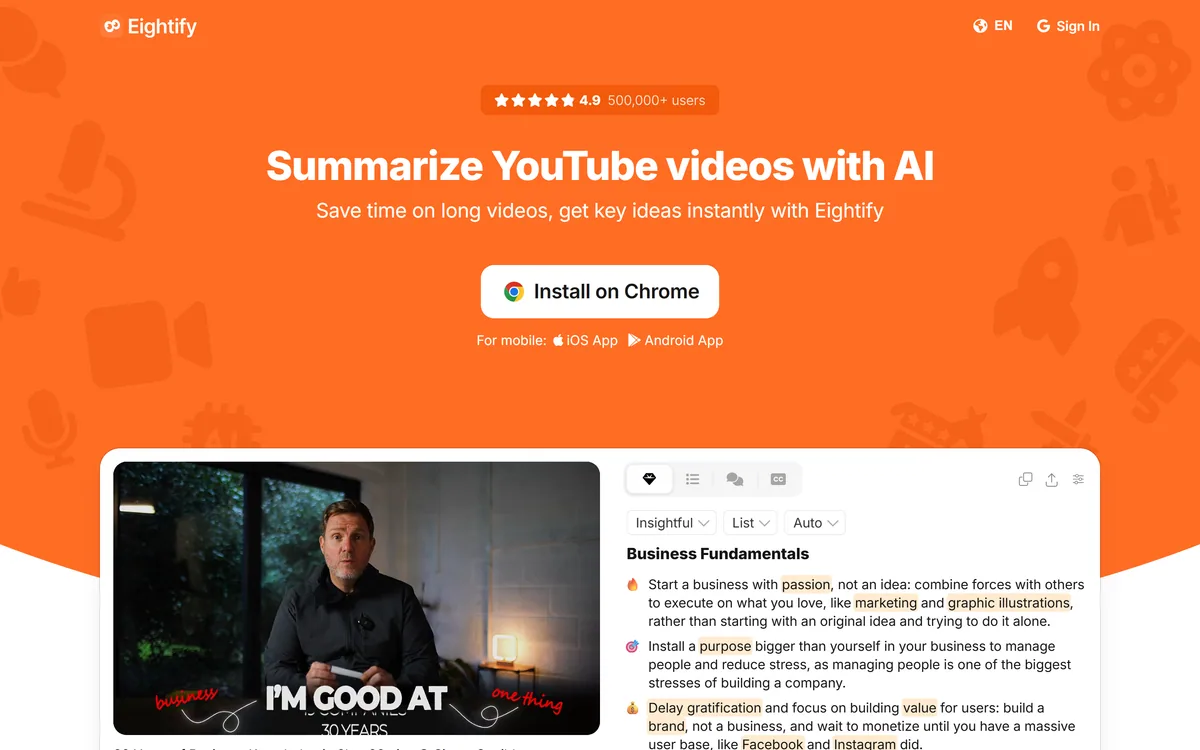
Eightify's defining choice is where it lives: inside the YouTube page. Open a video and the summary appears alongside it, so there is no copying a link into another tool or switching tabs. That small thing is most of the convenience.
The summaries are structured as key ideas with timestamps, which is smarter than a wall of text, because it doubles as navigation. You can read the gist and then click straight to the part that matters, treating a video more like a skimmable document.
It handles the content that most needs this, long podcasts, news, lectures and multi-hour recordings, where the payoff from not watching the whole thing is largest.
There is a quieter benefit, too: the summary doubles as a memory aid. A week after watching a long talk, most people retain only a vague impression; a saved key-idea summary with timestamps lets you reconstruct the argument in seconds and jump back to the exact moment, which turns passive watching into something you can actually refer to later.
Eightify's defining choice is where it lives: inside the YouTube page. The summary appears alongside the video, so there is no copying a link into another tool.
What Does Eightify Pull From A Video?
It extracts more than a plain summary, which is what makes it a research aid rather than a gimmick.
Key Ideas, Timestamps And Transcripts
The core output is a set of key ideas, each tied to a timestamp you can jump to, plus a full transcript that the vendor claims reads better than YouTube's own subtitles. Together they turn a video into something you can scan and search.
That transcript-and-summary pairing overlaps with transcription services; a speech API like AssemblyAI goes deeper for developers building their own tool, while Eightify packages it for a viewer who just wants the gist now.
A nice twist is the comment overview, which summarizes what the comment section is saying, often where the real verdict on a video lives. It also produces summaries and translations in 40+ languages, and can turn a summary into a shareable article.
For turning what you learn into something you keep, pairing it with a source-based research tool like Gemini Notebook works well: Eightify gets the gist out of the video, and a notebook organises it with your other material.
Where Eightify Saves You The Most Time
Eightify pays off most for people who use YouTube as an information source rather than entertainment: professionals keeping up with a field, students working through lectures, researchers and journalists scanning long recordings.
The biggest single win is the decide-before-you-watch step, reading a summary to judge whether a 90-minute video is worth your time at all, which saves far more than skimming ever could. The timestamps then save more on the videos you do watch.
It saves less for short videos, where a summary is barely faster than watching, or for content you watch for enjoyment. And because it depends on a video having usable spoken content, it is weaker on visual-heavy or lightly-narrated material.
It is worth being realistic about accuracy, too. A summary is an interpretation, and for anything where a precise figure, a quote or a nuance matters, the timestamps are the real feature: use the gist to find the right moment, then watch it rather than trusting the paraphrase. Treated that way, as a map rather than a replacement, it rarely steers you wrong.
How Eightify Sets Up Its Plans
Eightify is freemium with a paid subscription, delivered as a Chrome extension and mobile apps, with a family of related free summarizer and transcript tools around it. We do not publish prices, which change; check the site.
The value question is volume: if you watch or triage a lot of long videos, the time saved quickly outweighs a modest subscription. If you summarize the odd video, the free allowance may be all you need.
Because it installs in minutes and has a free tier, there is little reason not to trial it on your own viewing before deciding whether the paid tier earns its place. The adjacent free tools it offers, for summarising articles, PDFs and research papers, also make it easy to see whether its summarising style suits you before you commit to anything.
A Fast Way To Try Eightify
Because the value is time saved on real viewing, test Eightify on the kind of videos you actually watch.
- Install the extension and open a genuinely long video you were considering watching.
- Read the key-idea summary and decide whether the full video is worth your time.
- Use the timestamps to jump to one section and check they land accurately.
- Try the comment overview to see whether it captures the real reaction.
- If you work across languages, generate a summary in another one.
- Pass/fail: Eightify is worth it if it reliably saves you time on videos you would otherwise watch in full.
- Discount the '#1' and '10x' claims and judge it on your own time saved.
Eightify, The Quick Gist
- Eightify summarizes YouTube videos: key ideas with timestamps, shown right inside the YouTube page.
- It does more than a summary: transcripts, a comment overview and summaries in 40+ languages.
- It saves decision time: read the gist first, then decide whether to watch or jump to a section.
- Its superlatives are marketing: '#1' and '10x faster' claims are the vendor's, not measured facts.