Video & Audio Review

Reviewed by Daniel Reed· Senior AI Tools ReviewerLast verified How we review
Lemonaide logo

Lemonaide Review

Verified

Lemonaide, by Lemonaide Music, is an AI melody and MIDI generator for producers: it generates MIDI and audio loops from genre models you drag into a DAW, including 'Collab Club' models built in collaboration with named producers. Its free 'Seeds' and paid models carry nuanced royalty terms worth reading before commercial release.

3.7Editor Score
Visit website
lemonaide.aiAdded October 25, 2025
Lemonaide screenshot
3.7/5

Quick Verdict

Good

Lemonaide earns 3.7 as a focused AI idea starter for producers: it generates melodies as editable MIDI and audio loops you drag into a DAW, including 'Collab Club' models built in collaboration with named producers, so it respects consent rather than cloning styles without permission. It suits beatmakers who want a spark and keep creative control. It makes ideas, not finished songs, and its royalty terms are nuanced, so read the licensing, free versus threshold-based clearing, before any commercial release. AInexfinder Editor Score: 3.7/5.

Best for: Breaking creative block; Melody ideas

Pricing:
Freemium
Last verified:
October 22, 2026
Official site:
lemonaide.ai

The visit link goes to lemonaide.ai, the official site. Paid placements on AInexfinder are always labelled. How we make money

Beatmakers often get stuck at the blank-project stage. Lemonaide, from Lemonaide Music, is built to break that block, generating melody ideas as MIDI and audio loops you can drop into a DAW.

It offers free 'Seeds' and genre melody models, generates both MIDI and audio, targets keys and scales, and includes 'Collab Club' models built in collaboration with named producers. It sits among music AI tools like Suno, but focused on melody ideas rather than finished songs.

This review covers how Lemonaide makes a melody, which producers it suits, how it opens free and paid models, and the royalty terms worth understanding before you release.

Lemonaide, The Melody-Maker Brief

  • Lemonaide generates melodies and MIDI: AI ideas you drag straight into your DAW.
  • It has producer models: 'Collab Club' models built in collaboration with named producers.
  • It is an idea starter: MIDI and audio loops to spark tracks, not finished songs.
  • Royalty terms are nuanced: free and paid models carry different clearance rules for big releases.

Lemonaide Melody-Generator Facts

What it isAn AI melody and MIDI generator for producers
OperatorLemonaide Music
OutputMIDI and audio loops
TargetingKey and scale selection
ModelsFree 'Seeds' plus genre models
Collab ClubModels built with named producers
DAWDrag-and-drop into any DAW
NoteCopyright on the page read as 2024

AI Melodies And MIDI For Music Producers

Lemonaide's job is to generate musical ideas, not whole tracks. It produces melodies as both MIDI and audio loops, which you drag into your DAW to build on, so you keep full control of arrangement and production.

That MIDI focus is the differentiator from song-generators: you get editable note data in a key and scale you choose, which fits how producers actually work, rather than a finished stereo track you cannot easily change.

Its 'Collab Club' models are built in collaboration with named producers, so they emulate particular styles with those artists' involvement, which distinguishes them from unauthorised style-cloning.

The honest framing is that Lemonaide is a useful idea starter whose rights terms need reading. The vendor says free 'Seeds' output is royalty-free, and 'Collab Club' output is royalty-free below a streaming threshold with a clearing process for major placements, which is nuanced, not blanket 'free'. Its '#1 melody generator' and producer-credit claims are vendor-stated, and the copyright on the page we read was 2024, so confirm current terms.

Lemonaide sparks ideas as editable MIDI, but read the royalty terms: 'royalty-free' has thresholds and clearing for big releases.

How Does Lemonaide Make A Melody?

Lemonaide pairs quick melody generation with producer-collaboration models.

Genre Models Into MIDI And Audio

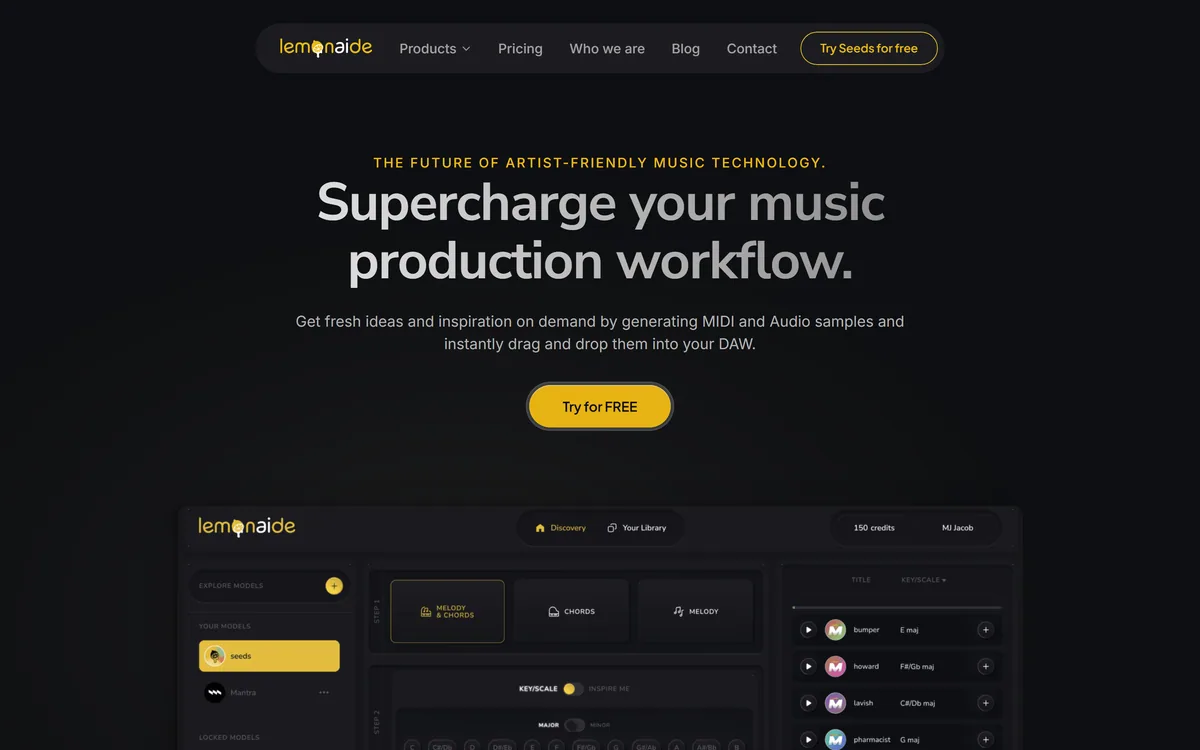
You generate melodies from the free 'Seeds' model or genre algorithms, target a key and scale, and get both MIDI and audio loops to drag into any DAW.

Where a tool like Suno generates finished songs, Lemonaide stays at the idea stage with editable MIDI, which suits producers who want to build the track themselves.

Collab Club Producer-Trained Models

'Collab Club' adds models built with named producers, emulating their styles with their involvement, and a 'Bridge' feature connects the workflow.

For royalty-free music generation more broadly, a tool such as OpenMusic AI is a different option; with any of them, read the licensing before commercial release. For mood-based background music rather than melody ideas, a tool like Beatoven.ai serves a different need.

Which Music Producers Lemonaide Suits

Lemonaide suits beatmakers and music producers, from beginners stuck for ideas to professionals wanting a fast spark, who work in a DAW and want editable MIDI rather than finished tracks.

It suits producers drawn to specific genres or producer styles via Collab Club, and anyone who values keeping creative control over arrangement and sound.

It fits less well people wanting complete, ready-to-release songs, and anyone who would release commercially without checking the royalty thresholds and clearing rules that apply to different models.

A fair way to judge it is by where you get stuck. If the blank-project melody stage is your bottleneck and you build tracks yourself, Lemonaide removes real friction; if you want finished songs or are unclear on the rights, treat it carefully. Two questions settle it: where you get stuck, and how you release. If the blank-project melody stage is your bottleneck and you build and arrange tracks yourself, Lemonaide removes real friction and the MIDI output keeps you in control of the final sound. The part to take seriously before you rely on it commercially is the rights: the free and Collab Club models carry different terms, with royalty-free use below a streaming threshold and a clearing process above it, so read the licensing for the specific model you used rather than assuming a blanket 'royalty-free', especially if a track takes off and crosses into major-placement territory.

How Lemonaide Opens Free And Paid Models

Lemonaide is freemium: the 'Seeds' model is free, with paid access to 'Collab Club' producer models. We do not publish prices, which change; check the site for current plans and the royalty terms attached to each model.

The question of value is whether the ideas it sparks meaningfully speed up your workflow, and whether the royalty terms suit how you intend to release.

The pragmatic approach is to generate from the free model into a real project, see whether the ideas inspire finished work, and read the licensing carefully before using anything in a commercial release.

Generating One Real Loop In Lemonaide

Because the rights terms are nuanced, trial Lemonaide on a real project and read the licensing.

  1. Generate a few melodies from the free 'Seeds' model in a key you want.
  2. Drag the MIDI into your DAW and build on it to judge usefulness.
  3. Try a Collab Club model if a producer style fits your track.
  4. Read the royalty terms: free vs Collab Club, and the streaming threshold for major placements.
  5. Confirm clearing requirements before any commercial release.
  6. Pass/fail: keep it if it sparks finished work and the rights suit your plans.
  7. Treat '#1 generator' and Grammy-producer claims as vendor-stated, and note the 2024 copyright.
Key Features of Lemonaide

  • AI melody generation

  • MIDI and audio loops

  • Key and scale targeting

  • Free 'Seeds' model

  • Genre models

  • Collab Club producer models

  • DAW drag-and-drop

  • Standalone and plugin use

Pros & Cons

Pros

5
  • Editable MIDI, not locked tracks
  • Fast idea generation
  • Consent-based producer models
  • Keeps creative control with you
  • Free model to start

Cons

5
  • Not finished songs
  • Royalty terms are nuanced
  • Rights need checking before release
  • Claims are vendor-stated
  • Copyright on the page read as 2024

Who Lemonaide Is For

A Good Fit For

  • Breaking creative block
  • Melody ideas
  • MIDI workflows
  • Genre-specific inspiration
  • Producer-style starters

Lemonaide Beside Other Music AI

The useful comparison is with other music AI tools.

ToolToolApproachBest for
LemonaideAI melody and MIDIEditable ideas for a DAWProducers wanting ideas
SunoFull song generationFinished tracks from promptsComplete songs
OpenMusic AIRoyalty-free musicGenerated music tracksRoyalty-free needs
Beatoven.aiMood-based musicBackground musicVideo and content scoring

Is Lemonaide The Right Idea Starter?

Beatmakers Lemonaide Serves

  • Beatmakers stuck for ideas
  • Producers who build tracks in a DAW
  • Fans of specific producer styles
  • Anyone wanting editable MIDI
  • Producers keeping creative control

When Lemonaide's Rights Terms Matter

  • People wanting finished songs
  • Anyone releasing without checking rights
  • Non-producers without a DAW
  • Those wanting blanket 'royalty-free'
  • Users expecting a full production suite

What Lemonaide's Site Explains

Last checked . Read from lemonaide.ai during this check, with the screenshot above captured at the same time.

  • An AI melody and MIDI generator for producers by Lemonaide Music
  • MIDI and audio loops you drag into a DAW
  • Free 'Seeds' plus genre melody models
  • 'Collab Club' models built with named producers
  • Nuanced royalty terms (free vs threshold-based clearing)
  • A freemium model
  • No prices reproduced here, in line with this site's pricing policy

Lemonaide's 'Collab Club' models are built in collaboration with named producers, so they are consent-based, not unauthorised style-cloning. Its royalty terms are nuanced: free 'Seeds' is royalty-free, while Collab Club output is royalty-free below a streaming threshold with clearing for major placements, so read the licensing before release. '#1 generator' and producer claims are vendor-stated, and the copyright read as 2024.

Music AI To Weigh Beside Lemonaide

A song generator, a royalty-free music tool and a mood-music tool to weigh alongside Lemonaide.

Lemonaide Pricing

AInexfinder does not list plan prices or billing details. For current pricing, plans, and trials, visit the official Lemonaide website.

Visit official website for pricing

Vendor pricing, credits, and billing policies change over time. Always confirm on the official site before you buy.

Frequently Asked Questions

What is Lemonaide?
Lemonaide, by Lemonaide Music, is an AI melody and MIDI generator for music producers. It generates MIDI and audio loops you drag into a DAW, including 'Collab Club' models built with named producers.
Is Lemonaide free?
It is freemium: the 'Seeds' model is free, with paid access to 'Collab Club' producer models. We do not publish prices, which change; check the site and its royalty terms.
Does Lemonaide make finished songs?
No. It generates melody ideas as editable MIDI and audio loops, not complete tracks. You build the arrangement and production yourself in a DAW, keeping creative control.
Are Lemonaide's melodies royalty-free?
It is nuanced. The free 'Seeds' output is described as royalty-free, while 'Collab Club' output is royalty-free below a streaming threshold with a clearing process for major placements. Read the licensing before release.
Are the producer models authorised?
Yes. 'Collab Club' models are built in collaboration with named producers, with their involvement, which distinguishes them from unauthorised style-cloning.
Who is Lemonaide best for?
Beatmakers and producers, from beginners stuck for ideas to professionals wanting a fast spark, who work in a DAW and want editable MIDI rather than finished tracks.
Does Lemonaide output MIDI?
Yes. It generates both MIDI and audio loops, with key and scale targeting, so you can edit the note data directly in your DAW.
Who operates Lemonaide?
The footer names Lemonaide Music. The copyright read as 2024 on the page we read, so confirm current details and terms on the site.
Can I use Lemonaide melodies commercially?
Often yes, but the terms differ by model and there are streaming thresholds and clearing rules for major placements. Read the licensing carefully before any commercial release.
How does Lemonaide compare to a song generator?
Song generators like Suno make finished tracks; Lemonaide stays at the idea stage with editable MIDI, which suits producers who want to build the track themselves.
3.7/5

Bottom Line

Lemonaide earns an AInexfinder Editor Score of 3.7/5 (good). Best for: Breaking creative block; Melody ideas; MIDI workflows.

Visit Lemonaide

User Reviews

Log in to write a review.

What Users Say

No reviews yet. Be the first to share your experience with Lemonaide.

Reviewed by Daniel Reed

Daniel Reed

Assigned reviewer

Daniel Reed

Senior AI Tools Reviewer

Daniel leads AInexfinder's tool reviews. He researches each tool from its own pricing, documentation and policies, checks its claims against independent sources, and writes up what it does well, where it falls short and who it genuinely suits.

Daniel and the AInexfinder editorial team research Lemonaide from its own website, pricing, documentation and policies, checked against independent sources. This review is research-based: unless its method note says otherwise, we have not bought a plan or run hands-on tests. The Editor Score is our editorial judgement, and payment never changes it.

AI tool reviewsPricing researchAI software
Last verified
Sources used
  • lemonaide.ai
  • AInexfinder listing fields (features, pros/cons, description)
  • Public vendor pages when available
Editorial policy
Listings may include affiliate or sponsored placements, which are labeled when present. Editorial scores and cons are not sold. See our affiliate disclosure and review methodology.
Embed this listing on your site
Featured on AInexfinder
Get your badge →

Related Pages

Lemonaide Comparisons & Guides

In Our Ranked Guides

Explore More