What is Audo?
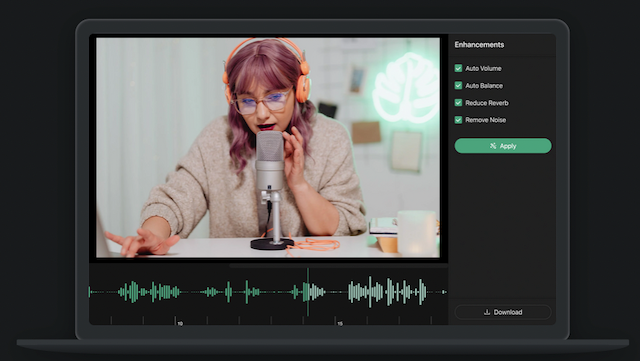
Audo, also known as Audo Studio, is a browser-based AI audio cleanup tool that automatically improves the quality of voice recordings with minimal effort.
Upload an audio file and it removes obnoxious background noise, reduces room echo, and automatically adjusts the volume level so speech sounds clear and consistent, which is ideal for last-minute fixes when there is no time for manual editing.
Because it runs in the browser and works on Mac, Windows, and Linux without installation, it is approachable for creators who are not audio engineers and just want a quick, clean result.
Audo targets podcasters, YouTubers, online educators, and anyone recording voice in less-than-ideal conditions, and the company highlights speed, claiming results far faster than manual cleanup in traditional editors. Strengths are its simplicity, fast one-click processing, cross-platform browser access, and a free tier to test it.
Weaknesses are that it is narrowly focused on cleanup rather than full editing, so it does not replace a DAW or a comprehensive podcast suite, monthly processing minutes are limited on lower tiers, and some advanced options remain in development.
Audo uses a freemium model with a free starter tier offering a small number of minutes per month, an affordable monthly creator plan with more minutes, and a pay-as-you-go option for occasional extra usage. Pricing changes often, so check the official site for current plans.
Audo's core capabilities include AI background noise removal, Automatic volume adjustment, Echo reduction for clearer speech, Browser-based, cross-platform access and Pay-as-you-go and subscription options.
AI background noise removal is built in, Automatic volume adjustment is built in, Echo reduction for clearer speech is built in, Browser-based, cross-platform access is built in, so you get a rounded toolkit rather than a single trick.
Each feature is designed to take the manual effort out of the task and help you reach a usable result faster, which is what makes Audo worth a place on your shortlist.
On the plus side, users consistently highlight Simple one-click cleanup, Fast results without installation and Free tier to try it out as the reasons they keep using Audo.
It isn't perfect, though — Focused on cleanup, not full editing and Monthly minutes limited on lower tiers are the trade-offs people most often mention, so weigh those against your own priorities before you commit.
As with any AI tool, the output still benefits from a quick human review, but Audo gets you most of the way there with far less effort.
Audo runs on a freemium pricing model, so you can start for free and only pay once you outgrow the free tier — handy for testing it on a real task before spending anything.
AI-tool pricing changes often, so always check the current plans, seats and add-ons on the official site for the latest details before you buy. Who is Audo for? It's best suited for one-click ai audio cleanup and noise removal.
Whether you're a beginner trying this kind of AI tool for the first time or a professional who'll use it every day, it's a credible option to consider.
If you're still deciding, compare Audo against the alternatives and the head-to-head comparisons linked below — looking at features, pricing and real user ratings side by side is the fastest way to find the right fit for your workflow and budget.
Who is Audo for?
Audo is best suited for one-click ai audio cleanup and noise removal. Whether you are trying this kind of video & audio tool for the first time or use one every day, it is a credible option to shortlist — compare it with the alternatives and head-to-head comparisons linked on this page to find the best fit for your workflow and budget.