
Runway is an AI video platform built around generative world models — Gen-4.5, Aleph 2.0, and Act-Two for performance capture — split across Runway Creative for filmmakers, Runway Dev for builders, and Runway Robotics.
FreemiumVideo & Audio

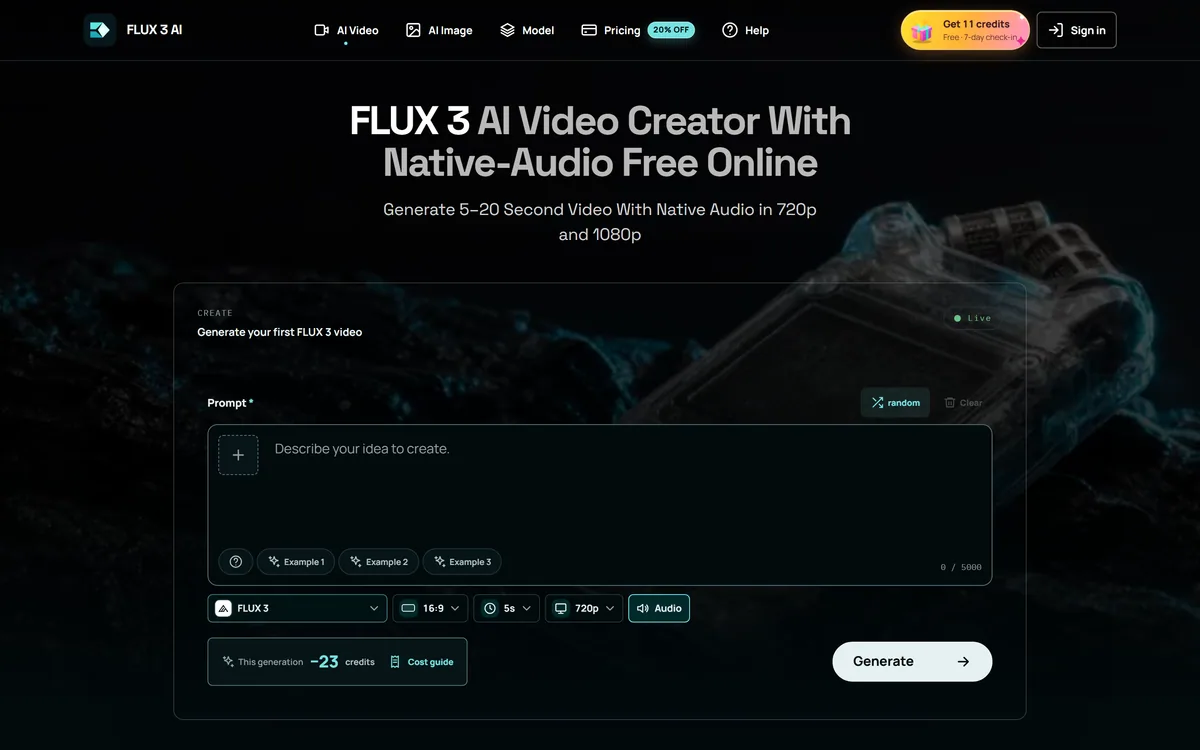
The workspace at www-flux3.com generates 5–20 second AI videos with native audio from text or a starting image, routing across FLUX 3, MiniMax H3, Seedance, Wan 3.0 and Kling 3.0 Pro, at 720p or 1080p with video extension.
Naming and listing accuracy: Two things to know before reading. First, this listing was catalogued as an image generator and the site generates video — the slug is inaccurate and we have kept it only so existing links do not break. Second, "FLUX" is a model family associated with Black Forest Labs, and the other models named here — MiniMax, Seedance, Wan and Kling — belong to their respective owners. This page describes the workspace published at www-flux3.com; we found no statement of corporate affiliation between that site and Black Forest Labs, and none is implied. AInexfinder is not affiliated with either. If you are looking for Black Forest Labs' own products, go to Black Forest Labs directly.
Short AI video has quietly split into two products. There are the labs building models, and there are the browser workspaces reselling access to several of them behind one prompt box. This is firmly the second kind, and the useful question is whether the assembly is worth paying an intermediary for.
The workspace at www-flux3.com generates clips of five to twenty seconds from a text prompt or a starting image, with audio generated alongside the picture, and lets you pick between models from several different companies within one session.
This review covers what native audio changes, why a multi-model workspace suits some people and not others, what the video extension feature is genuinely for, and the diligence worth doing on any site of this shape before you spend money.
| Site | www-flux3.com |
|---|---|
| Type | Browser-based multi-model AI video workspace |
| Output | Video, 5 to 20 seconds |
| Audio | Native generation — dialogue, ambience and sound effects |
| Models offered | FLUX 3, MiniMax H3 variants, Seedance, Wan 3.0, Kling 3.0 Pro and others |
| Inputs | Text prompts, or an uploaded image as a starting frame |
| Resolutions | 720p, 1080p |
| Aspect ratios | 16:9, 9:16, 1:1, 4:3, 3:4 |
| Continuation | Video extension to lengthen an existing clip |
| Workflow | Draft and Enhance — rough pass, then refine |
| Policy pages | Pricing, privacy, terms, cookies, refunds, copyright/DMCA |
| Model ownership | All models belong to their respective third-party developers |
Most short AI video arrives silent, and silence is a bigger problem than it sounds.
A clip with no audio is not a clip that needs a soundtrack adding — it is a clip that reads as unfinished. Footsteps that make no sound, a mouth that moves without speech, rain that falls silently: the viewer registers wrongness before they identify what is missing. Adding sound afterwards means sourcing or generating it, then syncing it to motion you did not design, which is fiddly work.
Generating dialogue, ambience and sound effects with the picture means they are at least nominally aligned with what is happening on screen. That is a genuine workflow saving and the strongest reason to prefer a video tool that offers it.
The realistic expectation is 'coherent', not 'designed'. Generated audio suits ambience and background far better than it suits dialogue carrying meaning, and anything where the sound has to hit a specific beat still wants a real edit.
Silent generated video does not read as quiet. It reads as broken, and the viewer knows before they know why.
FLUX 3, MiniMax H3, Seedance, Wan 3.0 and Kling 3.0 Pro come from different companies with genuinely different strengths, and being able to run the same prompt through several of them is the practical case for a workspace like this.
The models diverge in ways that are hard to read from documentation and obvious in output — motion realism, how they handle faces, prompt adherence, how quickly coherence degrades as a clip runs on. For a given shot, one will simply be better, and which one is not predictable in advance.
That is the honest argument for paying an intermediary: comparison without maintaining five accounts. It is also the argument's limit. If you have settled on one model, going to its source is cheaper and gets you updates first.
The dependency runs the same way as every aggregator. Model availability, versions and terms are set by the developers, and an upstream change lands on you without notice. Nothing about that is unique to this site — it is the shape of the category.
Two features here address the same underlying constraint, which is that generated video degrades as a clip runs on.
Five to twenty seconds is not an arbitrary product decision. Coherence in generated video decays with duration — characters drift, physics loosens, the scene forgets itself — and the ceiling reflects where output stops being usable rather than where the model stops producing frames.
Video extension continues an existing clip rather than generating a longer one from scratch, which is a sensible way to reach beyond the limit. Expect the seam to be visible and the drift to accumulate; each extension inherits the last one's imperfections.
A rough pass first, refinement second. This is the correct workflow for generative video and the one most people skip, because the temptation is to go straight to maximum quality and iterate expensively.
Prompt exploration at draft quality costs a fraction of the same exploration at 1080p. Settle the composition and the motion cheaply, then spend on the version you are actually keeping.
None of this is specific to this workspace. It is the standard evaluation for any browser tool reselling third-party model access, and it takes about five minutes.
This entry was originally catalogued under a slug describing an image generator. The site generates video. We have corrected the description rather than the slug, because changing a URL breaks any existing link to it — but the mismatch is worth knowing if you arrived here expecting stills.
The naming point in the disclosure above matters for the same reason it did on our krea2.org listing: where a site's name closely echoes a well-known model family, a reader can reasonably end up somewhere other than they intended. That is not an accusation about anyone's conduct, and we make none. It is a note that the domain is worth reading carefully before you enter payment details, which is true of every site in this category.
For what it is worth, the workspace publishes the policy pages you would want to see — pricing, privacy, terms, cookies, refunds, and a copyright/DMCA page. A DMCA page in particular is a sign of an operator that has thought about user-generated content, which not every site of this shape bothers with.
AI video generation of 5 to 20 seconds
Native audio generation — dialogue, ambience and sound effects
Text-to-video and image-to-video input
Model selection across FLUX 3, MiniMax H3, Seedance, Wan 3.0 and Kling 3.0 Pro
720p and 1080p output
Five aspect ratios covering landscape, portrait and square
Video extension to continue an existing clip
Draft and Enhance workflow for cheap iteration then a quality pass
The first decision is whether you want model choice or a direct relationship.
| Tool | Model access | Audio | Clip length |
|---|---|---|---|
| www-flux3.com workspace | Five families behind one prompt box | Native, generated with the picture | 5–20 seconds, extendable |
| Runway ML | Its own models, from the developer | Available | Short clips |
| Luma Dream Machine | Its own model, from the developer | Varies | Short clips |
| Krea 2 AI Workspace | Multi-model, images rather than video | Not applicable | Stills |
| MagicLight AI | Multi-model routing | Voice cloning, lip sync, subtitles | Up to 50 minutes |
Last checked . Read from www-flux3.com during this check, with the screenshot above captured at the same time.
Model names belong to their respective owners and are used descriptively. Because the models are operated by third parties, availability, versions and terms can change independently of this workspace — confirm current coverage and the commercial licensing position for generated video yourself before relying on either.
Direct from a developer, through a workspace, or a tool built for length rather than shots.
FLUX 3 AI Image Generator has an AInexfinder Editor Score of 3.3/5.
AInexfinder does not list plan prices or billing details. For current pricing, plans, and trials, visit the official FLUX 3 AI Image Generator website.
Visit official website for pricingVendor pricing, credits, and billing policies change over time. Always confirm on the official site before you buy.
Log in to write a review.
No reviews yet. Be the first to share your experience with FLUX 3 AI Image Generator.
Assigned reviewer
Daniel ReedSenior AI Tools Reviewer
Daniel reviews AI tools the slow way — by actually using them on real projects. His reviews cover what works, what breaks, and who each tool is genuinely a good fit for.
Daniel and the AInexfinder editorial team research FLUX 3 AI Image Generator using public product information, listing evidence, and (when available) hands-on checks. Scores reflect listing completeness and transparency — not paid placement.
Runway is an AI video platform built around generative world models — Gen-4.5, Aleph 2.0, and Act-Two for performance capture — split across Runway Creative for filmmakers, Runway Dev for builders, and Runway Robotics.

Descript is a video and audio editor that works by editing a transcript — delete a sentence and the footage goes with it — plus Studio Sound, Eye Contact, filler-word removal, AI voices, avatars, and the Underlord assistant.
Treblo generates complete songs from a text prompt in any style, with a browsable style library, an Explore feed of what others have made, iOS and Android apps, and a developer section for building on it.

kling3ai.co is an independent interface offering video generation through Kling 3.0 and Seedance models, with multi-shot storyboarding, motion control and 4K output. It is not Kuaishou's official Kling service, which runs at kling.ai.
Vibrantsnap is an AI tool that turns a rough screen recording into a polished walkthrough: it rewrites your narration, reads it in a studio voice in any language, and auto-edits the video with zooms, chapters and captions.
Kapwing is a browser-based video studio combining a timeline editor, subtitler, audio editor and dubbing into 40+ languages with AI tools including Smart Cut, Trim with Transcript, B-Roll Generator, Clip Maker and Character Consistency. Made in San Francisco.