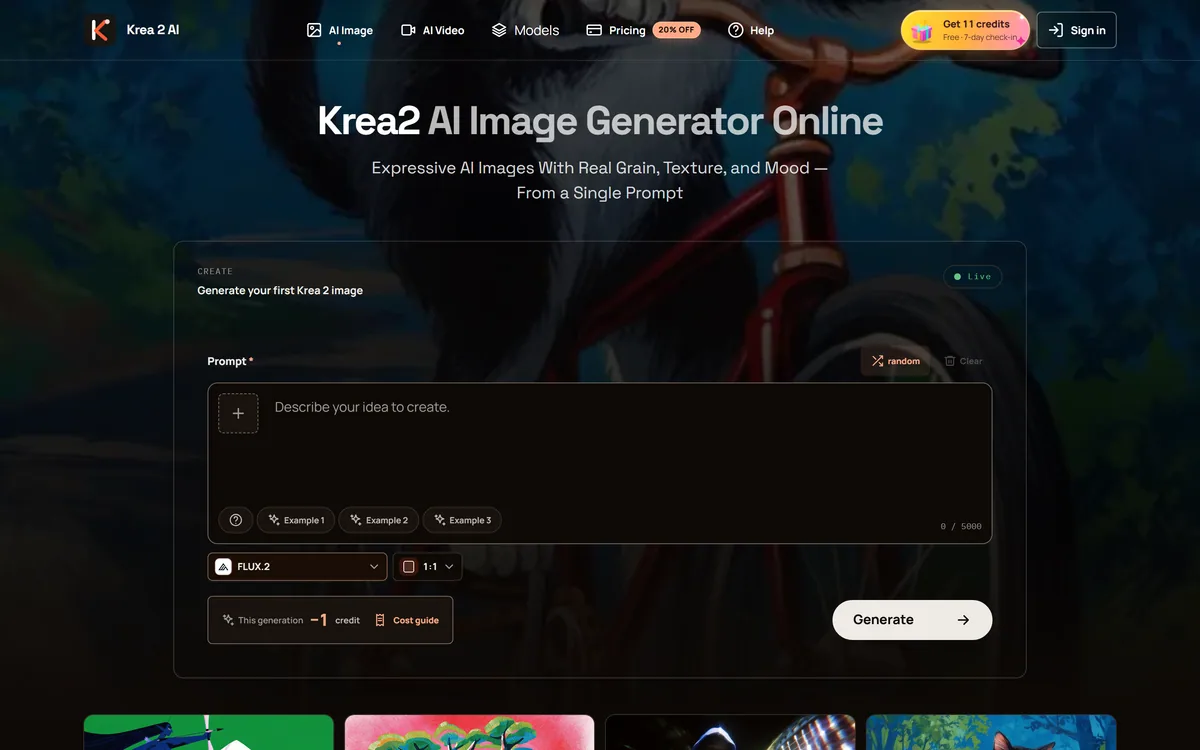
krea2.org is a browser image-generation workspace that runs several third-party models side by side, including Krea 2 tiers, FLUX.2, GPT Image 2, Nano Banana and Seedream 5.0, with reference uploads, six aspect ratios and live model switching.
Naming and affiliation: This listing covers the workspace published at krea2.org. "Krea" and "Krea 2" are names associated with Krea AI, and the other models named on this page — FLUX, GPT Image, Nano Banana and Seedream — belong to their respective owners. The krea2.org site does not state a corporate affiliation with any of them, and AInexfinder is not affiliated with krea2.org or with any of the model providers. Readers looking for Krea AI's own product should go to Krea AI directly.
Image generation has split into two kinds of product. There are the labs building models, and there are the workspaces that resell access to several of them at once. krea2.org is firmly the second kind: a browser interface where one prompt box can be pointed at models from four or five different companies.
That is a legitimate and useful business. Anyone who generates images regularly knows that no single model wins everything — one handles text in images well, another produces better photographic skin, a third is faster and cheaper for iteration — and maintaining separate accounts to reach them all is genuinely tedious.
This review covers what multi-model access is actually worth, which of the listed models do what, why the naming warrants a moment's attention before you commit, and what to verify for yourself.
The workspace runs several third-party models behind one prompt box, switchable mid-session.
Read This Before You Sign Up
It is a multi-model workspace, not a model developer — the generation happens on other companies' models accessed through one interface.
Check the name before you pay. This is krea2.org; if you were looking for Krea AI's own product, that is a different site.
The genuine appeal is breadth — FLUX.2, GPT Image 2, Nano Banana, Seedream and Krea tiers behind one prompt box, switchable mid-session.
Reference uploads are the useful feature: up to three images, videos and audio files to steer a generation.
Automatic refunds for failed generations is a small, sensible policy that not every aggregator bothers with.
Prompt history, generation tracking, live model switching
Failure handling
Automatic refund for failed generations
Policy pages
Privacy, terms, cookies and refunds
What A Model Aggregator Is Really Selling
The product is not generation quality — that belongs to whoever built the model. The product is convenience, comparison and consolidation.
Comparison is the strongest of the three. Running the same prompt through FLUX.2, GPT Image 2 and Nano Banana in one session, without three accounts and three interfaces, is a real workflow improvement for anyone who cares which model suits a given brief.
Consolidation follows from it: one prompt history, one place your generations live, one login. Live model switching within the same workspace is exactly the feature that makes comparison practical rather than theoretical.
Convenience is the weakest of the three, and worth being clear-eyed about. You are paying an intermediary for access to models most of which you could reach directly, which is a fair trade for the workflow and a poor one if you only ever use a single model.
An aggregator is worth it when you genuinely use several models. If you always reach for the same one, you are paying a middleman for a habit.
The Models Listed, And What Each Is For
The site lists Krea 2 in Large, Medium and Medium Turbo tiers, alongside FLUX.2, FLUX.2 Pro, FLUX.2 Max and FLUX.1 Kontext; GPT Image 2 in standard and Pro; the Nano Banana family including Nano Banana Pro and Nano Banana 2; and Seedream 5.0 in Lite and Pro.
The tiering is consistent across families and follows a familiar shape: turbo and lite variants iterate quickly and cheaply, pro and max variants cost more per image and hold detail better.
The practical workflow this enables is worth stating, because it is the actual argument for a multi-model workspace. Iterate on a cheap fast tier until the composition is right, then regenerate the settled prompt on a high-end tier. Doing that across model families in one session is the thing you cannot easily do with separate accounts.
Availability, however, is not this workspace's to guarantee. Every model here belongs to another company, and access, terms and versions can change without notice from upstream. That is inherent to the aggregator model rather than a criticism of this particular site.
Reference Inputs Are The Underrated Control
Up to three reference images, videos and audio files can be attached to steer a generation, and this matters more than the model list for most real work.
Prompting alone is a blunt instrument for controlling style. A reference image communicates a look in one upload that a paragraph of description approximates badly, and anyone trying to keep a series of images visually consistent will get further with references than with adjectives.
Ratios, History And Refunds
Six aspect ratios are offered — 1:1, 16:9, 4:3, 4:5, 2:3 and 9:16 — covering square, landscape, portrait and vertical video framing without cropping afterwards.
Prompt history and generation tracking matter because good prompts are discovered, not written, and losing the one that worked is the standard frustration of this category. Automatic refunds for failed generations is a minor policy that quietly signals the operator has thought about the case where a paid generation returns nothing.
Doing Your Own Diligence
For any workspace reselling third-party model access, a few checks are worth five minutes before you commit. None of this is unique to this site — it is the standard evaluation for the category.
Confirm you are on the site you intended. Several products in this space use similar names, and Krea AI's own service is a separate thing from krea2.org.
Read the refunds page and the terms, since credit-based products vary considerably in what happens to unused credits.
Check the commercial usage terms for generated images before using any output in paid work — these follow from the underlying model licences and are not always identical across models.
Test the models you actually care about on a small purchase before a large one, because upstream availability is outside the operator's control.
Compare the effective cost against going direct for your single most-used model, which is the real alternative.
Save prompts that work somewhere you control, rather than relying only on the platform's history.
Verify the aspect ratios and reference upload behaviour against your real workflow rather than assuming from the feature list.
Who This Suits, And Who Should Go Direct
The case for a multi-model workspace is strongest for people whose work genuinely varies. A designer producing marketing images one day and product mockups the next has real reason to switch models, and real reason to want one interface for it.
It is also a reasonable way to learn the landscape. Running one prompt across five model families teaches you more about their differences in an afternoon than reading comparisons does in a week.
The case is weakest for two groups. Anyone who has settled on one model should go to its source — you get the same output without an intermediary, plus first access to updates. And anyone doing serious commercial work should think hard about depending on a reseller for a production pipeline, since the models are not the operator's to guarantee.
For casual and exploratory use, the convenience is real and the stakes are low. That is the honest sweet spot.
Aggregator Or Source? The Trade-Off
Going through a workspace and going direct to a model are different purchases with different risks.
You genuinely use several different models depending on the brief
You want to compare model families on the same prompt without three accounts
You are still learning which model suits which kind of image
Reference-image steering matters more to you than any single model's edge
Your usage is exploratory rather than a production pipeline
Go Direct If
You have settled on one model and always use it
You are running commercial production work that cannot tolerate access changing
You need the newest model versions the moment they ship
You want the developer's own advanced controls rather than a common interface
Licensing certainty for commercial output is critical to your work
How This Entry Was Compiled
Last checked . Read from krea2.org during this check, with the screenshot above captured at the same time.
Model families listed on the site: Krea 2 Large, Medium and Medium Turbo; FLUX.2, FLUX.2 Pro, FLUX.2 Max and FLUX.1 Kontext; GPT Image 2 standard and Pro; Nano Banana, Nano Banana Pro and Nano Banana 2; Seedream 5.0 Lite and Pro
Reference upload allowance of up to three images, videos and audio files
Aspect ratios 1:1, 16:9, 4:3, 4:5, 2:3 and 9:16 offered on the site
Prompt history, generation tracking and live model switching described as workspace features
Automatic refund for failed generations stated on the site
Privacy, terms, cookies and refunds pages confirmed present in the site footer
The site displays Krea 2 branding; we found no statement of corporate affiliation with Krea AI or with any other model provider, and none is implied here
No plan prices published here, in line with this site's pricing policy
Model names belong to their respective owners and are used here descriptively. Because the models are operated by third parties, availability, versions and terms can change independently of this workspace — verify current coverage and the commercial licensing position for generated images yourself before relying on either.
Other Image Generation Routes
Direct from a developer, through a workspace, or inside a wider design platform.
Midjourney — a single model with a distinctive look, straight from the developer
GPT Image 2 — one of the models listed here, available at source
Nano Banana Pro — another of the families offered, covered in its own listing
OpenArt — multi-model generation with a community layer attached
Designers whose briefs vary enough to justify switching models
People learning the landscape and comparing model families directly
Anyone who wants reference-image steering across several models
Casual and exploratory generation where convenience outweighs control
Users tired of maintaining separate accounts with four different providers
Key features of Krea2.org AI Image Workspace
Multiple third-party model families accessible from one prompt box
Live model switching within the same workspace session
Krea 2 tiers in Large, Medium and Medium Turbo
FLUX.2, FLUX.2 Pro, FLUX.2 Max and FLUX.1 Kontext access
GPT Image 2 in standard and Pro variants
Nano Banana, Nano Banana Pro and Nano Banana 2
Seedream 5.0 Lite and Pro
Reference uploads of up to three images, videos and audio files
Six aspect ratios covering square, landscape, portrait and vertical
Prompt history, generation tracking and automatic refunds on failed generations
Pros & cons
Pros
5
One interface for several model families removes the multi-account tax on comparison
Live model switching makes running the same prompt across families genuinely practical
Reference uploads steer style far more effectively than prompt adjectives
Tiering across families supports cheap iteration then a high-quality final render
Automatic refunds on failed generations is a small policy most aggregators skip
Cons
5
Generation quality is inherited from other companies' models, not built here
Model availability and terms are set upstream and can change without notice
The naming is close enough to Krea AI's own product to be worth double-checking
You may pay an intermediary for access you could get at source
Advanced controls specific to one developer's own interface will not all be present
Krea2.org AI Image Workspace pricing
AInexfinder does not list plan prices or billing details. For current pricing, plans, and trials, visit the official Krea2.org AI Image Workspace website.
Vendor pricing, credits, and billing policies change over time. Always confirm on the official site before you buy.
Frequently asked questions
Is krea2.org the same as Krea AI?
They are different sites. This listing covers the workspace at krea2.org, which displays Krea 2 branding and does not state a corporate affiliation with Krea AI. If you were looking for Krea AI's own product, go to Krea AI directly.
Which models can I actually use?
The site lists Krea 2 in three tiers, the FLUX.2 family including Pro and Max plus FLUX.1 Kontext, GPT Image 2 standard and Pro, the Nano Banana family, and Seedream 5.0 Lite and Pro. All belong to other companies, so availability is set upstream rather than here.
Why use an aggregator instead of going direct?
Comparison and consolidation. Running one prompt across several model families in a single session, with one history and one login, is a real workflow gain. If you always use the same model, going direct is cheaper and gets you updates sooner.
How much do reference uploads help?
More than most people expect. Up to three images, videos and audio files can steer a generation, and a reference image communicates a look in one upload that a paragraph of description only approximates. For consistency across a series, references beat adjectives.
What happens if a generation fails?
The site states automatic refunds for failed generations. It is a small thing, and worth noticing — a paid generation that returns nothing is a common annoyance in credit-based products and not every operator handles it.
Can I use the images commercially?
Check the terms before assuming. Commercial usage rights follow from the underlying model licences as well as the workspace's own terms, and they are not necessarily identical across every model offered. This is worth five minutes of reading rather than a guess.
What should I check before paying?
Confirm you are on the site you intended, read the refunds and terms pages, test the specific models you care about with a small purchase first, and compare the effective cost against going direct for whichever model you use most.
Daniel reviews AI tools the slow way — by actually using them on real projects. His reviews cover what works, what breaks, and who each tool is genuinely a good fit for.
Daniel and the AInexfinder editorial team research Krea2.org AI Image Workspace using public product information, listing evidence, and (when available) hands-on checks. Scores reflect listing completeness and transparency — not paid placement.
Listings may include affiliate or sponsored placements, which are labeled when present. Editorial scores and cons are not sold. See our affiliate disclosure and review methodology.
VividManga colourises black-and-white manga while keeping recurring characters on a fixed palette and leaving speech bubbles untouched. It takes ZIP and CBZ archives, offers twelve-plus styles, and exports pages individually or as a packaged chapter.
Canva AI is the Magic Studio suite built into Canva — Magic Write for copy, Dream Lab for images, Magic Edit, Expand and Eraser for photos, Magic Switch for reformatting, Magic Charts for data, and Canva Code for interactive widgets.
Pixlr is a browser-based photo editor from Pixlr Pte Ltd with two editors and a generative AI layer — Generative Fill, Expand and Transform, background and object removal, Super Scale upscaling, face swap, plus image, video, and audio generation.
GenApe is an all-in-one AI platform covering writing, chat, image and video generation, image editing, product photography, translation, and research — with 145 free credits on signup and commercial rights granted to paid users.
Manga Colorizer converts black-and-white manga pages to full colour using models tuned for line art and screentone, with translation into 15+ languages, 2K and 4K output, four style presets, batch mode and a built-in chapter reader.
Pixelcut is an AI photo and video editor built around ecommerce workflows: product showcases, UGC-style ads and consistent AI personas, plus background removal, 16x upscaling, generative fill, magic eraser and batch editing across web, iOS and Android.