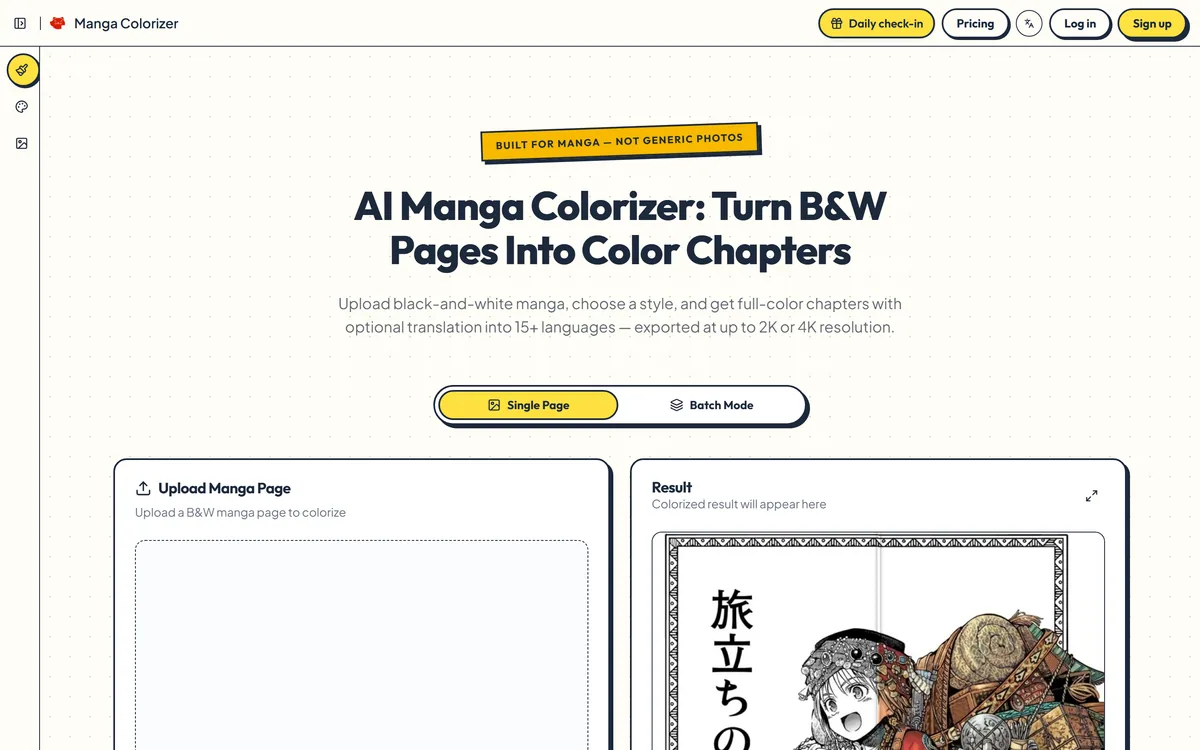
Manga Colorizer converts black-and-white manga pages to full colour using models tuned for line art and screentone, with translation into 15+ languages, 2K and 4K output, four style presets, batch mode and a built-in chapter reader.
mangacolorizer.com12 viewsAdded May 25, 20266K visitors
Colourising a photograph and colourising a manga page look like the same problem and are not. A photograph has continuous tone and soft edges. A manga page has hard black ink, deliberate blank space, and screentone — those dot patterns doing the work that shading does elsewhere — and a general-purpose coloriser reads screentone as noise and smooths it into mud.
Manga Colorizer is built for the second problem specifically. It applies models tuned for manga line art and panel layouts, preserving inked lines and screentone detail, and adds translation, high-resolution export and a chapter reader around the core operation.
This review covers what manga-aware colouring actually preserves, why translation is harder than it looks, what the style presets are really for, and the rights question no tool in this category can answer for you.
The specialisation is the point — generic colourisers treat screentone as noise and destroy it.
What Manga-Aware Colouring Preserves
Three things separate a good manga colourisation from a bad one, and all three are about restraint rather than colour choice.
Line integrity. The ink is the drawing. A coloriser that softens or bleeds across inked lines has destroyed the artwork in the act of improving it, and this is the single most common failure of general-purpose tools applied to manga.
Screentone handling. Those dot and hatch patterns are deliberate shading, not compression artefacts. A model that has not learned this treats them as noise to be cleaned, and the page loses its depth entirely.
Panel borders. Manga is composed in panels, and colour bleeding across a gutter reads as a printing fault. Keeping borders sharp is unglamorous and immediately visible when it fails.
Judge it on what survives, not on what appears. Good manga colour is measured by intact linework and readable screentone, not by how vivid the result is.
Translation Is A Layout Problem
Translation into 15+ languages sounds like a language feature and is mostly a layout feature.
Manga speech bubbles are drawn for the text they contain, and a Japanese line rendered in English or German is a different length, a different shape and often needs a different orientation. Text simply pasted over the original produces overflow, awkward breaks, and lettering that fights the artwork.
Rebuilding the bubbles and text boxes — which is what the tool describes doing — is the harder and correct approach. It is also where quality will vary most between pages, and the first thing to check on a sample before committing a whole chapter.
Translation quality itself carries the usual caveat, sharpened by the medium. Manga leans heavily on register, honorifics, dialect and wordplay, and machine translation flattens exactly those. Expect the plot to survive and the voice to thin — perfectly acceptable for reading a raw release you otherwise could not read at all, and not a substitute for a real localisation.
Presets, Resolution And Batch Work
The supporting features matter more than they first appear, because manga is consumed as chapters rather than as single images.
Why Style Presets Earn Their Place
Soft pastel, bold action, vintage print and webtoon tone are not decorative options. They set a tonal register, and register is what keeps forty pages looking like one work.
The wrong preset is genuinely wrong: pastel on a fight sequence drains it, bold action on a quiet domestic scene makes it shout. Choose per work rather than per page, and stay with it.
Resolution And Batch Mode
2K and 4K output covers reading on a good screen and printing at reasonable size. Accepted inputs are PNG, JPG and WEBP, and output comes as downloadable pages, whole chapters, or shareable reader links.
Batch mode is what makes any of this practical. A chapter is twenty pages; a volume is closer to two hundred. Processing one at a time is a hobby, and processing a batch consistently is the thing that makes a readable coloured chapter possible at all.
The Rights Question, Stated Plainly
This deserves its own section because the tool cannot address it and the reader should think about it.
Manga is copyrighted work owned by creators and publishers, and colourising or translating it produces a derivative of that work. The tool processes whatever you upload and has no way of knowing what you have permission to use — that judgement sits entirely with you.
Some uses are clearly fine. Your own artwork. Public domain material. Work you have licensed. An indie creator prototyping a colour edition of their own series — one of the audiences the site names — is on entirely solid ground.
Other uses are worth thinking about properly. Colourising a series you bought, for your own reading, sits in territory that varies by jurisdiction. Sharing the results publicly is a different act from making them, and the shareable links feature makes that distinction easy to cross without noticing.
The practical advice is simply to be deliberate: know which category your use falls into before you start, and treat 'private reading' and 'published online' as genuinely separate decisions.
Establish what you have the right to use before uploading anything, since the tool will not ask.
Test one page before a chapter, checking linework and screentone at full resolution rather than in a thumbnail.
Choose a style preset for the whole work, not per page — consistency is what makes a chapter readable.
Check translated bubbles for overflow and awkward breaks on a sample page before committing.
Run batch mode per chapter so tonal consistency holds across a reading session.
Export at the resolution you will actually read or print at, rather than the maximum available.
Treat the private sharing links as publication and decide accordingly, particularly for work you do not own.
The Short Version For Manga Readers
It is manga-specific, not a generic coloriser. The models are tuned for inked lines, panel borders and screentone, which general photo tools destroy.
Translation is bundled into 15+ languages, with speech bubbles and text boxes rebuilt rather than overlaid.
Output goes to 2K and 4K, with a built-in reader and private shareable links.
Four style presets — soft pastel, bold action, vintage print and webtoon tone — which matter more than they sound for tonal consistency.
The rights question is yours. The tool will process whatever you upload and has no view on whether you have permission to.
Formats, Languages And Output
Category
AI manga colourisation and translation
Specialisation
Models tuned for manga line art, panel layouts and screentone
Underlying model
Stated on the site as Nano Banana Pro on Gemini
Accepted inputs
PNG, JPG, WEBP
Output resolution
Up to 2K and 4K
Style presets
Soft pastel, bold action, vintage print, webtoon tone
Translation
15+ languages, with speech bubbles and text boxes rebuilt
Volume processing
Batch mode for multiple pages
Delivery
Downloadable pages or full chapters, plus a built-in reader with private shareable links
Named audiences
Manga fans reading raw releases, indie creators prototyping colour editions, scanlation and localisation teams
Key features of Manga Colorizer
Manga-aware colourisation preserving inked lines and screentone
Sharp panel border handling to prevent colour bleeding across gutters
Translation into 15+ languages with rebuilt speech bubbles and text boxes
Output at up to 2K and 4K resolution
Four style presets: soft pastel, bold action, vintage print and webtoon tone
Batch mode for processing whole chapters
Built-in chapter reader with private shareable links
PNG, JPG and WEBP input support
Download of individual pages or complete chapters
Pros & cons
Pros
5
Specialised for manga rather than adapted from photo tools, which is the whole difference
Screentone preservation is the detail generic colourisers reliably destroy
Rebuilding bubbles rather than overlaying text is the correct approach to translation layout
Style presets keep a whole chapter tonally consistent instead of page-by-page drift
Batch mode makes chapter-length work practical rather than theoretical
Cons
5
Machine translation flattens register, honorifics, dialect and wordplay, which manga leans on heavily
Bubble rebuilding quality varies by page, so a sample check is essential before a chapter
Automatic colour cannot infer an artist's intent for anything not visible on the page
The rights position for the material you upload is entirely your responsibility
Not publication quality — professional colour remains a skilled manual job
Best For
Readers following untranslated releases they otherwise could not read
Indie comic creators prototyping a colour edition of their own work
Artists exploring colour directions before a manual pass
Localisation teams wanting a fast first-pass layout to refine
Anyone working with public domain or properly licensed comic material
Why A Specialist Beats A General Image Tool Here
These all process images. Only one of them was built for ink and screentone.
ImgLarger — straightforward upscaling of an existing image
Smartcat — translation workflows where linguistic quality matters more than layout
Ailaysa — another translation and localisation platform for text-heavy work
What The Site States
Last checked . Read from mangacolorizer.com during this check, with the screenshot above captured at the same time.
Manga-aware colouring described as preserving inked lines, screentone detail and sharp panel borders
Translation into 15+ languages with speech bubbles and text boxes rebuilt in the target language
Output at 2K and 4K resolution, with PNG, JPG and WEBP accepted as inputs
Style presets named as soft pastel, bold action, vintage print and webtoon tone
Batch mode for processing multiple pages, and a chapter reader with private shareable links
The underlying model stated on the site as Nano Banana Pro on Gemini
Target audiences given as manga fans reading raw releases, indie creators and scanlation or localisation teams
Features, pricing, FAQ, blog, about, contact, privacy policy, terms of service and cookie policy pages present in the site footer
No plan prices published here, in line with this site's pricing policy
The section on rights is general information about copyrighted material and derivative works, not legal advice, and it is not a claim about how anyone uses this tool. Rules differ by jurisdiction; if you are unsure about a specific use, check before you publish.
Editor's Verdict
3.8/5
Manga Colorizer has an AInexfinder Editor Score of 3.8/5.
Manga Colorizer pricing
AInexfinder does not list plan prices or billing details. For current pricing, plans, and trials, visit the official Manga Colorizer website.
Vendor pricing, credits, and billing policies change over time. Always confirm on the official site before you buy.
Frequently asked questions
Why not use a general AI coloriser?
Because manga is not a photograph. Screentone — the dot and hatch patterns doing the shading — reads as noise to a general model, which smooths it away and flattens the page. Hard inked lines and panel borders also need preserving rather than blending. The specialisation is the entire point.
How good is the translation?
Good enough to follow a story you otherwise could not read. Manga leans heavily on register, honorifics, dialect and wordplay, and machine translation flattens exactly those. Expect the plot to survive and the voice to thin. It is not a substitute for a real localisation.
What do the style presets actually change?
The tonal register — and that is what keeps a chapter looking like one work. Pastel drains a fight sequence; bold action makes a quiet domestic scene shout. Choose per work rather than per page, and stay with it.
Can I process a whole chapter at once?
Yes, batch mode handles multiple pages, and it is what makes the tool practical. A chapter is twenty pages and a volume closer to two hundred. Run a batch per chapter so tonal consistency holds across a reading session.
Am I allowed to colourise manga I bought?
That depends on the work and where you are, and it is your responsibility rather than the tool's — it processes whatever you upload without asking. Your own art, licensed work and public domain material are clearly fine. Sharing results publicly is a separate decision from making them, and worth treating as one.
Is the output good enough to publish?
Not as final colour. Professional manga colouring is a skilled manual craft and this does not replace it. As a prototype, a colour test, or a way to read something otherwise inaccessible, it does the job well.
What formats can I upload and get back?
PNG, JPG and WEBP go in. Coloured pages come out at up to 2K or 4K, downloadable individually or as a full chapter, with a built-in reader and private shareable links as an alternative to downloading.
Daniel reviews AI tools the slow way — by actually using them on real projects. His reviews cover what works, what breaks, and who each tool is genuinely a good fit for.
Daniel and the AInexfinder editorial team research Manga Colorizer using public product information, listing evidence, and (when available) hands-on checks. Scores reflect listing completeness and transparency — not paid placement.
Listings may include affiliate or sponsored placements, which are labeled when present. Editorial scores and cons are not sold. See our affiliate disclosure and review methodology.
krea2.org is a browser image-generation workspace that runs several third-party models side by side, including Krea 2 tiers, FLUX.2, GPT Image 2, Nano Banana and Seedream 5.0, with reference uploads, six aspect ratios and live model switching.
Pet Pic Portraits turns a pet photo into styled artwork — Royal King, Pop Art, Watercolour, Viking, Wizard and more — with an instant preview before ordering. Output is a digital download, a canvas print or framed wall art, and it includes a pet memorial option.
RetypeWords is a browser tool that replaces text that has been flattened into a PNG, JPG or WebP image. It reads the words with OCR, lets you correct what it read, then regenerates the selected area so the new wording sits in the picture rather than on top of it.
Canva AI is the Magic Studio suite built into Canva — Magic Write for copy, Dream Lab for images, Magic Edit, Expand and Eraser for photos, Magic Switch for reformatting, Magic Charts for data, and Canva Code for interactive widgets.
Pixlr is a browser-based photo editor from Pixlr Pte Ltd with two editors and a generative AI layer — Generative Fill, Expand and Transform, background and object removal, Super Scale upscaling, face swap, plus image, video, and audio generation.
Magic Patterns is an AI design tool for product teams that turns prompts, requirements and ideas into high-fidelity UI, matching your existing design system so teams can prototype and test directions before committing engineering resources.