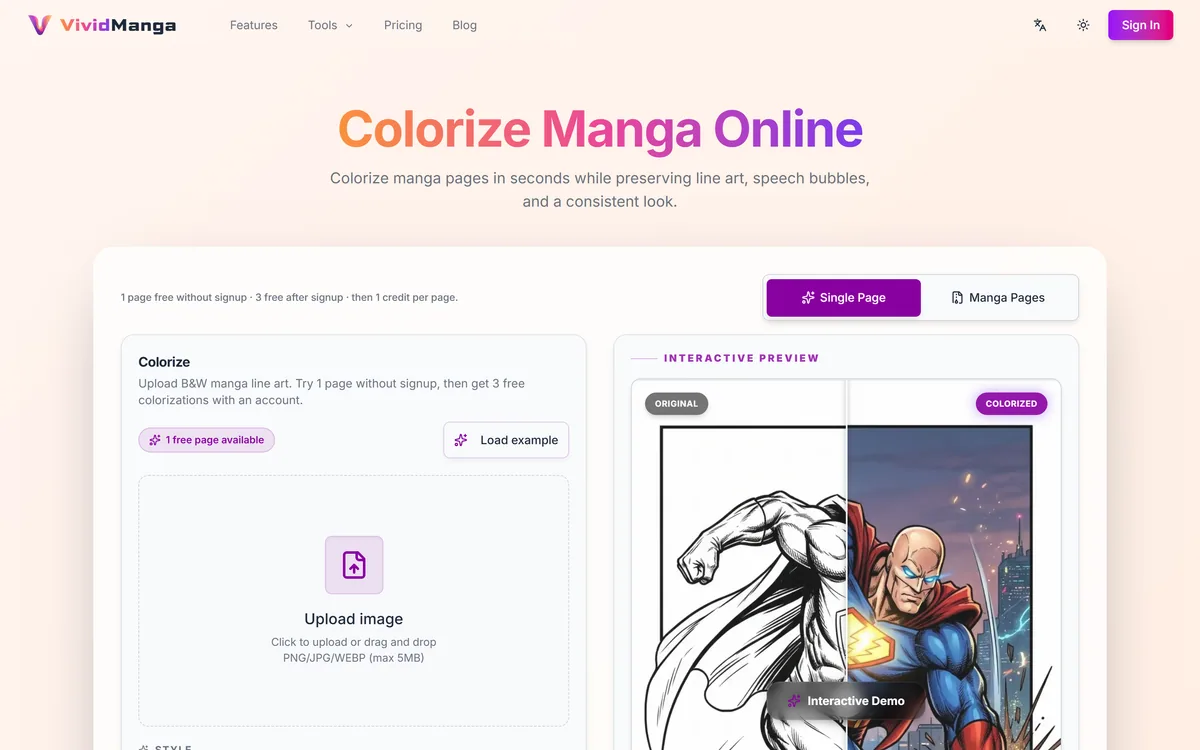
VividManga colourises black-and-white manga while keeping recurring characters on a fixed palette and leaving speech bubbles untouched. It takes ZIP and CBZ archives, offers twelve-plus styles, and exports pages individually or as a packaged chapter.
Colouring one manga page is a solved problem. Colouring two hundred of them is not, and the difference is entirely consistency: a model that treats every page as a fresh image will give the same character brown hair on page three and auburn on page forty, and the volume falls apart.
VividManga is built around that specific failure. Its character card system asks you to fix a palette for each recurring character first, then applies it across the batch, while text isolation keeps speech bubbles, sound effects and narration boxes out of the colouring pass entirely.
This review covers how the character workflow actually changes the output, why archive input matters more than it sounds, what the style list is really choosing between, and the limits — including the rights question no tool in this category can answer for you.
The pitch is volume-scale consistency — the problem single-page colourisers cannot solve.
VividManga's One Real Idea
Character cards lock a palette before you scale up, so a character keeps the same hair and jacket across every page of a chapter.
Speech bubbles, sound effects and narration boxes are isolated from colouring — the single fastest way to ruin a manga page is to tint the lettering.
It takes CBZ and ZIP archives, which is how digitised manga actually exists rather than as loose PNGs.
Twelve-plus styles including cel shaded, flat colour, watercolour, painterly and sepia — a register choice, not decoration.
No translation. If you also need the text in another language, this is not that tool.
Character Cards Are The Feature Worth Paying For
Everything else VividManga does, a general coloriser roughly does too. This is the part that does not exist elsewhere.
The workflow inverts the obvious one. Instead of colouring pages and hoping the model stays consistent, you review and define a colour palette per character first — the card — and only then run the chapter. The palette becomes a constraint the batch is held to rather than something re-guessed on every page.
That matters because character identity in manga is carried by very few signals. In black and white, a character is their hairstyle, their silhouette and their costume shapes. Add colour inconsistently and you have quietly created a different person, and readers notice long before they can explain why.
The practical consequence is that the setup step is where the quality is decided. Rushing the cards to get to the fun part produces exactly the drift the feature exists to prevent.
A page can be beautiful and still be wrong. In a volume, the only quality that matters is whether page forty agrees with page three.
Protecting The Lettering
Text isolation covers speech bubbles, sound effects and narration boxes, and it is the least glamorous capability on the list.
It is also the one whose absence is immediately obvious. Manga lettering is pure black on pure white by design, sitting inside shapes the artist drew to be read at speed. A coloriser that treats a speech bubble as an object to be tinted produces pages that are technically colourful and genuinely harder to read.
Sound effects are the harder case, because they are drawn artwork rather than typeset text — often overlapping panels, sometimes part of the composition. Getting those excluded reliably is a better test of the tool than any hero image, and it is worth checking on an action page rather than a quiet one.
Archive In, Archive Out
Accepted inputs are PNG, JPG and WEBP at up to 5 MB per file, uploaded individually, dragged in as a batch, or imported as a ZIP or CBZ archive. Output comes back as individual pages, a packaged batch ZIP, or CBZ and PDF, with 4K available on paid plans.
CBZ support is the detail that signals this was built by someone who has actually handled digitised manga. A CBZ is just a ZIP of page images with a comic-reader extension — it is how scanned volumes are stored and read, and a tool that cannot open one is asking you to unpack and repack every chapter by hand.
The 5 MB per-file ceiling is the constraint to check against your own scans. A high-resolution greyscale page can exceed that, and downscaling before upload is a quality decision you would rather make deliberately than discover halfway through a volume.
What The Style List Is Actually Choosing
Twelve-plus styles sounds like padding and is not, but the choice is narrower than the list implies. Natural, dramatic, vibrant, cel shaded, soft, flat colour, monochrome, pastel, painterly, retro, watercolour and sepia are really three decisions.
How much the colour asserts itself — vibrant and dramatic push, soft and pastel recede. Match this to the story's temperature, not your taste.
Whether it reads as animation or as painting — cel shaded and flat colour give the anime look most readers expect; painterly and watercolour give something closer to a cover illustration and fight the linework more.
Whether it is colour at all — monochrome and sepia are tonal treatments, useful for flashback sequences and for volumes where full colour would feel wrong.
The one rule that matters: pick per work, not per page. A chapter that changes register halfway through reads as a mistake even when each page is individually good.
Running A Chapter Properly
The order below is the difference between a chapter you can read and a folder of pages you have to re-do.
Confirm you have the right to colour the material before uploading anything — the tool processes whatever it is given and asks nothing.
Pick one representative page with your main characters clearly visible and colour it alone first.
Build character cards from that page, and take the time to get the palettes right. This is where the chapter's consistency is decided.
Choose one style for the whole work and write it down, so a session next week matches this one.
Run five pages, not the whole volume. Check lettering on an action page specifically, where sound effects overlap the art.
Only then import the full CBZ and run the batch.
Read the output end to end as a reader would. Drift between distant pages is invisible when you inspect them one at a time — which is the exact problem the character cards exist to solve.
The Ceiling On Generated Colour
There is no translation. Manga Colorizer bundles colour and 15-plus language translation with rebuilt speech bubbles; VividManga does colour only. If you are reading a raw release you cannot read, colour does not help you.
Automatic colour also cannot know intent. An artist's own colour edition makes choices about mood, symbolism and emphasis that are decisions, not derivations from a greyscale page. Generated colour produces something plausible, and plausible is not the same as right.
And the rights position sits entirely with you. Manga is copyrighted work owned by creators and publishers, and a coloured version is a derivative of it. Your own artwork, licensed material and public domain work are straightforward. Colouring a series you bought for private reading varies by jurisdiction, and sharing the result is a separate decision from making it — one the batch export and archive output make very easy to take without noticing.
Finally, this is a 2026 product with a small footprint. The Discord and refund policy are published, which is more than many, but treat it as a young tool and keep your source scans.
Terms That Decide Whether This Fits
Three of these come up constantly in manga colouring and are easy to skim past.
CBZ
A ZIP archive of page images with a comic-reader extension. It is how digitised volumes are stored, so accepting one saves unpacking and repacking every chapter by hand.
Character card
A fixed palette defined for a recurring character before the batch runs. It converts consistency from something you hope for into something the run is constrained by.
Text isolation
Excluding speech bubbles, sound effects and narration boxes from the colouring pass. Sound effects are the hard case because they are drawn artwork, not typeset text.
Cel shaded
Flat colour areas with hard-edged shadows, the look of traditional animation. It sits closest to what readers expect from a coloured manga and fights the linework least.
Formats, Styles And Limits
Company
VividManga, established 2026
Category
AI manga and line-art colourisation
Accepted inputs
PNG, JPG, WEBP
Per-file limit
5 MB
Batch input
Drag-and-drop, ZIP or CBZ archive import
Consistency
Character cards fixing a palette per recurring character
Text handling
Speech bubbles, sound effects and narration boxes isolated from colouring
Styles
12+, including natural, dramatic, vibrant, cel shaded, soft, flat colour, monochrome, pastel, painterly, retro, watercolour and sepia
Outputs
Individual pages, batch ZIP, CBZ and PDF
High resolution
4K on paid plans
Translation
Not offered
Community
Discord, GitHub and email links published
Policy pages
Privacy, terms, community guidelines and refund policy
Key features of VividManga
Character cards that fix a colour palette per recurring character
Consistent character colours maintained across a batch
Text isolation protecting speech bubbles, sound effects and narration boxes
ZIP and CBZ archive import for whole chapters
Drag-and-drop batch upload
12+ colour styles including cel shaded, flat colour, watercolour and sepia
Export as individual pages, batch ZIP, CBZ or PDF
4K output on paid plans
Pros & cons
Pros
5
Character cards address volume-scale consistency, which single-page tools cannot
CBZ input and output fit how digitised manga is actually stored and read
Text isolation covers sound effects, the hard case most tools get wrong
The style list spans genuinely different registers rather than twelve variations of one
Publishes community guidelines and a refund policy, which is more than much of this category
Cons
5
No translation, so a raw release you cannot read stays unreadable
5 MB per-file limit can force downscaling of high-resolution scans
Generated colour is plausible rather than authored — it cannot know an artist's intent
Quality depends on care taken at the character card stage, which is easy to rush
A 2026 product with a small footprint; keep your source scans
Best For
Creators colouring whole chapters for video edits or reading
Indie artists prototyping a colour edition of their own work
Archivists working from CBZ volumes
Readers who prefer colour and hold the rights to the material
Anyone who has tried a general coloriser and watched a character change colour mid-chapter
VividManga Beside Its Nearest Neighbours
One of these is a direct competitor; the rest are general image tools that were never built for ink and screentone.
ImgLarger — upscaling pages that are too small to colour well
OpenArt — generating original art rather than colouring existing pages
Sourced From The Product Pages
Last checked . Read from vividmanga.com during this check, with the screenshot above captured at the same time.
Consistent character colours via a character card system, described on the site
Text isolation covering speech bubbles, sound effects and narration boxes
Batch processing by drag-and-drop and by ZIP or CBZ archive import
Accepted formats PNG, JPG and WEBP with a 5 MB per-file limit
The style list of 12+ options, named on the site
Outputs as individual pages, batch ZIP, CBZ and PDF, with 4K on paid plans
Stated audiences including video creators, archivists, readers and publishers
Company given as VividManga, established 2026, with Discord, GitHub and email links plus privacy, terms, community guidelines and refund policy present in the footer
No translation feature found on the site at the time of this check
No plan prices published here, in line with this site's pricing policy
The rights section is general information about copyrighted work and derivatives, not legal advice, and is not a claim about how anyone uses this tool. Observations about consistency drift describe generative colouring in general rather than measured behaviour of this product.
Editor's Verdict
3.9/5
VividManga has an AInexfinder Editor Score of 3.9/5.
VividManga pricing
AInexfinder does not list plan prices or billing details. For current pricing, plans, and trials, visit the official VividManga website.
Vendor pricing, credits, and billing policies change over time. Always confirm on the official site before you buy.
Frequently asked questions
How is this different from Manga Colorizer?
Two things. VividManga has character cards that lock a palette per character across a batch, which is aimed at volume-scale consistency. Manga Colorizer has translation into 15+ languages with rebuilt speech bubbles, which VividManga does not offer at all. Pick on whether you need consistency or translation.
What do character cards actually do?
They let you fix a colour palette for each recurring character before the chapter runs, so the batch is constrained to it rather than re-guessing on every page. It is the difference between a coloured volume and a folder of individually plausible pages that disagree with each other.
Can I upload a whole volume at once?
Yes — drag a batch in, or import a ZIP or CBZ archive. CBZ matters because that is how digitised manga is normally stored, so you are not unpacking and repacking every chapter by hand. Individual files cap at 5 MB.
Will it colour over the speech bubbles?
It is specifically built not to — text isolation excludes speech bubbles, sound effects and narration boxes. Test it on an action page rather than a quiet one, since sound effects are drawn artwork rather than typeset text and are the harder case.
Which style should I pick?
Cel shaded or flat colour if you want the look readers expect from coloured manga. Watercolour and painterly read as illustration and fight the linework more. Monochrome and sepia are tonal treatments for flashbacks. Whichever you choose, use one for the whole work — changing register mid-chapter reads as a mistake.
Is the output good enough to publish?
Not as final colour. Professional manga colouring is an authored craft, and generated colour cannot know what an artist meant a scene to feel like. As a colour edition for reading, a prototype, or source material for video edits, it does the job.
Am I allowed to colour manga I own?
That depends on the work and where you are, and it is your call rather than the tool's — it processes whatever you upload. Your own art, licensed work and public domain material are clear. Publishing the result is a separate decision from making it, and batch export makes that line easy to cross without thinking about it.
Daniel reviews AI tools the slow way — by actually using them on real projects. His reviews cover what works, what breaks, and who each tool is genuinely a good fit for.
Daniel and the AInexfinder editorial team research VividManga using public product information, listing evidence, and (when available) hands-on checks. Scores reflect listing completeness and transparency — not paid placement.
Listings may include affiliate or sponsored placements, which are labeled when present. Editorial scores and cons are not sold. See our affiliate disclosure and review methodology.
krea2.org is a browser image-generation workspace that runs several third-party models side by side, including Krea 2 tiers, FLUX.2, GPT Image 2, Nano Banana and Seedream 5.0, with reference uploads, six aspect ratios and live model switching.
Pet Pic Portraits turns a pet photo into styled artwork — Royal King, Pop Art, Watercolour, Viking, Wizard and more — with an instant preview before ordering. Output is a digital download, a canvas print or framed wall art, and it includes a pet memorial option.
RetypeWords is a browser tool that replaces text that has been flattened into a PNG, JPG or WebP image. It reads the words with OCR, lets you correct what it read, then regenerates the selected area so the new wording sits in the picture rather than on top of it.
Canva AI is the Magic Studio suite built into Canva — Magic Write for copy, Dream Lab for images, Magic Edit, Expand and Eraser for photos, Magic Switch for reformatting, Magic Charts for data, and Canva Code for interactive widgets.
Pixlr is a browser-based photo editor from Pixlr Pte Ltd with two editors and a generative AI layer — Generative Fill, Expand and Transform, background and object removal, Super Scale upscaling, face swap, plus image, video, and audio generation.
Magic Patterns is an AI design tool for product teams that turns prompts, requirements and ideas into high-fidelity UI, matching your existing design system so teams can prototype and test directions before committing engineering resources.