A finished stereo mix is normally a one-way door. Everything has been summed together, and the individual decisions inside it — this note, that instrument, this take — are no longer separable by any conventional means.
Stem separation opened that door part way. Splitting a mix into vocals, drums, bass and other is now widely available and genuinely useful, and it stops there: you get four fixed recordings instead of one.
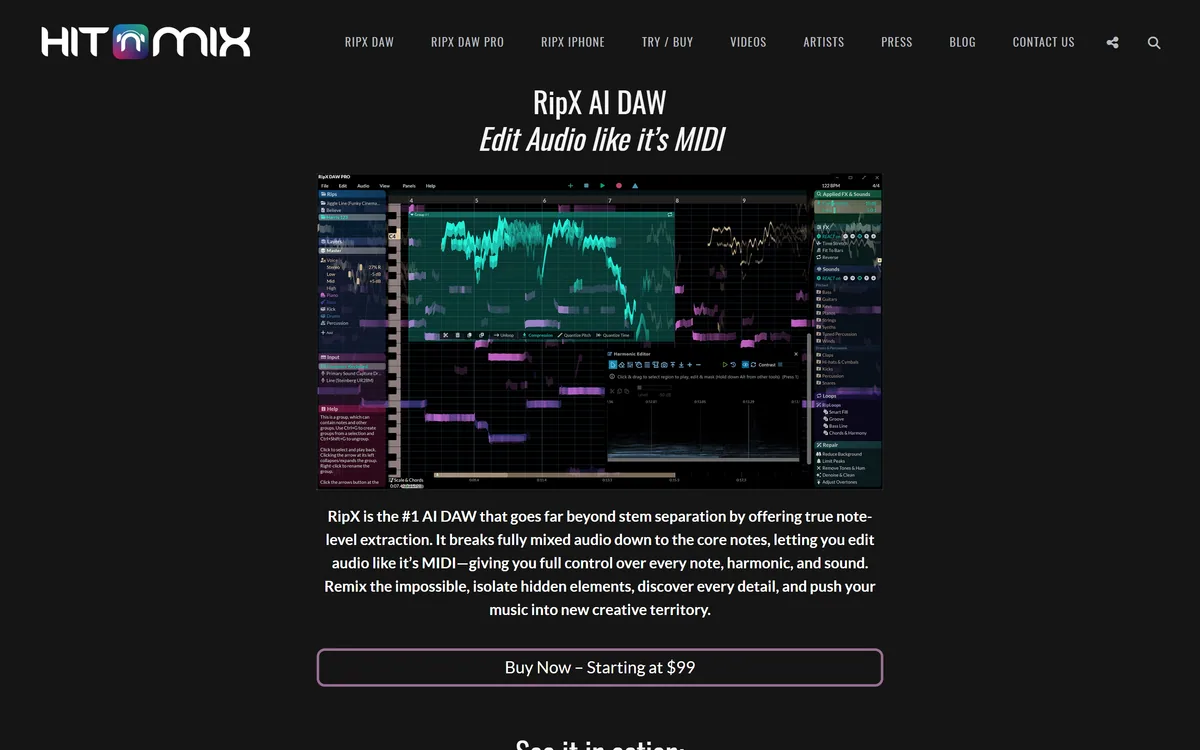
RipX goes a step further, and it is the step that matters. It separates into notes, which means a wrong note in a guitar part inside a finished master is something you can select, retune, or remove.
RipX DAW: Editing Inside The Mix
- Separation into six or more stems, and then further into individual notes you can select and change.
- Note-level editing — retune, move, replace or delete a single note inside a mixed recording.
- Audio to MIDI conversion, plus key and scale detection with Auto Pitch To Scale.
- Three editions: RipX DAW, RipX DAW PRO and RipX iPhone, from Hit'n'Mix Ltd.
- Its own Rip format stores the separated, note-level representation of a recording.
What Does Note-Level Audio Editing Mean?
RipX separates a mixed recording into six or more stems and then decomposes those into individual notes, each of which can be retuned, moved, replaced or deleted.
The conceptual jump is worth stating plainly. Conventional audio editing works on regions of time — you can cut a passage, fade it, filter it. Note-level editing works on musical events, so the unit you manipulate is the note rather than the second.
That changes what is possible rather than what is convenient. Fixing a single flat note in the third chorus of a mastered track is not a difficult edit in conventional tools; it is an impossible one, because the note exists mixed with everything else happening at the same moment.
The obvious uses follow: correcting a performance nobody can re-record, removing an instrument from a mix, transposing a part without transposing the whole track, and extracting a melody accurately enough to use elsewhere.
The less obvious use is educational, and it may be the strongest. Being able to isolate and examine what each instrument in a recording is actually playing, note by note, is a way of learning music that has never previously existed outside of transcription by ear.
That is a different ambition from repair. iZotope RX separates dialogue and rebalances a mix to fix how a recording sounds; this changes what it plays.
Fixing one flat note in a mastered track is not a hard edit in conventional tools. It is an impossible one, because the note exists mixed with everything happening at that moment.
RipX stores work in its own Rip format rather than in conventional audio files, and understanding why explains both a benefit and a constraint.
A WAV file is a sequence of samples. It has no concept of a note, an instrument or a musical event, which is precisely why editing inside one is so limited — there is nothing structured to edit.
The Rip format holds the decomposed representation: which notes exist, which stem each belongs to, their pitch, timing and character. That structure is what makes note-level editing possible at all, and no standard format carries it.
The constraint is portability. Work saved in a proprietary format is readable by the software that made it, and a project you built over weeks is not something you can hand to a collaborator using anything else.
The practical discipline is therefore to export at milestones rather than only at the end. Rendered audio and MIDI both leave the container, and having those means a project remains usable even if your relationship with the software changes.
Where Stem Separation Still Breaks Down
Separation quality varies enormously with the material, and knowing the pattern saves a great deal of wasted effort.
What separates well is anything the model has strong priors for and that occupies distinct space. A lead vocal over a clear arrangement, a bass line in its own register, drums with their characteristic transients — these come apart convincingly because they are distinguishable in the first place.
What separates badly is anything overlapping. Two guitars playing similar parts in the same register, a vocal doubled with harmonies, a dense mix where everything occupies the middle. The model must guess which energy belongs to which source, and when the sources are similar it guesses wrong.
Heavily processed material is the other hard case. Reverb, distortion and heavy compression blur the boundaries the separation depends on, which is why a modern loudness-maximised master separates worse than an older, more dynamic recording of the same music.
Artefacts are the tell. Isolated stems that sound acceptable under a full mix reveal watery smearing and phasing the moment they are heard alone — which is why auditioning a separated stem in isolation, before building anything on it, is the single most useful habit with this class of tool.
The same caution applies to every separation product, including the Music Rebalance module in a post suite and one-pass cleaners such as AudioCleaner AI: judge the result alone, not under a mix.
- Audition separated stems in isolation before building on them.
- Expect dense, heavily processed masters to separate worse than dynamic recordings.
- Export rendered audio and MIDI at milestones, not only at the end.
- Use note editing for what conventional tools cannot do, not for ordinary edits.
- Clear the rights before releasing anything built from someone else's recording.
Rebuilding A Track From A Stereo Mix
The workflow that gets the most from RipX starts by choosing material it can actually separate.
Attempting a dense modern master as a first project is how people conclude the technology does not work.
- Start with a dynamic, sparsely arranged recording rather than a loudness-maximised master.
- Separate, then audition every stem alone at listening volume before deciding what to do with it.
- Identify which single edit you actually need — a note, an instrument, a transposition — rather than exploring.
- Make that edit, then compare the result against the original at matched levels, since separation always costs something.
- Export both rendered audio and MIDI once the edit works, so the result exists outside the Rip container.
- Confirm the rights position before any of it is published, since separating a recording does not create a licence to use it.
Which Studios Get Value From This
RipX serves several audiences whose needs look similar and are not, and the edition choice follows from which one you are.
Remixers and producers use it to extract usable parts from finished recordings — a vocal, a drum break, a bass line — which is the most common use and the one most affected by separation quality.
Post-production and restoration use is narrower and higher-stakes: removing an instrument that cannot be re-recorded, fixing a performance in an archive recording, or salvaging material where the multitrack is lost.
Musicians and teachers use it differently again, as a transcription and analysis tool. Audio-to-MIDI conversion combined with key and scale detection turns a recording into something readable, which is a genuinely new way to study a piece of music.
The rights question applies across all three and is worth stating plainly rather than as a footnote. Separating a commercial recording produces stems you have no licence to use, and the technical ability to isolate a vocal has no bearing on whether you may release it. Clear that before, not after.
For spoken material none of this is the right shape, and a transcript-driven editor like Descript gets to the same edits far faster.