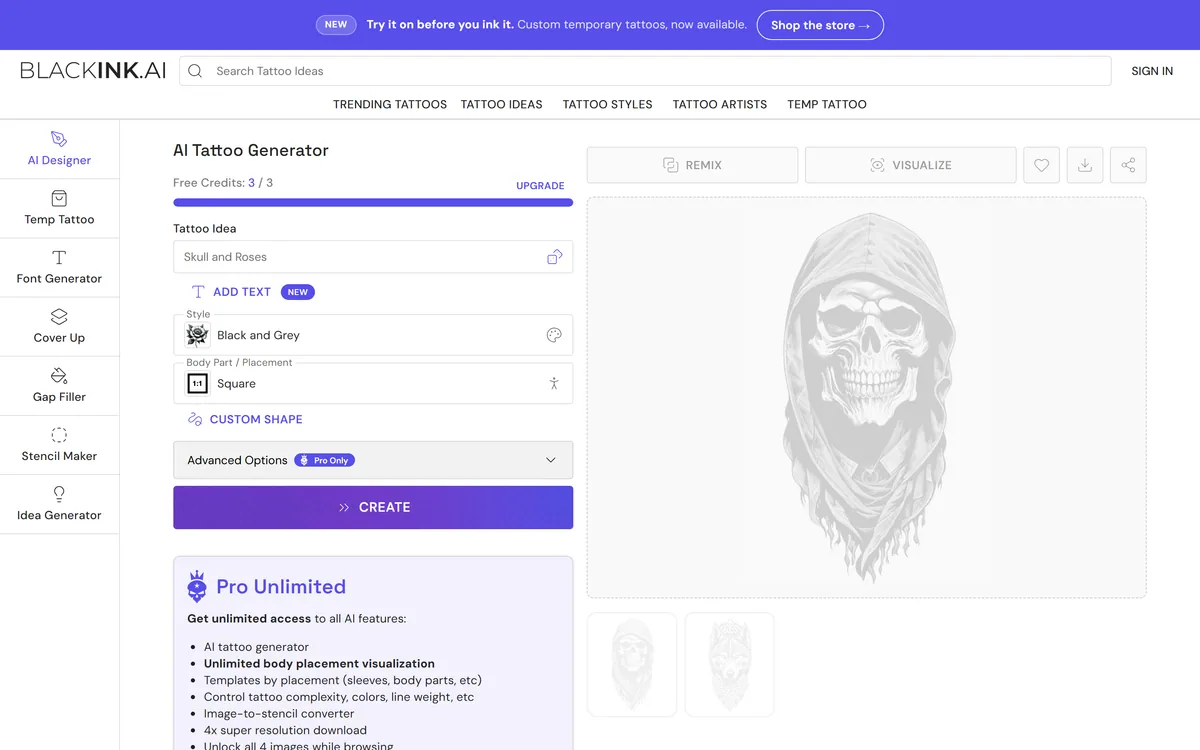
BlackInk AI is an AI tattoo-design generator that turns a text idea into custom tattoo concepts across 28+ styles, visualizes them on body parts, converts designs to stencils, and sells temporary tattoos to try a design before it is inked permanently.
blackink.ai7 viewsAdded January 18, 2026525K visitors
Walking into a tattoo studio with a vague idea is how people end up with regrets. BlackInk AI's pitch is to let you explore, refine and visualize a design, on the actual body part, before anything goes on skin.
It turns a text idea into custom tattoo concepts across 28+ styles, visualizes them on body parts, converts designs to stencils, and even sells temporary tattoos so you can wear a design first. For broader tattoo inspiration it sits alongside tools like Inkspo, with placement and stencils as its distinctive strengths.
This review covers what BlackInk AI gives a tattoo seeker, who it fits and its limits, what it costs, and the IP and permanence questions that matter more here than for most image tools.
BlackInk AI designs tattoos for a specific body placement and turns them into stencils.
BlackInk AI, The Tattoo Brief
BlackInk AI is an AI tattoo-design generator: describe an idea and get custom concepts across 28+ styles.
It is placement-aware: designs are built for a specific body part and can be visualized there.
It converts to stencils: turning a design into a stencil your artist can actually use.
Two real caveats: AI tattoo-art IP is unsettled, and the result goes permanently on skin, so proceed carefully.
Designing A Tattoo Idea From A Text Prompt
BlackInk AI's core is text-to-tattoo: describe what you want, pick a style, and it generates concepts you can refine. For someone who knows the vibe but cannot draw, that turns a vague idea into something concrete to react to.
What makes it tattoo-specific rather than a generic image generator is placement awareness. You choose a body part, and the design is generated and visualized for that area, which matters because a piece that works as a square image can look wrong wrapped around a forearm.
It is honest, in its FAQ, about the questions that come with AI tattoo art, licensing and whether a design is yours to ink, which is the right instinct for a product whose output ends up permanently on a body.
A piece that works as a square image can look wrong wrapped around a forearm. BlackInk AI generates and visualizes designs for a specific body part, which is what makes it tattoo-specific.
What Does BlackInk AI Give A Tattoo Seeker?
The tooling is genuinely tattoo-aware, but the caveats are as important as the features.
Styles, Placement And Stencils
You get 28+ styles, placement visualization across body parts, shape and aspect templates (including full sleeves), detail-complexity control, lettering and cover-up and gap-filler tools, and crucially a stencil converter that turns a design into something an artist can work from. The upload for stencils stays private.
That stencil step is what connects a generated image to an actual tattoo. A dedicated tattoo tool like Tattoo AI works the same space; the practical advice with any of them is to take the design to a professional artist rather than treating the output as final.
The IP And Permanence Questions
Two caveats deserve more weight than a feature list. First, intellectual property: AI-generated art raises unsettled questions about originality and ownership, which BlackInk's own FAQ touches on, so understand what you are licensing before you commit, especially for commercial use.
Second, permanence: this is art destined for skin. The sensible path is to use the temporary-tattoo option or a trial on the body visualizer first, and to have a professional artist review and adapt the design. For general art needs unrelated to tattoos, a tool like GenApe is a different job entirely.
Who BlackInk AI Fits, And Its Limits
BlackInk AI fits people planning a tattoo who want to explore ideas and see them on their body before committing, first-timers nervous about getting it right, and even tattoo artists and illustrators using it for rapid concepting with a client.
It is genuinely useful as a pre-studio design and conversation tool: you arrive with a refined, placement-aware concept and a stencil rather than a screenshot, which makes the artist's job easier and the outcome more predictable.
Its limits are the limits of AI art plus the stakes of tattoos: output quality and originality vary, the "100% unique every time" claim is unverifiable, and nothing it produces should go on skin without a professional's input. It is a starting point, not a finished tattoo.
What BlackInk AI Costs To Use
BlackInk AI is freemium, a few free credits to start, then a Pro Unlimited subscription, plus a separate e-commerce side selling temporary tattoos. We do not publish prices, which change; check the site.
For design exploration, the free credits are enough to judge whether the output suits your idea before paying, and the subscription makes sense only if you are iterating heavily toward a piece.
The temporary-tattoo purchase is a genuinely smart spend relative to the cost and permanence of a real tattoo: wearing a design for a few days tells you far more than staring at a screen does.
A Smart Way To Try BlackInk AI
Because the output ends up on skin, treat BlackInk AI as a design aid and bring a professional into the loop.
Describe your real idea, pick a style, and choose the actual body placement you have in mind.
Generate variations and refine detail and complexity until a concept feels right.
Use the body visualizer, and ideally a temporary tattoo, to see the design in place.
Convert the chosen design to a stencil to take to an artist.
Read the licensing and originality terms before assuming the design is yours to use.
Pass/fail: BlackInk AI is worth it if it gets you to a confident, placement-aware concept and stencil.
Have a professional tattoo artist review and adapt the design before anything is inked.
Key features of BlackInk AI
Text-to-tattoo generation
28+ tattoo styles
Body-part placement visualization
Shape and aspect templates
Detail-complexity control
Lettering, cover-up and gap-filler
Image-to-stencil converter
Temporary-tattoo store
Pros & cons
Pros
5
Placement-aware, not a generic image tool
Stencil converter bridges to a real tattoo
Try-before-you-ink temporary tattoos
Useful pre-studio concepting aid
Free credits to test the idea
Cons
5
AI-tattoo-art IP is unsettled
Output is destined for permanent skin
Quality and originality vary
'100% unique' is an unverifiable claim
Needs a professional artist's input
Best For
People planning a tattoo
Nervous first-timers
Seeing designs on the body
Getting a stencil for an artist
Artists concepting with clients
BlackInk AI Against Other Tattoo Tools
The useful comparison is with other tattoo and image tools.
Anyone planning a tattoo who wants to explore ideas first
First-timers nervous about getting the design right
People who want to see a design on their actual body part
Those who want a stencil to take to an artist
Tattoo artists concepting quickly with a client
When BlackInk AI Is Not The Answer
Anyone who would ink AI output without an artist's review
People needing guaranteed-original, commercial-safe art
Those uncomfortable with unsettled AI-art IP questions
Users wanting general, non-tattoo image generation
Anyone treating a generated design as a finished tattoo
What We Found Reviewing BlackInk AI
Last checked . Read from blackink.ai during this check, with the screenshot above captured at the same time.
An AI tattoo-design generator from a text idea
A stated 28+ tattoo styles and 14 body-part placements
Shape and aspect templates, including full sleeves
Detail-complexity control, lettering, cover-up and gap-filler tools
An image-to-stencil converter, with uploads kept private
A temporary-tattoo store to try a design before inking
A freemium model with a Pro Unlimited subscription
An FAQ addressing licensing and commercial-use questions
No plan prices reproduced here, in line with this site's pricing policy
AI-generated tattoo art raises unsettled IP and originality questions, and the output is destined for permanent skin application; the '100% unique' and user-count claims are vendor-stated. Have a professional artist review any design before inking.
Editor's Verdict
3.6/5
BlackInk AI earns 3.6 as a genuinely tattoo-aware design aid: placement-specific concepts across many styles, a stencil converter that bridges to a real tattoo, and a try-before-you-ink temporary option that is a smart spend given the stakes. The score is tempered by unsettled AI-tattoo-art IP questions, variable originality, and the simple fact that the output goes permanently on skin, so a professional artist should review any design first. AInexfinder Editor Score: 3.6/5.
BlackInk AI pricing
AInexfinder does not list plan prices or billing details. For current pricing, plans, and trials, visit the official BlackInk AI website.
Vendor pricing, credits, and billing policies change over time. Always confirm on the official site before you buy.
Frequently asked questions
What is BlackInk AI?
BlackInk AI is an AI tattoo-design generator. You describe an idea and it produces custom tattoo concepts across more than 28 styles, visualizes them on specific body parts, converts a design to a stencil an artist can use, and sells temporary tattoos so you can try a design before inking it permanently.
Is BlackInk AI different from a normal image generator?
Yes, in two ways that matter for tattoos: it is placement-aware, generating and visualizing a design for a specific body part, and it converts designs to stencils. A generic image tool produces a flat picture; BlackInk AI is built around how a tattoo actually sits on the body and reaches an artist.
Who owns a tattoo design from BlackInk AI?
This is genuinely unsettled. AI-generated art raises open questions about originality and ownership, which BlackInk's own FAQ touches on, so you should read the licensing terms before assuming a design is yours to use, especially for commercial purposes. When in doubt, clarify the rights first.
Can I just get a BlackInk AI design tattooed directly?
You should not treat it as final. The sensible path is to use the body visualizer and ideally a temporary tattoo first, then have a professional tattoo artist review and adapt the design. AI output varies in quality and the result is permanent, so a professional's input is important.
Does BlackInk AI make stencils?
Yes. It includes an image-to-stencil converter that turns a chosen design into a stencil an artist can work from, and your uploaded image for this stays private. That stencil step is what connects a generated concept to an actual tattoo in a studio.
How much does BlackInk AI cost?
It is freemium: a few free credits to start, then a Pro Unlimited subscription, plus a separate store selling temporary tattoos. We do not publish prices, which change; check the site. The free credits are enough to judge whether the output suits your idea before paying.
Can I try a design before getting it tattooed?
Yes, and you should. Beyond on-screen body-part visualization, BlackInk AI sells temporary tattoos so you can wear a design for a few days. Given the cost and permanence of a real tattoo, that try-before-you-ink option is one of its more genuinely useful features.
Who is BlackInk AI for?
People planning a tattoo who want to explore and refine ideas and see them on their body before committing, nervous first-timers, and even tattoo artists concepting quickly with a client. It is a pre-studio design and conversation aid rather than a replacement for an artist.
Is the '100% unique' claim reliable?
Treat it as marketing. Claims like generating a '100% unique' design every time, and the user-count figures, are vendor-stated and unverifiable. AI image tools can produce similar outputs from similar prompts, so judge a design on its own merits rather than on a uniqueness guarantee.
Who should avoid BlackInk AI?
Anyone who would ink AI output without a professional artist's review, people needing guaranteed-original or clearly commercial-safe art, those uncomfortable with unsettled AI-art IP questions, and anyone wanting general, non-tattoo image generation. It is a specialised, pre-studio tattoo aid.
Daniel reviews AI tools the slow way — by actually using them on real projects. His reviews cover what works, what breaks, and who each tool is genuinely a good fit for.
Daniel and the AInexfinder editorial team research BlackInk AI using public product information, listing evidence, and (when available) hands-on checks. Scores reflect listing completeness and transparency — not paid placement.
Listings may include affiliate or sponsored placements, which are labeled when present. Editorial scores and cons are not sold. See our affiliate disclosure and review methodology.
Patternaly is an AI pattern generator that turns a text prompt into seamless, tileable patterns for print-on-demand, textiles, packaging and wallpaper, with 19 artistic styles, a seamless checker, product mockups and HD export, and commercial rights on paid plans.
PixelLab generates pixel art game assets including character animations, 4 and 8 directional rotations, tilesets, environments and UI elements. It offers skeleton-based animation, true inpainting that understands the original image, and states it does not store generated or input images.
Pet Pic Portraits turns a pet photo into styled artwork — Royal King, Pop Art, Watercolour, Viking, Wizard and more — with an instant preview before ordering. Output is a digital download, a canvas print or framed wall art, and it includes a pet memorial option.
krea2.org is a browser image-generation workspace that runs several third-party models side by side, including Krea 2 tiers, FLUX.2, GPT Image 2, Nano Banana and Seedream 5.0, with reference uploads, six aspect ratios and live model switching.
Canva AI is the Magic Studio suite built into Canva — Magic Write for copy, Dream Lab for images, Magic Edit, Expand and Eraser for photos, Magic Switch for reformatting, Magic Charts for data, and Canva Code for interactive widgets.