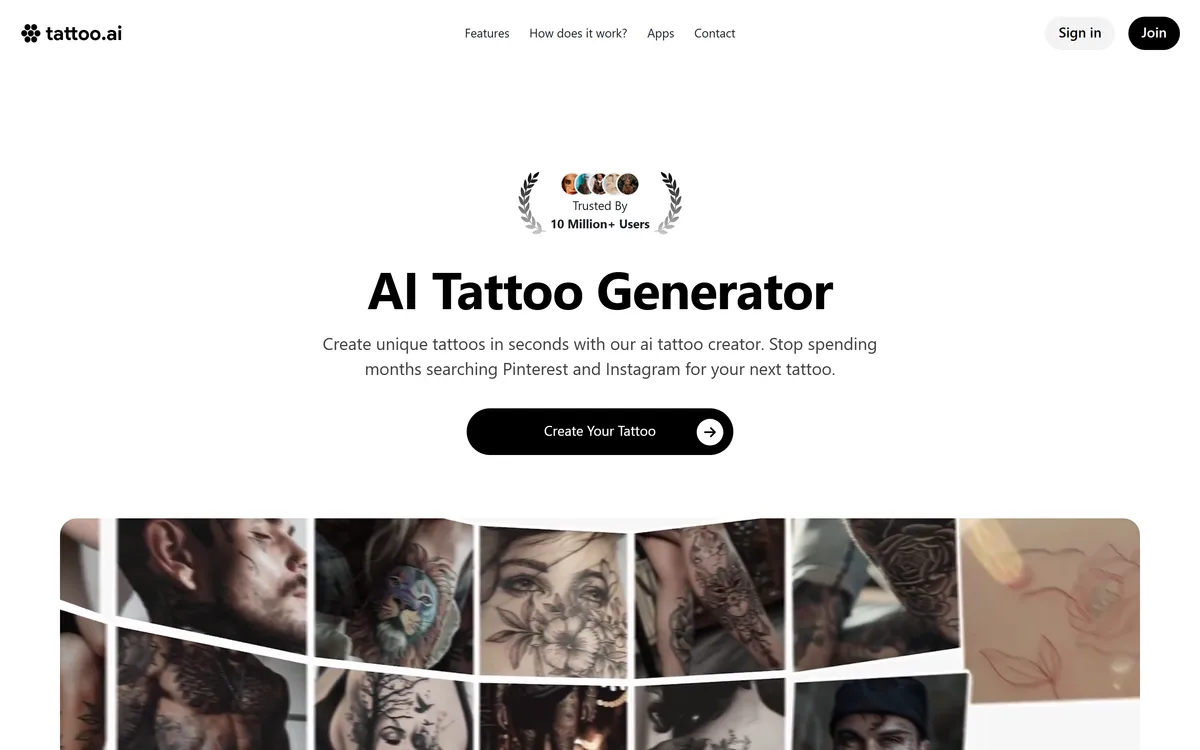
Tattoo AI generates tattoo designs from a written idea, in styles from dotwork to minimalist, then previews them on your skin through augmented reality before you download a high-resolution file to take to an artist. Apps are available for iOS and Android.
A tattoo is the rare purchase where the research phase can last years and the decision is permanent. Most of that research is scrolling other people's tattoos hoping one is close enough.
Tattoo AI inverts that. You describe the idea, pick a style, and get designs built from your own description rather than someone else's finished work.
The more interesting half is the augmented reality preview, because motif is rarely what people regret. Size and placement are.
Tattoo AI's homepage, captured 9 September 2026, showing the generator and design counter.
Why Generate A Tattoo Rather Than Search For One?
The site frames its own value plainly: stop spending months searching Pinterest and Instagram for your next tattoo.
That is a sharper description of the problem than most product copy manages, because searching for a tattoo is genuinely a bad way to arrive at one.
Search returns finished tattoos on other people's bodies. Those are the outputs of a conversation between a specific person and a specific artist, and copying one wholesale is both creatively hollow and, in many studios, politely declined.
Generation starts from your description instead. Whatever the design's quality, it is at least derived from what you asked for rather than from what happened to rank well.
The trade is that a generative model has seen enormous quantities of existing tattoo imagery and will reproduce its conventions. Ask for a wolf in blackwork and you will get something recognisably in that tradition — which is what you wanted, and also why the output is a starting point rather than an original. The same constraint applies to every style-trained generator, PixelLab included.
Search returns other people's finished tattoos. Generation returns something derived from your description. Both need an artist afterwards.
Styles As Constraints Rather Than Filters
The style dropdown is doing more work than it appears to. The footer lists sketch, realistic, minimalist, black and white, surreal and geometric among the options.
Style is not decoration in tattooing — it is a constraint set that determines what survives on skin over decades.
Fine-line and minimalist work reads beautifully in a rendered image and is the most likely to blur and spread over years. Blackwork and traditional styles have thick lines and solid fill precisely because those hold.
Realistic and surreal designs place the greatest demand on the artist, and a generated image gives no indication of whether the studio you are visiting can execute it.
So a style selection is best treated as the first question for the consultation rather than a settled answer — the tool renders the look, and only an artist can tell you how that look ages on your particular skin.
AR Try-On And Seeing It On Skin
The fourth of the site's five steps is trying the design on: previewing it on your skin before making a final decision, with the same feature in the mobile apps.
This is the strongest thing in the product and it deserves more emphasis than the generator gets.
Regret in tattooing clusters around scale and placement far more than subject. A design that looked balanced on a screen turns out to be too small to read at arm's length, or sits across a curve that distorts it, or crowds a piece already on the arm.
Seeing it on the actual limb, at actual size, catches most of that before the deposit rather than after the outline.
What AR cannot show is how the body moves. A flat preview on a still forearm says nothing about how a design reads across a shoulder in motion or over a joint that flexes, and that is exactly what an artist assesses in person.
Use the AR preview at full intended size, not a comfortable one.
Try the same design in two or three placements before deciding.
Check how it sits beside anything you already have.
Download the high-resolution file rather than screenshotting.
Expect the artist to redraw it, and budget consultation time for that.
What A Tattoo Artist Still Has To Do
The site's own fifth step is the honest one: download the high-resolution design and bring it to your tattoo artist for final adjustments and inking.
That sentence contains the whole limitation, and it is a credit to the product that it appears on the homepage rather than in a disclaimer.
A generated image is not a stencil. Line weights that render cleanly at screen resolution may be too fine to hold in skin. Gradients that look like shading are not achievable the way the image implies. Negative space that reads on white does not read on skin tone. A vector tool such as Vector Witch would at least hand over clean paths; a raster design gives an artist an impression to work from.
Artists also solve for the body, which no image can. Flow along a limb, how a design wraps, where it will stretch, and what will still be legible in twenty years are all decisions made on the person rather than on the file.
The productive way to use this is as a communication tool. Arriving at a consultation with a specific image beats arriving with a description, and it saves the part of the appointment usually spent establishing what you actually want.
Two User Counts On One Page
Two figures appear near the top of the site: a trusted-by badge stating 10 million+ users, and a counter stating 89,930,213 custom tattoo designs created by 987,900 users.
Those numbers do not describe the same population, and neither is labelled well enough to reconcile them.
The plausible reading is that one counts everyone across the publisher's apps or all-time downloads, while the other counts people who have generated a design. That would make the smaller number the more meaningful one.
We flag it not as a criticism but because it is the kind of thing worth noticing on any consumer app page — a headline figure and a working figure sitting side by side, measuring different things.
The design counter itself is the more interesting statistic. Ninety designs per generating user is a lot of iteration, which tells you something true about how people use this: not to find a design, but to keep going until one feels right. Editors like Photoleap see the same behaviour, and it is worth knowing before you judge a first result.
Bringing A Generated Design To A Studio
The gap between a generated image and a tattoo is a conversation, and it goes better when you arrive prepared.
This sequence gets the most out of the tool without mistaking its output for a finished plan.
Describe the idea in detail rather than naming a subject.
Generate across two or three styles before settling on one.
Preview at full size in every placement you are considering.
Download the high-resolution file to bring rather than a screenshot.
Book a consultation and ask directly how the design will age.
Expect and welcome the artist's redraw — that is where it becomes tattooable.
Tattoo AI: Designs Before The Needle
Text to tattoo design in a chosen style — dotwork, minimalist, geometric, realistic and others.
AR try-on previews the design on your own skin, which is where placement and scale get decided.
Published by HubX, with iOS and Android apps alongside the web version.
89,930,213 designs by 987,900 users shown on the counter, against a 10 million+ figure elsewhere on the page.
The output is a reference, not a stencil — the site's own final step is to take it to an artist for adjustments.
Tattoo AI: Numbers And Publisher
Publisher
HubX, per the footer copyright
What it does
Generates tattoo designs from a written description
Process
Five steps — idea, style and colour, generate, AR try-on, download
Styles listed
Sketch, realistic, minimalist, black and white, surreal, geometric
AR preview
Try a design on your skin before deciding
Mobile apps
iOS and Android, with generation and try-on on device
Design counter
89,930,213 designs created, as displayed
User counter
987,900 users on the counter; a separate badge states 10 million+ users
Output
High-resolution download intended to be taken to an artist
What we could not confirm: how the 10 million+ badge and the 987,900 user counter relate, since neither figure is defined on the page; which model generates the designs; whether generated output carries any commercial or reproduction rights; how accurate the AR placement preview is in practice on different skin tones and body positions; and whether tattoo artists in general accept generated references, which varies by studio. Plan prices displayed on the page are not reproduced here. We did not generate a design or use the AR preview.
Editor's Verdict
3.5/5
As a way to stop scrolling Pinterest for six months and start seeing your own idea rendered, Tattoo AI does the job well, and the AR try-on is the feature that genuinely earns its place — placement and scale are what people get wrong, not motif. Where it needs framing is what happens next. A generated image is a reference, not a stencil, and any competent artist will redraw it for how ink actually sits in skin. Treat it as the fastest way to arrive at a consultation with something specific to point at, and it is worth the download. AInexfinder Editor Score: 3.5/5.
Tattoo AI pricing
AInexfinder does not list plan prices or billing details. For current pricing, plans, and trials, visit the official Tattoo AI website.
Vendor pricing, credits, and billing policies change over time. Always confirm on the official site before you buy.
Frequently asked questions
What is Tattoo AI?
An AI tattoo generator published by HubX. You describe an idea, choose a style and colour, and it produces designs; an augmented reality feature then previews them on your skin, and the high-resolution file downloads for you to take to an artist.
Can I take a generated design straight to a studio?
You can take it as a reference, which is what the site itself recommends — its final step is bringing the design to a tattoo artist for final adjustments. Expect a redraw; a generated image is not a stencil.
Why does an artist need to redraw it?
Because ink behaves differently from pixels. Fine lines that render cleanly on screen may not hold in skin, gradients that read as shading are not always achievable, and negative space that works on white does not work on skin tone.
How useful is the AR try-on?
It is the strongest feature. Regret in tattooing clusters around scale and placement rather than subject, and seeing a design at actual size on the actual limb catches most of that before you commit.
What does AR not show?
How the body moves. A still preview on a flat forearm says nothing about how a design reads across a shoulder in motion or over a flexing joint, and that is precisely what an artist assesses in person.
Which style should I choose?
Style in tattooing is a constraint set, not a filter. Blackwork and traditional styles use thick lines and solid fill because those hold over decades; fine-line and minimalist work looks best in a render and is most likely to spread over years.
How many people use it?
The page shows two figures — a badge stating 10 million+ users and a counter stating 987,900 users alongside 89,930,213 designs created. Neither is defined, so read them as scale indicators measuring different things.
Is there a mobile app?
Yes, on both iOS and Android, with generation and the AR try-on available on device. That matters more here than for most generators, because trying a design on your own skin needs the phone camera.
Do I own the generated design?
The pages we read do not address rights over generated output. Worth settling before you commit to a piece, particularly if the design is unusual enough that you would mind seeing it appear on someone else.
Will my artist mind a generated reference?
That varies by studio and it is a fair question to ask when booking. Many artists welcome a specific reference over a vague description; others prefer to design from a conversation, and a generated image can constrain that conversation unhelpfully.
Daniel reviews AI tools the slow way — by actually using them on real projects. His reviews cover what works, what breaks, and who each tool is genuinely a good fit for.
Daniel and the AInexfinder editorial team research Tattoo AI using public product information, listing evidence, and (when available) hands-on checks. Scores reflect listing completeness and transparency — not paid placement.
Listings may include affiliate or sponsored placements, which are labeled when present. Editorial scores and cons are not sold. See our affiliate disclosure and review methodology.
PixelLab generates pixel art game assets including character animations, 4 and 8 directional rotations, tilesets, environments and UI elements. It offers skeleton-based animation, true inpainting that understands the original image, and states it does not store generated or input images.
Patternaly is an AI pattern generator that turns a text prompt into seamless, tileable patterns for print-on-demand, textiles, packaging and wallpaper, with 19 artistic styles, a seamless checker, product mockups and HD export, and commercial rights on paid plans.
krea2.org is a browser image-generation workspace that runs several third-party models side by side, including Krea 2 tiers, FLUX.2, GPT Image 2, Nano Banana and Seedream 5.0, with reference uploads, six aspect ratios and live model switching.
Pet Pic Portraits turns a pet photo into styled artwork — Royal King, Pop Art, Watercolour, Viking, Wizard and more — with an instant preview before ordering. Output is a digital download, a canvas print or framed wall art, and it includes a pet memorial option.
RetypeWords is a browser tool that replaces text that has been flattened into a PNG, JPG or WebP image. It reads the words with OCR, lets you correct what it read, then regenerates the selected area so the new wording sits in the picture rather than on top of it.