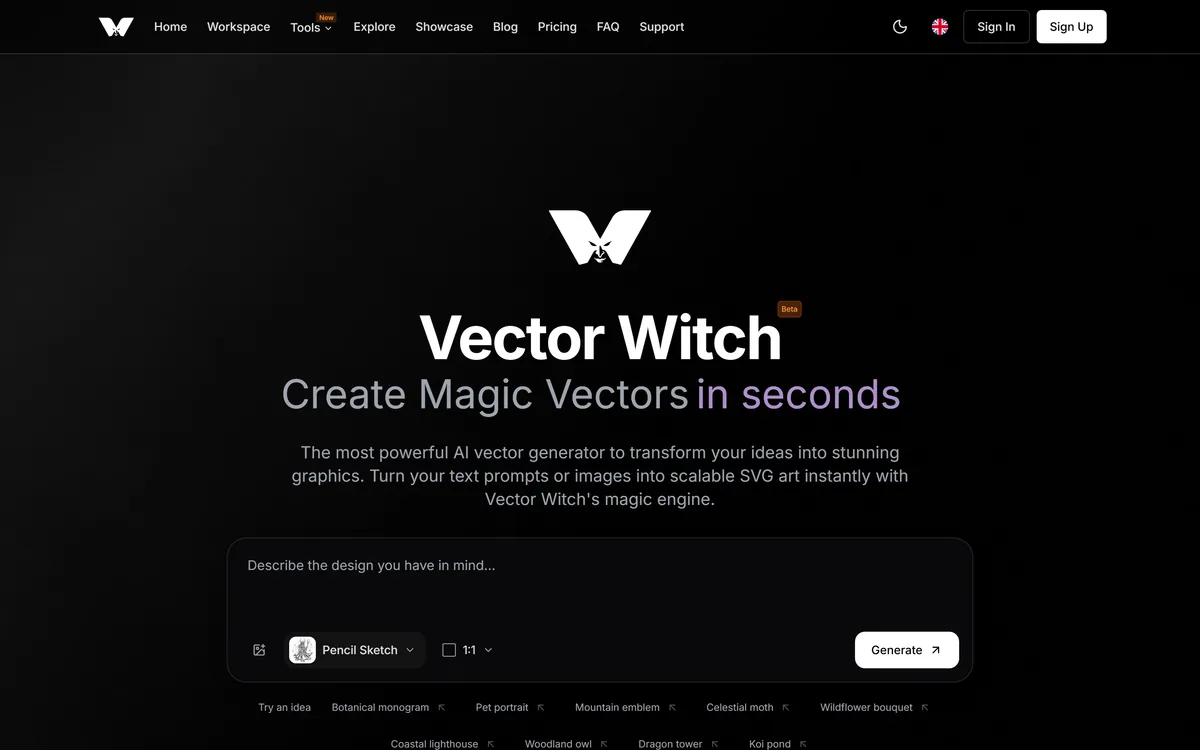
Vector Witch turns text prompts or uploaded images into scalable SVG across 17 styles, with output aimed at Cricut, Glowforge, LightBurn and Illustrator. Alongside generation it carries a set of engraving utilities — depth maps, halftones, 3D relief conversion, background removal and image restoration.
vectorwitch.com7 viewsAdded December 23, 20251K visitors
Almost every AI image tool produces pixels. If your output goes to a laser cutter or a vinyl machine, pixels are the wrong thing entirely — you need paths, and paths are much harder to generate.
Vector Witch's premise is that it produces genuine SVG rather than a raster image you then have to trace, and that the result drops into cutting software without cleanup.
Its own review wall tells you who actually relies on it, and the answer is more specific than the homepage suggests.
Vector Witch's homepage, captured 9 September 2026, showing the vector style selection.
Vector Witch: Prompts Into Scalable SVG
Text or image to SVG across 17 styles, split between vector styles and image styles.
Named machine compatibility: Cricut Design Space, Glowforge, LightBurn, xTool, Silhouette, Illustrator, Inkscape and CorelDRAW.
An engraving toolkit alongside it — depth maps, halftones, 3D relief conversion, upscaling and image restoration.
Labelled Beta at version 2.0, which is worth factoring into any workflow you depend on.
Made in the UK, registered company number 16739, per the footer.
Why Is Vector Output Harder Than Raster?
The distinction sounds technical and decides everything about whether a file is usable.
A raster image is a grid of coloured pixels. A vector file is a set of mathematical paths — this curve, that fill, this closed shape. Cutting and engraving machines need paths, because a blade follows a line and cannot follow a colour gradient.
Generative models produce pixels natively. Getting from there to a clean vector normally means auto-tracing, and auto-tracing is where craft projects go to die: thousands of stray nodes, shapes that nearly close, and stacked paths a laser will cut twice.
Producing paths directly avoids that, which is why generating SVG rather than converting to it is the whole claim worth testing here.
The test is not whether a file opens. It is whether the node count is sane, the shapes are closed, and there are no duplicate overlapping outlines — because a file that looks right on screen can still burn a line twice on a machine that charges you in material. Raster-native generators like PixelLab never face that test, since their output is meant to stay pixels.
A blade follows a line, not a gradient. That single fact is why vector generation is a different problem from image generation.
Who Actually Uses It, By Their Own Reviews
Vector Witch publishes a wall of reviews it states are verified Trustpilot reviews, shown exactly as written. Read as a group they are more informative than the feature list above them.
The recurring use case is not prompt-to-logo. It is photograph-to-engraving: converting photos into engravable files, keeping facial features intact, engraving on stone, metal and wood, and selling the resulting portraits.
Two reviewers mention a PRO mode specifically in connection with retaining detail in photographs of people, and one mentions using photo restoration with good results.
That tells you the product's centre of gravity sits somewhere other than the marketing headline, and the footer's tool list supports it — depth map converter, halftone generator and 3D relief converter are laser engraving utilities, not general design features.
It is worth knowing, because if you arrived hoping to generate original vector illustrations, you are evaluating a secondary use of a tool whose strongest audience is doing something else entirely. Tattoo AI has the same gap between its headline and its heaviest users.
Seventeen Styles And Cutting Machine Output
The style set splits into vector styles producing SVG and image styles producing detailed PNG, with the same prompt rendered in each.
Among the vector styles the site describes clean solid shapes with no line textures for Cricut and laser cutting, flat minimalist designs for logos and icons, outline for line-based artwork, silhouette for bold filled shapes, and drawing, engraving, linocut and cartoon for varied aesthetics.
The style descriptions do real work because they map to machine capability rather than taste. Solid shapes with no line texture is not a look — it is what a vinyl cutter can physically execute.
Compatibility is named rather than implied: LightBurn, Cricut Design Space, Silhouette Studio, Adobe Illustrator, Inkscape, CorelDRAW, Glowforge and xTool Creative, with the claim that files drop in without extra cleanup.
Naming eight specific applications is more useful than a generic SVG compatibility badge, because SVG is a standard that every one of those programs interprets slightly differently — which is exactly where cleanup work usually appears.
Check node count and closed shapes, not just whether the file opens.
Look for duplicate overlapping paths before sending to a laser.
Test one design on scrap material before committing good stock.
Use the vector styles for cutting and image styles for engraving detail.
Confirm commercial licensing before selling anything you generate.
What Beta Status Should Tell You
A Beta badge sits beside the product name, and the footer states version 2.0.
Labelling a shipping product Beta is a choice worth reading rather than skipping, and it usually means one of two things.
The generous reading is honesty: the team is signalling that behaviour may change and output may vary, which is fair for anything generative and rarer than it should be.
The practical reading is that you should not build a production workflow on it without a fallback. If you sell engraved portraits and the style you rely on changes character in an update, that is your problem rather than the vendor's.
The mitigating factor is that output here is a downloadable file rather than a hosted service. An SVG you have saved keeps working regardless of what the platform does next, which makes Beta considerably less risky than it would be for something you had to log into to use your own work.
The Tools Around The Generator
The footer lists background remover, depth map converter, halftone generator, puzzle maker, family crossword, 3D relief converter, image restoration, image upscaler and image to prompt.
Read that list carefully and the product's real shape appears. Three of those tools exist almost exclusively for laser work.
A depth map encodes distance as brightness, which is how a laser knows how deep to burn at each point — the input for greyscale engraving on wood or slate. A 3D relief converter serves the same purpose for carved output. A halftone generator converts continuous tone into dots, because a laser can burn or not burn and has no intermediate.
Those are not features a general design tool would build. They are the specific utilities a photo-to-engraving workflow needs, and their presence explains why the review wall reads the way it does.
The odd items — puzzle maker, family crossword — look like traffic-driving side tools rather than part of the core offering, which is common and harmless. Background removal is the one utility here that overlaps a general tool, and Photoroom does it at far greater scale.
Generating Vectors You Can Actually Use
The gap between a good-looking SVG and a machine-ready one is where craft projects lose material and time.
This sequence checks the things that only show up once a blade or a laser is involved.
Decide first whether you need cutting paths or engraving detail — they need different styles.
Generate at the aspect ratio you will actually produce.
Open the SVG in Inkscape or Illustrator and inspect the node count.
Delete duplicate overlapping paths before sending anything to a laser.
Run one test on scrap material at your real settings.
Settle commercial rights before listing a product made from the output.
Vector Witch: Styles And Company
Company
Vector Witch, made in the UK, registered company number 16739 per the footer
Status
Labelled Beta; footer states v2.0
Inputs
Text prompt, uploaded image, or both together
Styles
17, split between vector styles producing SVG and image styles producing PNG
Vector styles named
Clean, flat, outline, silhouette, drawing, engraving, linocut and cartoon
Output
SVG stated as ready for Cricut, laser cutting and print
Refabric — design generation for physical products
Photoroom — clean cutouts and product imagery at scale
Vector Witch: Read From The UK Company
Last checked . Read from vectorwitch.com in a browser session on the date above, including the full footer. The screenshot was captured at the same time.
Positioned as an AI SVG generator turning text prompts or images into scalable vector art
A Beta label displayed beside the product name
17 unique styles stated, split between vector styles and image styles
Vector styles described including clean, flat, outline, silhouette, drawing, engraving, linocut and cartoon
SVG output stated as ready for Cricut, laser cutting and print
Compatibility named with LightBurn, Cricut Design Space, Silhouette Studio, Adobe Illustrator, Inkscape, CorelDRAW, Glowforge and xTool Creative
Combined image and text prompting described as a supported input mode
Real-world uses listed as personalised portraits, wood engraving, leather personalisation and Cricut vinyl crafts
A review section states every quote is a verified Trustpilot review shown exactly as written
Reviews reference a PRO mode and photo restoration in the context of engraving photographs
Footer tools include depth map converter, halftone generator, 3D relief converter, background remover, image restoration, image upscaler and image to prompt
What we could not confirm: node counts, path cleanliness or whether generated SVG genuinely imports without cleanup, which requires opening files in each named application; what PRO mode is, since it appears only in reviewer quotes rather than in the feature descriptions; which model generates the vectors; commercial licensing for generated output; and how credits are consumed per generation. Plan prices are not reproduced here. We did not generate a file or cut anything.
Editor's Verdict
4.0/5
Vector Witch markets itself as an AI vector generator, and its own review wall says something more specific: the people who love it are laser engravers converting photographs into engravable files. That is the sharper product, and the footer's utility list — depth maps, halftones, 3D relief — confirms where the real work happens. Genuine SVG output rather than a traced raster is what makes it worth a look, and the named compatibility list is unusually concrete. It is still labelled Beta, and vector generation remains harder than the marketing implies. AInexfinder Editor Score: 4.0/5.
Vector Witch pricing
AInexfinder does not list plan prices or billing details. For current pricing, plans, and trials, visit the official Vector Witch website.
Vendor pricing, credits, and billing policies change over time. Always confirm on the official site before you buy.
Frequently asked questions
What is Vector Witch?
A UK-built AI vector generator that turns text prompts or uploaded images into SVG across 17 styles, with output aimed at cutting and engraving machines. It also carries a set of engraving utilities including depth maps, halftones and 3D relief conversion.
Why does vector output matter?
Because a blade or laser follows a path, not a colour. Generative models produce pixels natively, and converting them means auto-tracing — which is where craft projects acquire thousands of stray nodes and shapes that never quite close.
Will the files really import without cleanup?
The site names eight applications and claims they drop in cleanly. Worth verifying yourself, because the real test is node count, closed shapes and the absence of duplicate overlapping paths — not whether the file opens.
What do its own users actually use it for?
Converting photographs into engravable files, by their own reviews — engraving on wood, stone and metal, and selling personalised portraits. That is more specific than the homepage's prompt-to-vector framing suggests.
What is a depth map and why is it in the tool list?
It encodes distance as brightness, which tells a laser how deeply to burn at each point for greyscale engraving. Alongside the halftone generator and 3D relief converter, it is a specialist laser utility rather than a general design feature.
Which machines does it support?
Compatibility is named with LightBurn, Cricut Design Space, Silhouette Studio, Glowforge, xTool Creative, Adobe Illustrator, Inkscape and CorelDRAW. Naming applications specifically is more useful than a generic SVG badge, since each interprets the format differently.
What does the Beta label mean for me?
That output and behaviour may change, so do not build a production workflow on it without a fallback. The mitigation is that you download files rather than depending on a hosted service — a saved SVG keeps working regardless.
Which style should I pick?
Match it to the machine rather than the look. Clean and silhouette suit cutting because solid shapes with no line texture are what a blade can execute; the image styles carry more detail and suit engraving rather than cutting.
Can I sell what I generate?
Licensing is not addressed on the pages we read, and it matters here more than usual because several of the site's own reviewers describe selling engraved portraits made with it. Settle it before listing a product.
Should I test before cutting?
Always, on scrap, at your real settings. A file that looks correct on screen can still contain duplicate overlapping paths that a laser will burn twice, and material is the expensive part of finding that out.
Daniel reviews AI tools the slow way — by actually using them on real projects. His reviews cover what works, what breaks, and who each tool is genuinely a good fit for.
Daniel and the AInexfinder editorial team research Vector Witch using public product information, listing evidence, and (when available) hands-on checks. Scores reflect listing completeness and transparency — not paid placement.
Listings may include affiliate or sponsored placements, which are labeled when present. Editorial scores and cons are not sold. See our affiliate disclosure and review methodology.
krea2.org is a browser image-generation workspace that runs several third-party models side by side, including Krea 2 tiers, FLUX.2, GPT Image 2, Nano Banana and Seedream 5.0, with reference uploads, six aspect ratios and live model switching.
GenApe is an all-in-one AI platform covering writing, chat, image and video generation, image editing, product photography, translation, and research — with 145 free credits on signup and commercial rights granted to paid users.
SologoAI creates logos from a brand name, an image or a sketch, and layers a licensing model on top: traceable fonts and documented graphics, with commercial-use, trademark-use and exclusive buyout options, plus brand kits, mockups and vector export.
Adobe Firefly generates images, video, and audio from models trained on licensed Adobe Stock and public domain content, with Content Credentials on every output, Firefly Boards for ideation, Custom Models for brand style, and third-party partner models alongside Adobe's own.
GPT Image 2 launched on 21 April 2026 as ChatGPT Images 2.0 and as the gpt-image-2 API model. Its distinguishing capabilities are dense, accurate text rendering, layout fidelity for infographics and packaging, up to 3840px output, prompt-guided masking, and reasoning applied to image structure before generation.
OpenArt is an all-in-one AI creation platform covering image, video, voice and audio in one place, built around a Director that lets you lay out a storyboard and shape each shot through conversation, alongside persistent characters and worlds for consistency across a project.