Photoroom is a product visual platform for ecommerce covering background removal, AI product photography, batch editing, an image API, brand kits, marketplace sync and video templates. It states 1M+ businesses, SOC 2 Type 2 and enterprise options including custom models and SLA-backed uptime.
photoroom.com10 viewsAdded February 18, 20268.7M+ visitors
Almost every study anyone publishes about ecommerce conversion reaches the same conclusion: the photograph does more work than the copy, the price display or the layout. It is the first thing a shopper processes and often the only thing.
And almost every seller handles it badly, not through indifference but through logistics. Consistent product photography means a studio, controlled lighting and a process, and catalogues change faster than any of that can keep up.
Photoroom's position is that visuals should be a pipeline rather than a project — the same tooling whether you have one product or a million.
Photoroom: Product Visuals At Catalogue Scale
One listing to millions of SKUs — the same platform covers a phone photo and an API pipeline.
Batch editing without queue infrastructure, run across thousands of images via API or the web app.
Brand kits locking colours, logos and layouts so every image stays on brand automatically.
Marketplace sync publishing on-brand to Shopify and marketplace feeds, plus instant resize for every format.
Enterprise options with custom models, dedicated capacity, custom endpoints, SLA-backed uptime and SOC 2 Type 2.
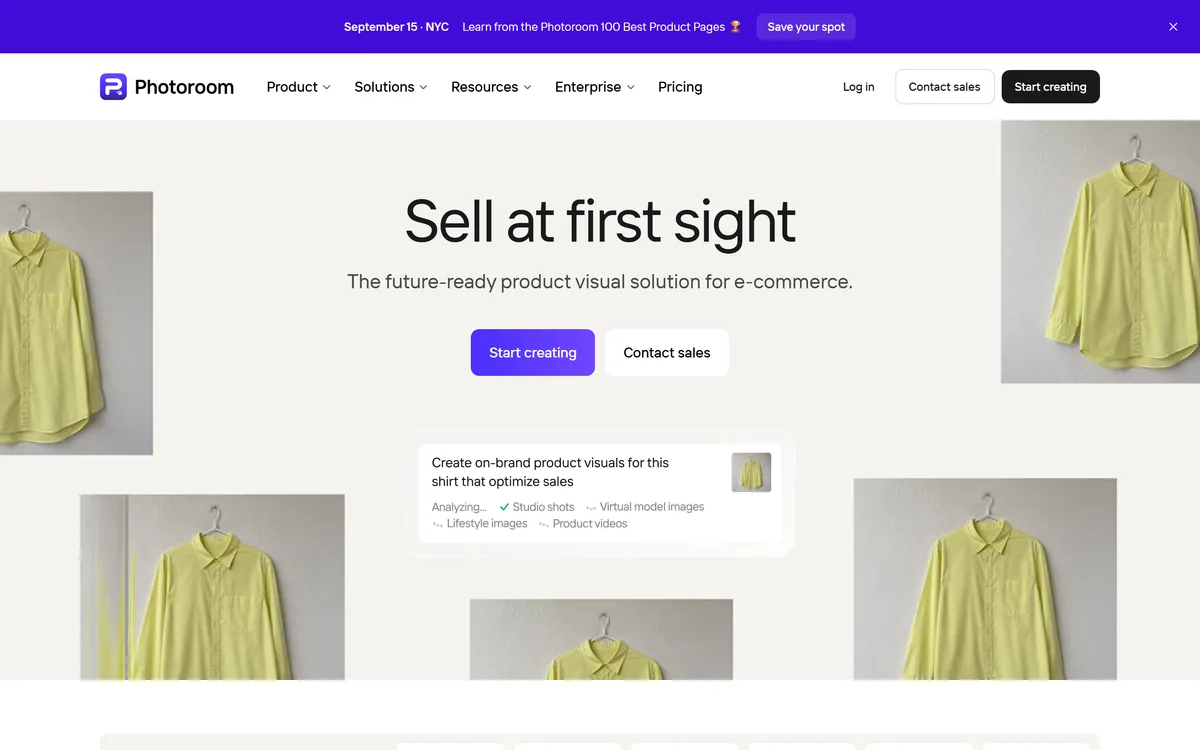
Photoroom's homepage, captured 9 September 2026, showing the ecommerce visual solution positioning.
Why Do Product Photos Decide Ecommerce Sales?
Photoroom positions itself with the line sell at first sight, as the future-ready product visual solution for ecommerce.
The phrase captures something real about how online shopping works. A shopper scanning a category page makes a decision in well under a second, and that decision is made almost entirely on the image.
Copy matters after the click. Price matters at comparison. The photograph decides whether either of those happens, which makes it the highest-leverage element on the listing by a wide margin.
Consistency compounds that effect. A category page where every product sits at a different scale on a slightly different white reads as untrustworthy even when each individual photo is fine, because inconsistency signals a seller who is not careful.
That is why brand kits matter more than any individual editing feature. Locking colours, logos and layouts means consistency is enforced rather than achieved by discipline, and discipline across thousands of images does not survive contact with a busy week — the same argument content platforms like Describely make about copy rules.
A category page where every product sits at a different scale on a slightly different white reads as untrustworthy, even when each photo is fine.
Batch Editing And The API Question
Photoroom describes running AI edits across thousands of images in one pass, via API or the web app, with no queue infrastructure on your side.
That last clause is the technically meaningful part and it is easy to skim past.
Processing thousands of images asynchronously is a real engineering problem: you need a queue, retry handling, failure isolation, progress tracking and somewhere to put the results. Building it is a sprint most teams do not want to spend.
A batch API that absorbs that is doing more than image editing — it is removing an infrastructure project, which is why the distinction between an image API and a batch API matters when comparing vendors.
The question worth asking is what happens to failures. In a batch of ten thousand, some will fail, and whether you get a clear report of which ones and why determines whether the pipeline is operable or a source of mystery gaps in your catalogue.
Brand Kits And Marketplace Sync
Two features address the same underlying problem from different ends: brand kits lock colours, logos and layouts, and marketplace sync publishes on-brand to Shopify and marketplace feeds.
The problem is that every sales channel has different image requirements, and satisfying all of them manually means producing the same product image five times.
Amazon, Shopify, Instagram, a comparison feed and your own site each want different dimensions, different background rules and sometimes different content restrictions. Getting one wrong means a rejected listing or a cropped product.
Instant resize handles the geometry, and marketplace sync handles the delivery — which together turn a repetitive manual chore into a configuration.
The brand kit is what stops that automation producing consistent mediocrity. Automated resizing without brand rules gives you the same product looking slightly different everywhere; with them, one image becomes every format while remaining recognisably yours.
Enforce consistency with a brand kit rather than relying on discipline.
Ask what a batch API reports when individual images fail.
Check marketplace output against each channel's actual requirements.
Use generated staging for context shots, not for the product itself.
Photograph the product accurately even if the background is generated.
Where Generated Product Imagery Gets Risky
Photoroom offers AI product photography, product staging into lifestyle scenes, recolouring and AI shadows, and those features sit on a spectrum of risk worth understanding.
Background replacement and shadow generation are low risk. The product is unchanged and only its surroundings are synthetic, which nobody is misled by.
Staging into lifestyle scenes is moderate. A sofa placed in a generated living room is a normal advertising convention, provided the sofa itself is accurate.
Recolouring is where it becomes serious. A product shown in a colour that does not match what ships is a returns problem at best and a misrepresentation at worst, and colour is one of the most common reasons for ecommerce returns.
The line worth holding is that the product must be truthful and the context may be constructed. Consumers accept that a lifestyle image is staged; they do not accept a product that arrives looking different from the photograph, and no efficiency gain survives that.
The same boundary applies once the image starts moving. Turning a product photograph into video, as Picwand does, introduces motion that can subtly distort form — and a distorted product in an advertisement is the same misrepresentation problem with more frames.
Copy carries the equivalent risk on the other side of the listing. A generated description asserting a material or a dimension is a factual claim, which is why catalogue content tools such as Describely build auditing in rather than treating generation as finished output.
From One Listing To Millions Of SKUs
Photoroom describes serving everyone from solo entrepreneurs listing a first product to enterprises managing millions of SKUs, with custom models, dedicated capacity and SLA-backed uptime at the top end.
Spanning that range is unusual and it works here because the underlying job is genuinely identical at both ends — the difference is volume and reliability rather than capability.
For a solo seller the value is immediate: a phone photograph becomes a clean listing image without a studio, and that is the whole gap between an amateur-looking listing and a professional one.
For an enterprise the value is different. Custom models mean the system can be tuned to a specific catalogue's quirks, and SLA-backed uptime matters because a visual pipeline that stops means listings that cannot go live.
SOC 2 Type 2 at the enterprise tier is the expected credential and it signals what the product is used for. A tool processing a company's entire catalogue sits in the production path, which is a different procurement question from a design app.
Where automation reaches its limit is the awkward image. A product with fine detail, a reflective surface or hair-like texture will defeat any automatic cutout, and manual tools of the kind Clipping Magic provides are what rescue those rather than a better model.
Where automation reaches its limit is the awkward image. A product with fine detail, a reflective surface or hair-like texture will defeat any automatic cutout, and manual tools of the kind Clipping Magic provides are what rescue those rather than a better model.
Producing Listing Images That Convert
Most sellers optimise the wrong end — spending on copy and pricing while the photograph does the actual work.
This sequence fixes the highest-leverage element first and keeps the catalogue consistent as it grows.
Photograph the product accurately, since generation cannot fix a wrong product.
Set up a brand kit before processing anything, so consistency is enforced from the start.
Process one category and view it as a grid — inconsistency only shows when images sit together.
Check each marketplace's requirements against the generated output before publishing.
Keep colour truthful even when the background is generated.
Move to the batch API only once the single-image output is right.
Photoroom: Platform And Certification
Operating company
Photoroom, Inc.
Product type
Product visual platform for ecommerce
Positioning
Sell at first sight — the future-ready product visual solution
Scale
1M+ businesses stated, from first listing to millions of SKUs
Batch
AI edits across thousands of images in one pass, with no queue infrastructure needed
API
An image API for automating production at scale
Brand kit
Locks colours, logos and layouts across every image
Marketplace sync
Publishes on-brand to Shopify and marketplace feeds
Editing features
Background remover, AI shadow, recolour, product staging, instant resize
Video
Video templates turning a product shot into Reels, TikTok and Stories content
Enterprise
Custom models, dedicated capacity, custom endpoints and SLA-backed uptime
What we could not confirm: pricing, including API pricing, which sits on a separate page we did not read; how batch failures are reported, which decides whether a pipeline is operable; which marketplaces the sync actually supports beyond Shopify; how custom models are trained and on whose data; where images are processed and how long they are retained; and how accurately recolouring matches real product colours. We did not process any images.
More Ecommerce Visual Tools
Adjacent products for the rest of a product listing.
Clipping Magic — manual cutout tools for images automation misses
Describely — the product copy beside the photograph
Photoleap — personal photo editing rather than catalogue work
Editor's Verdict
4.3/5
Product photography is the single highest-leverage thing in an ecommerce listing and the one most sellers handle worst, because doing it properly means a studio, lighting and consistency across a catalogue that keeps changing. Photoroom covers the whole range — a phone photo cleaned up for one listing, or an API processing millions of SKUs — with brand kits enforcing consistency across both. Batch editing without queue infrastructure and marketplace sync are the features that separate this from a background remover. The enterprise tier with SOC 2 and SLA-backed uptime shows it expects to sit in production pipelines. AInexfinder Editor Score: 4.3/5.
Photoroom pricing
AInexfinder does not list plan prices or billing details. For current pricing, plans, and trials, visit the official Photoroom website.
Vendor pricing, credits, and billing policies change over time. Always confirm on the official site before you buy.
Frequently asked questions
What is Photoroom?
Photoroom is a product visual platform for ecommerce covering background removal, AI product photography, batch editing, an image API, brand kits, marketplace sync and video templates. It states 1M+ businesses and offers enterprise options with custom models and SOC 2 Type 2.
Why do product photos matter more than copy?
Because a shopper scanning a category page decides in well under a second, almost entirely on the image. Copy matters after the click and price matters at comparison — the photograph decides whether either happens, which makes it the highest-leverage element.
Why does consistency matter so much?
Because a category page where every product sits at a different scale on a slightly different white reads as untrustworthy even when each image is fine. Inconsistency signals a seller who is not careful, and it compounds across a catalogue.
What is significant about batch editing?
The phrase no queue infrastructure on your side. Processing thousands of images asynchronously needs a queue, retry handling, failure isolation and progress tracking — a sprint most teams do not want to spend. A batch API that absorbs that removes an engineering project.
What should I ask about a batch API?
What happens to failures. In a batch of ten thousand some will fail, and whether you get a clear report of which ones and why determines whether the pipeline is operable or produces mystery gaps in your catalogue.
Is generated product imagery honest?
It depends which part is generated. Backgrounds and shadows are low risk — the product is unchanged. Lifestyle staging is a normal advertising convention. Recolouring is where it becomes serious, because a product arriving in a different colour is a returns problem at best.
What is the line to hold?
The product must be truthful and the context may be constructed. Consumers accept that a lifestyle image is staged; they do not accept a product that arrives looking different from the photograph, and no efficiency gain survives that.
Why do brand kits matter with automation?
Because automated resizing without brand rules produces the same product looking slightly different everywhere. Locking colours, logos and layouts means consistency is enforced rather than achieved by discipline — and discipline across thousands of images does not survive a busy week.
Does it work for a single seller?
Yes, and that is where the value is most immediate. A phone photograph becomes a clean listing image without a studio, which is the entire gap between an amateur-looking listing and a professional one.
What does enterprise add?
Custom models tuned to a specific catalogue's quirks, dedicated capacity, custom endpoints and SLA-backed uptime — because a visual pipeline that stops means listings that cannot go live. SOC 2 Type 2 is the expected credential for something sitting in the production path.
Daniel reviews AI tools the slow way — by actually using them on real projects. His reviews cover what works, what breaks, and who each tool is genuinely a good fit for.
Daniel and the AInexfinder editorial team research Photoroom using public product information, listing evidence, and (when available) hands-on checks. Scores reflect listing completeness and transparency — not paid placement.
Listings may include affiliate or sponsored placements, which are labeled when present. Editorial scores and cons are not sold. See our affiliate disclosure and review methodology.
Pixlr is a browser-based photo editor from Pixlr Pte Ltd with two editors and a generative AI layer — Generative Fill, Expand and Transform, background and object removal, Super Scale upscaling, face swap, plus image, video, and audio generation.
Pebblely generates product photography from a single uploaded image, placing the item into more than a hundred pre-built scene templates, generating in bulk, and resizing for marketplaces and social platforms. It is operated by a Singapore-registered company and states over 25 million images generated.
Pixelcut is an AI photo and video editor built around ecommerce workflows: product showcases, UGC-style ads and consistent AI personas, plus background removal, 16x upscaling, generative fill, magic eraser and batch editing across web, iOS and Android.
Collov AI does virtual staging and interior design from property photographs: furnishing empty rooms in named styles, applying consistent furniture across multiple angles of the same room, removing objects, converting to twilight, changing seasons, and producing 360-degree virtual tours. An API is available.
Deep-Image.ai is an AI image-enhancement and generation platform offering generative upscaling, denoising, sharpening, colour correction, background removal, avatars and text-to-image, with batch processing, vertical tools like Packshot Pro, and an API for automated workflows.
VanceAI is a suite of AI photo- and video-enhancement tools, upscaling, sharpening, denoising, restoring, colorizing, cartoonizing and background removal, built on proprietary deep convolutional networks, usable online or as desktop apps for local batch processing, with an API.