Phygital+ is a creative workspace putting 30+ image, video and audio models behind a node-based canvas, so a sequence of generation and editing steps becomes a reusable pipeline. It adds LoRA training for a consistent house style, 48+ templates, batch processing and shared canvases for teams.
phygital.plus12 viewsAdded May 20, 202616K visitors
There are now two kinds of multi-model AI platform, and the difference matters more than the model count either advertises.
The first is a menu, which is roughly what Freepik AI Image Generator offers alongside its stock library. You choose a model, type a prompt, get an image, and if you want the same treatment on another product you do the whole thing again from memory. The model list is long and the workflow is manual.
The second treats generation as a step in a process rather than an end in itself. Phygital+ is the second kind: its node-based canvas lets you connect models, edits and conditions into a pipeline, so the sequence that produced a good result becomes something you can run again on fifty different inputs. That distinction is the whole review.
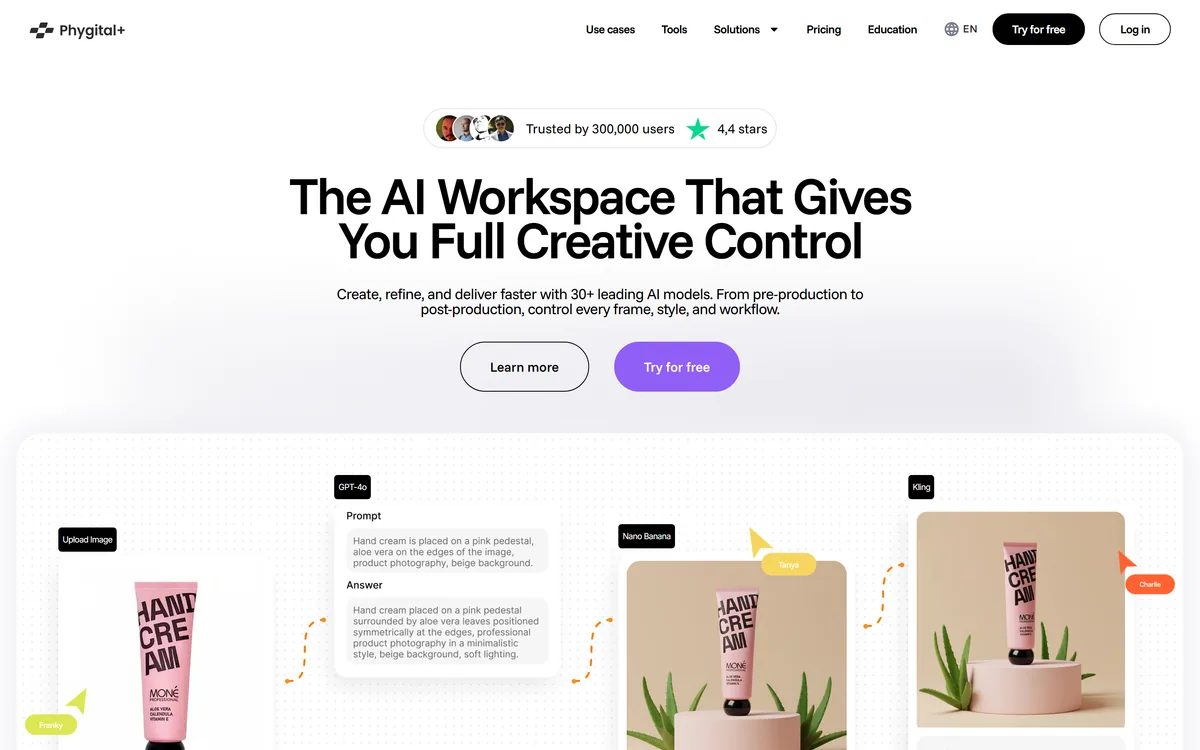
Phygital+'s homepage, captured 9 September 2026. The model roster leads the pitch; the node canvas underneath is the more interesting part.
Terms This Workspace Assumes
Four concepts you need before the interface makes sense.
Node-based workflow
Representing each operation as a connected box, so a sequence of steps becomes a graph you can rerun with different inputs rather than a set of actions you repeat by hand.
LoRA
A lightweight fine-tune that teaches a base model a specific character, product or style from a modest set of images. What lets a pipeline carry your look rather than the model's default.
Aggregator
A platform reselling access to models built by other companies. Buys you breadth and one bill; costs you control over rate limits, capabilities and licence terms.
Batch processing
Running many inputs through the same finished pipeline as a queue. Only possible once the pipeline exists, which is the argument for building one.
Thirty Models, One Canvas
More than thirty models in one workspace, including FLUX 2, Gemini 3, Veo 3.1, Kling 3.0, Seedream, Imagen 4, Midjourney, Ideogram and Runway Aleph.
The node canvas is the actual product — chain generation and editing steps into a pipeline you can rerun rather than repeat by hand.
LoRA training is included, so a pipeline can carry your own character or brand look rather than a model's defaults.
48+ live templates across beauty, ecommerce, food, game development, interiors and marketing, as starting points rather than blank canvases.
Built for teams, with shared collaborative canvases, batch processing and variations; API access is reserved for the enterprise tier.
Nodes Are What Separate This From A Model Menu
A node-based interface represents each operation as a box with inputs and outputs, connected by lines. Generation, upscaling, background removal, style transfer and video conversion each become a node, and the connections define the order.
Anyone who has used a compositing or procedural tool will recognise the idea immediately; anyone arriving from a prompt box such as Krea2.org will not. For everyone else it is a genuine adjustment, and it is the honest barrier to entry here — the first hour is harder than any prompt box.
What it buys is repeatability, which is the thing casual generation cannot provide. In a prompt-based tool, a good result is an event: you got there through six attempts and a fortunate variation, and reproducing it next month means remembering what you did. In a node graph, the route is the artefact. Change the input, rerun the graph, get the same treatment applied to something new.
For commercial work this is the difference between a tool and a toy. A brand producing imagery for a rotating catalogue does not need one perfect image; it needs the same treatment applied consistently to whatever ships next quarter.
Batch processing follows naturally from the same architecture. Once a pipeline exists, running fifty inputs through it is a queue rather than fifty sessions.
In a prompt box, a good result is something that happened to you. In a node graph, it is something you can do again.
LoRA Training Puts Your Own Look In The Pipeline
Phygital+ includes LoRA training, which lets you fine-tune a model on your own images so it reliably produces a specific character, product or visual style.
This is the capability that separates platforms serious about commercial work from those aimed at exploration. Base models produce their own aesthetic, and that aesthetic is shared with everyone else using them — which is precisely wrong for a brand whose visual identity is supposed to be distinctive.
Combining LoRA training with a node pipeline is the genuinely powerful combination on offer here. Your trained style becomes a node in a process, applied consistently across a catalogue, rather than a setting you remember to switch on.
The practical caution is that LoRA training needs a coherent dataset. Fifteen to thirty images that genuinely share the quality you want is more effective than a hundred that vaguely do, and the discipline of assembling that set is most of the work.
The Aggregator Trade-Off, Stated Plainly
Phygital+ resells access to models built by other companies — Google's Veo and Imagen, Black Forest Labs' FLUX, Kuaishou's Kling, ByteDance's Seedream and Seedance, Midjourney, Ideogram, Runway and others.
The advantages are real and immediate, and they are the same ones an agent-driven aggregator such as InVideo AI offers on the video side. One account, one interface, one bill, and no need to learn each model's prompt idiom. When something new ships, it appears in a workspace you already know. Switching between models for different steps costs nothing.
The costs are structural rather than incidental, and worth naming precisely. Upstream providers set their own rate limits, change capabilities, adjust pricing and define licence terms — and an aggregator passes all of that through without controlling any of it. When a provider restricts an endpoint, users find out afterwards.
The licence question is the one to take seriously for commercial work. Terms for commercial use of output are set by the model that generated it, not by the workspace you used. Two images produced in the same session on the same canvas can carry different terms.
The practical response is record-keeping rather than avoidance. Note which model produced each deliverable, and check that model's terms for the use you intend — particularly for advertising, print and anything appearing under a client's brand.
Record which underlying model produced each commercial deliverable.
Check licence terms per model, not per platform, for anything client-facing.
Expect capabilities and limits to change when upstream providers change them.
Note that API access is reserved for the enterprise tier, which matters if you intend to automate.
Test a new model on a low-quality tier before committing a pipeline to it.
Templates Are The Entry Point, Not The Product
The site lists more than forty-eight live templates spanning beauty, ecommerce, food, game development, interiors and marketing.
Templates matter here more than they usually do, because they are the answer to the node canvas being intimidating. Starting from a working pipeline built by someone who understood the tool is far more instructive than starting from an empty canvas and a documentation page.
They are best understood as teaching material rather than as finished products. Open one, see how the nodes connect, change a parameter, watch what happens downstream. That is a considerably faster route to competence than reading about node graphs.
The category coverage also tells you who this is aimed at. Beauty, ecommerce, food, interiors and game development are commercial production contexts with repeated, high-volume imagery needs — exactly the work where a repeatable pipeline pays for itself and one-off prompting does not.
The realistic expectation is that a template gets you eighty per cent of the way and you adjust the rest. That is fine, and it is much better than an empty canvas.
Building One Real Pipeline As A Test
The node canvas cannot be judged from a demo, because the demo is somebody else's finished pipeline. Build one yourself on real work.
The bar is step five. If rerunning the pipeline on new inputs does not save you meaningful time, the learning curve was not worth paying.
Start from a template in a category close to your work rather than from an empty canvas, and read how its nodes connect before changing anything.
Rebuild a task you actually do repeatedly — a product treatment, a character in a set style — rather than trying something novel.
Note the credits consumed reaching a result you would accept, then multiply by your realistic monthly volume. This is the number that decides the tier.
Train a small LoRA on fifteen to thirty images that genuinely share the quality you want, and add it to the pipeline as a node.
Now run five new inputs through the finished pipeline without changing it. The time this saves against doing it by hand is the entire value proposition.
Record which model produced each output, and check that model's commercial terms before anything reaches a client.
One Credit Meter Across Every Output Type
Access runs on credit-based subscription tiers — free, starter, pro, teams and enterprise — with an annual discount and credits covering image, video, text, 3D and audio generation alike.
One meter across every output type is a clean design, and it has a consequence worth planning for: video and 3D consume dramatically more than images. A month spent mostly on stills and a month with a video project are not comparable, and a tier chosen on the first will not survive the second.
API access sits at the enterprise tier only. If your intention is to automate a pipeline into a production system rather than run it in the interface, that single fact determines your tier before any feature comparison does.
The free tier is the right place to meet the node canvas, because the learning curve is the real question. If the interface does not click for you within an hour, no credit allowance fixes that.
We do not publish amounts, since tiers and credit rates change. Establish whether credits roll over, how video is metered against images, and which tier carries API access before committing.
Key features of Phygital+
Node-based canvas for chaining generation and editing steps into reusable pipelines
More than thirty models covering image, video, audio, text and 3D in one workspace
LoRA training for consistent characters, products and brand styles
48+ live templates across commercial categories as working starting points
Batch processing and variation generation across many inputs
Style consistency controls for characters and brand visuals
Shared collaborative canvases for teams
Text-to-speech and sound creation alongside visual generation
Pros & cons
Pros
6
Node pipelines make a good result repeatable, which prompt-based tools structurally cannot
LoRA training plus pipelines means output carries your look rather than a base model's default aesthetic
One account and one bill across thirty models, including several that would each need a separate subscription
Templates give a real route past the learning curve, teaching the canvas by example
Shared canvases turn a pipeline into a team asset rather than one person's knowledge
Batch processing follows naturally once a pipeline exists
Cons
6
The node canvas is a genuine learning curve that will lose casual users in the first hour
Credit consumption is unpredictable, and video and 3D deplete far faster than images
API access sits at the enterprise tier only, which blocks automation for smaller teams
As an aggregator it inherits upstream rate limits, capability changes and pricing without controlling them
Commercial licence terms are set per underlying model, so two outputs from one session can differ
No legal entity name appears on the pages we read, and no credit-per-generation table is published
Best For
Design teams applying repeated treatments across a rotating catalogue
Brands needing consistent character or product imagery at volume
Creative agencies handling several clients with distinct visual styles
Game developers producing asset sets in a coherent style
Ecommerce, beauty, food and interiors teams with high-volume imagery needs
Phygital+ Against The Creative Workspaces
The useful question is not how many models a platform offers but whether it lets you build something reusable out of them.
Tool
Interface
Reusable pipelines?
Best suited to
Phygital+
Node-based canvas across 30+ models
Yes — the core capability
Design teams producing repeated commercial imagery
Canva AI — finished layouts for people who are not designers
Nano Banana Pro — one strong model directly, if breadth is not what you need
Source Notes For This Review
Last checked . Read from phygital.plus, with the screenshot above captured in the same session.
Product described as an AI workspace covering creation, refinement and delivery of visual content with multiple models in one interface
Model count stated as 30+ leading AI models accessible in a single workspace
Node-based workflow system confirmed for building custom generation and editing pipelines
Template library stated as 48+ live templates across beauty, ecommerce, food, game development, interiors and marketing
Named models on the site include FLUX and FLUX 2, Imagen 4, Midjourney, Ideogram 3, Recraft Image V4, Seedream, Veo 3.1, Kling 3.0, Seedance 2.0, Runway Aleph, Topaz Video, WAN 2.5, Hailuo 3.0, Omnihuman, GPT-4o and Gemini
LoRA training capability confirmed on the site for consistent characters and brand visuals
Batch processing, variations and style consistency controls confirmed
Collaborative shared canvases confirmed for teams
API access stated as available at the Enterprise tier only
Pricing structure confirmed as credit-based tiers spanning Free, Starter, Pro, Teams and Enterprise, with an annual discount, and credits covering images, video, text, 3D models and audio
What we could not confirm: no legal entity name is given on the pages we read, only the product name; no credit-per-generation table is published, so cost cannot be estimated before use; maximum output resolutions and video lengths are not stated; commercial licence terms for output are set by each underlying model provider rather than by the platform, so they must be checked individually; and we did not build a pipeline, so nothing here reflects hands-on assessment of the canvas.
Editor's Verdict
4.0/5
Phygital+ scores well because node-based composition is a genuinely better idea than another model menu: it turns a lucky sequence of generations into a pipeline you can rerun on the next fifty products, which is what a working design team actually needs. LoRA training on top means the pipeline can carry your own look rather than a model's defaults, and shared canvases make that reusable across a team. It loses ground because a node canvas is a real learning curve that will lose casual users on day one, because credits make monthly cost genuinely unpredictable, and because an aggregator inherits every upstream model's licence terms and rate limits without controlling any of them. AInexfinder Editor Score: 4.0/5.
Phygital+ pricing
AInexfinder does not list plan prices or billing details. For current pricing, plans, and trials, visit the official Phygital+ website.
Vendor pricing, credits, and billing policies change over time. Always confirm on the official site before you buy.
Frequently asked questions
What is Phygital+?
A creative workspace putting more than thirty AI models for image, video, audio, text and 3D behind a node-based canvas. The canvas lets you connect generation and editing steps into a pipeline you can rerun with different inputs, rather than repeating a sequence of prompts by hand each time.
Is Phygital+ free?
There is a free tier, with credit-based subscriptions above it across Starter, Pro, Teams and Enterprise, and an annual discount. Credits cover images, video, text, 3D and audio from one meter. We do not publish amounts. Note that video and 3D consume credits far faster than images, so measure a real project before choosing a tier.
What does a node-based workflow actually give me?
Repeatability. In a prompt-based tool a good result is something that happened after six attempts, and reproducing it next month means remembering what you did. In a node graph the route itself is the artefact — change the input, rerun the graph, and the same treatment applies to something new. That is what makes batch work possible.
Which AI models does Phygital+ include?
The site names FLUX and FLUX 2, Imagen 4, Midjourney, Ideogram 3, Recraft Image V4, Seedream and Qwen for images; Veo 3.1, Kling 3.0, Seedance 2.0, Runway Aleph, WAN 2.5, Hailuo 3.0, Topaz Video and Omnihuman for video; plus GPT-4o and Gemini, with more than thirty models stated in total.
Can I train Phygital+ on my own brand style?
Yes — it includes LoRA training, letting you fine-tune on your own images so output reliably reproduces a specific character, product or visual style. Combined with a node pipeline, this is the platform's strongest capability. Assemble fifteen to thirty images that genuinely share the quality you want rather than a hundred that vaguely do.
Does Phygital+ have an API?
API support is stated as available at the Enterprise tier only. If you intend to automate a pipeline into a production system rather than run it in the interface, that single fact determines your tier before any feature comparison does. Confirm the terms directly, since it is the most consequential gating decision here.
Can I use Phygital+ output commercially?
Commercial terms are set by whichever underlying model generated the output, not by the workspace itself. Two images from the same session can carry different terms. Record which model produced each deliverable and check that provider's terms for your intended use — particularly for advertising, print and anything appearing under a client's brand.
Daniel reviews AI tools the slow way — by actually using them on real projects. His reviews cover what works, what breaks, and who each tool is genuinely a good fit for.
Daniel and the AInexfinder editorial team research Phygital+ using public product information, listing evidence, and (when available) hands-on checks. Scores reflect listing completeness and transparency — not paid placement.
Listings may include affiliate or sponsored placements, which are labeled when present. Editorial scores and cons are not sold. See our affiliate disclosure and review methodology.
Pet Pic Portraits turns a pet photo into styled artwork — Royal King, Pop Art, Watercolour, Viking, Wizard and more — with an instant preview before ordering. Output is a digital download, a canvas print or framed wall art, and it includes a pet memorial option.
krea2.org is a browser image-generation workspace that runs several third-party models side by side, including Krea 2 tiers, FLUX.2, GPT Image 2, Nano Banana and Seedream 5.0, with reference uploads, six aspect ratios and live model switching.
Canva AI is the Magic Studio suite built into Canva — Magic Write for copy, Dream Lab for images, Magic Edit, Expand and Eraser for photos, Magic Switch for reformatting, Magic Charts for data, and Canva Code for interactive widgets.
Pixlr is a browser-based photo editor from Pixlr Pte Ltd with two editors and a generative AI layer — Generative Fill, Expand and Transform, background and object removal, Super Scale upscaling, face swap, plus image, video, and audio generation.
GenApe is an all-in-one AI platform covering writing, chat, image and video generation, image editing, product photography, translation, and research — with 145 free credits on signup and commercial rights granted to paid users.
Magic Patterns is an AI design tool for product teams that turns prompts, requirements and ideas into high-fidelity UI, matching your existing design system so teams can prototype and test directions before committing engineering resources.