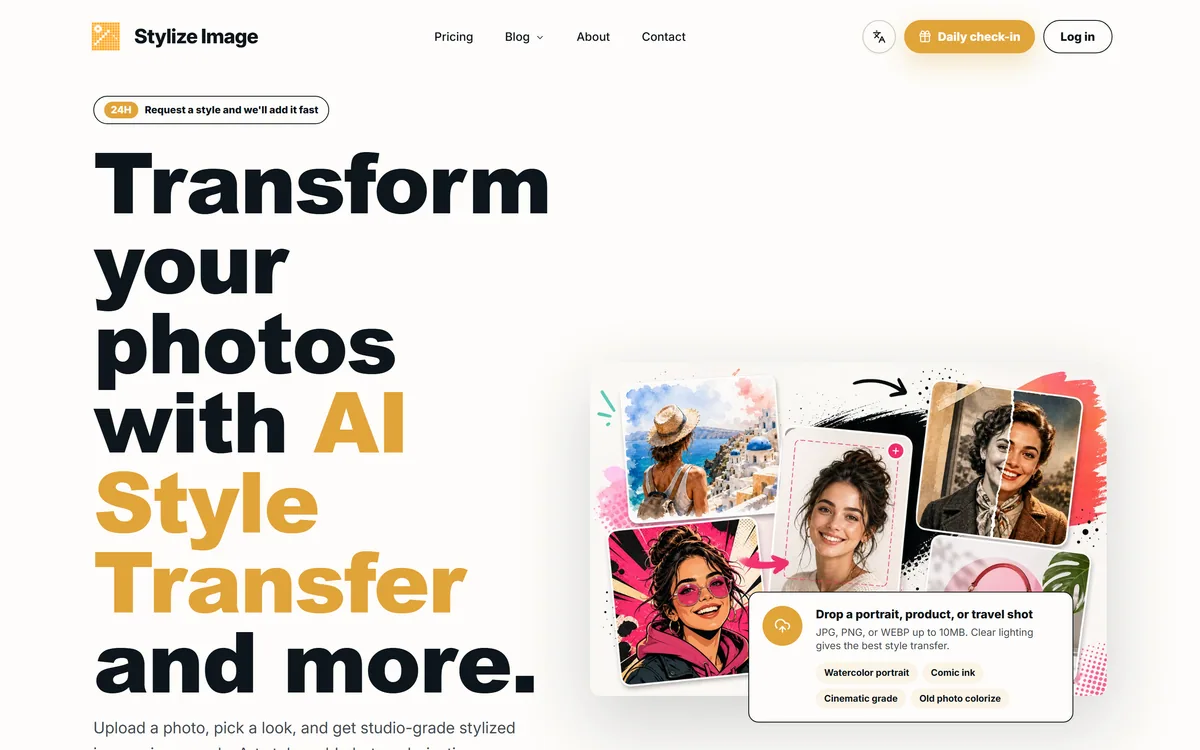
Stylize Image is an online AI photo-styling tool: upload a photo and apply 50+ style presets or a custom prompt, such as watercolour, comic ink or cinematic grade, plus old-photo colourisation, background removal, upscaling and batch edits for consistent catalogue or campaign looks.
stylizeimage.com6 viewsAdded October 30, 20258K visitors
Turning an ordinary photo into a watercolour portrait, a comic panel or a cinematic still used to take a skilled editor. Stylize Image aims to make that a three-step job: upload, pick a look, download.
It offers more than 50 style presets and custom prompts, plus old-photo colourisation, background removal, upscaling and batch edits that keep a whole set of images in one style. It sits among image tools like VanceAI, with a sharper focus on creative style transfer.
This review covers what you can do with Stylize Image, where it fits, how it prices and where it comes up short.
Stylize Image applies AI art styles and edits to photos in a browser workflow.
AI Style Transfer And Photo Edits In The Browser
Stylize Image does one creative job well: it reinterprets a photo in a chosen art style while trying to keep the subject, pose, edges and composition intact. Pick watercolour, comic ink, editorial or cinematic grading, or describe your own look, and get a stylised result in seconds.
Around that, it adds the practical edits people often need next: colourising old black-and-white photos, removing backgrounds, upscaling, and batch processing so a catalogue or campaign shares one consistent look.
It also responds to trends, inviting users to request new styles and aiming to add them quickly, with trend packs for social platforms. That makes it handy for creators who want a current look without learning an editor.
The honest framing is that it is a quick, accessible styling tool rather than a professional editor. Style quality varies by photo and preset, colourisation is an AI guess at colours rather than a restoration of the real ones, and some marketing claims, like privacy, deserve checking.
Colourisation is an AI guess at colours, not a restoration of the real ones; treat results as interpretations.
What Can Stylize Image Do To A Photo?
The tool combines creative styling with a handful of practical edits and a simple workflow.
Style Transfer, Colorize, Upscale And Batch
Upload a JPG, PNG or WEBP up to 10MB, choose from 50+ style presets or a custom prompt, and download the stylised result. You can also colourise old photos, remove backgrounds, upscale images and apply one look across a batch for consistent product or campaign visuals.
For deeper upscaling and enhancement where fidelity matters most, a dedicated tool like Deep-Image.ai focuses on that; Stylize Image's strength is the creative restyle.
A Private, Browser-Based, Watermark-Free Flow
Stylize Image markets a private, browser-based workflow with HD, watermark-free downloads and no design skills required. Because AI styling typically runs on servers, it is worth reading the privacy terms to understand what happens to uploaded photos, especially family pictures or client images.
If you need precise, manual control over an edit, layers, masks and adjustments, an editor like Pixlr gives that; Stylize Image trades control for speed and simplicity.
Where Stylize Image Fits, And Its Limits
Stylize Image fits creators and social media users who want eye-catching stylised images fast, small businesses wanting a consistent look across product or campaign photos, and families who want to try colourising old pictures.
It suits content teams testing visual directions quickly and anyone who wants creative effects without learning professional software.
Its limits: style results vary and can distort faces or details, colourisation invents plausible rather than true colours, and restyling other people's photos or artwork may raise permission and copyright questions. It is not a substitute for a professional editor or a careful photo restorer.
A good way to judge fit is to think about how often you need a stylised image and how much the result matters. For a weekly social post, a fun profile picture or a quick mood board, fast and good-enough results are exactly right. For a client brand campaign, a printed family heirloom or anything where a face must look exactly like the person, plan to review each result carefully and expect to discard some. Testing a handful of your own typical photos across several presets will quickly show which side of that line you are on.
How Stylize Image Prices Its Edits
Stylize Image lets you stylise for free to start, with a daily check-in and paid options for more or higher-volume use. We do not publish prices, which change; check the site.
The value question is whether you need styled images often enough to pay, and whether the quality on your own photos meets your bar. Occasional users may never need to upgrade.
Because there is a free start, the sensible approach is to run several of your own photos through different presets, try a colourisation and a batch, and only pay if the results are consistently usable.
A Quick First Edit With Stylize Image
Because results vary by photo and style, trial Stylize Image on your own images across a few presets.
Read the privacy terms before uploading personal or client photos.
Upload a clear portrait or product shot and try three different presets.
Check faces, hands and fine details for distortion at full size.
Try colourising an old photo and treat the colours as an interpretation.
Run a small batch to test consistency across images.
Pass/fail: Stylize Image is worth it if results are reliably usable for your purpose.
Only restyle photos or art you have the right to use.
Stylize Image Editor Facts
What it is
An online AI photo-styling and editing tool
Styles
50+ presets plus custom prompts
Restoration
Old black-and-white photo colourisation
Edits
Background removal and upscaling
Batch
Apply one look across many images
Output
HD, watermark-free downloads (vendor-stated)
Inputs
JPG, PNG or WEBP up to 10MB
Access
Free to start, with paid options
Stylize Image, The Style Brief
Stylize Image restyles photos with AI: 50+ presets like watercolour, comic ink and cinematic grade, or a custom prompt.
It bundles practical edits: old-photo colourisation, background removal, upscaling and batch processing.
It is quick and simple: no design skills needed, with HD, watermark-free downloads.
Check what you upload: 'private' claims and colourised results deserve a sceptical look, and restyling others' photos needs permission.
Is Stylize Image The Right Editor?
Social Creators Stylize Image Suits
Creators wanting stylised images fast
Small businesses wanting one consistent look
Content teams testing visual directions
Families curious about colourising old photos
Anyone avoiding professional editing software
When Stylize Image's Styles Come Up Short
Professional retouching and precise control
Faithful restoration of historic photo colours
Images where facial accuracy is critical
Restyling photos or art you lack rights to
Anyone who has not checked the privacy terms
Key features of Stylize Image
AI style transfer
50+ style presets
Custom style prompts
Old-photo colourisation
Background removal
Image upscaling
Batch editing
HD downloads
Pros & cons
Pros
5
Fast creative restyles
Wide range of presets plus prompts
Useful bundled edits
Batch mode for consistent looks
Free to start
Cons
5
Results vary and can distort details
Colourisation colours are AI guesses
Privacy claims worth verifying
Not a professional editor
Rights questions when restyling others' work
Best For
Stylised social images
Consistent campaign looks
Quick creative tests
Casual photo colourising
No-skill photo effects
Stylize Image Beside Other Photo Tools
The useful comparison is with other image tools, by creativity versus control.
Last checked . Read from stylizeimage.com during this check, with the screenshot above captured at the same time.
An online AI photo-styling and editing tool
50+ style presets plus custom prompts
Background removal and upscaling
Batch edits for a consistent look
HD, watermark-free downloads (vendor-stated)
A 'private, browser-based workflow' claim made by the vendor
JPG, PNG or WEBP inputs up to 10MB
A free start, a daily check-in and paid options
No prices reproduced here, in line with this site's pricing policy
Colourisation produces plausible, not historically accurate, colours, and style transfer can distort faces or details. Check the privacy terms before uploading personal photos, and only restyle images you have the right to use.
Other Photo And Design Tools
An image toolkit, a manual editor and an upscaler to weigh alongside Stylize Image.
Stylize Image earns 3.5 as a quick, accessible AI styling tool: 50+ presets and custom prompts turn photos into watercolour, comic, cinematic and other looks in seconds, with handy colourisation, background removal, upscaling and batch edits for consistent sets. It suits creators, small businesses and casual users who want effects without learning an editor. Results vary and can distort details, colourisation invents plausible rather than true colours, privacy claims deserve a check and restyling others' images needs permission, so test it on your own photos first. AInexfinder Editor Score: 3.5/5.
Stylize Image pricing
AInexfinder does not list plan prices or billing details. For current pricing, plans, and trials, visit the official Stylize Image website.
Vendor pricing, credits, and billing policies change over time. Always confirm on the official site before you buy.
Frequently asked questions
What is Stylize Image?
Stylize Image is an online AI photo-styling tool. You upload a photo and apply one of 50+ style presets or a custom prompt, and it also offers old-photo colourisation, background removal, upscaling and batch edits.
What styles does Stylize Image offer?
It offers more than 50 presets, such as watercolour portrait, comic ink, cinematic grade and editorial looks, plus custom prompts and trend packs for social platforms. You can also request new styles.
Can Stylize Image colourise old photos?
Yes. It colourises black-and-white photos, but the colours are the AI's plausible guesses rather than a record of the real ones, so treat results as an interpretation rather than a faithful restoration.
Is Stylize Image private?
It markets a private, browser-based workflow. Because AI styling usually runs on servers, read its privacy terms to understand what happens to uploaded photos before using personal or client images.
Is Stylize Image free?
You can stylise for free to start, with a daily check-in and paid options for more use. We do not publish prices, which change; check the site.
Can I use Stylize Image for product photos?
Yes, its batch mode can apply one look across product or campaign images for consistency, and it includes background removal. Check that stylised product images still represent the real item accurately.
Does Stylize Image keep faces accurate?
It aims to preserve subject, pose and composition, but style transfer can still distort faces, hands and fine details. Check results at full size, especially for portraits.
Who is Stylize Image best for?
Creators, social media users, small businesses and content teams who want quick stylised visuals, and casual users trying effects like colourisation. It is not a replacement for professional retouching.
Can I restyle any photo I find?
Only restyle photos and artwork you have the right to use. Transforming someone else's image or art can raise copyright and permission issues, regardless of how the tool is marketed.
What file types does Stylize Image accept?
It accepts JPG, PNG and WEBP images up to 10MB, and says clear lighting gives the best style-transfer results.
Daniel reviews AI tools the slow way — by actually using them on real projects. His reviews cover what works, what breaks, and who each tool is genuinely a good fit for.
Daniel and the AInexfinder editorial team research Stylize Image using public product information, listing evidence, and (when available) hands-on checks. Scores reflect listing completeness and transparency — not paid placement.
Listings may include affiliate or sponsored placements, which are labeled when present. Editorial scores and cons are not sold. See our affiliate disclosure and review methodology.
Pet Pic Portraits turns a pet photo into styled artwork — Royal King, Pop Art, Watercolour, Viking, Wizard and more — with an instant preview before ordering. Output is a digital download, a canvas print or framed wall art, and it includes a pet memorial option.
krea2.org is a browser image-generation workspace that runs several third-party models side by side, including Krea 2 tiers, FLUX.2, GPT Image 2, Nano Banana and Seedream 5.0, with reference uploads, six aspect ratios and live model switching.
Canva AI is the Magic Studio suite built into Canva — Magic Write for copy, Dream Lab for images, Magic Edit, Expand and Eraser for photos, Magic Switch for reformatting, Magic Charts for data, and Canva Code for interactive widgets.
Pixlr is a browser-based photo editor from Pixlr Pte Ltd with two editors and a generative AI layer — Generative Fill, Expand and Transform, background and object removal, Super Scale upscaling, face swap, plus image, video, and audio generation.
GenApe is an all-in-one AI platform covering writing, chat, image and video generation, image editing, product photography, translation, and research — with 145 free credits on signup and commercial rights granted to paid users.
Magic Patterns is an AI design tool for product teams that turns prompts, requirements and ideas into high-fidelity UI, matching your existing design system so teams can prototype and test directions before committing engineering resources.