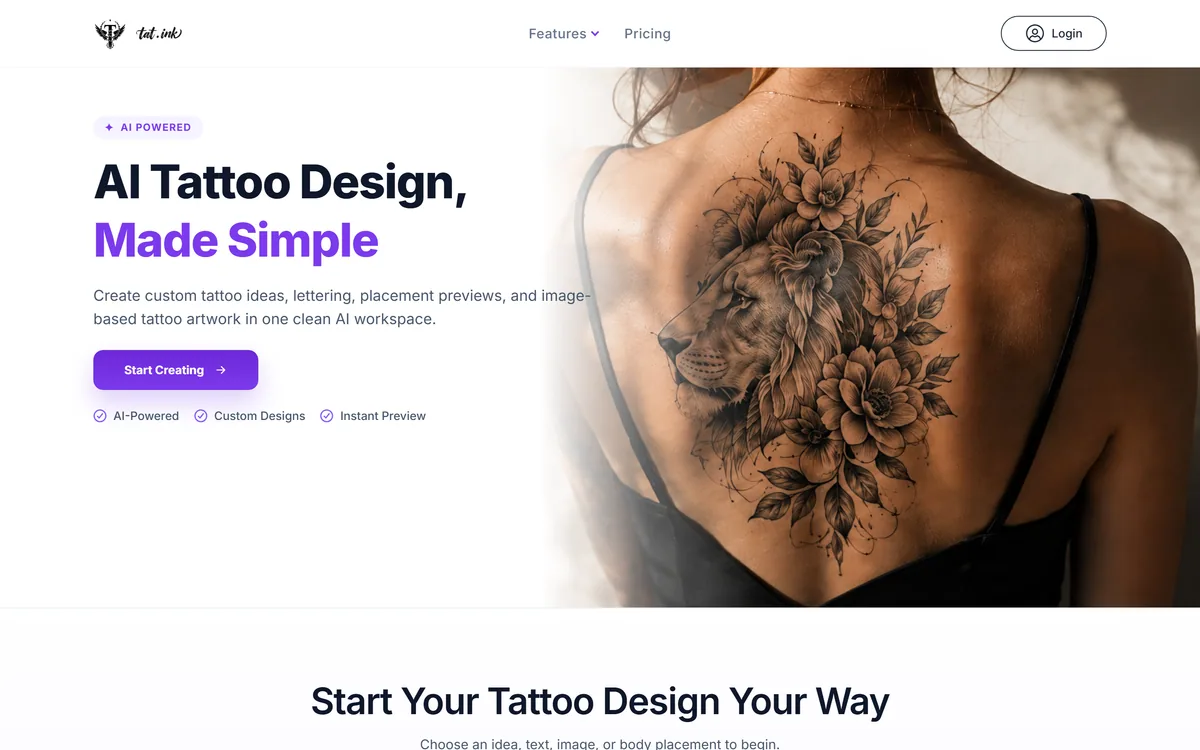
Tat Ink is an AI tattoo-design platform that turns prompts, text or images into tattoo artwork in styles like realism, minimalism and tribal, with a virtual try-on to preview placement on your own body photo. It is an ideation and preview aid, not a substitute for a professional tattoo artist.
A tattoo is one of the most permanent decisions most people make, and the hardest part is often picturing the idea before committing. Tat Ink is built for that stage: turning a vague concept into visual tattoo designs and showing roughly how one might sit on your body.
It generates artwork from prompts, text or images in styles like realism, minimalism and tribal, and offers a virtual try-on that overlays a design on your own photo. As an image generator it overlaps with tools like Stockimg AI, but it is tuned specifically for tattoo concepts and placement rather than general imagery.
This review covers what you can make with Tat Ink, who it is for, what it costs, and the real caveat that comes with anything permanent.
Tat Ink generates tattoo concepts and previews placement on a photo of your body.
Tat Ink Tattoo-Design Facts
What it is
An AI tattoo-design and preview platform
Generate
Concepts from a prompt, text or image
Styles
Realism, minimalism, tribal, surrealism and more
Lettering
A tattoo font generator for names and quotes
Preview
Virtual try-on on a photo of your body
Output
High-resolution downloads
Nature
An ideation and preview aid
Not
Not a substitute for a professional tattoo artist
Tat Ink, The Ink Brief
Tat Ink is an AI tattoo-design tool: generate concepts from a prompt, text or image across several art styles.
It previews placement: a virtual try-on overlays a design on a photo of your body to test size and position.
It is for ideation, not execution: a starting point to take to a tattoo artist, not a final, inkable file.
Permanence demands caution: previews are approximate, and a professional artist should design and apply the real thing.
AI Tattoo Concepts And On-Body Placement Previews
Tat Ink's core job is to help you explore and visualise tattoo ideas before you ever sit in a chair. You describe or upload an idea, pick a style, and it generates artwork, then lets you preview how it might look on your skin. For the exploration stage, that is a genuinely useful way to narrow down a direction.
The placement preview is the part that sets it apart from a generic image generator. Being able to overlay a design on a photo of your arm or back, and adjust size and position, turns an abstract idea into something you can actually react to.
The honest framing, though, is that this is ideation, not execution. AI-generated tattoo art can look striking on screen while being impractical to tattoo cleanly, and a virtual overlay is an approximation, not a guarantee of how ink will settle on skin over time.
So Tat Ink is best understood as a brainstorming and conversation tool: a way to arrive at a clearer brief to bring to a professional tattoo artist, who should design and apply the final piece. Treated that way, it adds real value; treated as a final design, it oversteps what any AI tool should.
Tat Ink is a way to arrive at a clearer brief to bring to a professional artist, not a final, inkable design.
What Can You Make With Tat Ink?
The platform covers idea generation and lettering, plus the placement preview that makes it tattoo-specific.
Prompt, Font And Image-To-Tattoo Designs
You can generate tattoo artwork from a text prompt, create lettering for names, quotes or dates with a tattoo font generator, or convert an existing image into a tattoo-style design, across a range of artistic styles and with high-resolution downloads. That covers the common starting points people bring to a first tattoo consultation.
The output quality varies as with any generator, and style fidelity is the thing to test. A general image tool like GenApe can make pictures but not tattoo-specific previews; Tat Ink's value is in framing everything around the tattoo use case rather than raw image generation.
A Virtual Try-On For Placement, Not A Promise
Upload a photo of the body area, arm, shoulder, back or leg, and Tat Ink overlays your chosen design so you can judge scale, placement and opacity, then save or share the preview with friends or an artist. For deciding where and how big, that is a helpful sanity check.
It is a visual approximation, though, not a rendering of how a real tattoo will age, stretch or sit on contoured skin. For converting or cleaning up a reference image you own, an enhancer like Deep-Image.ai handles quality; Tat Ink's job is the placement mock-up, which you should treat as indicative rather than exact.
Who Tat Ink Is For, And A Real Caveat
Tat Ink is for people in the ideation phase of getting a tattoo who want to explore styles, test placement and arrive at a clearer idea before talking to an artist, and for anyone who enjoys experimenting with tattoo concepts for fun.
It can also help tattoo artists and studios sketch client ideas quickly as a starting point for discussion, speeding up the early back-and-forth before a proper custom design.
The real caveat is permanence and originality: a virtual preview is approximate, AI art can raise style-originality questions, and the final design and application should come from a professional artist who can adapt it to real skin. Tat Ink is a brainstorming aid, not a replacement for that expertise, and it should never be the last step before getting inked.
How Tat Ink's Free And Paid Options Work
Tat Ink offers a way to start and paid options for more generation and features. We do not publish prices, which change; check the site.
The value question is modest and honest: for the cost of exploring ideas and previewing placement, does it save you time and false starts before a consultation? For someone genuinely planning a tattoo, a clearer brief can be worth it.
Because it is an ideation tool, the sensible approach is to use it to narrow a direction, download a few concepts you like, and then invest the real money in a professional artist rather than treating the AI output as the finished design.
A Low-Stakes First Try Of Tat Ink
Because this feeds a permanent decision, use Tat Ink to explore, and keep a professional artist in the loop.
Describe a real tattoo idea and generate concepts in a couple of styles.
Try the font generator if your idea involves lettering, names or dates.
Upload a body photo and preview placement, adjusting size and position.
Judge whether the designs are actually practical to tattoo, not just pretty on screen.
Save the concepts you like as a brief, not a final design.
Red line: take the result to a professional artist to design and apply the real tattoo.
Treat the preview as approximate; real ink ages and settles differently.
Is Tat Ink The Right Design Aid?
Tattoo Planners Tat Ink Can Help
People exploring tattoo ideas before a consultation
Anyone wanting to test placement on their own photo
Those experimenting with styles and lettering
Artists sketching early client concepts
People who want a clearer brief, not a final design
When Tat Ink's Designs Are The Wrong Call
Anyone treating the output as a final, inkable design
People who skip a professional artist
Those expecting the preview to match real, aged ink
Anyone needing guaranteed-original artwork
Users wanting a general image tool, not tattoo-specific
Key features of tat.ink
AI tattoo generator
Multiple art styles
Tattoo font/lettering generator
Image-to-tattoo converter
Virtual placement try-on
Size and opacity controls
High-resolution download
Save and share previews
Pros & cons
Pros
5
Good for exploring tattoo ideas
Placement preview on your own photo
Multiple styles and lettering options
Fast way to narrow a direction
Useful starting point for a consultation
Cons
5
Not a final, inkable design
Preview is approximate, not how ink ages
AI art raises originality questions
Output practicality for tattooing varies
No substitute for a professional artist
Best For
Tattoo ideation
Placement testing
Style exploration
Lettering concepts
Pre-consultation briefs
Tat Ink Beside General Image Generators
The useful comparison is with image tools, by how tattoo-specific each one is.
Last checked . Read from tat.ink during this check, with the screenshot above captured at the same time.
An AI tattoo-design platform
Concept generation from a prompt, text or image
Styles including realism, minimalism, tribal and surrealism
A tattoo font generator for lettering
A virtual try-on overlaying designs on a body photo
High-resolution downloads
Positioned as an ideation and preview aid
A free way to start, with paid options
No prices reproduced here, in line with this site's pricing policy
Tat Ink is a brainstorming and preview aid, not a substitute for a professional tattoo artist. Previews are approximate, AI art can raise originality questions, and a qualified artist should design and apply any permanent tattoo.
Editor's Verdict
3.4/5
Tat Ink earns 3.4 as a useful ideation and preview tool for the exploration phase of getting a tattoo: generate concepts from prompts, text or images across several styles, and preview placement on a photo of your own body. Its tattoo-specific framing makes it more helpful than a generic image generator for this purpose. But it is a brainstorming aid, not a final design: previews are approximate, AI art raises originality questions, and the real tattoo should be designed and applied by a professional artist. Use it to arrive at a clearer brief, not to skip the chair. AInexfinder Editor Score: 3.4/5.
tat.ink pricing
AInexfinder does not list plan prices or billing details. For current pricing, plans, and trials, visit the official tat.ink website.
Vendor pricing, credits, and billing policies change over time. Always confirm on the official site before you buy.
Frequently asked questions
What is Tat Ink?
Tat Ink is an AI tattoo-design platform. It generates tattoo concepts from a prompt, text or image across styles like realism, minimalism and tribal, includes a tattoo font generator, and offers a virtual try-on to preview a design on a photo of your body.
Can I get a tattoo straight from a Tat Ink design?
You should not treat the output as a final, inkable file. Tat Ink is for ideation: AI art can look striking on screen but be impractical to tattoo cleanly. Take the concepts you like to a professional tattoo artist to design and apply the real piece.
How accurate is the placement preview?
The virtual try-on is a helpful visual approximation for judging size and position, but it is not a rendering of how a real tattoo will age, stretch or sit on contoured skin. Treat it as indicative for planning, not a promise of the final result.
What styles can Tat Ink generate?
It offers a range of artistic styles, including realism, minimalism, tribal and surrealism, plus lettering through a tattoo font generator and image-to-tattoo conversion. Style fidelity varies, so generate a few options and judge which are actually practical to tattoo.
Is Tat Ink free?
Tat Ink offers a way to start and paid options for more generation and features. We do not publish prices, which change; check the site. Because it is an ideation tool, use it to narrow a direction and invest the real money in a professional artist.
Can tattoo artists use Tat Ink?
Yes, artists and studios can use it to sketch a client's idea quickly as a starting point for discussion, speeding up the early back-and-forth before a proper custom design. It supports the consultation rather than replacing the artist's own design work.
Are AI tattoo designs original?
AI-generated art raises originality questions, since models learn from large image sets, so a design may resemble existing work. For a permanent tattoo, a professional artist can create or adapt something genuinely custom, which is another reason to treat Tat Ink output as a brief, not a final piece.
Who is Tat Ink best for?
People in the ideation phase of getting a tattoo who want to explore styles, test placement and arrive at a clearer idea before a consultation, plus artists sketching early client concepts. It is the wrong tool for anyone treating the output as a final design.
Can I preview a tattoo on my own body?
Yes. You upload a photo of the area, arm, shoulder, back or leg, and Tat Ink overlays your chosen design so you can adjust scale, placement and opacity, then save or share the preview. It is a useful planning sanity check, within the limits of being an approximation.
Does Tat Ink replace a tattoo artist?
No, and it should not try to. A tattoo is permanent, and a qualified artist brings judgement about design, skin, aging and application that no AI preview can. Tat Ink helps you think and communicate your idea; the professional does the real design and the ink.
Daniel reviews AI tools the slow way — by actually using them on real projects. His reviews cover what works, what breaks, and who each tool is genuinely a good fit for.
Daniel and the AInexfinder editorial team research tat.ink using public product information, listing evidence, and (when available) hands-on checks. Scores reflect listing completeness and transparency — not paid placement.
Listings may include affiliate or sponsored placements, which are labeled when present. Editorial scores and cons are not sold. See our affiliate disclosure and review methodology.
Patternaly is an AI pattern generator that turns a text prompt into seamless, tileable patterns for print-on-demand, textiles, packaging and wallpaper, with 19 artistic styles, a seamless checker, product mockups and HD export, and commercial rights on paid plans.
PixelLab generates pixel art game assets including character animations, 4 and 8 directional rotations, tilesets, environments and UI elements. It offers skeleton-based animation, true inpainting that understands the original image, and states it does not store generated or input images.
Pet Pic Portraits turns a pet photo into styled artwork — Royal King, Pop Art, Watercolour, Viking, Wizard and more — with an instant preview before ordering. Output is a digital download, a canvas print or framed wall art, and it includes a pet memorial option.
krea2.org is a browser image-generation workspace that runs several third-party models side by side, including Krea 2 tiers, FLUX.2, GPT Image 2, Nano Banana and Seedream 5.0, with reference uploads, six aspect ratios and live model switching.
Canva AI is the Magic Studio suite built into Canva — Magic Write for copy, Dream Lab for images, Magic Edit, Expand and Eraser for photos, Magic Switch for reformatting, Magic Charts for data, and Canva Code for interactive widgets.