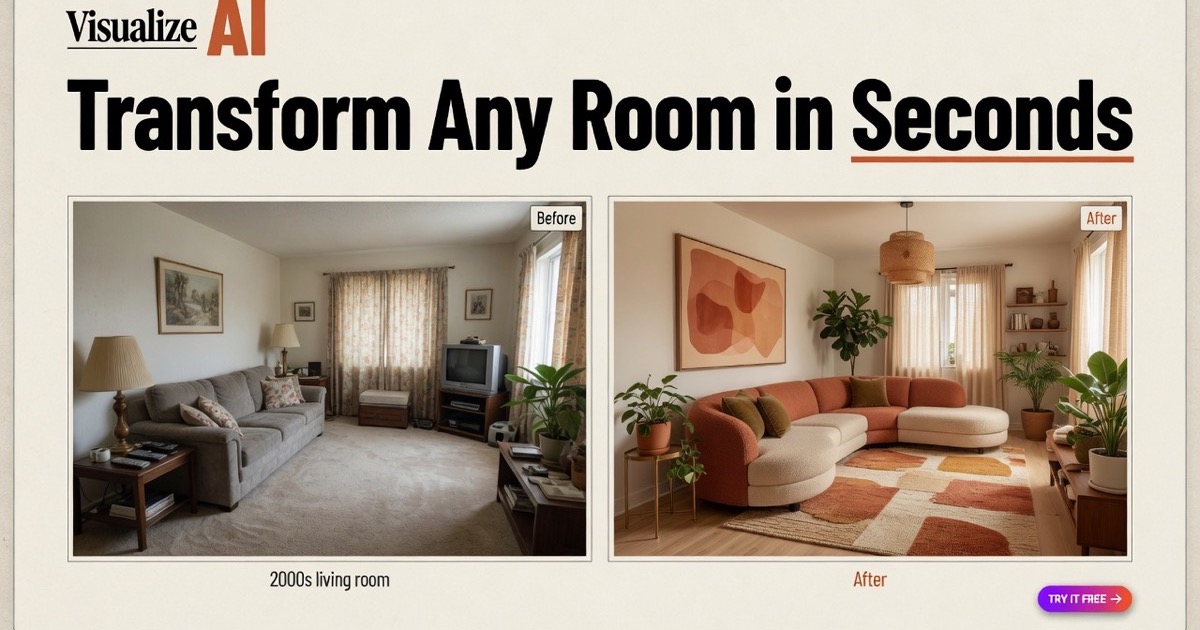
What is VisualizeAI?
VisualizeAI is an AI tool for interior design and architecture visualization that transforms a space from a single input image, sketch, or floor plan into a photorealistic redesign.
You upload a photo of a room or building, pick from more than thirty design styles such as modern, Japandi, Scandinavian, boho, and art nouveau, and the AI renders a reimagined version in seconds across room types including bedrooms, kitchens, living rooms, offices, bathrooms, and gardens.
Because it can work from sketches and floor plans in addition to photos, it suits both early ideation and later visualization, helping users explore directions before committing to real renovations or furnishing decisions.
It targets homeowners planning a makeover, real estate professionals staging listings, and interior designers and architects who want fast concept renders without spending hours in traditional 3D software.
VisualizeAI runs on a subscription model with a free trial, and paid tiers grant monthly render allowances along with commercial usage rights, which matters for professionals using outputs in client work or marketing.
Strengths include the speed of generating photorealistic concepts, the breadth of styles, and the flexibility of multiple input types.
Limitations are that the AI may alter structural elements or produce details that are not physically buildable, so renders serve as inspiration rather than construction documents, and meaningful use beyond the trial requires a paid plan. Pricing changes often, so check the official site for current plans.
VisualizeAI's core capabilities include Photo, sketch, and floor-plan input, More than thirty design styles, Photorealistic rendering in seconds and Commercial usage rights on paid plans.
Photo, sketch, and floor-plan input is built in, More than thirty design styles is built in, Photorealistic rendering in seconds is built in, Commercial usage rights on paid plans is built in, so you get a rounded toolkit rather than a single trick.
Each feature is designed to take the manual effort out of the task and help you reach a usable result faster, which is what makes VisualizeAI worth a place on your shortlist.
On the plus side, users consistently highlight Fast photorealistic concept rendering, Wide range of styles and room types and Flexible input options including sketches as the reasons they keep using VisualizeAI.
It isn't perfect, though — Renders may not be structurally buildable and Subscription required beyond the free trial are the trade-offs people most often mention, so weigh those against your own priorities before you commit.
As with any AI tool, the output still benefits from a quick human review, but VisualizeAI gets you most of the way there with far less effort. VisualizeAI runs on a subscription pricing model, aimed at users who want the full feature set without free-tier limits.
AI-tool pricing changes often, so always check the current plans, seats and add-ons on the official site for the latest details before you buy. Who is VisualizeAI for? It's best suited for ai interior design and architecture rendering.
Whether you're a beginner trying this kind of AI tool for the first time or a professional who'll use it every day, it's a credible option to consider.
If you're still deciding, compare VisualizeAI against the alternatives and the head-to-head comparisons linked below — looking at features, pricing and real user ratings side by side is the fastest way to find the right fit for your workflow and budget.
Who is VisualizeAI for?
VisualizeAI is best suited for ai interior design and architecture rendering. Whether you are trying this kind of image & design tool for the first time or use one every day, it is a credible option to shortlist — compare it with the alternatives and head-to-head comparisons linked on this page to find the best fit for your workflow and budget.