Email management tools have historically promised to clear your inbox, and the people who most need that are exactly the people who cannot risk it. An assistant that archives the wrong thread or sends a half-right reply is worse than the mess it replaced.
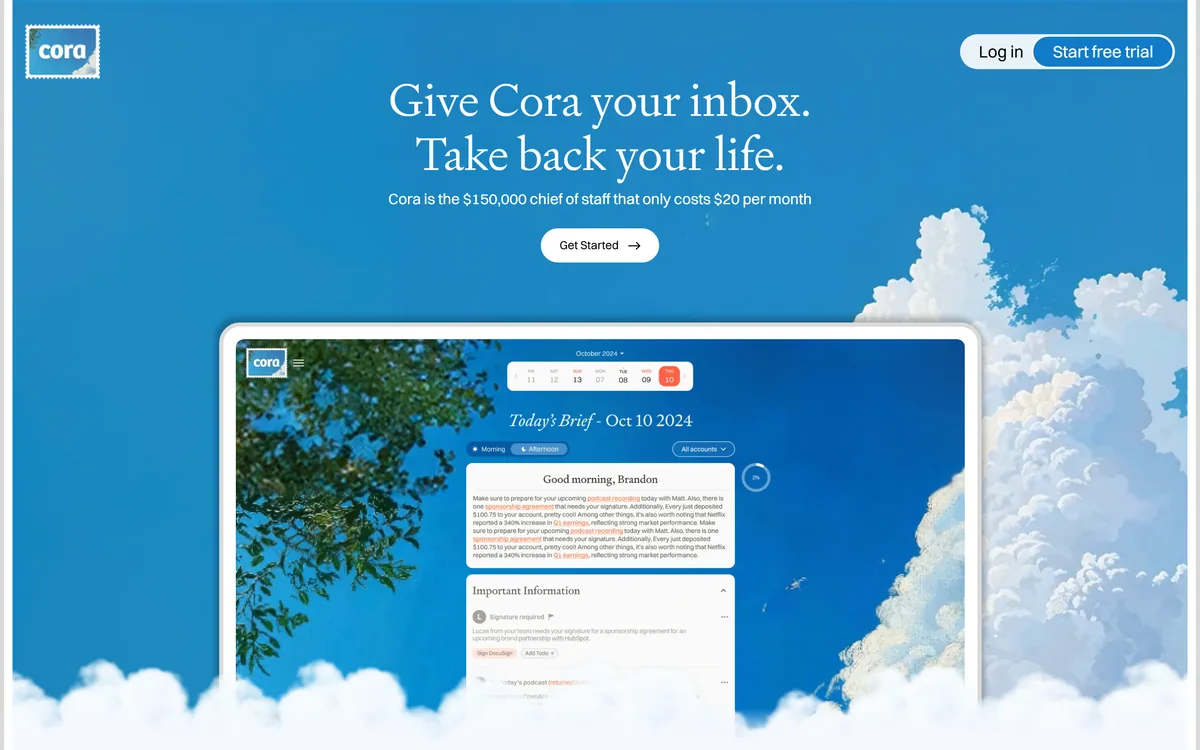
Cora takes the opposite position. It reads everything, organises it, drafts what it can, and then stops — because it does not have permission to do anything else.
The product that emerges from that constraint is not an inbox cleaner but a briefing service: something reads your mail and tells you what happened, and you decide what to do about it.
Cora: An Inbox That Briefs You
- It cannot send or delete — stated plainly as a permissions limit, which is the whole trust argument.
- A daily brief summarising what arrived, instead of a queue you work through.
- Pre-drafted responses that you review and send yourself.
- Google Verified and CASA Tier 2 compliant, with the site stating no backdoor access to your emails.
- Built by Every, alongside its other products, and endorsed on the homepage by named technology figures.
What Does Cora Actually Do To Email?
Cora's stated behaviour is to organise the inbox, categorise incoming mail, pre-draft responses and deliver daily brief summaries of what arrived.
The important structural point is that none of those actions are destructive. Organising and categorising change where things sit; drafting produces text you have not sent; a summary is a new artefact rather than an alteration.
That matters because the anxiety around email automation is specific rather than general. Nobody worries that a tool will summarise badly — they worry it will archive something that mattered or reply to a client with something wrong.
By staying entirely on the read-and-prepare side, Cora sidesteps the failure that makes people abandon these tools in week two. The worst case is that a summary is unhelpful, which costs you nothing.
The trade is that you remain the actor. Cora does not clear your inbox; it changes what facing your inbox involves, which is a smaller promise and a far more credible one.
Nobody worries an email tool will summarise badly. They worry it will archive something that mattered or reply to a client with something wrong.
Why It Cannot Send Or Delete
The site states directly that Cora does not have the ability or permissions to send or delete emails, and that there is no backdoor access to view your mail.
Publishing a limitation this prominently is a deliberate positioning choice, and it is the correct one for the category. In email, capability is not the scarce resource — trust is.
The reason it works as reassurance is that it is a permissions boundary rather than a promise about behaviour. A tool that could send but says it will not asks you to trust its judgement; a tool that cannot send asks you to trust nothing at all.
That distinction is worth internalising when evaluating any assistant with account access. What a product is technically able to do sets the worst case, and stated intentions do not change it.
The practical consequence is that Cora is safe to try in a way that most inbox automation is not. If it is useless you have lost time; you cannot lose an email — a materially different risk profile from tools such as WriteMail.ai that operate at the point of sending.
The Daily Brief Instead Of The Inbox
Cora's central output is a daily brief summarising what arrived, and the homepage testimonials describe reaching inbox zero and having a brief to read instead.
This reframes the medium. An inbox is a queue with an implicit obligation attached to each item; a brief is a document you read once and then decide about.
The psychological difference is larger than the functional one. A queue produces the feeling of falling behind, which is why people check email compulsively and still feel they are losing. A summary has an end.
It also changes what you see. Reading messages one at a time gives you no sense of the shape of the day's mail — a brief can tell you that four of eleven items are the same thread, that two need you today, and that the rest are newsletters.
The limitation is that a summary is an interpretation, and interpretations lose things. Tone, urgency implied rather than stated, the sentence that matters buried in paragraph six — these are exactly what summarisation flattens, so the brief works best as triage rather than as a replacement for reading what turns out to matter.
- Judge an email assistant on what it cannot do, not what it can.
- Treat the brief as triage — open anything that turns out to matter.
- Check what OAuth scopes any inbox tool actually requests before granting them.
- Read drafted replies properly; a good draft is more dangerous than a bad one.
- Give it two weeks before deciding, since categorisation improves with volume.
Email Permissions Worth Understanding
Cora states it is Google Verified and CASA Tier 2 compliant, which are specific things rather than marketing adjectives, and worth knowing how to read.
Google's verification process applies to applications requesting sensitive or restricted scopes — which reading someone's entire mailbox certainly is — and involves review of what the app does with that access.
CASA, the Cloud Application Security Assessment, is a third-party security assessment framework, with tiers reflecting depth. Tier 2 is a meaningful bar for a small product, and citing it specifically rather than saying enterprise-grade security is a good sign.
What neither of these tells you is retention: how long your mail is held, where, and whether any of it contributes to training. Those are separate questions that certifications do not answer.
The general habit worth forming is to read the consent screen rather than the marketing page. The scopes an application requests are the actual contract, and they are shown to you at the moment you are least inclined to read them.
Where An Email Assistant Stops Helping
Inbox assistants have a ceiling, and it arrives sooner for some people than others.
Volume is the first factor. Below roughly thirty messages a day, the overhead of reading a brief about your email approaches the cost of reading your email, and the tool is solving a problem you do not have.
Predictability is the second. If your mail is mostly newsletters and notifications, filters you set up once will do the same job with no ongoing dependency and no access granted to anyone.
The nature of the work is the third. People whose email is the work — negotiating, advising, deciding — cannot delegate reading, because the reading is the job. What they can delegate is sorting, which is the narrower and real benefit.
And an assistant cannot fix a culture. If your organisation runs on email because it has no other way to make decisions, better inbox management treats a symptom — the underlying fix looks more like the knowledge discipline that tools such as Wave and Dosu address, which is getting decisions out of inboxes entirely.
Handing Over Your Inbox Safely
Granting an application read access to your entire email history is one of the larger permissions most people ever give, and it deserves more thought than the two seconds a consent screen usually gets.
This sequence gets you a real evaluation without exposing more than necessary.
- Read the OAuth consent screen and check the scopes match what the product claims.
- Start with a secondary account if you have one, rather than your primary inbox.
- Use it for two full weeks — categorisation quality is not visible on day one.
- Compare the brief against the raw inbox daily at first, to see what it drops.
- Read every pre-drafted reply carefully, since a plausible wrong draft is the real risk.
- Check retention and training terms in writing before moving your main account across.
Cora: Product And Security
| Product type | AI email assistant |
|---|
| Made by | Every |
|---|
| Positioning | Give Cora your inbox, take back your life |
|---|
| Core output | Daily brief summaries of what arrived |
|---|
| Organisation | AI inbox categorisation |
|---|
| Drafting | Pre-drafted responses for you to review and send |
|---|
| Send and delete | Stated as not possible — no ability or permissions |
|---|
| Backdoor access | Stated as none; nobody can view your emails |
|---|
| Security | Google Verified and CASA Tier 2 compliant, per the site |
|---|
| Accounts | Multiple email accounts supported, with an unlimited tier |
|---|
| Bundle | Available within an Every bundle alongside Spiral and Sparkle |
|---|
| Trial | A free trial offered on the site |
|---|