

Midjourney is an AI image generator known for its distinctive aesthetic quality, currently on model V8.2, with a full web app alongside the original Discord workflow, plus an Editor, moodboards, style profiles, and five-second image-to-video.
Image & Design Review

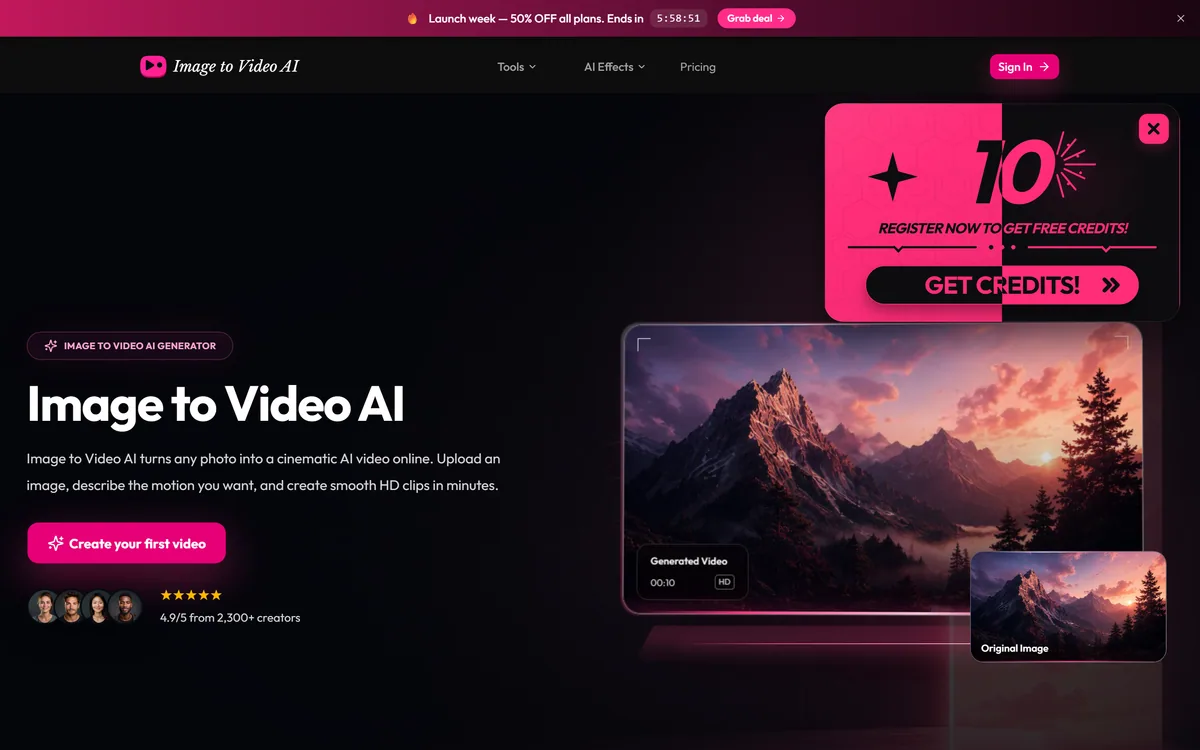
Image to Video AI is a web tool that animates a still photo into a short clip: upload an image, describe the motion, pick a model, and generate HD or 4K video on credits. It routes to third-party video models, so verify its provenance, licensing and data handling, and mind likeness for photos of people.
Fair
Image to Video AI earns 3.3 as a simple, usable front-end for turning a still photo into a short clip: upload, describe the motion, pick a model and generate at up to 4K. The experience is easy, but it routes to third-party models, so quality, licensing and trust all trace back to them and to an operator behind a generic name on a short domain. Verify the commercial-use claim and data handling before relying on it, and get consent for any real person's photo. For casual, low-stakes animation on free credits it is fine; for professional or sensitive work, choose a clearer-identity option. AInexfinder Editor Score: 3.3/5.
Best for: Casual photo animation; Short social clips
The visit link goes to image-to-video-ai.im, the official site. Paid placements on AInexfinder are always labelled. How we make money
Animating a still photo into a short moving clip is a genuinely fun and useful capability, and Image to Video AI offers it in the simplest possible form: upload, describe the motion, generate. The experience is easy; the questions worth asking are about what sits behind it.
It is a web front-end that routes your image to third-party video models, outputs HD or 4K clips on a credit system, and advertises commercial use. Because it is a generic-named tool on a short domain wrapping others' models, it is best weighed against clearer options like a model platform such as Replicate or a full editor.
This review covers how Image to Video AI animates a photo, where it makes sense, how its credits work, and the provenance and licensing caveats to check first.
Image to Video AI does one thing: it takes a static image and produces a short video where the scene moves according to a motion you describe. For social clips, simple product animation or turning a concept image into something dynamic, that is a quick and appealing capability.
The result quality depends almost entirely on the underlying model doing the generation, not on the wrapper around it. Image to Video AI is explicit that it offers multiple AI video models and even names them, which is a useful admission that it is a front-end routing to others' technology.
That front-end nature is the key to judging it. You are paying this tool for a convenient interface and credits on top of models you might reach elsewhere, so the sensible comparison is whether that convenience is worth it versus going more directly to the models or to a tool with a clearer identity.
The fair framing is that Image to Video AI is a straightforward image-to-video front-end whose value is ease of use, and whose quality, licensing and trustworthiness all trace back to the models and operator behind it, which is exactly what to verify.
You are paying for a convenient interface and credits on top of models you might reach elsewhere; the question is whether that convenience is worth it.
The workflow is a simple upload-and-describe flow, with output options and some caveats that matter more than the interface.
You upload a reference image, describe the motion you want in text, and choose from the available video models, then set resolution (up to 4K), duration (short clips of a few seconds to around fifteen) and aspect ratio. It is a low-friction flow aimed at non-experts.
Because the models are third-party, the honest comparison is with reaching them more directly. A model-hosting platform like Replicate gives developers raw access to video models with more control and transparency; Image to Video AI trades that for a simpler, consumer-facing wrapper.
The tool advertises HD and 4K output and commercial use 'safe for business and clients', which is a strong claim worth verifying in the actual terms, since commercial rights to AI-generated video can be nuanced and depend on the underlying model's licence. It also shows launch-week discounts and vendor ratings.
The provenance caveat is the same as for any generic-named tool on a short domain: confirm who operates it, how your uploaded images are stored and used, and that the commercial-use claim holds. And because animating a photo can involve a real person, getting consent matters; for simply improving a still you own, an enhancer like Deep-Image.ai sidesteps that entirely, and once you have a clip a general editor like VEED.IO is where you would assemble and polish it.
Image to Video AI makes sense for casual users and creators who want quick, low-stakes photo animation, are happy to test on free credits, and do not need control over or documentation of the exact model used.
It suits people who value the simple interface over going to a model platform directly, and short social or concept clips where good-enough motion from a still is the whole requirement.
It makes less sense for professional work needing dependable commercial rights (verify the terms first), anyone animating photos of real people without consent, and users who want model transparency, consistent results and a clearly identified operator. Its '4.9 from 2,300+ creators' figure is vendor-stated and not independently verified.
Image to Video AI gives free starter credits and then sells credits or plans, with higher resolutions and longer clips costing more, and promotional launch discounts shown on the site. We do not reproduce prices, which change; check the site.
The value question is whether the convenience premium over reaching the same models elsewhere is worth it, and whether the commercial-use rights you need actually hold, since paying for output you cannot legally use commercially would be a false economy.
Because there are free credits, the sensible approach is to test output quality on your own images first, read the licensing and data terms, and only buy credits if both the results and the rights satisfy you.
Because it is a front-end with provenance questions, trial Image to Video AI cautiously and verify the terms.
| What it is | A web tool that animates stills into short clips |
|---|---|
| Flow | Upload image, describe motion, pick a model, generate |
| Models | Routes to third-party video models (e.g. named ones) |
| Output | HD and 4K, several durations and aspect ratios |
| Licensing | Commercial-use claim; verify in the terms |
| Nature | A front-end, not its own model |
| Likeness | Get consent for photos of real people |
| Access | Free credits, then paid credits/plans |
Image-to-video generation
Text motion description
Multiple third-party models
HD and 4K output
Adjustable duration
Multiple aspect ratios
Commercial-use claim
Free starter credits
The useful comparison is with other ways to generate or work with video and images.
| Tool | Tool | Type | Best for |
|---|---|---|---|
| Image to Video AI | Photo-to-video front-end | Quick stills-to-clips via others' models | Casual, low-stakes animation |
| Replicate | Model-hosting platform | Direct model access via API | Developers wanting control |
| VEED.IO | Online video editor | Editing and assembling video | Traditional editing |
| Deep-Image.ai | Image enhancer/upscaler | Improving stills you own | No-likeness image work |
Last checked . Read from image-to-video-ai.im during this check, with the screenshot above captured at the same time.
Image to Video AI is a front-end routing to third-party models; quality, licensing and trust trace back to them and the operator. Verify who runs it, its data handling and that the commercial-use claim holds, and get consent for any photo of a real person. Its rating is vendor-stated.
A model platform, an editor and an enhancer to weigh alongside Image to Video AI.
AInexfinder does not list plan prices or billing details. For current pricing, plans, and trials, visit the official Image to Video AI website.
Visit official website for pricingVendor pricing, credits, and billing policies change over time. Always confirm on the official site before you buy.
Image to Video AI earns an AInexfinder Editor Score of 3.3/5 (fair). Best for: Casual photo animation; Short social clips; Testing on free credits.
Visit Image to Video AILog in to write a review.
No reviews yet. Be the first to share your experience with Image to Video AI.
Assigned reviewer
Daniel ReedSenior AI Tools Reviewer
Daniel leads AInexfinder's tool reviews. He researches each tool from its own pricing, documentation and policies, checks its claims against independent sources, and writes up what it does well, where it falls short and who it genuinely suits.
Daniel and the AInexfinder editorial team research Image to Video AI from its own website, pricing, documentation and policies, checked against independent sources. This review is research-based: unless its method note says otherwise, we have not bought a plan or run hands-on tests. The Editor Score is our editorial judgement, and payment never changes it.
Similar Tools
Midjourney is an AI image generator known for its distinctive aesthetic quality, currently on model V8.2, with a full web app alongside the original Discord workflow, plus an Editor, moodboards, style profiles, and five-second image-to-video.

Logome review on AInexfinder — freemium AI tool for Image & Design. Features, pricing notes, and alternatives.


Canva AI is the Magic Studio suite built into Canva — Magic Write for copy, Dream Lab for images, Magic Edit, Expand and Eraser for photos, Magic Switch for reformatting, Magic Charts for data, and Canva Code for interactive widgets.

Coolors review on AInexfinder — freemium AI tool for Image & Design. Features, pricing notes, and alternatives.
GPT Image 2 launched on 21 April 2026 as ChatGPT Images 2.0 and as the gpt-image-2 API model. Its distinguishing capabilities are dense, accurate text rendering, layout fidelity for infographics and packaging, up to 3840px output, prompt-guided masking, and reasoning applied to image structure before generation.
Topaz Labs makes professional AI image and video enhancement software, upscaling, sharpening, denoising, restoring, stabilizing and frame interpolation, across desktop, web and mobile, with Emmy-winning technology and a long track record, used by photographers, videographers and finishing pros.
Related Pages