

Midjourney is an AI image generator known for its distinctive aesthetic quality, currently on model V8.2, with a full web app alongside the original Discord workflow, plus an Editor, moodboards, style profiles, and five-second image-to-video.
Image & Design Review
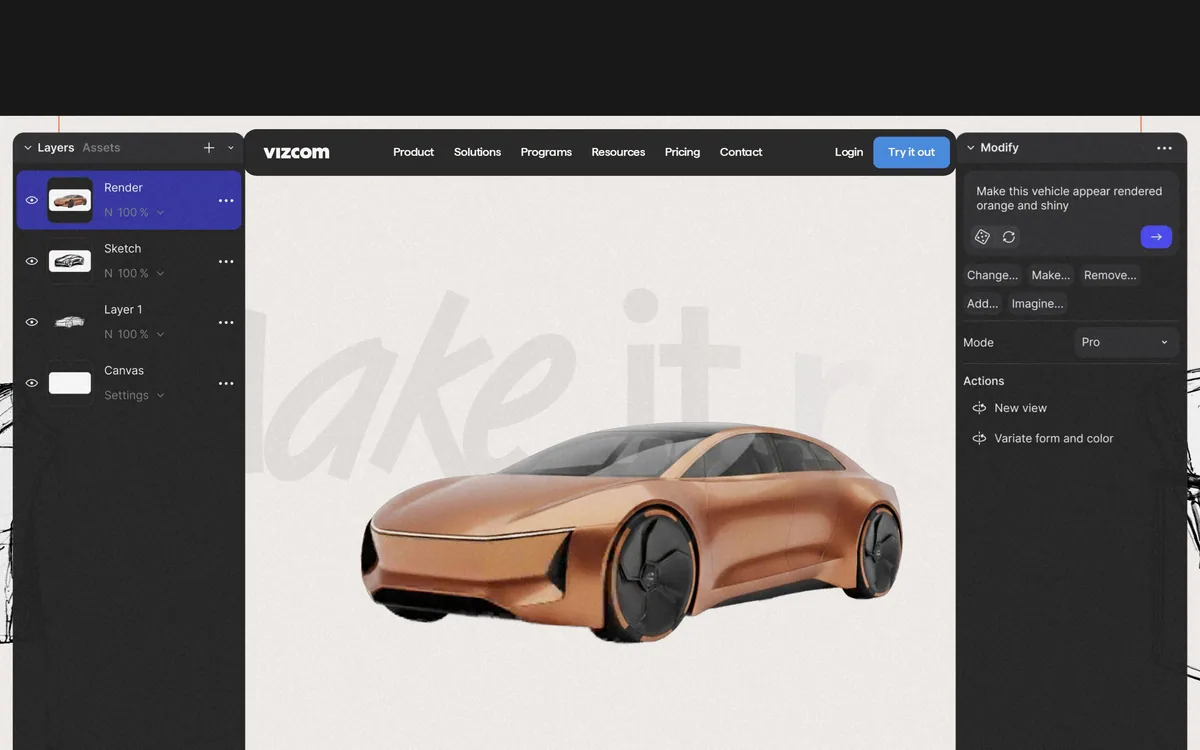
Vizcom converts sketches into full-fidelity renders for product and industrial designers, with 3D model visualisation, animation, natural-language editing and enhancement, used across automotive, footwear, apparel, gaming and industrial design.
Very good
Vizcom starts from the designer's own line rather than from a text prompt, and that single architectural choice is why professional designers use it while treating general image generators as toys. A sketch carries proportion, intent and taste that no prompt conveys, and rendering it preserves the authorship. The company also does something almost nobody in this category does: it states explicitly that free users' generated images may be used to improve the service, and that it claims no ownership of your designs either way. Say what you do, and say it where people will read it. AInexfinder Editor Score: 4.2/5.
Best for: Industrial and product designers who sketch; Footwear and apparel design teams producing colourways
The visit link goes to vizcom.com, the official site. Paid placements on AInexfinder are always labelled. How we make money
The positioning is a new way to design for the real world, described as an ideation toolkit bringing clarity to the messy middle of idea generation — from your vision, through variations, into reality.
The workflow named on the page is sketch, render, iterate, make it real, and the first word is the one that matters.
Almost every other generative image tool starts from a text prompt. A prompt is a poor container for a design idea: it cannot express proportion, stance, the specific curve a designer has in mind, or the several decisions already made in the first thirty seconds of drawing.
A sketch carries all of that, which is why starting from one produces a render that resembles what the designer intended rather than an interpretation of a description.
It also settles the authorship question in a way prompting does not. The concept originated with the designer, on paper or on screen, and the tool rendered it — a materially different relationship from generating a design and adopting it. That distinction is why this product sits comfortably in professional studios.
A prompt cannot express proportion, stance, or the specific curve a designer has in mind. A sketch carries all of it, plus the decisions made in the first thirty seconds.
The editing tools are described in natural design language — adjust and edit any image, from large edits to little tweaks, with controls for palette, form, style, colour and new viewing angles at fixed rotations.
Preserving the original line through those edits is the whole technical problem, and it is more difficult than it sounds.
A render that beautifully ignores the sketch is useless. Designers can tell instantly when proportions have drifted, when a radius has been smoothed into something generic, or when a stance has been subtly corrected toward the average of everything the model has seen. Those are not small errors — they are the removal of the design.
The value is therefore in fidelity to the input rather than in the appeal of the output, which inverts how consumer image tools are judged.
The rotation control offering fixed increments is a small detail that signals the right intent, since generating a plausible alternative view of a specific object is much harder than generating a plausible object. Studio-oriented tools like Promethean AI take the same posture from the asset-library direction rather than the sketching one.
The phrase the messy middle of idea generation is doing precise work, and anyone who has run a design phase will recognise what it names.
The beginning of a project is cheap: sketches are fast and a designer can produce twenty in a morning. The end is well understood: a chosen direction gets modelled, engineered and prototyped. The middle is where time disappears.
The middle is the stretch where a direction has to be shown to people who cannot read a sketch. A client, a marketing lead or an executive looks at a line drawing and cannot see the product — so the designer renders it, which historically meant hours of modelling and material work for a concept that may be rejected in ten minutes.
The consequence is that fewer directions get shown, and the decision narrows before it should.
Removing that cost changes the shape of the phase rather than merely speeding it up. Six rendered directions instead of two means the choice is made from a wider field, and it means the designer is not emotionally committed to the one option they spent a day rendering. The named case studies — an automotive designer discussing a well-known coupe, a footwear designer, an extreme sports gear designer and a design university — describe exactly that professional context.
The FAQ contains a statement worth quoting because so few companies in this category make one: what you create stays private and is used only to provide the service, while free users may have their generated images included to help improve Vizcom's services — and even then, Vizcom does not claim ownership of your designs, concepts or original ideas, and you retain full rights.
That is three separate commitments stated plainly, and the middle one is the unusual part.
Almost every free tier in generative software is funded partly by data. Very few say so in a customer-facing FAQ, in a sentence a buyer will actually read, and fewer still pair it with an explicit disclaimer of ownership over the concepts themselves.
The practical implication is straightforward rather than alarming. If you are exploring a confidential product for a client under NDA, that belongs on a paid tier, and now you know why rather than guessing. If you are a student or exploring personal work, the trade is clear and you can accept it knowingly.
That is what good disclosure achieves: not the absence of a trade-off, but a decision the user can actually make. The published Data and Security and Trust pages suggest the same posture extends beyond the FAQ. Enterprise design tools such as ARK Design AI should be asked the same question directly, because most will not volunteer it.
The wider toolkit reaches beyond rendering: place your object in the real world and add motion by animating, drop in any 3D model and swap colours, materials and scenes instantly, direct a story across a series of clips, and enhance brings out detail in renderings.
One feature is described as turning your concept into something you can hold, and the framing from pixels to atoms tells you who this is for.
Industrial and product design has a constraint that screen-based design does not: the output is manufactured. A concept that renders beautifully and cannot be tooled, moulded or assembled is not a design, and this is where generative tools most often produce nonsense — plausible-looking objects with impossible geometry.
Starting from a designer's sketch mitigates that substantially, because a trained designer's line already respects manufacturing reality in ways a model does not know about.
Visualising existing 3D models is the complementary half and arguably the more practical one for a working studio. A model already exists in the pipeline; swapping colourways, materials and scenes on it instantly replaces a rendering queue that used to take days. The industry list — industrial, footwear, gaming, apparel, automotive — is specific enough to check against your own work. Broader creative platforms such as Adobe Firefly cover adjacent needs without this professional focus.
The risk is not bad renders. It is a studio that starts generating concepts instead of designing them.
This order keeps the design work where it belongs.
| Category | AI design platform for product and industrial designers |
|---|---|
| Core workflow | Sketch, render, iterate, make it real |
| Editing | Natural language adjustment across palette, form, style and colour |
| Views | New viewing angles at fixed rotation increments |
| 3D | Existing models imported for instant colour, material and scene changes |
| Motion | Animation of objects and multi-clip sequences |
| Enhancement | An Enhance function bringing out detail in renderings |
| Industries | Enterprise, industrial, footwear, gaming, apparel and automotive |
| Free tier | A starter plan stated as completely free, no card required |
| Roles | Admin and Editor paid; Viewer free with read-only access |
| Data terms | Free users' generated images may be used to improve the service; ownership of designs not claimed |
| Resources | Documentation, student and educator programmes, plus Data and Security and Trust pages |
Sketch to full-fidelity rendering
Natural language image editing
Form, palette and style controls
New viewing angles at fixed rotations
Import and visualisation of existing 3D models
Instant colourway and material swaps
Object animation and multi-clip sequences
Detail enhancement on renderings
Design AI tools differ by what they start from.
| Tool | Starts from | Preserves | Best for |
|---|---|---|---|
| Vizcom | Your own sketch | Proportion and design intent | Product and industrial designers |
| ARK Design AI | A brief or site | Programme requirements | Architectural early design |
| Promethean AI | Your existing asset library | A studio's own taste | Game and film environment teams |
| Adobe Firefly | A prompt or reference | General visual direction | Broad creative production |
| Traditional rendering | A 3D model | Everything, exactly | Final images that must be accurate |
Other tools for visualising designs before they exist.
Last checked . Read from vizcom.com in a browser session on the date above, with the screenshot captured at the same time.
What we could not confirm: how faithfully renders preserve sketch proportions in practice; what the Data and Security and Trust pages state in detail, since we did not open them; how animation quality holds up; what the paid tiers change about data handling beyond the FAQ statement; and pricing. We did not upload a sketch or run a render.
AInexfinder does not list plan prices or billing details. For current pricing, plans, and trials, visit the official Vizcom website.
Visit official website for pricingVendor pricing, credits, and billing policies change over time. Always confirm on the official site before you buy.
Vizcom earns an AInexfinder Editor Score of 4.2/5 (very good). Best for: Industrial and product designers who sketch; Footwear and apparel design teams producing colourways; Automotive studios exploring exterior and interior directions.
Visit VizcomLog in to write a review.
No reviews yet. Be the first to share your experience with Vizcom.
Assigned reviewer
Daniel ReedSenior AI Tools Reviewer
Daniel leads AInexfinder's tool reviews. He researches each tool from its own pricing, documentation and policies, checks its claims against independent sources, and writes up what it does well, where it falls short and who it genuinely suits.
Daniel and the AInexfinder editorial team research Vizcom from its own website, pricing, documentation and policies, checked against independent sources. This review is research-based: unless its method note says otherwise, we have not bought a plan or run hands-on tests. The Editor Score is our editorial judgement, and payment never changes it.
Similar Tools
Midjourney is an AI image generator known for its distinctive aesthetic quality, currently on model V8.2, with a full web app alongside the original Discord workflow, plus an Editor, moodboards, style profiles, and five-second image-to-video.

Mobile-first AI art and video generator with many styles Category: Image & Design.


Canva AI is the Magic Studio suite built into Canva — Magic Write for copy, Dream Lab for images, Magic Edit, Expand and Eraser for photos, Magic Switch for reformatting, Magic Charts for data, and Canva Code for interactive widgets.
GPT Image 2 launched on 21 April 2026 as ChatGPT Images 2.0 and as the gpt-image-2 API model. Its distinguishing capabilities are dense, accurate text rendering, layout fidelity for infographics and packaging, up to 3840px output, prompt-guided masking, and reasoning applied to image structure before generation.

Coolors review on AInexfinder — freemium AI tool for Image & Design. Features, pricing notes, and alternatives.
Topaz Labs makes professional AI image and video enhancement software, upscaling, sharpening, denoising, restoring, stabilizing and frame interpolation, across desktop, web and mobile, with Emmy-winning technology and a long track record, used by photographers, videographers and finishing pros.
Related Pages