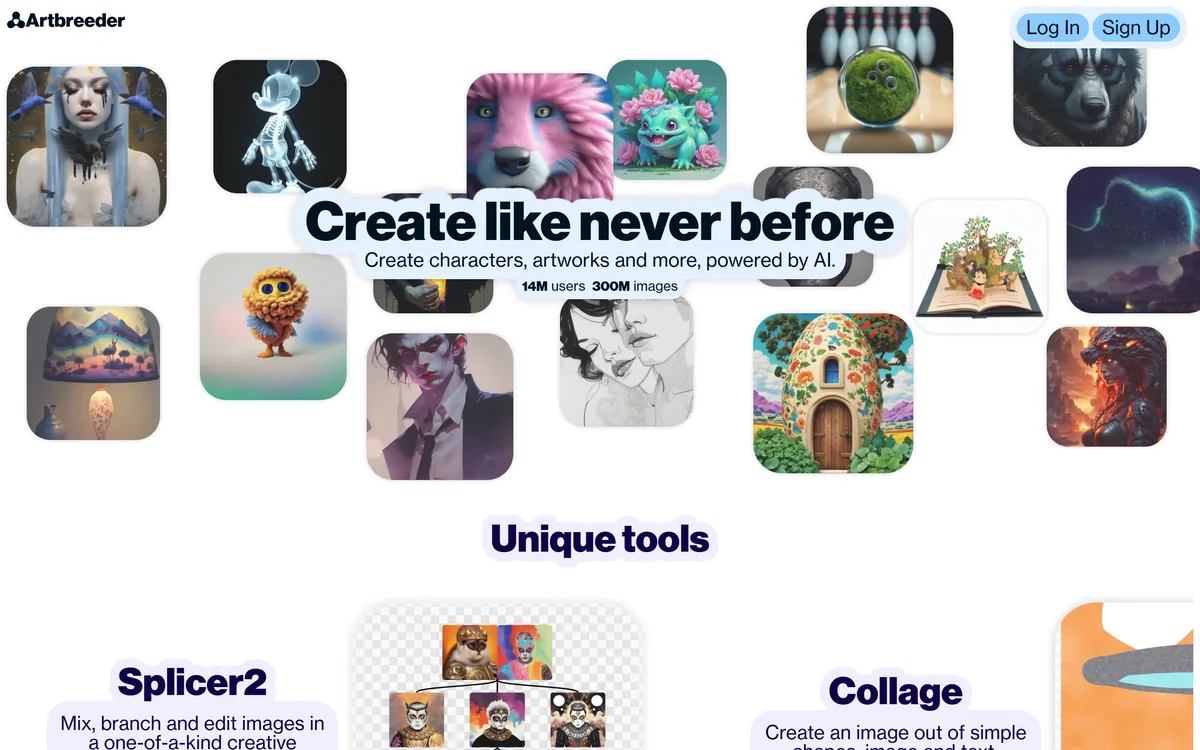
Artbreeder is a long-running AI creative platform for making characters and artworks by mixing and editing images: Splicer blends images and adjusts 'genes' such as age and features, Collage turns shapes, images and text into pictures, and a community shares, remixes and runs contests.
artbreeder.com7 viewsAdded August 25, 202560K visitors
Before prompt boxes took over AI art, Artbreeder made its name with a different idea: take existing images and 'breed' them, blending and adjusting traits until something new appears. That remix-first approach still defines it.
Today it offers Splicer for mixing images and editing 'genes' such as age or other features, Collage for composing images from simple shapes, pictures and text, and an active community of contests and remix parties. It sits among image tools like Stylize Image, but its strength is iterative exploration rather than one-shot generation.
This review covers what you can create with Artbreeder, which artists and writers it suits, how its tiers work, and when it is the wrong image tool.
Artbreeder mixes and edits images into new characters and artworks.
Mixing And 'Breeding' Images Into New Art
Artbreeder's appeal is exploration. Instead of writing a perfect prompt, you start from an image and nudge it, blending it with others or sliding traits up and down, and watch variations emerge. Many people find that more intuitive and more surprising than prompting from scratch.
Its Splicer tool is the heart of this: mix images together and adjust 'genes' that control attributes such as age, expression or colour, then branch from any result to keep exploring. Splicer2 offers a newer interface for mixing, branching and editing.
Collage takes a different route, letting you arrange rough shapes, images and text and have the AI turn the layout into a finished picture, which is helpful when you know the composition you want but cannot draw it.
The honest framing is that Artbreeder is a creative playground rather than a precision production tool. It excels at character concepts, mood and iteration, but output varies, and editing real people's faces raises consent and likeness questions that are your responsibility.
Artbreeder excels at character concepts and iteration, but editing real people's faces raises consent questions that are yours to handle.
What Can You Create With Artbreeder?
Artbreeder offers a handful of distinctive creation tools around a sharing community.
Splicer, Collage And Gene Editing
Splicer blends source images and lets you edit traits as sliders, Splicer2 adds branching and editing in one view, and Collage converts a rough arrangement of shapes, images and text into a coherent picture. Together they suit iterative work where you refine an idea over many small steps.
For applying an art style to an existing photo rather than breeding new images, Stylize Image is a more direct tool; Artbreeder is about evolving new imagery.
A Remixing Community, And A Likeness Caveat
Artbreeder's community lets you follow creators, share work, enter daily-theme contests and join remix parties built around reworking each other's images, which makes it as much a social space as a tool.
That remix culture means you are often building on others' public images, so respect the platform's rules and creators' work. Its gene-style editing can depict real-looking people, so never use it to manipulate a real person's likeness without consent. For more conventional prompt-based generation, GenApe or Stockimg AI are simpler options.
Which Artists And Writers Artbreeder Suits
Artbreeder suits writers and worldbuilders who want faces and characters for stories and games, tabletop players creating portraits, concept artists exploring directions, and anyone who enjoys open-ended visual experimentation.
It suits people who think visually rather than verbally, since blending and sliders are often easier than describing exactly what you want in a prompt.
It suits less well commercial production that needs precise, repeatable brand output, photorealistic product imagery or strict control over every detail.
It is also not the right tool for anything involving real individuals without their permission. Character work with fictional faces is its sweet spot, and that is where it is most enjoyable and least risky.
A useful mindset is to treat Artbreeder as a sketchbook: generate many variations quickly, save the ones that spark ideas, and refine the best candidates in more controllable tools when you need a finished asset.
How Artbreeder's Free And Paid Tiers Work
Artbreeder is free to start, with paid tiers that typically add more generation credits, higher resolution and extra features. We do not publish prices, which change; check the site.
The value question is how often you create: casual users may be happy on the free tier, while heavy character designers and worldbuilders may find a paid tier worthwhile for volume and resolution.
Before using images commercially, read Artbreeder's terms on ownership and licensing of generated and remixed works, since images built on other users' uploads can carry different considerations than images made only from your own inputs.
Try the free tier with a real project, such as a set of characters for a story, before deciding whether the paid features matter to you.
A First Remix Session In Artbreeder
Because Artbreeder rewards iteration, trial it on a real creative project rather than a single image.
Start a set of characters or scenes for a story, game or campaign idea.
Use Splicer to blend images and adjust traits, branching from promising results.
Try Collage to compose a scene from shapes, images and text.
Browse the community and remix with attribution and the platform's rules in mind.
Read the terms on commercial use before using images in paid work.
Pass/fail: Artbreeder is worth it if it reliably sparks usable creative directions.
Never edit or depict a real person's likeness without their consent.
Artbreeder Image-Mixing Facts
What it is
An AI image-mixing and character-creation platform
Splicer
Mix images and edit their 'genes' (traits)
Splicer2
Mix, branch and edit in a newer interface
Collage
Compose images from shapes, images and text
Community
Follow creators, remix, contests and remix parties
Company
Morphogen
Scale claim
14M users and 300M images (vendor-stated)
Access
Free to start, with paid tiers
Artbreeder, The Remix Brief
Artbreeder is an image-mixing playground: blend images and tweak traits to 'breed' new characters and art.
Its tools are distinctive: Splicer for mixing and gene editing, Collage for composing from shapes, images and text.
It is community-driven: remixing, following creators, contests and remix parties are central to the experience.
Mind likeness and rights: editing real people's faces needs consent, and check the terms before commercial use.
Is Artbreeder The Right Creative Playground?
Creators And Worldbuilders Artbreeder Serves
Writers and worldbuilders creating characters
Tabletop and game players making portraits
Concept artists exploring directions
Visual thinkers who prefer sliders to prompts
People who enjoy a remix community
When Artbreeder Is The Wrong Image Tool
Precise, repeatable brand production
Photorealistic product imagery
Editing real people's faces without consent
Commercial use without checking the terms
Anyone needing pixel-level control
Key features of Artbreeder
Splicer image mixing
Trait ('gene') editing
Splicer2 branching
Collage composition
Character creation
Community remixing
Daily contests
Free tier
Pros & cons
Pros
5
Intuitive, slider-based exploration
Distinctive remix-first tools
Great for character concepts
Active creative community
Free to start
Cons
5
Less precise than production tools
Output quality varies
Likeness and consent risks with faces
Commercial terms need checking
Heavy use needs a paid tier
Best For
Character concepts
Worldbuilding
Tabletop portraits
Concept art exploration
Remix communities
Artbreeder Compared With Prompt-Only Generators
The useful comparison is with other image tools, by how you create with them.
Last checked . Read from artbreeder.com during this check, with the screenshot above captured at the same time.
An AI image-mixing and character-creation platform
Splicer for mixing images and editing traits
Splicer2 for mixing, branching and editing
Collage for composing from shapes, images and text
A community with following, contests and remix parties
Operated by Morphogen, per the site footer
Vendor-stated figures of 14M users and 300M images
Free to start, with paid tiers
No prices reproduced here, in line with this site's pricing policy
Artbreeder's gene-style editing can depict realistic faces; never use it on a real person's likeness without consent. Check the terms on ownership and commercial use, especially for remixed images.
Image Tools To Weigh Beside Artbreeder
A style-transfer tool, a prompt-based generator and an asset generator to weigh alongside Artbreeder.
Artbreeder earns 3.7 as a distinctive, enjoyable creative playground: Splicer's image mixing and trait editing, Splicer2's branching and Collage's shape-to-picture composition make iterative character and concept work feel natural, backed by an active remix community. It is excellent for writers, worldbuilders and concept artists. It is less precise than production tools, its face editing carries likeness and consent risks, and commercial use needs a careful read of the terms, especially for remixed images. AInexfinder Editor Score: 3.7/5.
Artbreeder pricing
AInexfinder does not list plan prices or billing details. For current pricing, plans, and trials, visit the official Artbreeder website.
Vendor pricing, credits, and billing policies change over time. Always confirm on the official site before you buy.
Frequently asked questions
What is Artbreeder?
Artbreeder is an AI platform for creating characters and artworks by mixing and editing images, with tools like Splicer, Splicer2 and Collage and a community built around remixing.
How does Artbreeder's Splicer work?
Splicer blends images together and lets you adjust 'genes', sliders for traits such as age or expression, then branch from results to keep exploring variations.
What is Artbreeder Collage?
Collage lets you arrange simple shapes, images and text, and the AI turns that rough composition into a finished picture.
Is Artbreeder free?
Artbreeder is free to start, with paid tiers for more credits, higher resolution and extra features. We do not publish prices, which change; check the site.
Can I edit photos of real people in Artbreeder?
You should not alter or depict a real person's likeness without their consent. Artbreeder is best used for fictional characters.
Can I use Artbreeder images commercially?
That depends on Artbreeder's terms and on whether images build on other users' work. Read the licensing terms before commercial use.
Who is Artbreeder best for?
Writers, worldbuilders, game and tabletop players, concept artists and visual thinkers who enjoy iterating on characters and scenes.
How is Artbreeder different from prompt-based generators?
Instead of writing a detailed prompt, you evolve images by blending and adjusting traits, which many people find more intuitive for character work.
Does Artbreeder have a community?
Yes. You can follow creators, share work, enter daily-theme contests and join remix parties built around reworking images.
Are Artbreeder's user numbers reliable?
Figures like 14 million users and 300 million images are vendor-stated signals of scale. Judge it on whether it helps your own creative work.
Daniel reviews AI tools the slow way — by actually using them on real projects. His reviews cover what works, what breaks, and who each tool is genuinely a good fit for.
Daniel and the AInexfinder editorial team research Artbreeder using public product information, listing evidence, and (when available) hands-on checks. Scores reflect listing completeness and transparency — not paid placement.
Listings may include affiliate or sponsored placements, which are labeled when present. Editorial scores and cons are not sold. See our affiliate disclosure and review methodology.
Patternaly is an AI pattern generator that turns a text prompt into seamless, tileable patterns for print-on-demand, textiles, packaging and wallpaper, with 19 artistic styles, a seamless checker, product mockups and HD export, and commercial rights on paid plans.
PixelLab generates pixel art game assets including character animations, 4 and 8 directional rotations, tilesets, environments and UI elements. It offers skeleton-based animation, true inpainting that understands the original image, and states it does not store generated or input images.
krea2.org is a browser image-generation workspace that runs several third-party models side by side, including Krea 2 tiers, FLUX.2, GPT Image 2, Nano Banana and Seedream 5.0, with reference uploads, six aspect ratios and live model switching.
Pet Pic Portraits turns a pet photo into styled artwork — Royal King, Pop Art, Watercolour, Viking, Wizard and more — with an instant preview before ordering. Output is a digital download, a canvas print or framed wall art, and it includes a pet memorial option.
Canva AI is the Magic Studio suite built into Canva — Magic Write for copy, Dream Lab for images, Magic Edit, Expand and Eraser for photos, Magic Switch for reformatting, Magic Charts for data, and Canva Code for interactive widgets.