DeepSource is an AI code review platform combining over 5,000 deterministic static analysis rules with AI review agents, covering security, quality, complexity and coverage. It includes SAST, SCA, IaC security and Autofix, and the site states DeepSource has joined Harness.
deepsource.com6 viewsAdded December 31, 20253K visitors
Every team that has adopted a code analysis tool has also, at some point, turned most of it off. Not because the findings were wrong, but because there were too many that did not matter, and the signal drowned.
That experience is why the interesting question about automated review is no longer what can it find. It is what fraction of what it finds is worth acting on.
DeepSource's answer is to run two different kinds of analysis with opposite failure modes, and to treat false positives as the thing being engineered against rather than an acceptable cost.
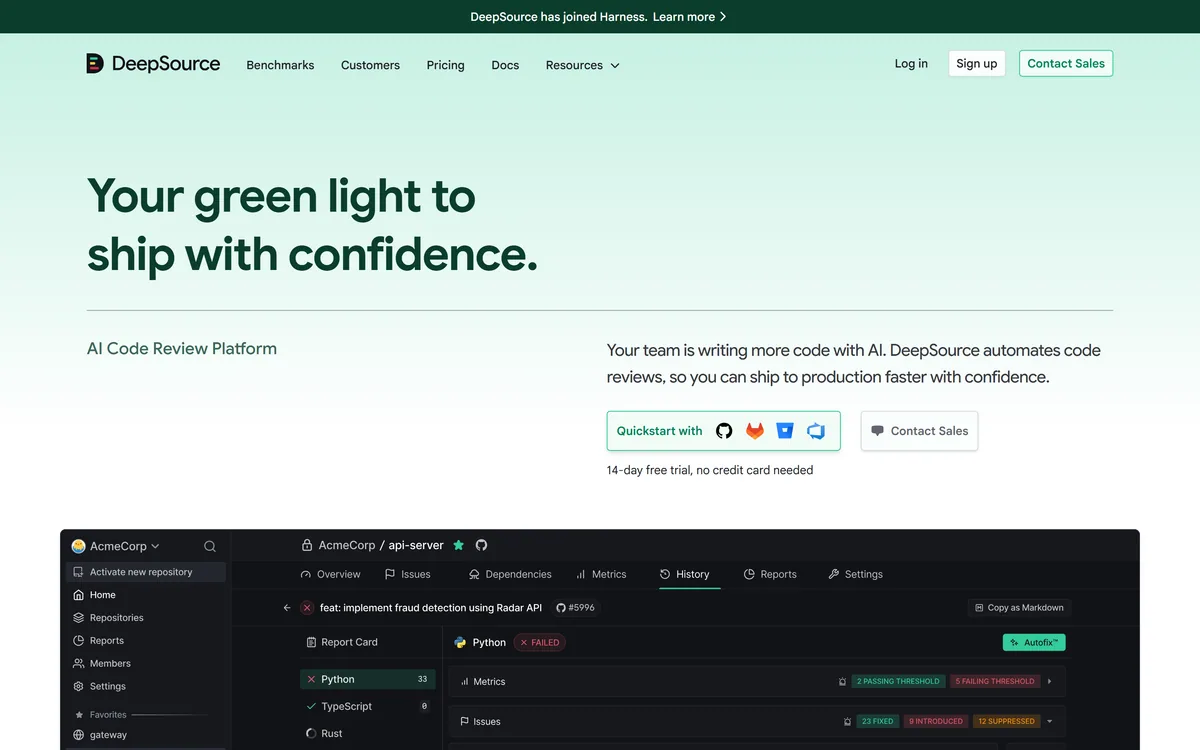
DeepSource's homepage, captured 9 September 2026, showing an inline review comment on a pull request.
DeepSource: Static Analysis Plus Agents
Hybrid by design — 5,000+ deterministic rules alongside an AI review agent, because they fail differently.
False positives named as the enemy, with high-signal, low-noise findings as the stated goal.
SAST, SCA, IaC security, code quality and coverage in one platform.
Autofix for remediation, plus Globstar as a published open-source component.
DeepSource has joined Harness, per a banner on the site — worth factoring into a long-term decision.
Why Combine Deterministic Rules With AI?
DeepSource describes deep code review with hybrid static analysis and AI agents, producing high-signal, low-false-positive issues across security, quality, complexity and coverage, powered by 5,000+ deterministic rules alongside an AI review agent.
The two halves are good at genuinely different things, and understanding that split explains the architecture.
Deterministic rules are pattern matching. They find the same problem every time, never invent one, and can be trusted as a gate precisely because they are boring. Using shell=True with user-supplied input is a rule; it does not require judgement.
AI agents handle what patterns cannot express. The example on DeepSource's own page is instructive: grouping records without sorting them first, which produces silently incorrect batches. No regular expression describes that, because the defect is in the reasoning rather than in the syntax.
Running both means the deterministic layer can block confidently while the AI layer advises. That distinction — what gates versus what comments — is the design detail that decides whether a team keeps the tool on, and it is handled differently by every product in the space, including cubic and Codacy.
Deterministic rules can be trusted as a gate precisely because they are boring. AI agents catch what no pattern can express, and occasionally invent something.
False Positives Are The Real Enemy
DeepSource states high-signal, low-false-positive issues as an explicit goal, and it is the right thing to optimise for.
The mathematics of developer attention are unforgiving. A tool with 90% precision produces one wrong finding in ten, which a team tolerates. At 50% precision, half of every review is wasted, and within a month people stop reading any of it.
Crucially, the tool does not get turned off at that point — it gets ignored, which is worse. An ignored analysis tool still shows green checks, still appears in the pipeline, and still creates the impression that something is being checked.
That is why precision matters more than coverage in practice. A tool finding 60% of real issues that people act on beats one finding 95% that people scroll past.
The test that matters during evaluation is simple: run it on a repository you know well, read the first thirty findings, and count the ones you would fix. Everything else in the sales material is secondary to that number.
Joining Harness And What It Means
A banner at the top of the site states that DeepSource has joined Harness, and for anyone evaluating the product now, that is a material fact rather than a footnote.
The straightforward reading is positive. Acquisition by a larger platform company usually means more engineering resource, more stability, and a longer runway than an independent developer-tools company typically has.
The questions it raises are the ordinary ones and worth asking directly. Whether the standalone product continues to be sold and supported, whether pricing changes on renewal, and whether the roadmap now serves the acquirer's platform strategy rather than the original product's users.
For a code analysis tool specifically, integration direction matters. A product folded into a wider delivery platform tends to become excellent inside that platform and less accommodating outside it, which is a problem if the rest of your pipeline lives elsewhere.
None of this is a reason to avoid it. It is a reason to ask about contract terms, standalone availability and roadmap commitments before a multi-year commitment, in the same way you would with any recently acquired vendor.
Judge the tool on precision — run it on a repo you know and count fixable findings.
Gate on deterministic rules; let AI findings advise rather than block.
Ask about standalone availability and pricing on renewal after the acquisition.
Enable one analyser at a time rather than everything on day one.
Watch for ignored findings, which are worse than a tool that was removed.
Autofix And One-Click Remediation
DeepSource lists Autofix among its product capabilities, alongside SAST, SCA, code quality, IaC security and coverage.
Automated remediation is the natural complement to detection, because a finding nobody has time to fix is not much better than one nobody found.
It works cleanly on mechanical issues. An unused import, a deprecated call, a formatting violation — these have exactly one correct fix, and reviewing that fix takes seconds.
It works less cleanly the moment intent is involved. A fix that changes behaviour, even correctly, needs the same review any change needs, and the danger is that a batch of automated fixes gets approved with less scrutiny precisely because they came from a tool.
The sensible policy is to separate the two. Let automation fix the mechanical category freely, and require normal review for anything that touches logic. That keeps the time saving without importing a new class of risk into your history.
What Analysis Cannot Find
Static analysis, hybrid or otherwise, has hard limits, and knowing them prevents a false sense of coverage.
It cannot find defects that depend on runtime state. A race condition that appears under load, a query that is fine until the table has ten million rows, an integration that fails only against the real third-party service — none of these exist in the source.
It cannot find business logic errors. Code that correctly implements the wrong requirement is indistinguishable from code that implements the right one, and no analyser has access to what the requirement should have been.
It cannot find architectural problems. Every function can be clean while the boundaries between services are wrong, which is the failure that costs most over time and is invisible to file-level inspection — the gap that health-scoring tools such as CodeScene partially address and testing products such as Bug0 approach from the runtime side.
The right expectation is that analysis is one layer. It removes a large category of defect cheaply, which frees human attention for the categories it cannot see — provided the team actually redirects that attention rather than assuming the gate covers everything.
Introducing Automated Review To A Team
The predictable failure with analysis tooling is enabling every analyser on the whole organisation, generating ten thousand findings, and creating a backlog nobody will ever touch.
This order builds credibility on new code first and leaves historical debt as a separate, deliberate decision.
Enable it on one repository and one analyser to start.
Read the first thirty findings and count how many you would genuinely fix.
Apply the gate to new changes only, so nobody is blocked by history.
Let deterministic rules block and AI findings comment, at least initially.
Use Autofix freely for mechanical issues and review anything touching logic.
Address historical findings as a scheduled project, not as a pull request blocker.
DeepSource: Coverage And Ownership
Operating company
DeepSource Corp.
Ownership
DeepSource has joined Harness, per a site banner
Product type
AI code review platform
Approach
Hybrid — deterministic static analysis plus AI review agents
What we could not confirm: pricing and how usage is metered; how the 5,000+ rules are distributed across languages, which determines coverage for your stack; measured precision or false-positive rates, which the site claims as a goal rather than a figure; which models drive the AI review agent; whether code is retained after analysis and where it is processed; and what the Harness acquisition means for standalone availability, pricing or roadmap. We did not connect a repository.
Editor's Verdict
4.2/5
The argument DeepSource makes is the correct one for this category: deterministic rules and AI review are good at opposite things, so run both. Rules never hallucinate, never vary, and catch the same class of problem every time — which is exactly what a gate needs. AI agents catch the reasoning errors rules cannot express, at the cost of occasional confident nonsense. Combining them, with false positives named as the explicit enemy, is more honest engineering than either pure approach. The one thing to weigh is that DeepSource has joined Harness, which is good for resourcing and introduces the usual questions about product direction. AInexfinder Editor Score: 4.2/5.
DeepSource pricing
AInexfinder does not list plan prices or billing details. For current pricing, plans, and trials, visit the official DeepSource website.
Vendor pricing, credits, and billing policies change over time. Always confirm on the official site before you buy.
Frequently asked questions
What is DeepSource?
DeepSource is an AI code review platform from DeepSource Corp. combining 5,000+ deterministic static analysis rules with AI review agents, across security, quality, complexity and coverage. It includes SAST, SCA, IaC security and Autofix, and a site banner states DeepSource has joined Harness.
Why combine rules with AI agents?
They fail differently. Deterministic rules find the same problem every time and never invent one, which is what a blocking gate needs. AI agents catch defects in reasoning that no pattern can express — like grouping records without sorting them first, which produces silently wrong results.
Why do false positives matter so much?
Because developer attention is unforgiving. At 90% precision a team tolerates the noise; at 50% half of every review is wasted and within a month nobody reads any of it. And the tool does not get removed — it gets ignored, while still showing green checks.
How should I evaluate it?
Run it on a repository you know well, read the first thirty findings, and count how many you would actually fix. That ratio matters more than rule counts or coverage claims, because a tool finding 60% of issues people act on beats one finding 95% people scroll past.
What does joining Harness mean for buyers?
More resourcing and stability, plus the ordinary acquisition questions. Ask whether the standalone product continues to be sold and supported, whether pricing changes at renewal, and whether the roadmap now serves the acquirer's platform — particularly if the rest of your pipeline lives elsewhere.
Should I let it block pull requests?
Let deterministic rules block and AI findings comment, at least initially. Rules are consistent and explainable, which is what a gate requires. Probabilistic findings blocking a merge produces arguments that damage trust in the whole tool.
Is Autofix safe to use?
For mechanical issues, yes — an unused import or a deprecated call has exactly one correct fix. For anything touching logic, require normal review. The specific risk is that a batch of automated fixes gets approved with less scrutiny precisely because a tool produced them.
What can static analysis never find?
Anything depending on runtime state — race conditions under load, queries fine until the table is large, integrations that fail against the real service. It also cannot find business logic errors, since correctly implemented wrong requirements look identical to correct ones.
How do I avoid a ten-thousand-finding backlog?
Enable one repository and one analyser, apply the gate to new changes only so nobody is blocked by history, and treat historical findings as a scheduled project rather than a merge blocker. Everything-on-day-one is how these rollouts fail.
Is it better than a linter?
For security scanning, dependency analysis and reasoning-level defects, substantially. For style and basic correctness, a configured linter and formatter already do most of the job — so the honest question is which of the additional categories you actually need covered.
Daniel reviews AI tools the slow way — by actually using them on real projects. His reviews cover what works, what breaks, and who each tool is genuinely a good fit for.
Daniel and the AInexfinder editorial team research DeepSource using public product information, listing evidence, and (when available) hands-on checks. Scores reflect listing completeness and transparency — not paid placement.
Listings may include affiliate or sponsored placements, which are labeled when present. Editorial scores and cons are not sold. See our affiliate disclosure and review methodology.
CodeScene measures code with CodeHealth, a validated metric predicting defects and delivery performance. It states the average enterprise codebase scores 5.15 out of 10 while AI needs 9.5 to work reliably, and offers an MCP server, automated reviews and IDE feedback. Operated by CodeScene AB.
cubic reviews pull requests in GitHub and your IDE, enforces rules written in plain English, and learns from senior engineers' PR comment history. It runs thousands of agents nightly to scan an entire codebase for bugs, pulls context from Linear, JIRA, Notion and Confluence, and is free for public repositories.
Sourcery is an AI code-review tool that reviews every pull request in minutes, catching bugs, edge cases and security issues with one-click fixes, plus codebase security scanning, with a strong stance on keeping your code private.
Snyk Code is a static application security testing tool built for developers, using DeepCode AI to find vulnerabilities in the IDE in real time and Snyk Agent Fix to propose pre-validated fixes, including coverage for AI-generated code.
Korbit AI is an automated code-review tool that reviews pull requests inside GitHub, GitLab and Bitbucket, flagging bugs, security and design issues with fix explanations, writing PR descriptions and summaries, and generating team insights, without training on your code.
Codacy combines static analysis, SAST, SCA, secret scanning, IaC checks and test coverage in one platform, and has repositioned around AI-assisted engineering — detecting AI policy violations and unapproved model calls, with Codacy Guardrails embedding checks inside agentic workflows.