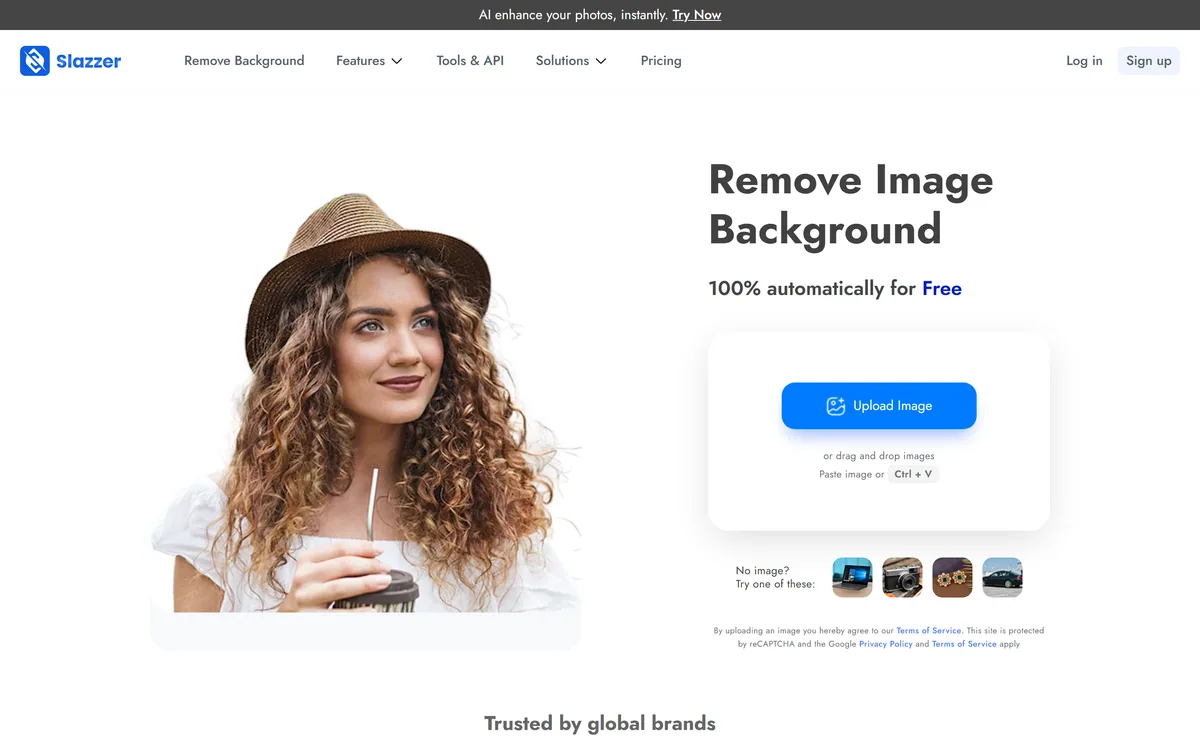
Slazzer is an AI background remover built for volume: automatic cutouts for people, products, cars and more, bulk processing through desktop apps and an API, AI extras like shadows, upscaling and relighting, and cataloguing workflows for grocery, food and furniture images.
slazzer.com7 viewsAdded October 9, 20251.1M+ visitors
Background removal is now a commodity feature, so the real question is what a tool does around the cutout. Slazzer's answer is volume: it is built for teams processing large catalogues, not just the odd profile picture.
Beyond automatic cutouts, it offers desktop apps for batch processing, an API for developers, AI extras like shadows, relighting, sky replacement and upscaling, and dedicated cataloguing workflows. It competes with cutout tools like EzRemove, with a clearer focus on bulk and business use.
This review covers what Slazzer offers around the cutout, who it suits, how it prices, and where automatic removal still falls short.
Slazzer removes backgrounds automatically, with tools aimed at high-volume catalogues.
Slazzer, The Bulk-Cutout Brief
Slazzer removes backgrounds automatically: upload, and the subject is cut out in seconds, including hair and fur.
It is built for volume: desktop apps for thousands of images, an API, and on-premise options.
Catalogue workflows set it apart: grocery, food and furniture cataloguing, plus shadows, relighting and upscaling.
Free cutouts have limits: high resolution and bulk use sit on paid plans, and hard edges still need checking.
Automatic Background Removal With A Catalog Workflow
Slazzer detects the subject in a photo and returns a clean cutout in seconds, aiming to handle the hard parts, hair, fur and complex edges, automatically. For a single image that is a free, quick job; for a business it is the first step in a pipeline.
What makes Slazzer distinctive is how much of that pipeline it covers. It offers dedicated cataloguing workflows for grocery, food and furniture images, and solutions pitched at ecommerce, photography, news, advertising and car dealerships, all of which process images at scale.
Its volume tooling backs that up: desktop apps that drag and drop thousands of images, an API for developers, and on-premise deployment for organisations that cannot send images to the cloud.
The honest framing is that cutout quality is broadly comparable among good removers, so Slazzer's real value is in throughput and workflow. As with any automatic tool, fine edges and transparent subjects still need a human eye before images go live.
Cutout quality is broadly comparable among good removers, so Slazzer's real value is in throughput and workflow.
What Does Slazzer Offer Around The Cutout?
Slazzer's value sits in bulk processing and the AI extras that finish product images.
Fast Automatic Cutouts And Bulk Processing
You can paste or drop an image for an instant cutout, or use the Windows, Mac and Linux desktop apps to process thousands of images at once, with mobile apps for quick jobs on the go. That bulk path is what separates a catalogue tool from a one-off remover.
If your needs are broader image processing, enhancing, restoring and upscaling across many kinds of photo, a toolkit like VanceAI spans more of that ground; Slazzer centres on cutouts and product imagery.
AI Extras, API And Desktop For Volume
Around the cutout, Slazzer adds AI shadows, upscaling, enhancement, relighting, sky replacement, de-oldify for old photos and AI-generated backgrounds, plus an API and on-premise options for developers and enterprises.
Those extras help product shots look finished rather than just isolated. For manual control over every pixel and layer, an editor like Pixlr is the better fit; Slazzer is about doing the same steps automatically across many images.
Who Slazzer's Bulk Tools Suit, And Its Limits
Slazzer is for ecommerce sellers, marketplaces, photographers, agencies, car dealers and retailers who need consistent cutouts and product images at volume, and for developers who want background removal through an API.
It suits teams cataloguing large product ranges, such as grocery, food or furniture, and organisations that need on-premise processing for privacy or compliance.
Its limits are those of every automatic remover: very fine hair, glass, smoke and overlapping subjects can still need manual cleanup, and AI-generated backgrounds should be checked so product images stay accurate to the real item. Its testimonials are vendor-presented.
For a quick decision, estimate how many images you process a month and how many need a perfect edge. A seller listing a few dozen products may be fine with any free remover, while a retailer refreshing thousands of catalogue images, or a dealership photographing cars daily, will feel the difference that desktop batching, an API and consistent output make. The same logic applies to developers: if background removal is a step inside your own product, an API with predictable results matters more than a polished web interface.
How Slazzer Prices Its Cutouts
Slazzer offers free automatic background removal, with paid credit-based plans for higher resolution, bulk processing and API use. We do not publish prices, which change; check the site.
The value question is cost per finished image at your volume, including how many need manual touch-ups. For a seller processing hundreds of products a month, bulk tooling can easily outweigh the subscription.
Because the core cutout is free, the sensible approach is to run your hardest product photos through it, then test the desktop app or API on a real batch before choosing a plan.
Compare total cost per finished, approved image rather than the cost of a single cutout.
A Quick First Cutout With Slazzer
Because edge quality and throughput are what matter, trial Slazzer on difficult images and a real batch.
Upload a photo with hard edges, such as hair, fur or a busy background.
Zoom in on the cutout and check the edges and any stray pixels.
Try an AI shadow or background to see if the product looks finished.
Run a batch of real catalogue images through the desktop app.
Count how many images still need manual cleanup.
Pass/fail: Slazzer is worth it if bulk cutouts need little rework at your volume.
Check AI backgrounds keep products accurate to the real item.
Key features of Slazzer
Automatic background removal
Bulk desktop processing
Background-removal API
On-premise deployment
AI shadows and relighting
AI upscaling and enhancement
Catalogue workflows
Mobile apps
Pros & cons
Pros
5
Built for high-volume processing
Desktop apps for thousands of images
API and on-premise options
Useful finishing extras for product shots
Free automatic cutouts
Cons
5
Hard edges can still need cleanup
High resolution and bulk use cost extra
Cutout itself is a commodity feature
AI backgrounds need accuracy checks
Testimonials are vendor-presented
Best For
High-volume product images
Ecommerce catalogues
Batch processing
Developer APIs
On-premise image work
Slazzer Beside Other Cutout Tools
The useful comparison is with other image tools, by how they handle volume and control.
Last checked . Read from slazzer.com during this check, with the screenshot above captured at the same time.
An automatic AI background remover
Cutouts for people, products, cars, animals and graphics
Desktop apps for Windows, Mac and Linux batch processing
Android and iOS apps
AI shadows, upscaling, relighting, sky replacement and de-oldify
Grocery, food and furniture cataloguing workflows
Free automatic removal, with paid plans for volume
No prices reproduced here, in line with this site's pricing policy
Slazzer's edge is throughput and workflow rather than a unique cutout. Fine edges still need checking, and AI-generated backgrounds should keep product images accurate. Testimonials are vendor-presented.
More Background And Image Tools
A cutout studio, an image toolkit and a manual editor to weigh alongside Slazzer.
Slazzer earns 3.7 as a background remover built around volume rather than one-off cutouts: automatic removal that handles hair and complex edges, desktop apps for thousands of images, an API and on-premise options, AI extras like shadows and relighting, and dedicated cataloguing workflows. Cutout quality is broadly comparable among good tools, so its value is throughput and workflow for sellers, retailers and developers. Fine edges still need a human check, and AI backgrounds should keep product images accurate. AInexfinder Editor Score: 3.7/5.
Slazzer pricing
AInexfinder does not list plan prices or billing details. For current pricing, plans, and trials, visit the official Slazzer website.
Vendor pricing, credits, and billing policies change over time. Always confirm on the official site before you buy.
Frequently asked questions
What is Slazzer?
Slazzer is an AI background remover built for volume. It cuts out subjects automatically and adds bulk desktop processing, an API, on-premise options, AI extras like shadows and upscaling, and cataloguing workflows.
Is Slazzer free?
Automatic background removal is free to use, with paid credit-based plans for higher resolution, bulk processing and API access. We do not publish prices, which change; check the site.
Can Slazzer process images in bulk?
Yes. Its Windows, Mac and Linux desktop apps let you drag and drop thousands of images, and its API supports automated processing, which is its main advantage over one-off removers.
How good are Slazzer's cutouts?
It aims to handle hair, fur and complex edges automatically, and results are broadly comparable to other good removers. Very fine edges, glass and smoke can still need manual cleanup, so check at full zoom.
Does Slazzer have an API?
Yes, Slazzer offers an API for developers and on-premise options for enterprises, so background removal can be built into your own systems or run without sending images to the cloud.
What are Slazzer's cataloguing workflows?
Slazzer offers dedicated workflows for grocery, food and furniture cataloguing, aimed at retailers and marketplaces that need consistent product images across large ranges.
Who is Slazzer best for?
Ecommerce sellers, marketplaces, retailers, photographers, agencies, car dealers and developers who need consistent cutouts at volume. Occasional users needing a single cutout can use any free remover.
Can I add shadows or new backgrounds?
Yes. Slazzer offers AI shadows, relighting, sky replacement and AI-generated backgrounds. Check that generated backgrounds keep product images accurate to the real item.
How does Slazzer compare to EzRemove?
Both remove backgrounds automatically. EzRemove pairs free removal with a broad studio of image and video tools; Slazzer focuses more on bulk processing, APIs, on-premise options and catalogue workflows.
Can Slazzer run on my own servers?
Slazzer offers on-premise options for organisations that cannot send images to the cloud, alongside its API. Contact Slazzer for current on-premise terms and check that they fit your security and compliance requirements.
Daniel reviews AI tools the slow way — by actually using them on real projects. His reviews cover what works, what breaks, and who each tool is genuinely a good fit for.
Daniel and the AInexfinder editorial team research Slazzer using public product information, listing evidence, and (when available) hands-on checks. Scores reflect listing completeness and transparency — not paid placement.
Listings may include affiliate or sponsored placements, which are labeled when present. Editorial scores and cons are not sold. See our affiliate disclosure and review methodology.
Removal.ai is an automatic background removal service that cuts the subject out of a photo and returns it on a transparent or replaced background. It handles bulk uploads, exposes an API, ships a desktop app, and adds a light editor for text, effects and marketplace-sized presets.
krea2.org is a browser image-generation workspace that runs several third-party models side by side, including Krea 2 tiers, FLUX.2, GPT Image 2, Nano Banana and Seedream 5.0, with reference uploads, six aspect ratios and live model switching.
Pet Pic Portraits turns a pet photo into styled artwork — Royal King, Pop Art, Watercolour, Viking, Wizard and more — with an instant preview before ordering. Output is a digital download, a canvas print or framed wall art, and it includes a pet memorial option.
RetypeWords is a browser tool that replaces text that has been flattened into a PNG, JPG or WebP image. It reads the words with OCR, lets you correct what it read, then regenerates the selected area so the new wording sits in the picture rather than on top of it.
Canva AI is the Magic Studio suite built into Canva — Magic Write for copy, Dream Lab for images, Magic Edit, Expand and Eraser for photos, Magic Switch for reformatting, Magic Charts for data, and Canva Code for interactive widgets.
Pixlr is a browser-based photo editor from Pixlr Pte Ltd with two editors and a generative AI layer — Generative Fill, Expand and Transform, background and object removal, Super Scale upscaling, face swap, plus image, video, and audio generation.