Ema builds what it calls Universal AI Employees for HR, IT and finance, covering recruiting, onboarding, benefits and performance. EmaFusion combines 100+ models with automatic failover, 1,000+ prebuilt connectors reach existing systems, and the compliance list runs to eight certifications including ISO 42001.
Wispr Flow
Verified
Wispr Flow is a voice-to-text tool that types polished writing wherever your cursor is, across Mac, Windows, iPhone and Android, and now bundles an AI meeting notetaker into the same subscription.
4.4Editor Score
wisprflow.ai7 viewsAdded May 21, 202692K visitors
Voice typing has a long history of being almost good enough. The transcription was close, but you still had to clean up the filler, the false starts and the 'the the' stutters, and the editing often cost more than the typing would have.
Wispr Flow's bet is that the cleanup is the product. You talk the way you think, and it hands back the email, message or note you meant to write — filler gone, repetition fixed, tone matched to the app you are in. It runs wherever your cursor sits, from Gmail to a code editor, and syncs across Mac, Windows, iPhone and Android.
This review covers how the dictation differs from built-in voice typing, what the new Notetaker adds, where your voice data actually goes, how the plans are shaped, and who will genuinely feel it pay off.
The Wispr Flow Picture In Four Lines
- Wispr Flow is a voice-to-text tool that types clean, finished writing wherever your cursor is, in any app, with no plugins.
- It edits as you speak, removing filler, fixing repetition and matching a tone you set per app, rather than transcribing you word for word.
- It now includes a Notetaker for meeting notes in the same subscription, alongside dictation across Mac, Windows, iPhone and Android.
- Privacy is a selling point: data is not sold, you choose whether it trains the model, and it holds SOC 2 Type II, HIPAA and ISO 27001.
Wispr Flow Specs Every Dictation User Should Know
| What it is | Voice-to-text dictation plus an AI meeting notetaker |
|---|---|
| Platforms | Mac, Windows, iPhone, Android |
| Works in | Any app with a text field — no plugins required |
| Languages | 100+, auto-detected |
| Speed claim | Around 4x faster than typing, roughly 220 wpm |
| Personalisation | Learns your vocabulary, snippets, and per-app tone |
| Added product | Wispr Flow Notetaker, included in the subscription |
| Security | SOC 2 Type II, HIPAA and ISO 27001 certified; data not sold |
| Account type | Subscription with a free tier |
Dictation That Cleans Up Filler As You Speak
The core product does the opposite job from a voice generator like WellSaid, which turns written text into speech. Wispr Flow turns speech into written text — and crucially, into text you would actually send.
Where ordinary voice typing captures every 'umm', repeated word and self-correction, Flow identifies filler, repetition and corrections and resolves them, so a chaotic spoken paragraph lands as a clean one. It also adapts to how you write in different apps, keeping a casual tone in chat and a formal one in email, which is the kind of judgement that usually forces a manual edit.
It types wherever your cursor is with no integrations to set up, which is the quiet reason it sticks: there is no separate window to paste out of, no app it does not work in. If you can type there, you can talk there.
The transcription was never the hard part. The cleanup was, and that is exactly the part Wispr Flow treats as the product.
What Does Wispr Flow Notetaker Add To The Subscription?
The newer half of the product is Notetaker, an AI meeting-notes tool now bundled into the same subscription as dictation. It is Wispr's move from personal writing into shared output.
Flow Learns Your Vocabulary And Snippets
Flow learns the words and names specific to you — client names, company jargon, product spellings — either automatically or by your adding them, so it stops mangling the terms that matter. You can also save snippets for text you type constantly, like a bio or an address, and expand them by speaking a shortcut.
This is where a general dictation tool and a thought-shaper diverge. A tool like AudioPen is built to turn one spoken monologue into a clean note; Flow aims to do that cleanup live, everywhere you already type, which is a broader and harder target.
One Subscription For Dictation And Meetings
Notetaker produces meeting notes accurate enough to act on, and both products now sit under one plan rather than being sold separately. For anyone who already dictates all day, getting meeting capture in the same subscription is a real convenience.
It is not a dedicated meeting platform, though. If recording, speaker-labelled transcripts and a searchable meeting archive are your central need, a purpose-built transcriber like Otter.ai still goes deeper on that specific job.
Where Your Voice Data Goes, And The Certifications Behind It
Voice tools ask for an unusually intimate stream of data — everything you say into your devices — so the privacy position is not a footnote. Wispr states that your data is never sold and that you choose whether it is used to help improve Flow.
It also publishes the certifications procurement teams look for: SOC 2 Type II, HIPAA and ISO 27001. HIPAA in particular signals that regulated users have been considered, which matters if you work anywhere near health data.
As with any cloud voice tool, the sensible posture is to read the current data-controls page yourself and set the training preference the way you want it before you dictate anything confidential. The controls are there; use them deliberately.
What Wispr Flow Costs Across Dictation And Notetaker
Wispr Flow runs on a subscription with a free tier, and the notable recent change is that dictation and Notetaker are now included together rather than priced as two products. There is no perpetual-licence option; this is ongoing software.
AInexfinder does not publish plan prices because they shift and the vendor states them best. What to weigh is usage: if you will dictate across your whole day and also want meeting notes, one bundled subscription is straightforward value. If you would only ever use one half, judge the plan against that narrower use.
Check the free tier's limits before deciding — for many people the free version is enough to prove whether the cleanup actually changes how they work.
A Hands-On Way To Trial Wispr Flow In Your Own Apps
Dictation lives or dies on your own voice, accent and environment, so test it where you actually work rather than trusting a demo.
- Install Flow on your main device and dictate a real email in the app you normally send from, start to finish.
- Deliberately ramble — backtrack, repeat yourself, add filler — and check how clean the output lands without manual editing.
- Add three of your own tricky words or names to the vocabulary and confirm Flow stops getting them wrong.
- Switch between a casual app and a formal one and see whether the tone genuinely adapts.
- If meetings matter, run Notetaker on one real call and judge whether the notes are action-ready.
- Pass/fail: Flow is worth paying for only if, across these, you edit less than you would have typed — if you are still heavily correcting, it is not your tool.
- Finally, open the data-controls page and set your training preference before you rely on it for anything sensitive.
Should You Move To Wispr Flow?
People Who Will Feel Wispr Flow Pay Off
- Anyone who writes a high volume of email, messages and notes across many apps
- People who think faster than they type, or find typing slow or tiring
- Multilingual users who switch languages mid-flow
- Professionals who want meeting notes in the same tool as dictation
- Teams in regulated settings who need the published security certifications
People Who Can Skip Wispr Flow For Now
- Occasional typists for whom built-in voice input is already fine
- People who need a dedicated meeting platform with deep transcript archives
- Anyone unwilling to send voice data to a cloud service at all
- Users whose work is mostly code or structured input rather than prose
- Those who have not tested it on their own accent and environment yet
Key features of Wispr Flow
Voice-to-text dictation that types clean writing in any app
Live removal of filler, repetition and self-corrections
Per-app tone adaptation, from casual chat to formal email
100+ languages with automatic detection
Vocabulary learning for names and jargon, plus saved snippets
Wispr Flow Notetaker for meeting notes in the same subscription
Cross-device sync across Mac, Windows, iPhone and Android
Published SOC 2 Type II, HIPAA and ISO 27001 certifications
Pros & cons
Pros
5- Delivers text you would actually send, not a raw transcript to edit
- Works everywhere your cursor is, with no integrations to configure
- Handles multiple languages and switches between them naturally
- Bundles meeting notes with dictation in one subscription
- Clear, certified privacy posture with user control over training data
Cons
5- Notetaker is not a substitute for a dedicated meeting platform
- Results vary with accent, speaking style and background noise
- Requires sending voice data to a cloud service
- Less useful for code or structured input than for prose
- Value depends on dictating enough to justify a subscription
Best For
- High-volume writers working across many apps
- People who think faster than they type
- Multilingual users who switch languages mid-sentence
- Professionals who want dictation and meeting notes together
- Regulated teams who need the published certifications
Wispr Flow Set Beside Other Voice-To-Text Tools
Voice tools split by whether they shape one note, capture meetings, or type everywhere you work.
| Tool | Main job | Scope | Notable strength |
|---|---|---|---|
| Wispr Flow | Dictation that types clean text anywhere | Any app, all devices, plus a notetaker | Live cleanup and per-app tone |
| AudioPen | Turns a spoken ramble into a polished note | Its own app and keyboard | Rewrite styles and length control |
| Otter.ai | Meeting transcription and summaries | Meetings and recordings | Speaker-labelled searchable archive |
How This Wispr Flow Review Was Verified
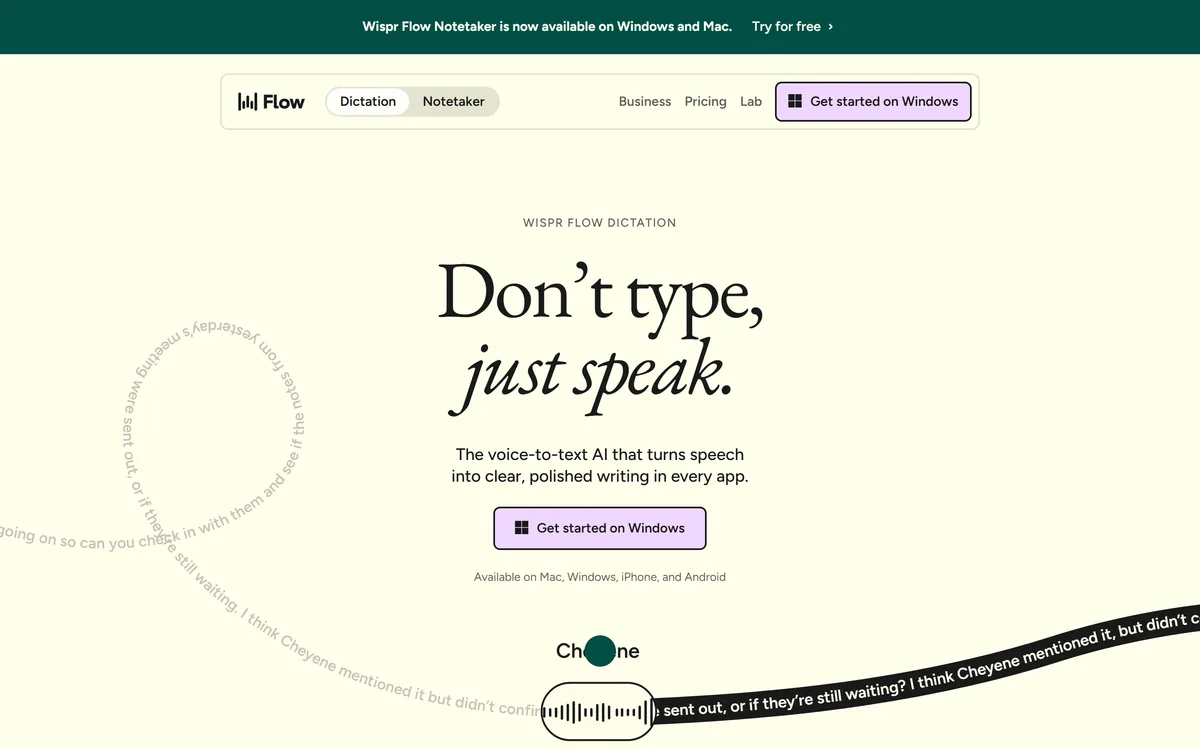
Last checked . Read from wisprflow.ai during this check, with the screenshot above captured at the same time.
- Voice-to-text dictation that types into any app with no plugins, across Mac, Windows, iPhone and Android
- Live editing of filler, repetition and corrections, with per-app tone adaptation
- Support for 100+ languages with automatic detection
- Wispr Flow Notetaker for meeting notes, included in the same subscription
- Vocabulary learning and saved snippets described as features
- Stated privacy position: data not sold, user choice over model-improvement use
- SOC 2 Type II, HIPAA and ISO 27001 certifications claimed on the site
- Terms, privacy and data-controls pages present in the footer
- No plan prices reproduced here, in line with this site's pricing policy
Speed figures such as 4x faster and 220 wpm are the vendor's own claims; real-world results depend on your voice, accent and environment.
Other Ways To Get From Voice To Text
A note-shaper, a meeting transcriber, and the inverse job of turning text back into speech.
Editor's Verdict
4.4/5Wispr Flow scores 4.4 because it solves the real problem of voice typing — the cleanup, not the transcription — works in every app, and backs it with serious privacy certifications; the half-point held back reflects a Notetaker that is handy but not yet a match for a dedicated meeting platform. AInexfinder Editor Score: 4.4/5.
Wispr Flow pricing
AInexfinder does not list plan prices or billing details. For current pricing, plans, and trials, visit the official Wispr Flow website.
Visit official website for pricingVendor pricing, credits, and billing policies change over time. Always confirm on the official site before you buy.
Frequently asked questions
What is Wispr Flow and what does it do?
Wispr Flow is a voice-to-text tool that types polished writing wherever your cursor is, in any app, across Mac, Windows, iPhone and Android. It edits filler and repetition as you speak and now includes an AI meeting notetaker in the same subscription.
How is Wispr Flow different from Siri or built-in voice typing?
Built-in voice typing transcribes you literally, including the filler and false starts. Wispr Flow resolves those as you speak and adapts tone to the app you are in, so the output reads like writing you meant to send rather than a raw transcript you have to clean up.
Does Wispr Flow work in other languages and with an accent?
It supports more than 100 languages with automatic detection and is built to switch between them naturally. Accent handling is generally strong but varies by voice and environment, so the reliable test is dictating in your own voice before committing.
Is my voice data private with Wispr Flow?
Wispr states that your data is never sold and that you choose whether it is used to improve Flow, and it publishes SOC 2 Type II, HIPAA and ISO 27001 certifications. Set your training preference on the data-controls page before dictating anything confidential.
What does Wispr Flow Notetaker add?
Notetaker produces meeting notes accurate enough to act on, and it is now bundled with dictation in one subscription. It is convenient for people who already dictate, but it is not a full meeting platform with deep transcript archives.
Is Wispr Flow free?
There is a free tier, which for many people is enough to judge whether the cleanup changes how they work. Heavier use and the full feature set sit behind a paid subscription that now covers both dictation and Notetaker.
How does Wispr Flow compare with AudioPen?
AudioPen is built to turn one spoken monologue into a clean, restyled note. Wispr Flow does its cleanup live and everywhere you type, which is broader. If you mainly capture standalone thoughts, AudioPen is tighter; if you want dictation across every app, Flow fits better.
How does Wispr Flow compare with Otter.ai for meetings?
Otter.ai is a dedicated meeting transcriber with speaker labels and a searchable archive. Wispr Flow's Notetaker is good and bundled with dictation, but if meeting capture is your central need, Otter.ai still goes deeper on that specific job.
Do I need a special microphone for Wispr Flow?
No. It works with the microphone already in your laptop or phone. A quieter environment and a decent built-in mic improve accuracy, but no extra hardware is required to use it well.
Is Wispr Flow worth it for a small team?
Often yes, especially where people write a lot across many apps and want meeting notes in the same tool. The deciding factor is volume: if the team dictates enough to edit less than it would type, the subscription pays for itself.
Reviews
Log in to write a review.
User Reviews
No reviews yet. Be the first to share your experience with Wispr Flow.
Reviewed by Daniel Reed
Assigned reviewer
Daniel ReedSenior AI Tools Reviewer
Daniel reviews AI tools the slow way — by actually using them on real projects. His reviews cover what works, what breaks, and who each tool is genuinely a good fit for.
Hands-on reviewsProduct testingAI software
Daniel and the AInexfinder editorial team research Wispr Flow using public product information, listing evidence, and (when available) hands-on checks. Scores reflect listing completeness and transparency — not paid placement.
- Last verified
- Methodology
- How we review AI tools
- Sources used
- wisprflow.ai
- AInexfinder listing fields (features, pros/cons, description)
- Public vendor pages when available
- Editorial policy
- Listings may include affiliate or sponsored placements, which are labeled when present. Editorial scores and cons are not sold. See our affiliate disclosure and review methodology.
Related tools
Saner.AI is an AI personal assistant that consolidates notes, tasks, emails and documents into one workspace. Its Skai assistant turns emails and brain dumps into scheduled tasks, and it is explicitly designed around ADHD, with a co-founder who has it.
FreemiumProductivity & Automation
Simular Inc. builds Sai, an AI agent that operates a private cloud-based virtual desktop — clicking, typing and using interfaces the way a person does, while also able to call APIs, use a terminal and write code. Its research line is the Agent S series.
AI-powered CRM for relationship-driven teams Category: Productivity & Automation.

axess is a free AI job-search tool that scans LinkedIn, Indeed and Glassdoor daily, scores each role against your profile on both relevance and likelihood, researches the employer, and prepares a tailored CV and cover letter for the matches worth pursuing.

Otter.ai transcribes meetings live, writes summaries and action items, and organises everything into searchable Channels — with OtterPilot joining Zoom, Teams, and Google Meet, plus role-specific agents for sales, recruiting, and SDR work.
FreemiumProductivity & Automation
Explore More
Embed this listing on your site
Featured on AInexfinder