WriteMail.ai writes and replies to emails from a few key points, with controls for length, style, tone and mood across 30+ languages. It integrates directly into Gmail via a Chrome extension, and states that generated messages never touch its servers.
writemail.ai8 viewsAdded March 26, 202624K visitors
Email is the writing task nobody wants and everybody has. It is high-volume, low-stakes individually, and consumes an amount of a working week that is genuinely difficult to justify.
It is also the task where generated text is easiest to spot. A recipient reads dozens of messages a day, has an unconscious model of what a real one sounds like, and notices when something arrives too balanced, too complete and too pleased with itself.
WriteMail.ai's more interesting contribution is not solving that. It is the privacy position — a claim that generated messages never reach its servers, which for business correspondence is a rarer thing than an email generator.
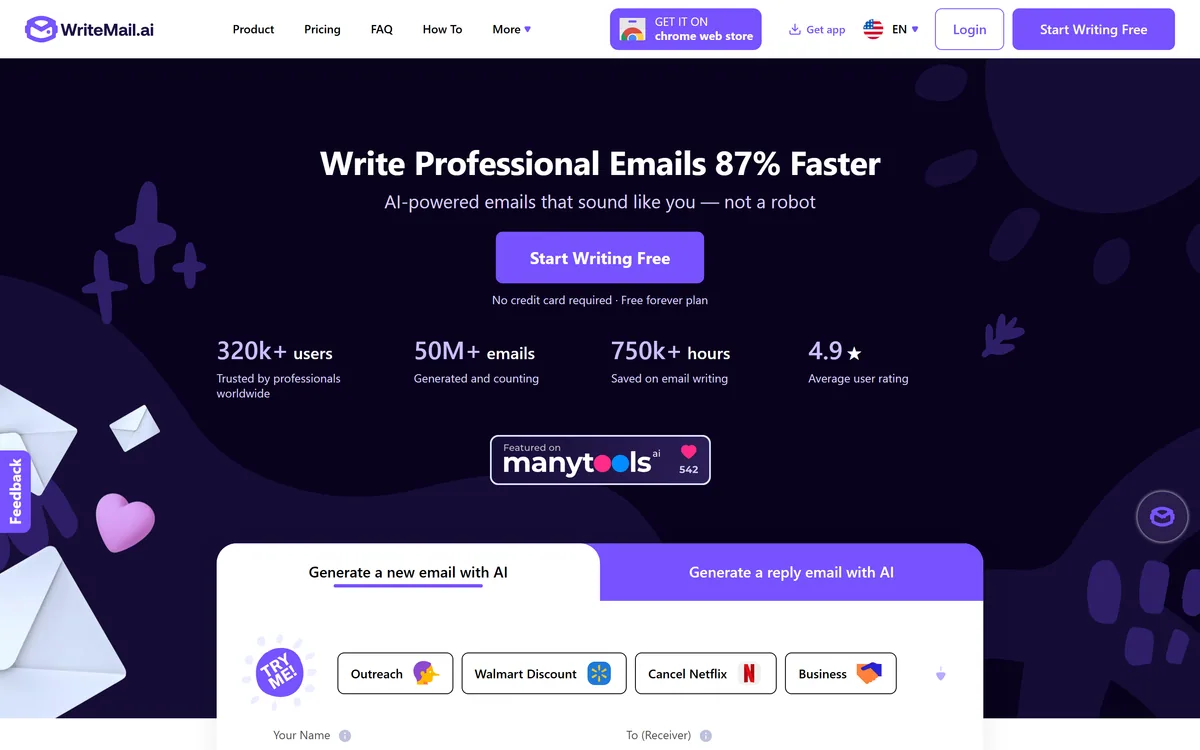
WriteMail.ai's homepage, captured 9 September 2026, showing the email generator with its tone, style and length controls.
WriteMail.ai: The Inbox Case
Messages never touch the server, per the site, with personalised options stored in a browser cookie rather than a database.
Separate controls for length, style, tone and mood, rather than one setting doing all four badly.
30+ languages, which is where most of the practical value sits.
Works inside Gmail through a Chrome extension, so there is no tab to switch to.
Templates for common situations — outreach, job applications, proposals, invitations, newsletters and cancellations.
WriteMail.ai: Features And Privacy
Product type
AI email writing and reply generator
Generation
New emails and replies from key points
Controls
Length, style, tone, mood and emoji, each set independently
Languages
30+
Templates
Outreach, business, marketing, job application, proposal, event invitation, newsletter and cancellation among others
Gmail integration
Works inside Gmail via a Chrome extension
Mail Assistant
Version 2, available on paid plans, including a signature creator prompt
Data handling
Generated messages stated never to touch the server; personalised options stored in a browser cookie rather than a database
Entry
Free forever plan, no credit card required
Stated reach
320k+ users, 50M+ emails generated, 750k+ hours saved, 4.9 average user rating
Distribution
Chrome Web Store, plus an app
Does Email Actually Need An AI Writer?
The honest answer is that it depends entirely on which emails, and the distinction is sharper than most tools admit.
For the emails where the words barely matter — a scheduling confirmation, a routine follow-up, a polite decline, an acknowledgement — generation is straightforwardly useful. Nobody reads those carefully, the format is fixed, and staring at a blank compose window for ten minutes is pure waste.
For the emails where the words are the whole point — a difficult conversation, a first approach to someone you want to impress, an apology, anything with a relationship attached — generated text is a liability. Those are precisely the messages where a recipient reads closely, and closely is where generated prose gives itself away.
The tell is not vocabulary. It is completeness: generated email answers every point, acknowledges the counter-argument, closes warmly and reads as though nobody was in a hurry — which is not how a person under pressure writes.
The workable division is that generation drafts the routine ones and you write the ones that matter. That is not a limitation of this product; it is the shape of the task, and any tool claiming otherwise is overselling.
The alternative to generating a routine email is speaking it. Willow Voice puts your own words in the compose window, which sidesteps the detection problem entirely.
Generated email gives itself away through completeness. It answers every point and closes warmly, which is not how a person under pressure writes.
Four Controls Beat One Voice Slider
WriteMail.ai separates length, style, tone, mood and emoji into distinct settings, and that separation is better design than the single brand-voice control most writing tools offer.
The reason is that those four things vary independently in real correspondence. A message can be short and warm, long and blunt, formal and friendly, or brief and apologetic — and a single slider between professional and casual cannot express any of those combinations.
Tone and mood in particular are different axes that get conflated constantly. Tone is how you are speaking — formal, direct, deferential. Mood is what you are conveying — enthusiasm, regret, urgency. A message can be formal and apologetic, or casual and firm.
Getting those right matters more in email than almost anywhere else, because email has no facial expression or timing to carry the meaning. A message that lands as colder than intended is a real and common failure, and it is usually a tone problem rather than a wording one.
The emoji control is a small thing that reveals attention. Whether emoji belong in an email is entirely contextual — normal in one industry, disqualifying in another — and making it a setting rather than a default is the right call.
Never Touching The Server Is An Unusual Design
WriteMail.ai states that it values user privacy and takes steps to ensure generated messages never touch its server, with personalised options stored in a browser cookie rather than in a database.
That claim deserves attention because of what email actually contains. Business correspondence carries pricing, negotiations, personnel matters, customer complaints and the occasional legally significant sentence — and a tool that drafts it is a tool with visibility into all of it.
Most competitors process this server-side, which is an ordinary arrangement governed by a privacy policy that can change. Stating that content does not reach the server is a structurally stronger position than promising to look after it.
The corollary is worth understanding: options stored in a cookie live in that browser only. Clear your cookies and your settings are gone, and they do not follow you to another machine. That is the trade a local-storage design makes, and it is a reasonable one.
It is also a claim worth verifying rather than accepting, because it is unusual enough to be a differentiator. The privacy policy is the place to read it in full, and anyone routing genuinely sensitive correspondence through any writing tool should do that before the first message rather than after.
That position is unusually strong for the category. An outbound platform like Instantly has to hold your messages server-side, because sending them is the product.
Generate the routine emails and write the ones that carry a relationship.
Set tone and mood separately — they are different axes and both matter.
Read the privacy policy in full if the claim is why you are choosing this.
Expect settings to live in one browser, since cookies do not travel.
Check output in your second language with a native speaker before relying on it.
Thirty Languages And The Reply Problem
WriteMail.ai supports 30+ languages with what it describes as native-quality output, and this is where the practical value sits rather than in the speed claim.
Writing a professional email in a second language is disproportionately hard. You can read it fluently, you can speak it adequately, and writing something that lands as competent rather than awkward requires a register you may never have learned.
That gap has real consequences. A message that reads as slightly off in a business context affects how the sender is perceived, and people avoid writing in their second language for exactly that reason — which shrinks the set of people they can approach directly.
Generation genuinely helps here in a way it does not in your first language, because the baseline is not a fluent draft but a message you would have laboured over or not sent.
The caveat is that native-quality is a claim rather than a measurement, and quality varies by language for the usual reason. Have a native speaker read the first few in any language you will rely on, particularly for anything with commercial or legal weight.
For marketing copy beyond the inbox the comparison set changes again — generators such as StoryLab.ai cover formats an email tool has no reason to.
Writing An Email Worth Replying To
The measure of an email is whether it gets a reply, and generated messages fail on that more often than they fail on quality.
The reason is length and specificity, which are things a tool will not fix for you.
Write down the one thing you want the recipient to do before generating anything.
Give the tool the specific detail only you have — a name, a number, something from your last conversation.
Set the length shorter than feels comfortable, since generated email runs long and long email gets skipped.
Cut the opening pleasantry, which is where generated messages waste the attention they were given.
Read it aloud before sending — anything you would not say out loud does not belong in the message.
Reserve the emails that matter for your own words, and use the tool for the ones that do not.
Key features of WriteMail.ai
Email and reply generation from a few key points
Independent controls for length, style, tone, mood and emoji
30+ languages for composing and replying
Templates covering outreach, applications, proposals, invitations and cancellations
Gmail integration through a Chrome extension
Mail Assistant with a signature creator on paid plans
A free forever plan requiring no card
Pros & cons
Pros
6
States that generated messages never touch the server, which is unusual in this category
Options stored in a browser cookie rather than a vendor database
Four separate controls express combinations one voice slider cannot
Separating tone from mood matters in a medium with no facial expression
30+ languages address the genuinely hard problem of professional writing in a second language
Working inside Gmail removes the tab switch that kills adoption
Cons
6
Email is where generated prose is most easily detected, through completeness rather than vocabulary
Cookie storage means settings do not follow you to another browser or device
The underlying model and where it runs are not disclosed
The 87% faster figure has no stated basis
No operating company, location or pricing detail published
Gmail-centric, so the integration advantage disappears elsewhere
Best For
People with high volumes of routine correspondence
Professionals writing business email in a second language
You write a high volume of routine email where the words do not much matter.
You correspond professionally in a language that is not your first.
The privacy claim matters because your email carries commercially sensitive content.
You live in Gmail and would not use a tool that needed another tab.
You want tone and mood controlled separately rather than by one slider.
Draft it yourself when
The email carries a relationship — an apology, a difficult conversation, a first approach.
You would send generated messages without reading them.
You need settings to follow you across devices, which cookie storage prevents.
You are not on Gmail, where the integration advantage disappears.
You need team-wide brand voice controls, which this does not offer.
WriteMail.ai: Verifying The Numbers
Last checked . Read from writemail.ai in a browser session, with the screenshot above captured alongside.
Positioned as AI-powered email writing that sounds like you rather than a robot
Generation confirmed for both new emails and replies
Controls confirmed for length, style, tone, mood and emoji, each set separately
30+ languages stated for composing and replying
Templates confirmed including outreach, business, marketing, job application, proposal, event invitation, newsletter and cancellation
Gmail integration confirmed, described as working inside the inbox without switching tabs
Mail Assistant confirmed as a version 2 feature available on paid plans
Privacy statement confirmed on the site: generated messages never touch the server, with personalised options stored in a browser cookie rather than in a database
A free forever plan confirmed, with no credit card required
Stated figures on the site: 320k+ users, 50M+ emails generated, 750k+ hours saved, 4.9 average user rating, and emails written 87% faster
Distribution confirmed via the Chrome Web Store, with an app also offered
What we could not confirm: the operating company's legal name or location; pricing tiers and what separates them; which underlying model generates the text and where it runs, which matters given the never-touches-the-server claim; the basis for the 87% faster figure; where the 4.9 rating is hosted; how many of the 320k+ users are active; and whether output quality varies by language. We did not use the product, so nothing here reflects tested output.
Other Email And Writing Tools
Composing, dictating and sending at volume are three different products.
Willow Voice — dictating an email rather than generating one
Instantly — cold outreach at volume, which is a different discipline
Jasper AI — when brand voice across a team is the requirement
PitchBud — for press outreach specifically, sent from your own inbox
Editor's Verdict
3.7/5
The privacy claim is what distinguishes this from a hundred similar tools. WriteMail.ai states that generated messages never touch its server and that personalised options live in a browser cookie rather than a database — which, for a tool you would point at business correspondence, is a materially stronger position than the category norm. The separate tone, style, mood and length controls are also better designed than a single voice slider. It scores mid-table because email is the writing task where generic output is most easily detected, and 30+ languages is where the real value sits rather than in the speed claim. AInexfinder Editor Score: 3.7/5.
WriteMail.ai pricing
AInexfinder does not list plan prices or billing details. For current pricing, plans, and trials, visit the official WriteMail.ai website.
Vendor pricing, credits, and billing policies change over time. Always confirm on the official site before you buy.
Frequently asked questions
What is WriteMail.ai?
WriteMail.ai generates emails and replies from a few key points, with independent controls for length, style, tone, mood and emoji across 30+ languages. It works inside Gmail through a Chrome extension, offers templates for common situations, and states that generated messages never touch its servers.
Which emails should I generate and which should I write?
Generate the ones where the words barely matter — scheduling, routine follow-ups, polite declines, acknowledgements. Write the ones where the words are the point: a difficult conversation, a first approach, an apology, anything with a relationship attached. Those are precisely where a recipient reads closely.
Can people tell an email was AI-generated?
Often, and the tell is not vocabulary. It is completeness — generated email answers every point, acknowledges the counter-argument and closes warmly, which is not how a person under time pressure writes. A recipient reading dozens of messages a day has an unconscious model of what a real one sounds like.
What does never touching the server mean?
The site states that generated messages do not reach its servers and that personalised options are stored in a browser cookie rather than a database. For a tool drafting business correspondence — pricing, negotiations, personnel matters — that is structurally stronger than a promise to look after content held server-side.
What is the trade-off with cookie storage?
Your settings live in that browser only. Clear your cookies and they are gone, and they do not follow you to another machine or another browser. That is the ordinary cost of a local-storage design, and it is a reasonable one if the reason you chose the tool is that content stays local.
Why does separating tone from mood matter?
Because they vary independently. Tone is how you are speaking — formal, direct, deferential. Mood is what you are conveying — enthusiasm, regret, urgency. A message can be formal and apologetic, or casual and firm, and a single slider between professional and casual cannot express either.
Is the 30+ language support useful?
It is where most of the practical value sits. Writing professional email in a second language is disproportionately hard — you may read fluently and still lack the register that makes a message land as competent. Generation helps there in a way it does not in your first language, where the baseline is already a fluent draft.
Should I trust the 87% faster claim?
Treat it as marketing. No basis is stated for it, and the honest question is not how fast you write an email but whether the email gets a reply. A tool that halves your writing time and produces messages people skip has not saved you anything.
How do I make a generated email actually get replied to?
Set the length shorter than feels comfortable, since generated email runs long and long email gets skipped. Cut the opening pleasantry. Give the tool a specific detail only you have — a name, a number, something from your last conversation — because specificity is what separates a message worth answering from one worth ignoring.
Does it work outside Gmail?
The Gmail integration is what the site leads with, delivered through a Chrome extension, and an app is also offered. For anyone on Outlook or another client the integration advantage — no tab switching — is where the product's convenience mostly lives, so it is worth confirming coverage before relying on it.
Daniel reviews AI tools the slow way — by actually using them on real projects. His reviews cover what works, what breaks, and who each tool is genuinely a good fit for.
Daniel and the AInexfinder editorial team research WriteMail.ai using public product information, listing evidence, and (when available) hands-on checks. Scores reflect listing completeness and transparency — not paid placement.
Listings may include affiliate or sponsored placements, which are labeled when present. Editorial scores and cons are not sold. See our affiliate disclosure and review methodology.
MailMaestro is an AI email assistant from Maestro Labs that drafts replies, summarizes threads and triages your inbox directly inside Outlook and Gmail, offering three drafts per request in your tone across 20+ languages, with enterprise-grade security.
Copy.ai has become an AI-native go-to-market platform: workflows and agents that run prospecting, lead processing, deal coaching, ABM, and CRM enrichment across Salesforce, HubSpot, Gong, Outreach, and 2,000+ integrations.
Writesonic has become an AI search growth platform — tracking whether your brand appears across 10 AI platforms, running optimisation and citation work through an Action Center, and reporting results against traffic and revenue.
Talefy, from AIcberg Labs, is an interactive AI storytelling platform. Readers make choices that change the plot, and creators build characters, worlds and branching narratives across fantasy, sci-fi, romance, horror and comedy.
Postiv packages LinkedIn strategy, drafting, carousel design, scheduling, analytics and comment replies into a single weekly ritual run by an assistant called Bob, working through the official LinkedIn API rather than a browser extension.
Type.ai is an AI editor built for long-form creative writing, with a draft and AI assistant deeply integrated, story notes for characters and settings, custom style rules, offline mode and export to DOCX, PDF or narrated audio.