Handwriting has a well-documented advantage that no amount of typing speed overcomes: people remember more of what they wrote by hand. The slowness is the point — you cannot transcribe verbatim, so you have to decide what matters.
It also has a fatal flaw as a system. A notebook is unsearchable. Something you wrote in March exists only if you remember which notebook, roughly when, and are willing to leaf through it.
That trade — better encoding, worse retrieval — kept handwritten notes a personal habit rather than a working system. Goodnotes' central feature removes the second half of it, and everything else the product does is arranged around that.
What Does Goodnotes Give You?
- Handwriting that becomes searchable — the single feature that makes digital handwritten notes worth keeping.
- Search spans typed text, handwriting and sketches together, in one query rather than three separate places.
- Six platforms: iPad, iPhone, Mac, Windows, Android and web, which is unusual for an app that began as iPad-only.
- PDF annotation with an infinite canvas and real-time collaboration on shared whiteboards.
- AI features on top: summarisation, mind maps from notes, turning meeting minutes into a project plan, and audio transcription.
Searchable Handwriting Is The Whole Product
Goodnotes converts handwriting to text and searches across typed text, handwriting and sketches together.
The unified part is what matters more than the recognition. A note-taking system where handwriting lives in one silo and typed text in another has solved nothing — you still have to remember where you wrote something before you can look for it.
One query across everything means the archive becomes usable rather than merely stored. A meeting note from eighteen months ago is retrievable by a word you remember, which is the only realistic way anyone finds anything.
The realistic expectation on accuracy needs setting, and no figure is published. Handwriting recognition quality varies enormously with the individual — neat print recognises close to perfectly, hurried cursive considerably less well, and a script with idiosyncratic letterforms may fail badly. This is not a product where a review can tell you how well it will work; it depends on your handwriting.
The practical consequence is that search works probabilistically rather than exactly. If a word you searched for does not appear, try a synonym or a nearby word rather than concluding the note is not there — the note exists, the recognition may have differed.
Searchable handwriting closes the gap that always made paper lossy. Typed workspaces like Notion AI have had search since the beginning; handwriting was the format that did not.
A notebook you cannot search is a notebook you write into and never read. Retrieval, not capture, is what makes notes a system.
Goodnotes runs on iPad, iPhone, Mac, Windows, Android and web, which is a substantial change from its origins as an iPad application.
That matters because the historical objection to handwriting apps was lock-in to one device. Notes taken on an iPad that could not be read on a work laptop were a personal archive rather than a working one, and plenty of people declined to commit their thinking to a format they could only reach in one place.
Cross-platform availability changes the calculation. You can write on a tablet with a stylus, which is where handwriting belongs, and read or search on whatever machine you have at work.
The honest expectation is that these are not equal experiences. Handwriting requires a good stylus and a responsive screen, and the iPad remains where that is best. Treat the other platforms as reading, searching and typing surfaces rather than as equivalent writing environments.
How Much Should You Trust AI Summarisation Of Your Own Notes?
Goodnotes offers summarisation, mind map generation from notes, turning meeting minutes into a project plan, and audio transcription alongside notes.
These are genuinely useful and worth a specific caution, because summarising your own notes is different from summarising an article.
Notes are already a summary. You wrote down what mattered and left out what did not, and that selection is the intellectual work. Summarising a summary compresses something already compressed, and what gets dropped in the second pass is frequently the specific detail you kept deliberately — the number, the name, the caveat.
Where these features are strongest is transformation rather than compression. Turning meeting minutes into a project plan changes the shape of information rather than reducing it, and extracting actions from a page of scrawl is exactly the tedious step people skip.
Mind maps sit in the same category: a different arrangement of what you wrote, which can genuinely surface a relationship you had not noticed.
The reasonable discipline is to use the derived output as a working document and keep the original note as the record. When the summary and your handwriting disagree, your handwriting is what you actually thought.
Summarisation carries the same caveat wherever it appears. Meeting tools such as Otter.ai produce confident summaries of conversations, and a summary is a starting point rather than a record.
- Keep the original note as the record; a summary is a working document, not a replacement.
- Use transformation features — plans, mind maps — more readily than compression ones.
- Check that numbers, names and dates survived any summarisation, since those are what get dropped.
- Review audio transcription for names and technical terms, where it consistently fails.
- Search with synonyms if a word does not appear, since recognition is probabilistic rather than exact.
PDF Annotation Is The Underrated Use Case
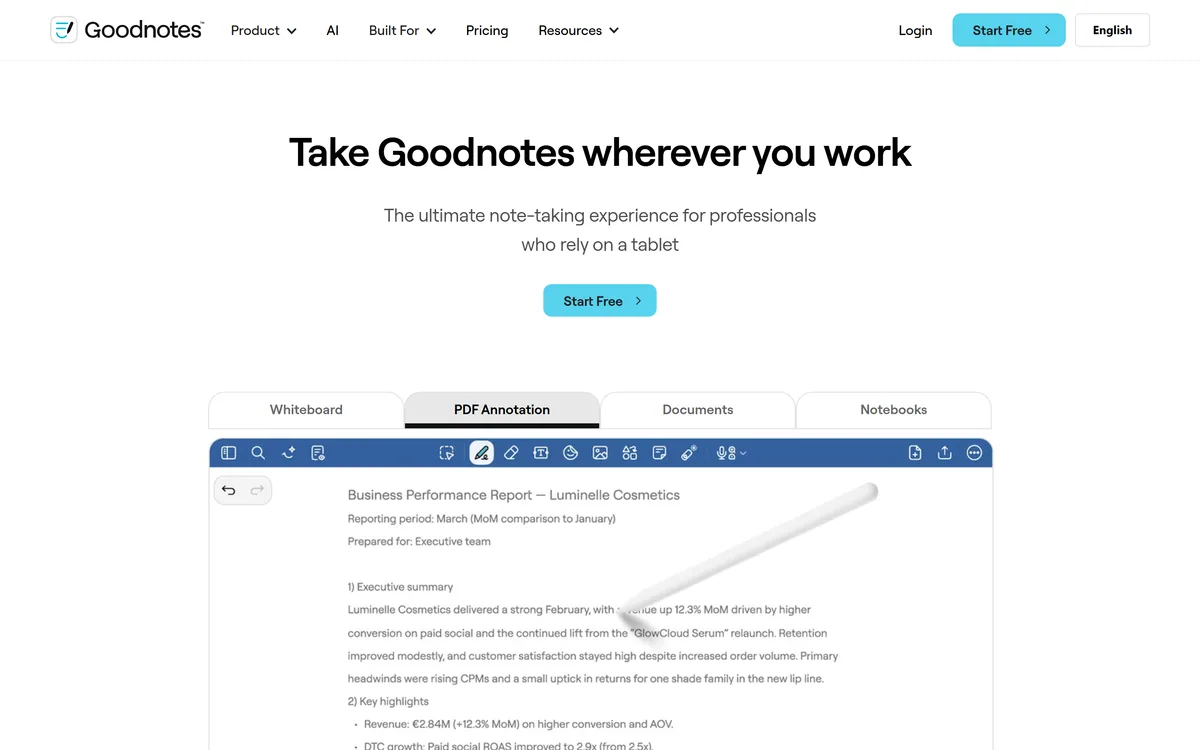
Alongside note-taking, Goodnotes annotates PDFs and offers an infinite canvas with real-time collaboration.
PDF annotation is arguably the strongest practical case for the whole category, and it serves a very specific set of people. Students marking up papers and textbooks. Lawyers annotating contracts. Researchers working through publications. Anyone who reads professionally and thinks in the margins.
The alternative for that work is printing, which produces annotations that exist on paper and nowhere else, or reading on a screen without marking anything, which for most people means retaining considerably less.
Handwritten annotation on a tablet gets both: the cognitive benefit of marking up by hand and a searchable record afterwards. For someone who reads a hundred papers a year, that is a genuinely different working method rather than a convenience.
The infinite canvas and collaboration features point at a second audience — teams whiteboarding together — which is a different product from personal note-taking and worth evaluating separately if that is what you need.
For reflective writing rather than reference notes, a journalling tool like Mindsera is built around a different purpose, and a workspace such as Cleve around a third.
Testing It On Your Own Handwriting
This is a product where a review genuinely cannot tell you how well it will work, because the answer depends on your script. Test it before committing an archive.
The bar is step two. If recognition fails on your natural handwriting, every downstream feature fails with it.
- Write a full page in your natural hand — the way you write when taking notes at speed, not carefully for a test.
- Search for five words from that page. How many you find is the single number that predicts whether this product works for you.
- Repeat on a page of hurried writing, since that is what real note-taking produces and where recognition degrades most.
- Annotate a real PDF you need to read, and check whether your annotations are searchable afterwards.
- Test on your secondary device — Windows, Android or web — to confirm reading and searching are as good as the writing platform.
- Try summarisation on a note whose content you know well, and check whether the numbers and names survived.
The Subscription And What The Metrics Describe
Goodnotes is subscription-based, with amounts not disclosed on the pages we read, and states GDPR, CCPA, ISO 27001 and AICPA SOC 2 Type II compliance.
That certification set is stronger than most consumer note apps carry, and it points at where the company is heading. The stated metrics point the same way: documents powering work, countries, teams, and a reliability figure. Those are business metrics rather than consumer ones.
That divergence is worth naming, because it affects what you are buying. Goodnotes is well known as a personal handwriting app and is clearly pursuing organisational use, and the two have different needs — a personal user wants sync and search, an organisation wants administration, permissions and compliance evidence.
For a personal buyer the compliance work is harmless and slightly reassuring. For an organisational buyer it is the reason to consider it at all.
We do not publish amounts. The thing to check before committing years of notes is export: what format your notes leave in, and whether handwriting exports as an image or as text. An archive you cannot get out of an app is an archive that belongs to the app.
| Product type | Handwriting-first note-taking, PDF annotation and whiteboarding |
|---|
| Platforms | iPad, iPhone, Mac, Windows, Android and web |
|---|
| Handwriting | Conversion of handwriting to text |
|---|
| Search | Across typed text, handwriting and sketches together |
|---|
| AI features | Summarisation, mind map generation, meeting minutes to project plan, audio transcription |
|---|
| PDF | Annotation and markup |
|---|
| Canvas | Infinite canvas whiteboards with real-time collaboration |
|---|
| Audio | Recording with transcription alongside notes |
|---|
| Certifications | GDPR, CCPA, ISO 27001, AICPA SOC 2 Type II |
|---|
| Stated usage | 10,000+ documents powering work, 50+ countries, 150+ teams, 99.9% reliability |
|---|
| Pricing model | Subscription; amounts not disclosed on the pages we read |
|---|