The average office worker spends a chunk of every day inside their inbox, and most of that time is spent on emails that are not hard, just slow. MailMaestro is built to take that grind off your plate.
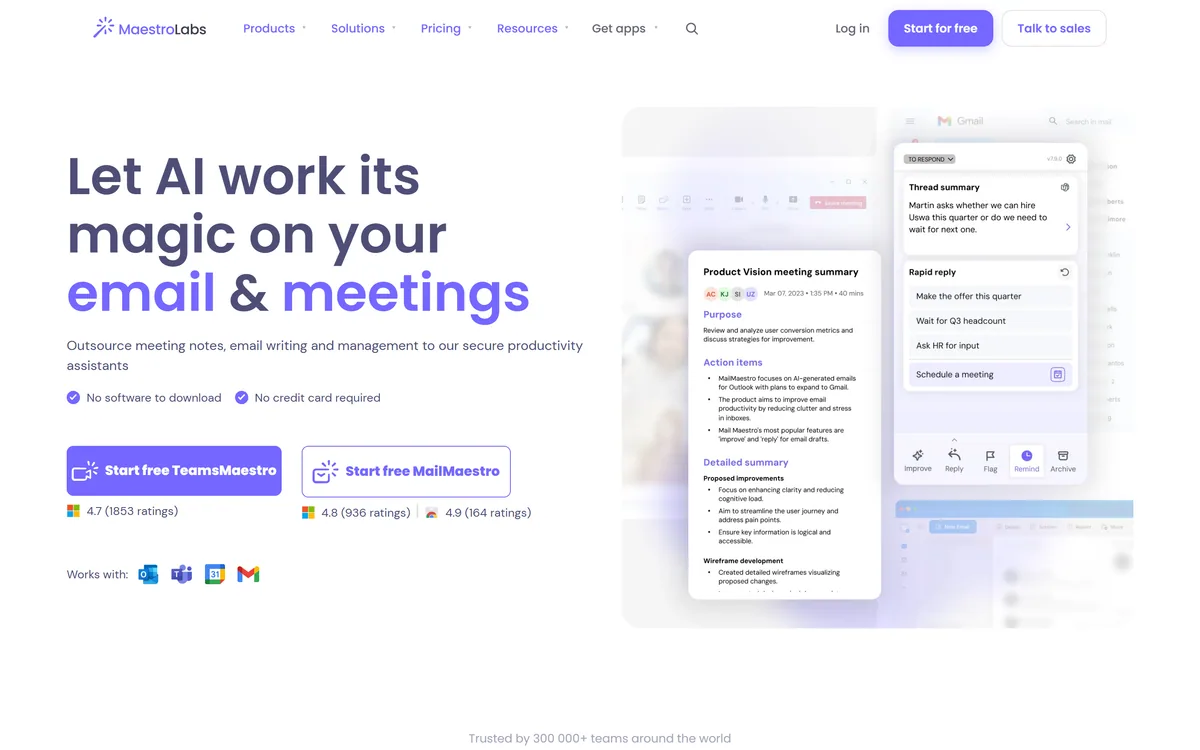
It is an AI email assistant from Maestro Labs that lives inside Outlook and Gmail, drafting replies, summarizing long threads and tagging your inbox by priority. Rather than a separate app you paste into, it appears on the sidebar where you already work, much as a dictation tool like Wispr Flow sits inside whatever you are typing in.
This review covers how MailMaestro turns a one-line instruction into a usable reply, where an email assistant genuinely pays off, how its pricing and security stack up, and who should skip it.
MailMaestro, The Two-Minute Version
- MailMaestro is an AI email assistant: it drafts, replies, summarizes and triages email without leaving Outlook or Gmail.
- One instruction, three drafts: pick the tone, language and length, and it returns three options to choose from, in 20+ languages.
- It is part of Maestro Labs: alongside TeamsMaestro for meeting notes, and it leans hard on enterprise security.
- It saves time, not judgement: drafts still need a read before you hit send, especially for anything delicate.
Email Drafting That Lives Inside Your Inbox
MailMaestro's central idea is that an email assistant is only useful if it does not interrupt you. So instead of a standalone chatbot, it installs as an extension on the Outlook ribbon or as a Gmail Chrome extension and appears on the sidebar of the email you are already reading.
That placement matters more than it sounds. The friction that kills most writing tools is the tab-switch and the copy-paste; by sitting where the email is, MailMaestro removes both, so using it feels like part of replying rather than a detour.
The parent brand, Maestro Labs, runs a sibling product called TeamsMaestro for meeting notes and action items, so the two cover the two biggest time sinks of office life. This review focuses on MailMaestro, the email half.
The friction that kills most writing tools is the tab-switch and the copy-paste. MailMaestro removes both by living on the sidebar of the email you are already in.
How Does MailMaestro Turn One Line Into A Reply?
The headline workflow is deliberately simple, and the detail sits in how much control you get over the output.
Three Drafts In Your Tone And Language
You write a short instruction, choose a tone, length and language, and MailMaestro returns three distinct drafts rather than one. Getting options, instead of a single take you then have to wrestle with, is the right design for email, where the right wording is a matter of judgement.
Support spans 20+ languages, so the same instruction can produce a polished reply in a language you read better than you write. A general writing tool like Type.ai can do similar drafting, but MailMaestro's three-option, in-place flow is tuned specifically for the reply box.
Thread Summaries And Inbox Triage
Open a long thread and MailMaestro summarizes the whole conversation, then offers response options, which is the feature most users end up relying on. It also auto-tags emails by priority and intent, and surfaces action items and deadlines.
That triage side turns it from a writer into an inbox manager. If you lean on an AI organiser such as Saner.ai to keep on top of tasks, MailMaestro covers the same instinct inside email specifically: less clutter, fewer missed follow-ups.
Where An Email Assistant Earns Its Keep
MailMaestro pays off most for people who send a high volume of similar, non-sensitive email: client updates, scheduling, intros, follow-ups. For those, three drafts and a thread summary genuinely save hours a week.
It also helps anyone who writes in a second language for work, or who finds a blank reply box harder than editing a draft. The magic-templates and keyword-shortcut features reward people with repetitive messages they send again and again.
Where it earns less is nuanced, high-stakes writing, a difficult negotiation, a sensitive HR note, where the wording is the work and a generated draft is a starting point at best. MailMaestro is honest enough in practice that it positions itself as a time-saver, not a replacement for your judgement.
How MailMaestro Handles Pricing And Security
MailMaestro is freemium: you can start for free with no credit card, and paid and enterprise tiers add volume and advanced features, with a sales motion for larger deployments. We do not publish prices, which change; check the site for current figures.
Security is where it works hardest, and for an inbox tool that is the right priority. Maestro Labs states it is SOC 2 Type II, GDPR compliant and HIPAA compliant with a BAA on request, with encryption in transit and at rest, and enterprise options for zero-day data retention and PII obfuscation.
It also discloses that it runs on a combination of OpenAI and Anthropic models, which is more transparency than many assistants offer. The value question is simple: for the time it saves across a team, a per-seat cost is usually easy to justify.
A Quick Way To Trial MailMaestro
Because the whole pitch is that it fits your existing workflow, test it there rather than on toy examples.
- Install the extension for your client, the Outlook ribbon add-in or the Gmail Chrome extension.
- Open a genuinely long thread and use the summary, then judge whether the recap is accurate.
- Draft a real reply with a set tone and length, and compare the three options it returns.
- Try an instruction in a second language if you write in one for work.
- Let it triage your inbox for a day and see whether the priority tags match your own sense.
- Pass/fail: MailMaestro is worth it if the drafts need only light edits and the summaries are reliable.
- Always read a generated draft before sending, especially for anything sensitive or binding.
MailMaestro Email Assistant Facts
| What it is | An AI email assistant for Outlook and Gmail |
|---|
| Parent brand | Maestro Labs (sibling product: TeamsMaestro) |
|---|
| Core action | Three email drafts per instruction |
|---|
| Languages | 20+ for drafting, translation and summaries |
|---|
| Also does | Thread summaries, triage, smart labels |
|---|
| Models | A mix of OpenAI and Anthropic models |
|---|
| Security | SOC 2 Type II, GDPR, HIPAA (BAA on request) |
|---|
| Works in | Outlook (web, legacy, new), Gmail, Teams |
|---|