

Midjourney is an AI image generator known for its distinctive aesthetic quality, currently on model V8.2, with a full web app alongside the original Discord workflow, plus an Editor, moodboards, style profiles, and five-second image-to-video.
Image & Design Review
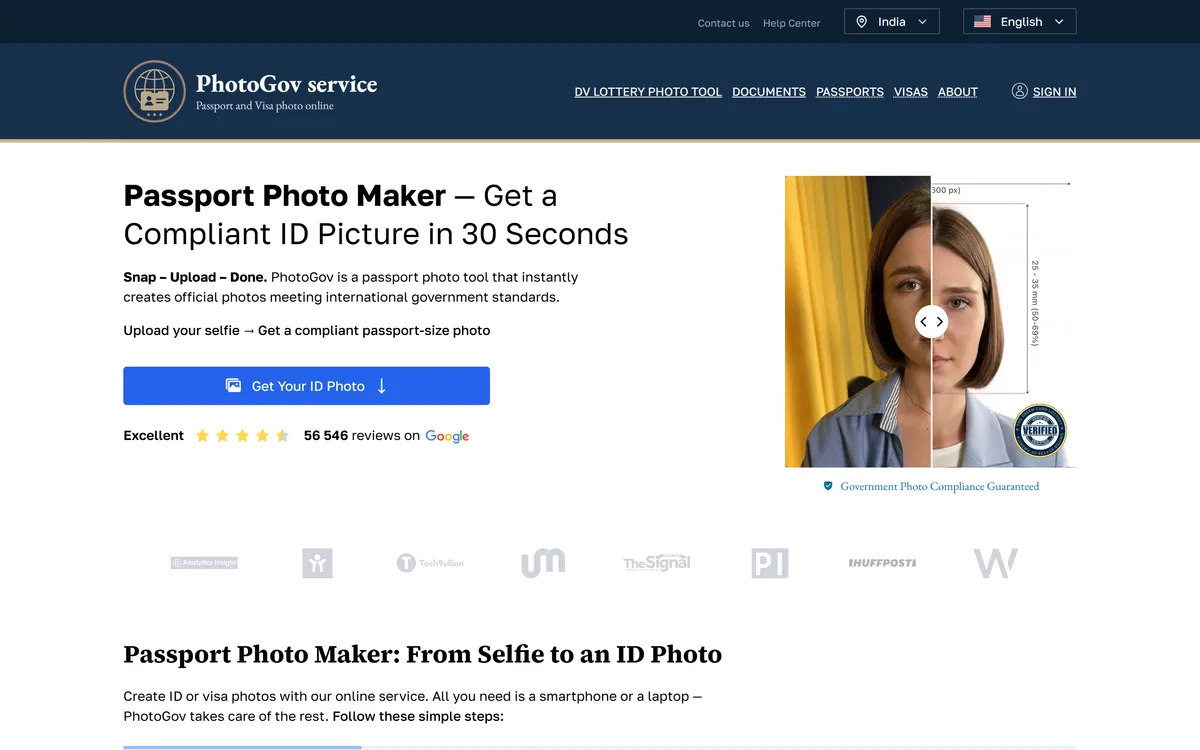
PhotoGov converts an uploaded selfie into a passport, visa or ID photo meeting official requirements, covering 900+ document types across 200 countries in about 30 seconds. It states it is independent of any government and that final acceptance rests with the issuing authority.
Very good
Passport photo requirements are unusually strict, extremely specific to each country and document, and almost impossible to satisfy by accident. PhotoGov's value is holding those rules for 900+ document types and applying them automatically — which is exactly the kind of tedious, high-precision, low-judgement work software should do. The disclaimer on its own homepage is the mark of a serious service rather than a weakness: it states plainly that it is not affiliated with any government and that final acceptance rests with the issuing authority. Both of those are true of every photo tool, and most do not say so. AInexfinder Editor Score: 4.0/5.
Best for: Travellers applying for visas with differing photo requirements; Anyone renewing a passport without easy access to a photo booth
The visit link goes to photogov.net, the official site. Paid placements on AInexfinder are always labelled. How we make money
Almost nobody gets a passport photo right on the first attempt without help, and it is not carelessness. The rules are absurdly precise — head height in millimetres, background shade, expression, glasses, shadow, ear visibility — and they differ by country and by document.
The traditional answer was a booth or a photographer who knew the local specification. That works and it means travelling somewhere to be photographed badly under fluorescent light.
PhotoGov's proposition is that the specification is data, and applying it to a photograph you already have is something software can do in half a minute.
PhotoGov states that it takes an uploaded selfie and automatically adjusts it to official requirements, delivering a ready-to-download ID picture, and that the portrait does not have to be perfect.
The reason automation helps so much here is that the requirements are geometric rather than aesthetic, and geometry is precisely measurable.
Head height as a proportion of the image, the position of the eyes within the frame, the distance from the top of the head to the border, the exact dimensions in millimetres — these are numbers, and getting them wrong is why photos are rejected.
Background is the second most common failure. Requirements specify a shade, not just a colour, and an off-white wall photographed in warm light is a different shade from the one required.
What software cannot fix is what the photograph does not contain. A closed eye, a shadow across the face, a head turned slightly, glasses reflecting, or hair obscuring the eyebrows are content problems rather than geometry problems — which is why the input still matters even when the tool handles the maths.
Requirements are geometric rather than aesthetic, and geometry is measurable. That is exactly why software is good at this and a mirror is not.
PhotoGov states directly that it is an independent service, not affiliated with any government, embassy or consulate, that its information is based on official requirements and verified primary sources, and that final acceptance is determined solely by the issuing authority.
That paragraph is more valuable than any feature on the page, and it is worth understanding why.
No photo service can guarantee acceptance, because acceptance is a decision made by a person or system at an embassy, passport office or licensing authority applying their own judgement to their own rules.
A tool can apply the published specification correctly and still produce a photo somebody rejects — for a reason that is discretionary, or because a local office interprets a rule more strictly than the published version suggests.
Stating that plainly on the homepage rather than burying it is the behaviour of a service that expects to be trusted. Any competitor guaranteeing acceptance is making a promise about somebody else's decision, which is worth noticing.
PhotoGov states it makes photos for 900+ types of ID documents across 200 countries, with a selector for country and document type.
The breadth is the product, and it addresses a specific and underappreciated problem: requirements do not just vary by country, they vary by document within a country.
A passport, a visa, a driving licence and a residence permit issued by the same government frequently require different dimensions and different head proportions, and a photo correct for one is rejected for another.
Visa requirements are the worst case, because the destination country sets them rather than your own — so somebody applying for three visas may need three different photos of themselves taken the same afternoon.
Holding nine hundred specifications is therefore not a vanity number, it is the entire value proposition. What matters when evaluating is whether *your* specific document is covered and how current the specification is, since governments revise these rules without announcement.
Two options on the site are worth singling out because they show the service understands its own limits.
The first is expert verification, offered at checkout. A human checking the output before you submit it is a sensible product for a situation where the cost of being wrong is a rejected application and a delayed trip.
It also handles the class of problem automation cannot see. Software can confirm the geometry is correct; it is much weaker at judging whether an expression reads as neutral, whether a shadow is disqualifying, or whether hair is obscuring something.
The second is a medical restriction checkbox, for cases where health issues affect the photo and a medical certificate is required. Most authorities have provisions for people who cannot meet standard requirements — a medical condition affecting eye position, head covering worn for religious reasons, or an inability to hold a neutral expression.
Building that into the flow rather than leaving people to discover it is a small thing that indicates the specifications have actually been read rather than scraped.
There are situations where software cannot substitute for a photographer, and knowing them saves a rejected application.
Biometric enrolment is the clearest. Some documents require the photograph to be taken at a specific facility with specific equipment, and no uploaded selfie will do — the requirement is about the capture, not the image.
Poor input is the second. A tool adjusting a photograph cannot add detail that was never captured, so a low-resolution, badly lit or heavily compressed image produces a compliant-shaped photo of poor quality that may still be rejected.
Printing is the third and most avoidable. A digital photo meeting every specification printed at the wrong size on the wrong paper is non-compliant, and that step is entirely on you.
And a photo is one part of an application. Getting it right removes one failure mode from a process with several — the same narrow-but-real value that document tools like Clipping Magic provide in a completely different setting.
It is worth separating this from photo tools that adjust for appearance. Editors like Photoleap and commercial platforms such as Photoroom optimise how an image looks; an ID photo tool optimises whether it complies, and those are opposite objectives that happen to share an interface.
Most rejected photos fail on things that were decided before the picture was taken, which is where the effort belongs.
This sequence gets the input right, since that is the part software cannot rescue.
The vocabulary of ID photo specifications, and what each measurement controls.
| Product type | Online passport, visa and ID photo tool |
|---|---|
| Coverage | 900+ document types across 200 countries |
| Speed | About 30 seconds from upload to finished photo |
| Flow | Select country and document, upload, process, checkout, download |
| Output | Digital and printable formats |
| Optional step | Expert verification available at checkout |
| Accessibility | A medical restriction option where health issues affect the photo |
| Independence | States it is not affiliated with any government, embassy or consulate |
| Acceptance | States final acceptance is determined solely by the issuing authority |
| Sources | Information stated as based on official government requirements and verified primary sources |
| Displayed rating | 56,546 reviews referenced on the page |
Automatic adjustment of a selfie to official ID requirements
Coverage of 900+ document types across 200 countries
Country and document type selection
Optional expert verification before download
A medical restriction pathway
Digital and printable output
Processing in about 30 seconds
A DV lottery photo tool
Photo tools differ by whether they measure, remove, edit or generate.
| Tool | What it does | Precision required | Best for |
|---|---|---|---|
| PhotoGov | Applies official ID specifications to a selfie | Exact, to the millimetre | Passport, visa and licence applications |
| Clipping Magic | Removes backgrounds with manual tools | Visual | Product and catalogue imagery |
| Photoroom | Product visuals at scale | Commercial | Ecommerce listings |
| Photoleap | Creative photo editing | Aesthetic | Personal and social images |
| Picwand | Turns images into video | Creative | Ads and short-form content |
Last checked . Read from photogov.net in a browser session on the date above, with the screenshot captured alongside.
What we could not confirm: pricing, or what expert verification costs; the operating company, which the pages we read do not name; how frequently document specifications are updated as governments revise them; where uploaded photographs are processed and how long they are retained, which matters because they are identity documents; whether the review count corresponds to a named review platform; and what happens if a photo produced by the service is rejected. We did not upload a photo.
AInexfinder does not list plan prices or billing details. For current pricing, plans, and trials, visit the official PhotoGov website.
Visit official website for pricingVendor pricing, credits, and billing policies change over time. Always confirm on the official site before you buy.
PhotoGov earns an AInexfinder Editor Score of 4.0/5 (very good). Best for: Travellers applying for visas with differing photo requirements; Anyone renewing a passport without easy access to a photo booth; People applying for several documents at once.
Visit PhotoGovLog in to write a review.
No reviews yet. Be the first to share your experience with PhotoGov.
Assigned reviewer
Daniel ReedSenior AI Tools Reviewer
Daniel leads AInexfinder's tool reviews. He researches each tool from its own pricing, documentation and policies, checks its claims against independent sources, and writes up what it does well, where it falls short and who it genuinely suits.
Daniel and the AInexfinder editorial team research PhotoGov from its own website, pricing, documentation and policies, checked against independent sources. This review is research-based: unless its method note says otherwise, we have not bought a plan or run hands-on tests. The Editor Score is our editorial judgement, and payment never changes it.
Similar Tools
Midjourney is an AI image generator known for its distinctive aesthetic quality, currently on model V8.2, with a full web app alongside the original Discord workflow, plus an Editor, moodboards, style profiles, and five-second image-to-video.

Mobile-first AI art and video generator with many styles Category: Image & Design.


Canva AI is the Magic Studio suite built into Canva — Magic Write for copy, Dream Lab for images, Magic Edit, Expand and Eraser for photos, Magic Switch for reformatting, Magic Charts for data, and Canva Code for interactive widgets.
GPT Image 2 launched on 21 April 2026 as ChatGPT Images 2.0 and as the gpt-image-2 API model. Its distinguishing capabilities are dense, accurate text rendering, layout fidelity for infographics and packaging, up to 3840px output, prompt-guided masking, and reasoning applied to image structure before generation.

Coolors review on AInexfinder — freemium AI tool for Image & Design. Features, pricing notes, and alternatives.
Topaz Labs makes professional AI image and video enhancement software, upscaling, sharpening, denoising, restoring, stabilizing and frame interpolation, across desktop, web and mobile, with Emmy-winning technology and a long track record, used by photographers, videographers and finishing pros.
Related Pages