

Midjourney is an AI image generator known for its distinctive aesthetic quality, currently on model V8.2, with a full web app alongside the original Discord workflow, plus an Editor, moodboards, style profiles, and five-second image-to-video.
Image & Design Review
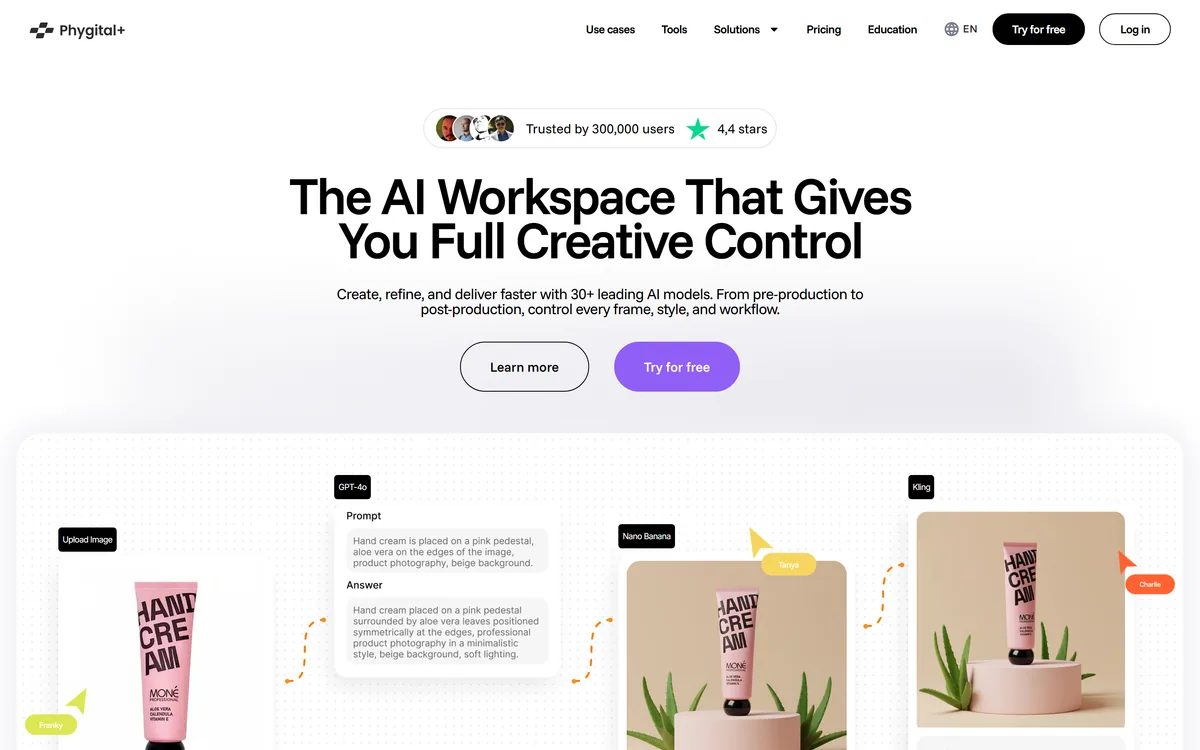
Phygital+ is a creative workspace putting 30+ image, video and audio models behind a node-based canvas, so a sequence of generation and editing steps becomes a reusable pipeline. It adds LoRA training for a consistent house style, 48+ templates, batch processing and shared canvases for teams.
Very good
Phygital+ scores well because node-based composition is a genuinely better idea than another model menu: it turns a lucky sequence of generations into a pipeline you can rerun on the next fifty products, which is what a working design team actually needs. LoRA training on top means the pipeline can carry your own look rather than a model's defaults, and shared canvases make that reusable across a team. It loses ground because a node canvas is a real learning curve that will lose casual users on day one, because credits make monthly cost genuinely unpredictable, and because an aggregator inherits every upstream model's licence terms and rate limits without controlling any of them. AInexfinder Editor Score: 4.0/5.
Best for: Design teams applying repeated treatments across a rotating catalogue; Brands needing consistent character or product imagery at volume
The visit link goes to phygital.plus, the official site. Paid placements on AInexfinder are always labelled. How we make money
There are now two kinds of multi-model AI platform, and the difference matters more than the model count either advertises.
The first is a menu, which is roughly what Freepik AI Image Generator offers alongside its stock library. You choose a model, type a prompt, get an image, and if you want the same treatment on another product you do the whole thing again from memory. The model list is long and the workflow is manual.
The second treats generation as a step in a process rather than an end in itself. Phygital+ is the second kind: its node-based canvas lets you connect models, edits and conditions into a pipeline, so the sequence that produced a good result becomes something you can run again on fifty different inputs. That distinction is the whole review.
Four concepts you need before the interface makes sense.
A node-based interface represents each operation as a box with inputs and outputs, connected by lines. Generation, upscaling, background removal, style transfer and video conversion each become a node, and the connections define the order.
Anyone who has used a compositing or procedural tool will recognise the idea immediately; anyone arriving from a prompt box such as Krea2.org will not. For everyone else it is a genuine adjustment, and it is the honest barrier to entry here — the first hour is harder than any prompt box.
What it buys is repeatability, which is the thing casual generation cannot provide. In a prompt-based tool, a good result is an event: you got there through six attempts and a fortunate variation, and reproducing it next month means remembering what you did. In a node graph, the route is the artefact. Change the input, rerun the graph, get the same treatment applied to something new.
For commercial work this is the difference between a tool and a toy. A brand producing imagery for a rotating catalogue does not need one perfect image; it needs the same treatment applied consistently to whatever ships next quarter.
Batch processing follows naturally from the same architecture. Once a pipeline exists, running fifty inputs through it is a queue rather than fifty sessions.
In a prompt box, a good result is something that happened to you. In a node graph, it is something you can do again.
Phygital+ includes LoRA training, which lets you fine-tune a model on your own images so it reliably produces a specific character, product or visual style.
This is the capability that separates platforms serious about commercial work from those aimed at exploration. Base models produce their own aesthetic, and that aesthetic is shared with everyone else using them — which is precisely wrong for a brand whose visual identity is supposed to be distinctive.
Combining LoRA training with a node pipeline is the genuinely powerful combination on offer here. Your trained style becomes a node in a process, applied consistently across a catalogue, rather than a setting you remember to switch on.
The practical caution is that LoRA training needs a coherent dataset. Fifteen to thirty images that genuinely share the quality you want is more effective than a hundred that vaguely do, and the discipline of assembling that set is most of the work.
Phygital+ resells access to models built by other companies — Google's Veo and Imagen, Black Forest Labs' FLUX, Kuaishou's Kling, ByteDance's Seedream and Seedance, Midjourney, Ideogram, Runway and others.
The advantages are real and immediate, and they are the same ones an agent-driven aggregator such as InVideo AI offers on the video side. One account, one interface, one bill, and no need to learn each model's prompt idiom. When something new ships, it appears in a workspace you already know. Switching between models for different steps costs nothing.
The costs are structural rather than incidental, and worth naming precisely. Upstream providers set their own rate limits, change capabilities, adjust pricing and define licence terms — and an aggregator passes all of that through without controlling any of it. When a provider restricts an endpoint, users find out afterwards.
The licence question is the one to take seriously for commercial work. Terms for commercial use of output are set by the model that generated it, not by the workspace you used. Two images produced in the same session on the same canvas can carry different terms.
The practical response is record-keeping rather than avoidance. Note which model produced each deliverable, and check that model's terms for the use you intend — particularly for advertising, print and anything appearing under a client's brand.
The site lists more than forty-eight live templates spanning beauty, ecommerce, food, game development, interiors and marketing.
Templates matter here more than they usually do, because they are the answer to the node canvas being intimidating. Starting from a working pipeline built by someone who understood the tool is far more instructive than starting from an empty canvas and a documentation page.
They are best understood as teaching material rather than as finished products. Open one, see how the nodes connect, change a parameter, watch what happens downstream. That is a considerably faster route to competence than reading about node graphs.
The category coverage also tells you who this is aimed at. Beauty, ecommerce, food, interiors and game development are commercial production contexts with repeated, high-volume imagery needs — exactly the work where a repeatable pipeline pays for itself and one-off prompting does not.
The realistic expectation is that a template gets you eighty per cent of the way and you adjust the rest. That is fine, and it is much better than an empty canvas.
The node canvas cannot be judged from a demo, because the demo is somebody else's finished pipeline. Build one yourself on real work.
The bar is step five. If rerunning the pipeline on new inputs does not save you meaningful time, the learning curve was not worth paying.
Access runs on credit-based subscription tiers — free, starter, pro, teams and enterprise — with an annual discount and credits covering image, video, text, 3D and audio generation alike.
One meter across every output type is a clean design, and it has a consequence worth planning for: video and 3D consume dramatically more than images. A month spent mostly on stills and a month with a video project are not comparable, and a tier chosen on the first will not survive the second.
API access sits at the enterprise tier only. If your intention is to automate a pipeline into a production system rather than run it in the interface, that single fact determines your tier before any feature comparison does.
The free tier is the right place to meet the node canvas, because the learning curve is the real question. If the interface does not click for you within an hour, no credit allowance fixes that.
We do not publish amounts, since tiers and credit rates change. Establish whether credits roll over, how video is metered against images, and which tier carries API access before committing.
Node-based canvas for chaining generation and editing steps into reusable pipelines
More than thirty models covering image, video, audio, text and 3D in one workspace
LoRA training for consistent characters, products and brand styles
48+ live templates across commercial categories as working starting points
Batch processing and variation generation across many inputs
Style consistency controls for characters and brand visuals
Shared collaborative canvases for teams
Text-to-speech and sound creation alongside visual generation
The useful question is not how many models a platform offers but whether it lets you build something reusable out of them.
| Tool | Interface | Reusable pipelines? | Best suited to |
|---|---|---|---|
| Phygital+ | Node-based canvas across 30+ models | Yes — the core capability | Design teams producing repeated commercial imagery |
| InVideo AI | Agent-driven video editor over 200+ models | Agent memory rather than explicit pipelines | Video specifically, with less manual control |
| Freepik AI Image Generator | Conventional generation interface with stock assets | No | Quick generation alongside a stock library |
| Krea2.org AI Image Workspace | Real-time generation and editing canvas | Limited | Fast iterative visual exploration |
| Canva AI | Design editor with AI features attached | Templates rather than pipelines | Non-designers producing finished layouts |
| Product type | Multi-model AI creative workspace with node-based pipelines |
|---|---|
| Model count stated | 30+ across image, video, audio, text and 3D |
| Image models named | FLUX, FLUX 2, FLUX Kontext, Imagen 4, Midjourney, Ideogram 3, Recraft Image V4, Seedream 4.5 and 5.0, Qwen 2.5 |
| Video models named | Veo 3.1, Kling 3.0, Seedance 2.0, Gen 4.5, WAN 2.5, Hailuo 3.0, Runway Aleph, Topaz Video, Omnihuman |
| Other models named | GPT-4o, Gemini 2.5 and 3.0 |
| Workflow | Node-based canvas for building custom generation and editing pipelines |
| Templates | 48+ live templates across beauty, ecommerce, food, game development, interiors and marketing |
| Customisation | LoRA training for consistent characters, products and brand styles |
| Scale features | Batch processing and variations |
| Collaboration | Shared canvases for teams |
| API access | Enterprise tier only |
| Pricing model | Credit-based subscription across Free, Starter, Pro, Teams and Enterprise, with an annual discount |
Compare on how much structure each imposes — that determines whether output is repeatable or merely produced.
Last checked . Read from phygital.plus, with the screenshot above captured in the same session.
What we could not confirm: no legal entity name is given on the pages we read, only the product name; no credit-per-generation table is published, so cost cannot be estimated before use; maximum output resolutions and video lengths are not stated; commercial licence terms for output are set by each underlying model provider rather than by the platform, so they must be checked individually; and we did not build a pipeline, so nothing here reflects hands-on assessment of the canvas.
AInexfinder does not list plan prices or billing details. For current pricing, plans, and trials, visit the official Phygital+ website.
Visit official website for pricingVendor pricing, credits, and billing policies change over time. Always confirm on the official site before you buy.
Phygital+ earns an AInexfinder Editor Score of 4.0/5 (very good). Best for: Design teams applying repeated treatments across a rotating catalogue; Brands needing consistent character or product imagery at volume; Creative agencies handling several clients with distinct visual styles.
Visit Phygital+Log in to write a review.
No reviews yet. Be the first to share your experience with Phygital+.
Assigned reviewer
Daniel ReedSenior AI Tools Reviewer
Daniel leads AInexfinder's tool reviews. He researches each tool from its own pricing, documentation and policies, checks its claims against independent sources, and writes up what it does well, where it falls short and who it genuinely suits.
Daniel and the AInexfinder editorial team research Phygital+ from its own website, pricing, documentation and policies, checked against independent sources. This review is research-based: unless its method note says otherwise, we have not bought a plan or run hands-on tests. The Editor Score is our editorial judgement, and payment never changes it.
Similar Tools
Midjourney is an AI image generator known for its distinctive aesthetic quality, currently on model V8.2, with a full web app alongside the original Discord workflow, plus an Editor, moodboards, style profiles, and five-second image-to-video.

Mobile-first AI art and video generator with many styles Category: Image & Design.


Canva AI is the Magic Studio suite built into Canva — Magic Write for copy, Dream Lab for images, Magic Edit, Expand and Eraser for photos, Magic Switch for reformatting, Magic Charts for data, and Canva Code for interactive widgets.
GPT Image 2 launched on 21 April 2026 as ChatGPT Images 2.0 and as the gpt-image-2 API model. Its distinguishing capabilities are dense, accurate text rendering, layout fidelity for infographics and packaging, up to 3840px output, prompt-guided masking, and reasoning applied to image structure before generation.

Coolors review on AInexfinder — freemium AI tool for Image & Design. Features, pricing notes, and alternatives.
Topaz Labs makes professional AI image and video enhancement software, upscaling, sharpening, denoising, restoring, stabilizing and frame interpolation, across desktop, web and mobile, with Emmy-winning technology and a long track record, used by photographers, videographers and finishing pros.
Related Pages