

Midjourney is an AI image generator known for its distinctive aesthetic quality, currently on model V8.2, with a full web app alongside the original Discord workflow, plus an Editor, moodboards, style profiles, and five-second image-to-video.
Image & Design Review
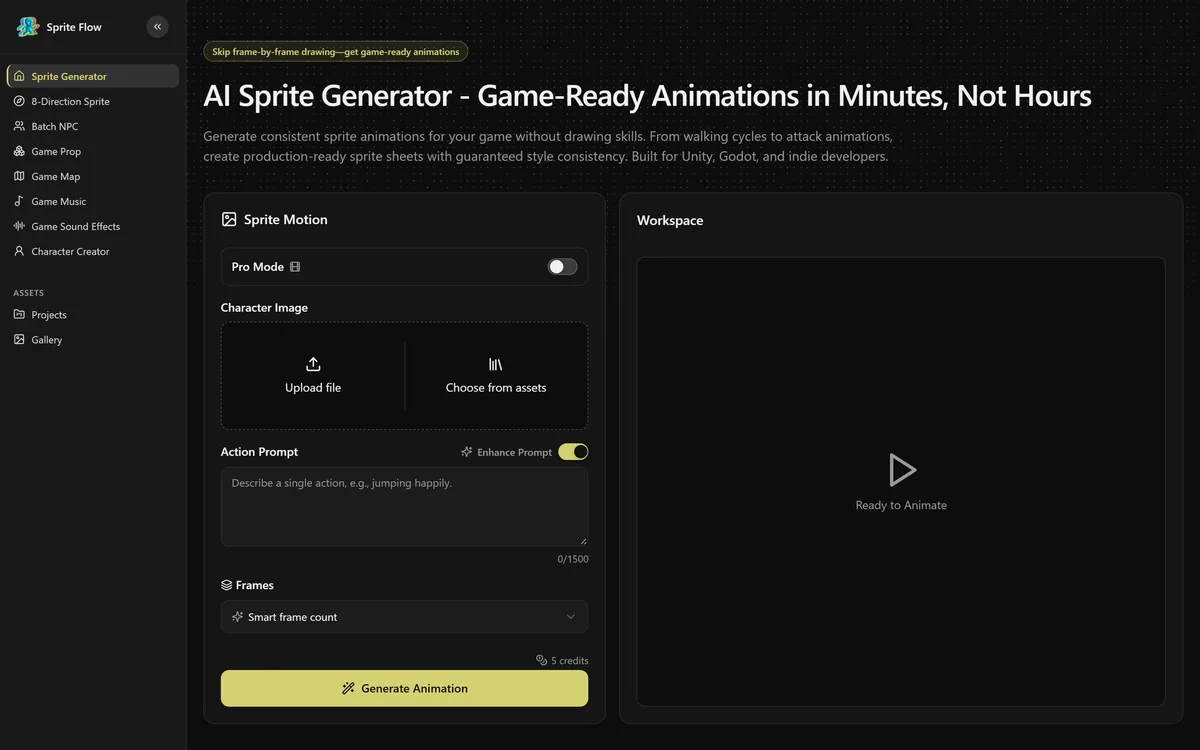
Sprite Flow generates game-ready character sprite animations and sprite sheets from a description or reference image. It produces walk cycles, idle loops, attacks and 4- or 8-directional sets, trains on your reference art for style consistency, and exports as PNG atlases with engine-specific formats for Unity, Godot and Unreal.
Good
Exporting in engine-native formats rather than generic PNGs is what separates this from a novelty — Unity animation controllers, Godot AnimatedSprite resources and Unreal Paper2D flipbooks mean the output enters a project instead of starting a conversion job. It is marked down because nothing is published about who runs it or what licence the generated assets carry, which is the first question any commercial game developer has to answer. AInexfinder Editor Score: 3.8/5.
Best for: Solo game developers blocked on art production; Prototyping mechanics before committing to an artist
The visit link goes to spriteflow.io, the official site. Paid placements on AInexfinder are always labelled. How we make money
Generating a game character is easy and has been for years. Generating the same character twelve times, in twelve slightly different poses, with every pixel of the costume identical, is a fundamentally different problem — and it is the one that matters.
A walk cycle needs the character recognisably identical across every frame. If the belt buckle moves, the hair changes length or the shade of the tunic shifts between frames, the animation flickers and reads as broken. Human eyes are extremely good at detecting exactly this kind of inconsistency in motion.
General generators — Freepik and its peers — are close to useless for sprite work despite producing beautiful individual characters. Ask for the same character eight times and you get eight cousins.
Purpose-built sprite generation attacks that specifically, and the style-training feature — feeding your own reference images to maintain a consistent look — is the mechanism that makes it plausible across a whole project rather than a single animation.
The directional sets are where the arithmetic becomes brutal by hand. An 8-directional character with idle, walk, run, attack and death is forty animation sequences, each several frames. For a solo developer that is months, and it is why so many indie top-down games ship with four directions or none.
This is a genuinely good application of generation: high-volume, highly repetitive, consistency-critical work that nobody enjoys and that blocks projects.
Ask a general image model for the same character eight times and you get eight cousins. In an animation, that reads as a flicker — which is why sprite work needed its own tool.
The export formats are the least glamorous item on the feature list and the one that determines whether any of this reaches a game.
Generic PNG sprite sheets are what most AI art tools produce, and they leave a real job behind: slicing the sheet into frames, defining pivot points, building animation clips, wiring up a state machine. That is an afternoon per character, and it is exactly the kind of friction that kills tool adoption.
Sprite Flow exports Unity sprite atlases with animation controllers, Godot AnimatedSprite .tres resources and Unreal Paper2D flipbooks. Those are not exports of images — they are engine objects that drop into a project already assembled.
Knowing that Godot uses .tres resources and that Unreal's 2D system is Paper2D means the people building this have shipped games or worked closely with people who have. That kind of specificity is hard to fake and it is a genuine credibility signal for a product with almost no other public information.
Sprite-focused alternatives like PixelLab stop at the sheet. The accompanying JSON metadata, individual frame sequences and GIF previews cover the cases where you want to handle import yourself or review before committing.
Resolution from 16x16 to 512x512 spans authentic retro sprites through modern high-resolution 2D, which is a wider range than most pixel art tools attempt.
This is the gap that matters most, and the site does not address it.
A game developer generating character art needs to know three things before shipping: whether they own the output, whether they can use it commercially, and whether anyone else can generate the same character. None of that is published here.
The questions are not academic. If you build a game around a protagonist, that character is your brand — it goes on the store page, the marketing, the merchandise. Discovering afterwards that you cannot claim rights in it, or that the terms limit commercial use, is a serious problem rather than an inconvenience.
The broader legal position adds to this. In several jurisdictions purely AI-generated images may not attract copyright protection at all, which means you may be free to use a character while being unable to stop anyone else using it. For a game whose identity is its character, that matters.
There is a further consideration specific to games. Several platforms — including Steam — now require developers to disclose AI-generated content in their store submissions, and the rules have changed more than once. That is a compliance step to plan for rather than discover at submission.
None of this makes the tool unusable. It means the licence terms are the first thing to read, and the answer should be in writing before a generated character becomes your game's identity.
This site does not publish plan prices. Sprite Flow's structure is a free tier with monthly subscription plans for unlimited generation, alongside per-generation credit costs that are not disclosed publicly.
Unlimited generation on a subscription is the right shape for this work, and more important than it sounds. Sprite animation is iterative — you generate a walk cycle, the arm swing is wrong, you regenerate, the colour shifted, you regenerate again. Per-generation metering would make developers ration exactly the iteration the work requires.
That said, unlimited claims in generative products usually carry fair-use limits somewhere. Worth asking what happens at genuinely high volume, since a project needing forty animation sets across six characters is a lot of generation.
The free tier is the right way to evaluate this, because the only question that matters is whether the output matches your game's existing art. Style consistency is subjective and project-specific in a way no feature list can convey.
Two things to confirm: whether style training from your reference images is available on the free tier, since that is the feature that makes output usable rather than merely generated; and whether engine-native export is gated to paid tiers, as export formats often are.
For a solo developer the comparison worth running is against commissioning a pixel artist, which for forty animation sets is a substantial cost and a multi-week timeline.
Being specific here is more useful than a general caveat, and the boundary is clearer in game art than in most categories.
When the art style is the game. Games whose identity is a distinctive visual voice — hand-drawn, deliberately imperfect, stylistically unusual — cannot get that from a generator trained on existing work. Generation converges on the familiar, which is the opposite of distinctive.
When animation quality is the feel. In fighting games and precise platformers, animation timing is gameplay. Anticipation frames, hit pause, recovery — these are tuned by animators who understand how the frames read to a player under pressure, and they are not a rendering problem.
Broader asset platforms such as Scenario train custom models for the same consistency problem. When the character has to act. Personality in a sprite comes from small choices in posture and timing that communicate who the character is. That is authored, not generated.
Where it genuinely fits is equally clear: prototyping, placeholder art that lets you test mechanics before committing to an artist, background and enemy characters that need to exist without carrying the game, variant outfits and palettes of an established design, and solo projects that would otherwise never ship because forty animation sets was always impossible.
That last group is a large and real audience. A lot of good games do not exist because one person could not draw them.
| Category | AI sprite and game character animation generation |
|---|---|
| Input | Character description or uploaded reference images |
| Animation types | Walk cycles, idle loops, running, jumping, attack moves and combat animations |
| Directional support | 4-directional and 8-directional sets for top-down and isometric games |
| Variants | Outfit and colour variants without redrawing animation sequences |
| Style training | Accepts user reference images to maintain a consistent art style across generations |
| Styles supported | Retro pixel art at 8-bit, 16-bit and 32-bit, modern 2D cartoon, anime, and custom trained styles |
| Resolution range | 16x16 to 512x512, with scalable output |
| Export formats | PNG sprite atlases, JSON metadata, individual frame sequences, GIF previews and XML variants |
| Engine support | Unity sprite atlases with animation controllers, Godot AnimatedSprite .tres resources, Unreal Engine Paper2D flipbooks |
| Not published | Company background, team, location, or the licence terms attaching to generated assets |
| Charging model | Free tier with monthly subscription plans for unlimited generation; per-generation credit costs exist but are not disclosed. No prices published here |
Game asset generation splits between sprite-specific tools and broader platforms with style training.
Sprite animation generation from a description or reference image
Walk, idle, run, jump, attack and combat animation types
4-directional and 8-directional sprite sets
Outfit and colour variants without regenerating animations
Style training from your own reference images
Retro pixel art at 8-bit, 16-bit and 32-bit
Modern 2D cartoon and anime styles
Resolution from 16x16 to 512x512
PNG sprite atlases with JSON metadata
Individual frame sequences and GIF previews
Unity sprite atlases with animation controllers
Godot AnimatedSprite .tres resources
Unreal Engine Paper2D flipbook export
The distinguishing question is whether output arrives as images or as something an engine understands.
| Tool | Focus | Engine-ready export | Style consistency |
|---|---|---|---|
| Sprite Flow | Character sprite animation | Unity, Godot and Unreal native formats | Training on your reference images |
| PixelLab | Pixel art and sprites | Sprite sheets | Style controls |
| Scenario | Broad game assets | Image export | Custom trained models |
| Layer AI | Studio game art pipelines | Production formats | Brand and style systems |
| Rosebud AI | Game creation overall | Within its own platform | Varies |
Last checked . Read from spriteflow.io during this check, with the screenshot above captured at the same time.
No licence terms for generated assets are published, which is the first question a commercial game developer needs answered — confirm ownership and commercial use rights in writing before a generated character becomes your game's identity. In several jurisdictions purely AI-generated images may not attract copyright protection, meaning you could be free to use a character without being able to stop others using it. Several game platforms also require AI content disclosure at submission.
AInexfinder does not list plan prices or billing details. For current pricing, plans, and trials, visit the official SpriteFlow website.
Visit official website for pricingVendor pricing, credits, and billing policies change over time. Always confirm on the official site before you buy.
SpriteFlow earns an AInexfinder Editor Score of 3.8/5 (good). Best for: Solo game developers blocked on art production; Prototyping mechanics before committing to an artist; Top-down and isometric games needing directional animation sets.
Visit SpriteFlowLog in to write a review.
No reviews yet. Be the first to share your experience with SpriteFlow.
Assigned reviewer
Daniel ReedSenior AI Tools Reviewer
Daniel leads AInexfinder's tool reviews. He researches each tool from its own pricing, documentation and policies, checks its claims against independent sources, and writes up what it does well, where it falls short and who it genuinely suits.
Daniel and the AInexfinder editorial team research SpriteFlow from its own website, pricing, documentation and policies, checked against independent sources. This review is research-based: unless its method note says otherwise, we have not bought a plan or run hands-on tests. The Editor Score is our editorial judgement, and payment never changes it.
Similar Tools
Midjourney is an AI image generator known for its distinctive aesthetic quality, currently on model V8.2, with a full web app alongside the original Discord workflow, plus an Editor, moodboards, style profiles, and five-second image-to-video.

Mobile-first AI art and video generator with many styles Category: Image & Design.


Canva AI is the Magic Studio suite built into Canva — Magic Write for copy, Dream Lab for images, Magic Edit, Expand and Eraser for photos, Magic Switch for reformatting, Magic Charts for data, and Canva Code for interactive widgets.
GPT Image 2 launched on 21 April 2026 as ChatGPT Images 2.0 and as the gpt-image-2 API model. Its distinguishing capabilities are dense, accurate text rendering, layout fidelity for infographics and packaging, up to 3840px output, prompt-guided masking, and reasoning applied to image structure before generation.

Coolors review on AInexfinder — freemium AI tool for Image & Design. Features, pricing notes, and alternatives.

Topaz Labs makes professional AI image and video enhancement software, upscaling, sharpening, denoising, restoring, stabilizing and frame interpolation, across desktop, web and mobile, with Emmy-winning technology and a long track record, used by photographers, videographers and finishing pros.
Related Pages