Coding & Development Review

Reviewed by Daniel Reed· Senior AI Tools ReviewerLast verified How we review
StackHawk logo

StackHawk Review

Verified

StackHawk is an application and API security platform that runs DAST against your running app, surfaces what's exploitable, and remediates inside the AI coding-agent loop (Claude Code, Cursor, Copilot and more) before a PR opens. It suits engineering and AppSec teams shipping with AI agents, with the caveats that automated scanning and fixes still need security-expert oversight, and that its resolution figures are vendor-stated.

4.0Editor Score
Visit website
stackhawk.comAdded December 17, 2025
StackHawk screenshot
4.0/5

Quick Verdict

Very good

StackHawk earns 4.0 as a capable, well-targeted application-security platform for the AI-coding era. It runs real dynamic testing (DAST) against your running app and APIs to find what's genuinely exploitable, then closes the loop, the AI coding agent remediates and a rescan verifies, fitting inside tools like Claude Code, Cursor and Copilot so security runs where code is written, before a PR opens. As AI-written code proliferates, that's a genuinely modern and valuable approach, with broad coverage across API, MCP-server and LLM security. The caveat is that security still needs expertise: automated scanning and AI fixes are a force-multiplier, not a substitute, so a security engineer should review findings and confirm fixes actually resolve issues. Its resolution figures are vendor-stated and pricing wasn't in our read. For engineering and AppSec teams with the expertise to oversee it, it's a strong choice; teams without any security capacity should weigh it carefully. AInexfinder Editor Score: 4.0/5.

Best for: Application security testing; Securing AI-written code

Pricing:
Freemium
Last verified:
October 21, 2026
Official site:
stackhawk.com

The visit link goes to stackhawk.com, the official site. Paid placements on AInexfinder are always labelled. How we make money

AI coding agents ship code fast, and fast code can ship vulnerabilities. StackHawk's pitch is to secure that loop: test the running app, find what's exploitable, and fix it before the PR opens.

It runs modern DAST against your app and APIs, installs into AI coding agents like Claude Code and Cursor, and runs a find-fix-verify loop. It sits among coding tools like Semgrep, at the application-security end.

This review covers how StackHawk tests security, which teams it suits, how it's sold, and the experts-still-needed caveat to weigh first.

StackHawk, The AppSec Brief

  • StackHawk secures apps: DAST against your running app and APIs.
  • It fits AI coding: fixes inside the coding-agent loop before a PR opens.
  • It's a loop: find, fix, verify, with a rescan to confirm.
  • Mind the basics: automated scanning still needs security expertise.

Application And API Security Testing (DAST)

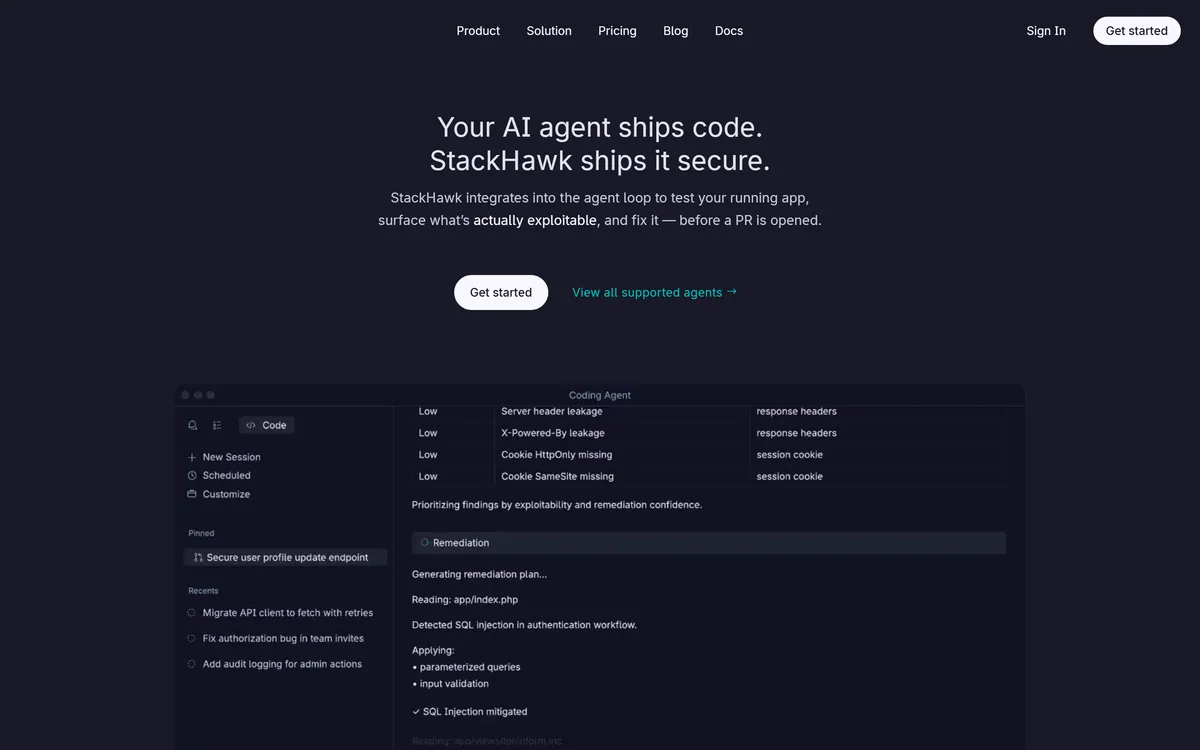
StackHawk's core job is dynamic application security testing (DAST): rather than just scanning source code, it tests your running application and APIs to find what's actually exploitable, then closes the loop, the AI coding agent remediates the issue in the codebase, and a rescan verifies the fix, aiming to secure code before the pull request even opens.

Its modern angle is fitting into the AI-coding-agent workflow: it installs as a skill into Claude Code, Cursor, Codex, Antigravity and GitHub Copilot, so security runs inside the loop where AI is writing code. Its coverage spans modern DAST, API security, remote MCP-server testing, LLM security testing, sensitive-data detection, gRPC/GraphQL and business-logic testing.

It's aimed at developers and AppSec teams using AI coding agents, and leans on the pitch 'every other tool finds vulnerabilities; StackHawk fixes them'.

The honest framing is that StackHawk is a capable, well-targeted security platform, runtime DAST that finds truly exploitable issues (not just theoretical ones) and remediates them in the agent loop is a genuinely modern, valuable approach as AI-written code proliferates. The caveat is that security still needs expertise: automated scanning and AI-assisted fixes are powerful, but they don't replace security engineers, a scan can miss issues or surface false positives, and an AI-generated fix needs review to confirm it actually resolves the vulnerability without introducing another. So treat it as a force-multiplier for AppSec, not a substitute for it. Its figures (95% of vulnerabilities resolved before the PR, zero net-new exploitable vulnerabilities) are vendor-stated, and the pricing model wasn't in our read.

StackHawk runs real DAST on your running app and fixes issues inside the AI coding-agent loop, a genuinely modern approach; it's a force-multiplier for security experts, not a replacement, so review the AI-generated fixes.

How Does StackHawk Test Security?

StackHawk pairs runtime DAST with in-agent remediation and verification.

DAST Scans And CI/CD

It scans your running app and APIs for exploitable issues, then verifies fixes with a rescan.

A reviewer like Greptile reviews pull-request code; StackHawk's angle is testing the running app and fixing issues in the agent loop, a runtime-security job.

AI-Agent Security And Triage

It installs into Claude Code, Cursor, Copilot and more, running security inside the coding loop.

A scanner like Corgea focuses on finding and fixing code issues; StackHawk centres on DAST against the running app, so match it to whether you need runtime testing, and keep experts in the loop.

Which Engineering Teams StackHawk Fits

StackHawk suits engineering and AppSec teams that ship software, especially those using AI coding agents, and want security testing and remediation inside the development loop rather than as a late gate.

It suits teams that want runtime DAST (finding truly exploitable issues), API, MCP-server and LLM security testing, and the find-fix-verify workflow integrated with their coding agents.

It suits less well teams without any security expertise to oversee the results, those wanting a simple one-off scan, and anyone who'd treat automated fixes as guaranteed without review.

A fair way to place it: if you ship code (especially with AI agents) and have security expertise to oversee it, StackHawk is a capable, modern choice that catches exploitable issues early; if you have no one to review the findings and fixes, or want a quick scan, weigh it carefully, because automated security still needs a human who understands it. Run it on a real app, verify the find-fix-verify loop catches real issues and that the AI fixes genuinely resolve them, confirm the pricing, and keep a security engineer reviewing the output.

How StackHawk Is Sold To Engineering

StackHawk shows 'get started' and a Pricing page, but the model and amounts weren't in our read. We do not publish prices; check the site and confirm the pricing model and what each plan includes.

The value question is vulnerabilities caught early versus cost: catching exploitable issues before a PR, rather than in production, can prevent costly incidents, justifying the platform for teams shipping meaningful software.

The sensible approach is to run it on a real app, judge whether the DAST finds genuinely exploitable issues and the AI remediation resolves them, confirm the pricing and integration with your agents, and keep security expertise overseeing it.

Running One Scan With StackHawk

Because security needs expertise, run StackHawk on a real app with a security engineer reviewing.

  1. Run it on a real app and connect your AI coding agent.
  2. Verify the DAST finds genuinely exploitable issues.
  3. Review each AI-generated fix to confirm it resolves the issue.
  4. Check the verify rescan actually confirms remediation.
  5. Confirm the pricing model and integration coverage.
  6. Pass/fail: StackHawk is worth it if it catches real issues early, expert-reviewed.
  7. Treat the resolution figures as vendor-stated.

StackHawk Security-Testing Facts

What it isAn application and API security (DAST) platform
CompanyStackHawk Inc. (Colorado)
CoreRuntime DAST against a running app; find what's exploitable
LoopFind (scan), Fix (agent remediates), Verify (rescan)
FitsInstalls into Claude Code, Cursor, Codex, Copilot and more
CoversAPI security, MCP-server testing, LLM security, business logic
Access'Get started' + Pricing (model not detailed in our read)
SensitiveSecurity tool; automated scanning still needs expert oversight

StackHawk Security-Testing Terms

DAST
Dynamic application security testing, which tests a running app for exploitable vulnerabilities.
Remediation
Fixing a vulnerability, here by the AI coding agent, followed by a rescan to verify.
Exploitable
A vulnerability that can actually be used by an attacker, as opposed to a theoretical finding.
Shift-left
Doing security testing earlier in development, so issues are caught before release.

Is StackHawk The Right Security Scanner?

Security Teams StackHawk Serves

  • Engineering and AppSec teams
  • Teams shipping with AI coding agents
  • Those wanting runtime DAST
  • API and LLM security needs
  • Teams with security expertise

When StackHawk Still Needs Experts

  • Teams without security expertise
  • Anyone wanting a one-off scan
  • Those trusting auto-fixes unchecked
  • Projects too small to need it
  • Anyone needing a public price first
Key Features of StackHawk

  • Runtime DAST

  • Find-fix-verify loop

  • Agent integrations

  • API security

  • MCP-server testing

  • LLM security testing

  • Business-logic testing

  • Rescan verification

Pros & Cons

Pros

5
  • Tests the running app (real DAST)
  • Fixes inside the AI coding-agent loop
  • Find-fix-verify with rescan
  • Broad coverage (API, LLM, MCP)
  • Catches exploitable issues early

Cons

5
  • Still needs security expertise
  • AI fixes need review
  • Pricing not in our read
  • Not for teams without AppSec
  • Figures are vendor-stated

Who StackHawk Is For

A Good Fit For

  • Application security testing
  • Securing AI-written code
  • API and LLM security
  • Find-fix-verify workflows
  • Shift-left AppSec

StackHawk Beside Security Tools

The useful comparison is with other code-security tools.

ToolToolApproachBest for
StackHawkApp security (DAST)Test running app + fixEngineering/AppSec
GreptileAI code reviewerPR review in contextCode review
CorgeaSecurity fix agentFind + fix code issuesAppSec
SemgrepStatic analysisRule-based scanningCode scanning

What StackHawk's Security Pages State

Last checked . Read from stackhawk.com during this check, with the screenshot above captured at the same time.

  • Runtime DAST against a running app and APIs
  • Find, Fix (agent remediates), Verify (rescan) loop
  • Installs into Claude Code, Cursor, Codex, Copilot
  • API security, MCP-server, LLM security, business-logic testing
  • Finds exploitable issues before a PR opens
  • 'Get started' + Pricing (model not in our read)
  • Automated scanning still needs security-expert oversight
  • AI-generated fixes need review to confirm they resolve issues
  • Resolution figures are vendor-stated
  • No prices reproduced here, in line with this site's pricing policy

StackHawk's automated scanning and AI-assisted fixes are powerful but don't replace security engineers: a scan can miss issues or surface false positives, and an AI-generated fix needs review to confirm it resolves the vulnerability without introducing another. Treat it as a force-multiplier for AppSec, not a substitute. Its figures (95% resolved before the PR, zero net-new exploitable vulnerabilities) are vendor-stated; pricing wasn't in our read.

AppSec Tools To Weigh Beside StackHawk

An AI code reviewer, a security fix agent and a static analyser to weigh beside StackHawk.

  • Greptile — an AI code reviewer for pull requests
  • Corgea — a security find-and-fix agent
  • Semgrep — rule-based static code scanning

StackHawk Pricing

AInexfinder does not list plan prices or billing details. For current pricing, plans, and trials, visit the official StackHawk website.

Visit official website for pricing

Vendor pricing, credits, and billing policies change over time. Always confirm on the official site before you buy.

Frequently Asked Questions

What is StackHawk?
StackHawk is an application and API security platform that runs dynamic testing (DAST) against your running app, finds what's exploitable, and remediates inside the AI coding-agent loop before a PR opens, with a find-fix-verify workflow. It's by StackHawk Inc.
Is StackHawk free?
It shows 'get started' and a Pricing page, but the model and amounts weren't in our read. We do not publish prices; check the site and confirm the pricing model and what each plan includes.
Does StackHawk replace security engineers?
No. Its automated scanning and AI-assisted fixes are a force-multiplier, not a substitute: a scan can miss issues or raise false positives, and an AI fix needs review, so a security engineer should oversee the results.
How does StackHawk fit AI coding agents?
It installs as a skill into AI coding agents like Claude Code, Cursor, Codex, Antigravity and GitHub Copilot, so security testing and remediation run inside the loop where AI is writing code.
What is DAST?
Dynamic application security testing, which tests your running application and APIs for vulnerabilities that are actually exploitable, as opposed to static analysis that only reads source code.
What can StackHawk test?
Modern DAST, API security, remote MCP-server testing, LLM security testing, sensitive-data detection, gRPC/GraphQL and business-logic testing, across your running app.
Are StackHawk's fix claims reliable?
Figures like 95% of vulnerabilities resolved before the PR and zero net-new exploitable vulnerabilities are vendor-stated. Verify on your own app whether the fixes genuinely resolve issues, with a security engineer reviewing.
Who is StackHawk for?
Engineering and AppSec teams that ship software, especially those using AI coding agents, and want security testing and remediation inside the development loop rather than as a late gate, with security expertise to oversee it.
Does StackHawk verify its fixes?
Yes, it runs a find-fix-verify loop: after the agent remediates an issue, a rescan verifies the fix. You should still review that the rescan confirms genuine remediation.
What is the best way to try StackHawk?
Run it on a real app with your AI coding agent, verify the DAST finds genuinely exploitable issues and the AI fixes resolve them, confirm the pricing and integration, and keep a security engineer reviewing the output.
4.0/5

Bottom Line

StackHawk earns an AInexfinder Editor Score of 4.0/5 (very good). Best for: Application security testing; Securing AI-written code; API and LLM security.

Visit StackHawk

User Reviews

Log in to write a review.

What Users Say

No reviews yet. Be the first to share your experience with StackHawk.

Reviewed by Daniel Reed

Daniel Reed

Assigned reviewer

Daniel Reed

Senior AI Tools Reviewer

Daniel leads AInexfinder's tool reviews. He researches each tool from its own pricing, documentation and policies, checks its claims against independent sources, and writes up what it does well, where it falls short and who it genuinely suits.

Daniel and the AInexfinder editorial team research StackHawk from its own website, pricing, documentation and policies, checked against independent sources. This review is research-based: unless its method note says otherwise, we have not bought a plan or run hands-on tests. The Editor Score is our editorial judgement, and payment never changes it.

AI tool reviewsPricing researchAI software
Last verified
Sources used
  • stackhawk.com
  • AInexfinder listing fields (features, pros/cons, description)
  • Public vendor pages when available
Editorial policy
Listings may include affiliate or sponsored placements, which are labeled when present. Editorial scores and cons are not sold. See our affiliate disclosure and review methodology.
Embed this listing on your site
Featured on AInexfinder
Get your badge →

Related Pages

StackHawk Comparisons & Guides

In Our Ranked Guides

Explore More