

Midjourney is an AI image generator known for its distinctive aesthetic quality, currently on model V8.2, with a full web app alongside the original Discord workflow, plus an Editor, moodboards, style profiles, and five-second image-to-video.
Image & Design Review

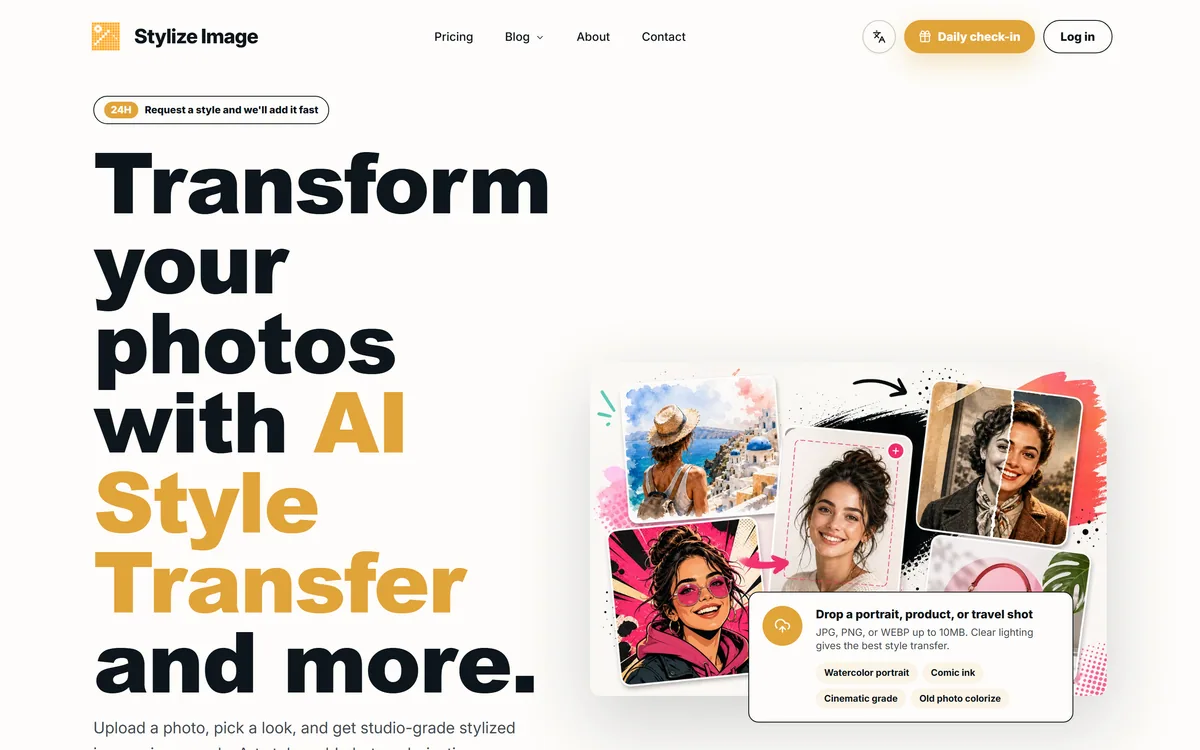
Stylize Image is an online AI photo-styling tool: upload a photo and apply 50+ style presets or a custom prompt, such as watercolour, comic ink or cinematic grade, plus old-photo colourisation, background removal, upscaling and batch edits for consistent catalogue or campaign looks.
Good
Stylize Image earns 3.5 as a quick, accessible AI styling tool: 50+ presets and custom prompts turn photos into watercolour, comic, cinematic and other looks in seconds, with handy colourisation, background removal, upscaling and batch edits for consistent sets. It suits creators, small businesses and casual users who want effects without learning an editor. Results vary and can distort details, colourisation invents plausible rather than true colours, privacy claims deserve a check and restyling others' images needs permission, so test it on your own photos first. AInexfinder Editor Score: 3.5/5.
Best for: Stylised social images; Consistent campaign looks
The visit link goes to stylizeimage.com, the official site. Paid placements on AInexfinder are always labelled. How we make money
Turning an ordinary photo into a watercolour portrait, a comic panel or a cinematic still used to take a skilled editor. Stylize Image aims to make that a three-step job: upload, pick a look, download.
It offers more than 50 style presets and custom prompts, plus old-photo colourisation, background removal, upscaling and batch edits that keep a whole set of images in one style. It sits among image tools like VanceAI, with a sharper focus on creative style transfer.
This review covers what you can do with Stylize Image, where it fits, how it prices and where it comes up short.
Stylize Image does one creative job well: it reinterprets a photo in a chosen art style while trying to keep the subject, pose, edges and composition intact. Pick watercolour, comic ink, editorial or cinematic grading, or describe your own look, and get a stylised result in seconds.
Around that, it adds the practical edits people often need next: colourising old black-and-white photos, removing backgrounds, upscaling, and batch processing so a catalogue or campaign shares one consistent look.
It also responds to trends, inviting users to request new styles and aiming to add them quickly, with trend packs for social platforms. That makes it handy for creators who want a current look without learning an editor.
The honest framing is that it is a quick, accessible styling tool rather than a professional editor. Style quality varies by photo and preset, colourisation is an AI guess at colours rather than a restoration of the real ones, and some marketing claims, like privacy, deserve checking.
Colourisation is an AI guess at colours, not a restoration of the real ones; treat results as interpretations.
The tool combines creative styling with a handful of practical edits and a simple workflow.
Upload a JPG, PNG or WEBP up to 10MB, choose from 50+ style presets or a custom prompt, and download the stylised result. You can also colourise old photos, remove backgrounds, upscale images and apply one look across a batch for consistent product or campaign visuals.
For deeper upscaling and enhancement where fidelity matters most, a dedicated tool like Deep-Image.ai focuses on that; Stylize Image's strength is the creative restyle.
Stylize Image markets a private, browser-based workflow with HD, watermark-free downloads and no design skills required. Because AI styling typically runs on servers, it is worth reading the privacy terms to understand what happens to uploaded photos, especially family pictures or client images.
If you need precise, manual control over an edit, layers, masks and adjustments, an editor like Pixlr gives that; Stylize Image trades control for speed and simplicity.
Stylize Image fits creators and social media users who want eye-catching stylised images fast, small businesses wanting a consistent look across product or campaign photos, and families who want to try colourising old pictures.
It suits content teams testing visual directions quickly and anyone who wants creative effects without learning professional software.
Its limits: style results vary and can distort faces or details, colourisation invents plausible rather than true colours, and restyling other people's photos or artwork may raise permission and copyright questions. It is not a substitute for a professional editor or a careful photo restorer.
A good way to judge fit is to think about how often you need a stylised image and how much the result matters. For a weekly social post, a fun profile picture or a quick mood board, fast and good-enough results are exactly right. For a client brand campaign, a printed family heirloom or anything where a face must look exactly like the person, plan to review each result carefully and expect to discard some. Testing a handful of your own typical photos across several presets will quickly show which side of that line you are on.
Stylize Image lets you stylise for free to start, with a daily check-in and paid options for more or higher-volume use. We do not publish prices, which change; check the site.
The value question is whether you need styled images often enough to pay, and whether the quality on your own photos meets your bar. Occasional users may never need to upgrade.
Because there is a free start, the sensible approach is to run several of your own photos through different presets, try a colourisation and a batch, and only pay if the results are consistently usable.
Because results vary by photo and style, trial Stylize Image on your own images across a few presets.
| What it is | An online AI photo-styling and editing tool |
|---|---|
| Styles | 50+ presets plus custom prompts |
| Restoration | Old black-and-white photo colourisation |
| Edits | Background removal and upscaling |
| Batch | Apply one look across many images |
| Output | HD, watermark-free downloads (vendor-stated) |
| Inputs | JPG, PNG or WEBP up to 10MB |
| Access | Free to start, with paid options |
AI style transfer
50+ style presets
Custom style prompts
Old-photo colourisation
Background removal
Image upscaling
Batch editing
HD downloads
The useful comparison is with other image tools, by creativity versus control.
| Tool | Tool | Strength | Best for |
|---|---|---|---|
| Stylize Image | AI style transfer and quick edits | Creative restyles in seconds | Social and campaign visuals |
| VanceAI | AI image toolkit | Enhancing, upscaling, restoring | Broad image processing |
| Pixlr | Online editor | Manual control and layers | Hands-on editing |
| Deep-Image.ai | Enhancer and upscaler | High-fidelity upscaling | Image quality work |
Last checked . Read from stylizeimage.com during this check, with the screenshot above captured at the same time.
Colourisation produces plausible, not historically accurate, colours, and style transfer can distort faces or details. Check the privacy terms before uploading personal photos, and only restyle images you have the right to use.
An image toolkit, a manual editor and an upscaler to weigh alongside Stylize Image.
AInexfinder does not list plan prices or billing details. For current pricing, plans, and trials, visit the official Stylize Image website.
Visit official website for pricingVendor pricing, credits, and billing policies change over time. Always confirm on the official site before you buy.
Stylize Image earns an AInexfinder Editor Score of 3.5/5 (good). Best for: Stylised social images; Consistent campaign looks; Quick creative tests.
Visit Stylize ImageLog in to write a review.
No reviews yet. Be the first to share your experience with Stylize Image.
Assigned reviewer
Daniel ReedSenior AI Tools Reviewer
Daniel leads AInexfinder's tool reviews. He researches each tool from its own pricing, documentation and policies, checks its claims against independent sources, and writes up what it does well, where it falls short and who it genuinely suits.
Daniel and the AInexfinder editorial team research Stylize Image from its own website, pricing, documentation and policies, checked against independent sources. This review is research-based: unless its method note says otherwise, we have not bought a plan or run hands-on tests. The Editor Score is our editorial judgement, and payment never changes it.
Similar Tools
Midjourney is an AI image generator known for its distinctive aesthetic quality, currently on model V8.2, with a full web app alongside the original Discord workflow, plus an Editor, moodboards, style profiles, and five-second image-to-video.

Mobile-first AI art and video generator with many styles Category: Image & Design.


Canva AI is the Magic Studio suite built into Canva — Magic Write for copy, Dream Lab for images, Magic Edit, Expand and Eraser for photos, Magic Switch for reformatting, Magic Charts for data, and Canva Code for interactive widgets.
GPT Image 2 launched on 21 April 2026 as ChatGPT Images 2.0 and as the gpt-image-2 API model. Its distinguishing capabilities are dense, accurate text rendering, layout fidelity for infographics and packaging, up to 3840px output, prompt-guided masking, and reasoning applied to image structure before generation.

Coolors review on AInexfinder — freemium AI tool for Image & Design. Features, pricing notes, and alternatives.
Topaz Labs makes professional AI image and video enhancement software, upscaling, sharpening, denoising, restoring, stabilizing and frame interpolation, across desktop, web and mobile, with Emmy-winning technology and a long track record, used by photographers, videographers and finishing pros.
Related Pages