Reviewed by Daniel ReedLast verified How we review
Cleanup.pictures logo

Cleanup.pictures

Verified

Cleanup.pictures review on AInexfinder — freemium AI tool for Image & Design. Features, pricing notes, and alternatives.

4.5Editor Score
Visit website
cleanup.pictures4 viewsAdded February 4, 2026240K visitors

What is Cleanup.pictures?

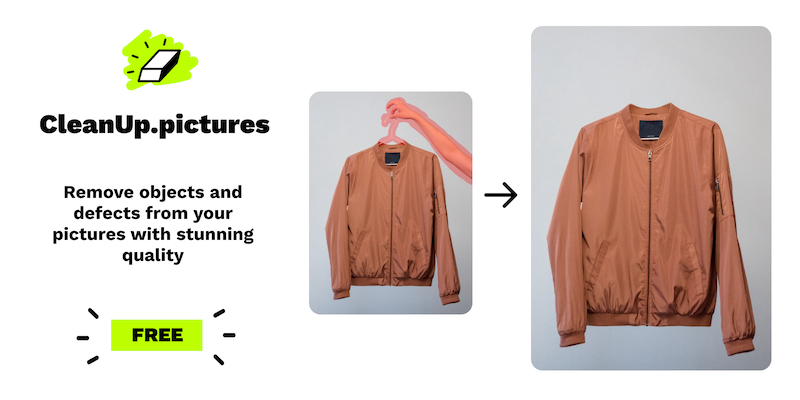
pictures is a web-based AI photo retouching tool focused on cleanly removing unwanted elements from images using inpainting technology.

Made by Init ML, the team behind ClipDrop, it lets users brush over objects, people, text, logos, watermarks or defects and have the AI intelligently reconstruct what should be behind them.

Its key advantage over traditional clone-stamp editing is that the AI genuinely predicts the hidden background, producing more natural results with far less effort.

It is aimed at photographers removing timestamps or tourists, creative agencies remixing visuals, real estate agents depersonalizing property photos, ecommerce sellers polishing product shots and developers who can access it via API. The interface is simple drag-and-drop and needs only a few clicks, making it approachable for non-experts.

Typical use cases include cleaning up distractions in a scene, preparing profile pictures, and removing logos or text from images. Pros: fast and easy object removal with strong inpainting quality, a genuinely usable free tier with unlimited images at 720p, and API access for automation.

Cons: the free version caps resolution at 720p so high-resolution output requires a paid plan, and it is specialized for removal rather than full image editing.

pictures is freemium, with a free 720p tier and an affordable Pro plan for unlimited resolution, plus inclusion in ClipDrop Pro and usage-based API pricing. Pricing changes often, so check the official site for current plans.

pictures's core capabilities include AI inpainting object and people removal, Removes text, logos and watermarks, Simple brush-based drag-and-drop interface, Free unlimited images at 720p and API access for automation.

AI inpainting object and people removal is built in, Removes text, logos and watermarks is built in, Simple brush-based drag-and-drop interface is built in, Free unlimited images at 720p is built in, so you get a rounded toolkit rather than a single trick.

pictures worth a place on your shortlist. pictures. It isn't perfect, though — Free tier limited to 720p resolution and Specialized for removal, not full editing are the trade-offs people most often mention, so weigh those against your own priorities before you commit.

pictures gets you most of the way there with far less effort. pictures runs on a freemium pricing model, so you can start for free and only pay once you outgrow the free tier — handy for testing it on a real task before spending anything.

AI-tool pricing changes often, so always check the current plans, seats and add-ons on the official site for the latest details before you buy. pictures for? It's best suited for ai object remover that erases anything from photos.

Whether you're a beginner trying this kind of AI tool for the first time or a professional who'll use it every day, it's a credible option to consider.

pictures against the alternatives and the head-to-head comparisons linked below — looking at features, pricing and real user ratings side by side is the fastest way to find the right fit for your workflow and budget.

Who is Cleanup.pictures for?

Cleanup.pictures is best suited for ai object remover that erases anything from photos. Whether you are trying this kind of image & design tool for the first time or use one every day, it is a credible option to shortlist — compare it with the alternatives and head-to-head comparisons linked on this page to find the best fit for your workflow and budget.
Key features of Cleanup.pictures

  • AI inpainting object and people removal

  • Removes text, logos and watermarks

  • Simple brush-based drag-and-drop interface

  • Free unlimited images at 720p

  • API access for automation

Pros & cons

Pros

4
  • High-quality inpainting with minimal effort
  • Usable free tier with unlimited images
  • API available for developers
  • AI inpainting object and people removal

Cons

4
  • Free tier limited to 720p resolution
  • Specialized for removal, not full editing
  • Works best when you invest a bit of setup time
  • May be more specialized than an all-in-one suite

Best For

  • Users who need AI inpainting object and people removal
  • Teams that need removes text, logos and watermarks
  • Teams that need simple brush-based drag-and-drop interface
  • Teams that need free unlimited images at 720p
  • Teams using API access for automation
  • AI object remover that erases anything from photos

Editor's Verdict

4.5/5

Cleanup.pictures has an AInexfinder Editor Score of 4.5/5.

Cleanup.pictures pricing

AInexfinder does not list plan prices or billing details. For current pricing, plans, and trials, visit the official Cleanup.pictures website.

Visit official website for pricing

Vendor pricing, credits, and billing policies change over time. Always confirm on the official site before you buy.

Frequently asked questions

What is Cleanup.pictures?
Cleanup.pictures review on AInexfinder — freemium AI tool for Image & Design. Features, pricing notes, and alternatives.
How much does Cleanup.pictures cost?
AInexfinder does not publish plan prices because vendor pricing changes frequently. Visit the official Cleanup.pictures website (cleanup.pictures) for current pricing, trials, and plans.
What are the main features of Cleanup.pictures?
Listed features include: AI inpainting object and people removal; Removes text, logos and watermarks; Simple brush-based drag-and-drop interface; Free unlimited images at 720p; API access for automation.
Are there alternatives to Cleanup.pictures?
Similar tools on AInexfinder include Remini, GoStudio, Topaz Labs. See the alternatives and compare links on this page.

Reviews

Log in to write a review.

User Reviews

No reviews yet. Be the first to share your experience with Cleanup.pictures.

Reviewed by Daniel Reed

Daniel Reed

Assigned reviewer

Daniel Reed

Senior AI Tools Reviewer

Daniel reviews AI tools the slow way — by actually using them on real projects. His reviews cover what works, what breaks, and who each tool is genuinely a good fit for.

Hands-on reviewsProduct testingAI software

Daniel and the AInexfinder editorial team research Cleanup.pictures using public product information, listing evidence, and (when available) hands-on checks. Scores reflect listing completeness and transparency — not paid placement.

Last verified
Sources used
  • cleanup.pictures
  • AInexfinder listing fields (features, pros/cons, description)
  • Public vendor pages when available
Editorial policy
Listings may include affiliate or sponsored placements, which are labeled when present. Editorial scores and cons are not sold. See our affiliate disclosure and review methodology.

Explore More

Embed this listing on your site
Featured on AInexfinder
Get your badge →