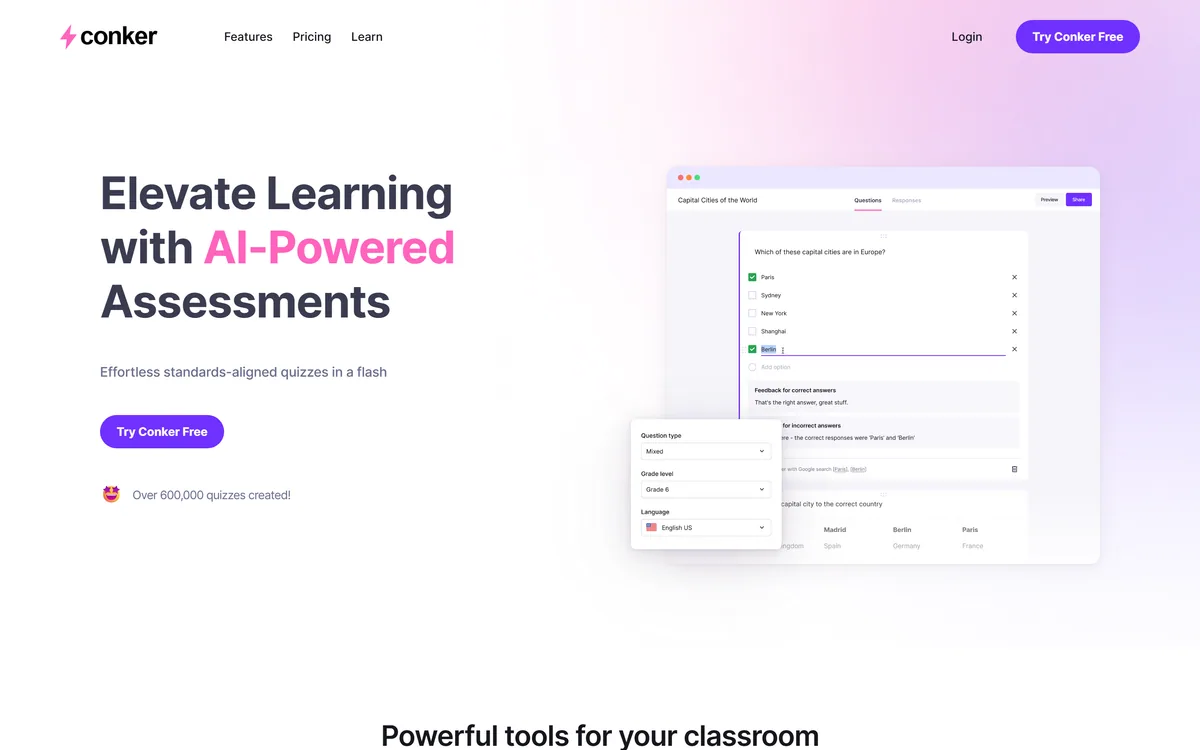
Conker is an AI quiz and assessment maker for teachers that generates standards-aligned quizzes with varied question types, offers read-aloud accessibility, and exports to Google Forms and Canvas, with thousands of ready-made K12 assessments to adapt.
Making good, standards-aligned quizzes is a quietly huge part of a teacher's week, and most of it is repetitive. Conker is built to take that off their plate without taking the teaching out of it.
It generates standards-aligned quizzes with varied question types, offers integrated read-aloud for accessibility, and exports straight to Google Forms and Canvas, with thousands of ready-made K12 assessments to adapt. It sits among classroom tools like Class Companion, firmly on the teacher's side of the desk rather than the student's.
This review covers what Conker gives a teacher, who it suits, how it prices, and where it is less of a fit.
Conker generates standards-aligned quizzes teachers can export to Google Forms or Canvas.
Conker Quiz Maker Facts
What it is
An AI quiz and assessment maker for teachers
Core
Standards-aligned quizzes in a few clicks
Question types
Multiple choice and other varied formats
Accessibility
Integrated read-aloud on all quizzes
Standards
Ready-made K12 assessments (NGSS, TEKS)
Export
Google Forms and Canvas LMS
Proof
600,000+ quizzes created (vendor)
Access
Free to try, with paid plans
Conker, The Classroom Brief
Conker is an AI quiz maker for teachers: it generates standards-aligned assessments in a few clicks.
It fits how teachers work: varied question types, read-aloud accessibility, and export to Google Forms and Canvas.
It is standards-aware: thousands of ready-made K12 assessments (starting with NGSS and TEKS) to adapt.
It is a teacher tool, not a student shortcut: built for the educator making the quiz, not answering it.
Standards-Aligned Quizzes For The Classroom
Conker's job is specific and well-scoped: generate quizzes a teacher can actually use, aligned to standards, with the question variety and accessibility real classrooms need. That focus on the teacher's workflow is what separates it from a generic quiz generator.
Being standards-aligned matters because a quiz that does not map to what teachers must assess is extra work, not less. Conker starts from K12 standards like NGSS and TEKS and offers thousands of ready-made assessments to adapt, so teachers begin from something relevant.
It is clearly a teacher tool, built for the educator creating and grading, not the student answering. That framing keeps it on the right side of the classroom-AI line, a tool for teaching, not for shortcutting learning.
That distinction matters more than it might seem. A great deal of classroom AI blurs into helping students produce answers, which teachers then have to police; Conker instead gives time back to the person setting and grading the work, so the AI supports assessment rather than undermining it. For a teacher weighing which tools to allow in their room, a maker aimed squarely at them, rather than at their students, is an easier call to trust.
A quiz that does not map to what teachers must assess is extra work, not less. Conker starts from standards, so teachers begin from something relevant rather than generic.
What Does Conker Give A Teacher?
The value is generation that fits real classrooms, and the practical details of accessibility and export.
AI Quizzes And Varied Question Types
Conker creates quizzes with a few clicks, offering a range of engaging question types rather than only multiple choice, and lets teachers tailor or differentiate quizzes for different groups of learners. That saves the repetitive drafting while keeping the teacher in control of the content.
A learning-platform like Khanmigo focuses on tutoring students; Conker focuses on the assessment-making side for teachers, which is a different, complementary job in the same classroom.
Standards, Accommodations And Exports
Every Conker quiz includes integrated read-aloud for students who benefit from accessibility support, it draws on standards-aligned assessments, and it exports to Google Forms, dropping results into a gradebook, and shares via Canvas LMS.
Those integrations are what make it practical day to day: a quiz is only useful if it fits the tools a teacher already grades in. A quiz-first study app like Gizmo serves students revising; Conker serves the teacher building and distributing the assessment.
Who Conker Suits Among Educators
Conker suits K12 teachers who make regular quizzes and want to save the repetitive drafting while keeping assessments standards-aligned and accessible, and who already work in Google Forms or Canvas.
The read-aloud accessibility and differentiation support suit teachers with mixed-ability classes, and the ready-made standards-aligned bank suits anyone who wants a relevant starting point rather than a blank page. For the assessment-making part of teaching, it is a genuine time-saver.
It suits less well higher-education or corporate assessment with very different needs, teachers outside the standards it covers who would get less from the alignment, and anyone wanting a full LMS rather than a quiz maker that plugs into one. Its quiz-count figure is vendor-stated.
How Conker Prices For Teachers
Conker is free to try, with paid plans for more. We do not publish prices, which change; check the site.
The value question for a teacher or school is simple: how much of the repetitive quiz-making week it removes against the cost, which for someone making assessments regularly is an easy case, especially given the standards alignment and accessibility built in.
Because there is a free tier, the sensible approach is to make a few real, standards-aligned quizzes, export them to your actual gradebook, and see whether the time saved is real before paying.
A Quick Way To Test Conker
Because it has to fit a real classroom, trial Conker on quizzes you would actually set and grade.
Generate a real quiz for a topic you teach and check it aligns to your standards.
Use varied question types and tailor one for a different group of learners.
Turn on read-aloud and confirm the accessibility support works for your students.
Export to Google Forms or Canvas and confirm it lands in your gradebook cleanly.
Adapt a ready-made standards-aligned assessment to see how good the starting point is.
Pass/fail: Conker is worth it if it removes real quiz-making time while staying standards-aligned.
Treat the 600,000+ quizzes figure as vendor-stated; judge it on your own classroom.
Does Conker Fit Your Classroom?
Teachers Conker Helps
K12 teachers making regular quizzes
Teachers who need standards-aligned assessments
Classes needing read-aloud accessibility
Teachers already using Google Forms or Canvas
Anyone wanting a relevant starting point over a blank page
When Conker Falls Flat
Higher-ed or corporate assessment with different needs
Teachers outside the standards it covers
Anyone wanting a full LMS, not a quiz maker
Students looking for an answer tool (it is for teachers)
Those who take the quiz-count figure as proof of quality
Key features of Conker
AI quiz generation
Standards-aligned assessments
Varied question types
Differentiation for learner groups
Integrated read-aloud
Ready-made K12 assessment bank
Google Forms export
Canvas LMS sharing
Pros & cons
Pros
5
Standards-aligned, not generic, quizzes
Read-aloud accessibility built in
Exports to Google Forms and Canvas
Saves repetitive quiz-making time
Free tier to test it
Cons
5
Aimed at K12, less for higher-ed or corporate
Value tied to the standards it covers
A quiz maker, not a full LMS
Quiz-count figure is vendor-stated
Teacher-side only, not a student tool
Best For
K12 teachers
Standards-aligned assessment
Mixed-ability classrooms
Google Forms and Canvas users
Regular quiz makers
Conker Against Other Quiz Tools
The useful comparison is with other classroom and study tools, on the teacher-versus-student side.
Last checked . Read from conker.ai during this check, with the screenshot above captured at the same time.
An AI quiz and assessment maker for teachers
Standards-aligned quizzes generated in a few clicks
A range of question types and differentiation
Integrated read-aloud accessibility on all quizzes
Ready-made K12 assessments starting with NGSS and TEKS
Export to Google Forms and sharing via Canvas LMS
A stated 600,000+ quizzes created
A free tier with paid plans
No plan prices reproduced here, in line with this site's pricing policy
Conker is a teacher-facing tool for making assessments, not a student answer tool. Its quiz-count figure is vendor-stated; judge quality on your own classroom and standards.
Other Teaching And Quiz Tools
A classroom assessment tool, a student tutor and a quiz-first study app to weigh alongside Conker.
Conker earns 3.9 as a focused, teacher-friendly quiz maker: it generates standards-aligned assessments in a few clicks, with varied question types, built-in read-aloud accessibility, and export to Google Forms and Canvas, saving the repetitive drafting that eats a teacher's week. It is K12-focused and tied to the standards it covers, and its quiz-count figure is vendor-stated, but for teachers making regular assessments it is a genuine time-saver. AInexfinder Editor Score: 3.9/5.
Conker pricing
AInexfinder does not list plan prices or billing details. For current pricing, plans, and trials, visit the official Conker website.
Vendor pricing, credits, and billing policies change over time. Always confirm on the official site before you buy.
Frequently asked questions
What is Conker?
Conker is an AI quiz and assessment maker for teachers. It generates standards-aligned quizzes with varied question types in a few clicks, offers integrated read-aloud accessibility, and exports to Google Forms and Canvas, with thousands of ready-made K12 assessments to adapt.
Is Conker for teachers or students?
Teachers. Conker is built for the educator creating and distributing assessments, not the student answering them. That keeps it on the right side of the classroom-AI line, a tool for teaching and assessment-making rather than a shortcut for students to get answers.
Are Conker's quizzes standards-aligned?
Yes. Conker starts from K12 standards such as NGSS and TEKS and offers thousands of ready-made, standards-aligned assessments to adapt. That alignment matters because a quiz that does not map to what teachers must assess creates extra work rather than saving it.
Can Conker export to Google Forms and Canvas?
Yes. It exports quizzes to Google Forms, which can feed a gradebook, and shares them via Canvas LMS. Those integrations are what make it practical day to day, since a quiz is only useful if it fits the tools a teacher already grades and teaches in.
Does Conker support accessibility?
Yes. Every Conker quiz includes integrated read-aloud for students who benefit from that support, and it allows differentiation for different groups of learners. Those features make it more usable in mixed-ability classrooms than a plain quiz generator.
Is Conker free?
It is free to try, with paid plans for more. We do not publish prices, which change; check the site. The sensible approach is to make a few real standards-aligned quizzes, export them to your actual gradebook, and see whether the time saved is real before paying.
Who is Conker best for?
K12 teachers who make regular quizzes and want to save repetitive drafting while keeping assessments standards-aligned and accessible, especially those already working in Google Forms or Canvas. It is less suited to higher-education or corporate assessment with different requirements.
What question types does Conker support?
It offers a range of engaging question types beyond plain multiple choice, and lets teachers tailor or differentiate quizzes for different learner groups. That variety helps assess understanding in more than one way while still generating quickly.
Is Conker a full learning platform?
No, it is a focused quiz and assessment maker that plugs into tools you already use, like Google Forms and Canvas, rather than a complete LMS. If you need a full learning-management platform, Conker complements one rather than replacing it.
Are Conker's usage numbers reliable?
Figures like 600,000+ quizzes created are vendor-stated, so treat them as indicating adoption rather than proof of quality. Judge Conker on your own classroom: whether its generated quizzes are accurate, standards-aligned and genuinely save you time to make and grade.
Daniel reviews AI tools the slow way — by actually using them on real projects. His reviews cover what works, what breaks, and who each tool is genuinely a good fit for.
Daniel and the AInexfinder editorial team research Conker using public product information, listing evidence, and (when available) hands-on checks. Scores reflect listing completeness and transparency — not paid placement.
Listings may include affiliate or sponsored placements, which are labeled when present. Editorial scores and cons are not sold. See our affiliate disclosure and review methodology.
Edcafe AI is an AI toolkit for K-12 teachers from Inknoe. It builds chatbots, quizzes, flashcards, reading activities, slide decks and lesson plans from a topic or an uploaded document, tracks student work, and integrates with Canvas, Moodle and Blackboard.
QuizRise turns text, PDFs, YouTube videos, webpages, slides, documents and handwritten notes into quizzes, flashcards and summaries. It exports to Moodle XML, GIFT, Aiken, Respondus, Kahoot, PDF and Word, and adds spaced repetition and analytics.
LUCA is a K-12 reading intervention platform that analyses student reading at the phoneme level rather than the word level, identifying skill gaps in real time. It reports a 17.4 words-per-minute average fluency gain and 763,000+ grapheme-phoneme mappings, delivered through SoundScout, StoryGen and Assessment Intelligence.
RemNote combines outlining, handwriting, PDF annotation and spaced-repetition flashcards in one document, generating cards, quizzes and summaries from PDFs, slides, lecture transcripts and video, with an exam scheduler that works backwards from a date you set.
Question AI is a homework-helper app that scans a question and returns step-by-step answers across school subjects, plus AI writing, search, translation and summarizing. Its study uses are legitimate; using it to hand in answers or graded work crosses academic-integrity lines, which we weigh honestly.
Gizmo is a mobile-first study app that turns your notes, PDFs, slides and YouTube videos into AI-generated quizzes and flashcards, built around active recall so revision becomes a habit rather than a chore.