
Codeless AI infrastructure for performance marketing Category: Business & Marketing.
CreateUGC
Verified
CreateUGC turns a product link or script into UGC-style video ads using AI avatars, voiceover and product imagery. It routes across Seedance 2.5, Veo 3, Kling 3 and Topview, and is aimed at TikTok, Instagram and marketplace listings.
3.6Editor Score
createugc.ai8 viewsAdded June 1, 20262K visitors
User-generated content ads work for one reason: they do not look like ads. A real person holding a real product in a real kitchen carries a credibility that a polished studio spot cannot buy, and the entire format exists to borrow that credibility.
CreateUGC generates that. Paste a product link or a script, pick from a library of AI avatars, and it produces a vertical creator-style video with voiceover and lip sync — no actor, no shipping, no shoot.
The production case is genuinely strong, and this review covers it. But a tool whose output's whole value comes from appearing authentic raises a question a feature list will not answer, and that question is now regulated in several places. We cover that too, because it is the thing most likely to cost a buyer money.
What You Are Actually Buying
- Product link or script in, vertical ad out — the site claims under 60 seconds, with AI avatars, voiceover and your product imagery.
- It is a router, not a model. Seedance 2.5, Veo 3, Kling 3 and Topview are named on the homepage.
- The format is the point: UGC ads work because they read as a real person's opinion — which is exactly what makes generated ones a disclosure question.
- Marketplace-aimed as well as social: Amazon, Etsy and eBay listings alongside TikTok and Instagram.
- "Converts up to 5.7X more" is CreateUGC's own claim, printed on its homepage. Treat it as marketing, not measurement.
The Production Maths That Makes This Attractive
The reason this category exploded is not novelty. It is that UGC advertising has an economics problem the format itself creates.
Creator ads work best in volume — you need many variants because you cannot predict which one lands, and each one burns out fast. The traditional route means briefing creators, shipping product, waiting, paying per video, and starting again in three weeks. Fifty variants is not a budget line, it is a project.
Generation collapses that. The same product, the same script, twelve different presenters and eight hooks, produced in an afternoon. For a seller with a hundred SKUs and no creator budget, this is the difference between running video ads and not.
The marketplace angle strengthens it further. Amazon, Etsy and eBay listing videos are a genuinely under-served format — sellers know a video lifts conversion and most have no realistic way to produce one per product.
Nobody films fifty variants of an ad. That is the actual problem this solves, and it is a real one.
A Router Over Other People's Models
The homepage names Seedance 2.5, Veo 3, Kling 3 and Topview. CreateUGC assembles; it does not generate from a model of its own.
That is a sensible design and worth understanding rather than holding against it. Video models are enormously expensive to train, and a company competing on workflow can adopt whichever is currently strongest instead of defending its own. When a better model ships, a router benefits immediately.
The consequences for a buyer are two. Raw visual quality is largely inherited — it is roughly what the underlying models produce, and the same is true of every competitor routing over the same set. What CreateUGC owns is the pipeline: product-link parsing, avatar consistency, script fitting, lip sync and the vertical format.
The second consequence is dependency. Model availability, terms and versions are set by other companies, and an upstream change arrives without warning. That is inherent to the category rather than a fault of this product.
The Part A Feature List Will Not Tell You
This deserves its own section because it is the risk that actually costs money, and it is specific to this format rather than to this vendor.
A UGC ad's persuasive power comes from the viewer believing they are seeing a real customer's genuine opinion. When the presenter is generated, that belief is false — and advertising regulators in several jurisdictions treat undisclosed synthetic endorsement as a consumer-protection matter rather than a stylistic choice.
The rules are moving quickly and they differ by market. Platform policies on synthetic media labelling have tightened, marketplace terms have their own requirements, and disclosure obligations around AI-generated endorsements are being written into law in more places each year. None of that makes the tool unusable; it makes the compliance question something to settle before a campaign rather than after a complaint.
The practical position is straightforward: find out what your platforms and markets require, label accordingly, and never let a generated presenter make a factual claim about the product that you could not substantiate yourself. A synthetic person saying "this cleared my skin in a week" is a claim you own, regardless of who appeared to say it.
- Check the synthetic-media labelling policy of every platform you will post to, before producing at volume
- Check marketplace terms separately — Amazon, Etsy and eBay each set their own rules
- Keep generated presenters away from testimonial-style claims you cannot substantiate
- Assume disclosure obligations will tighten rather than relax, and build for that
- If a campaign's whole premise is "real customers", generated presenters are the wrong instrument
Running It Without Wasting A Month
The failure mode is producing fifty variants that all read as synthetic, then concluding the category does not work.
- Settle the disclosure question first. It shapes the creative, so doing it last means redoing the work.
- Start with one product you already have organic performance data for, so you have a benchmark.
- Write the script yourself rather than letting the product link generate it — the copy carries more of the result than the avatar does.
- Generate three avatars against the same script and watch them muted, which is how most viewers will see them.
- Check lip sync closely on a phone screen. Mismatched mouth movement is the tell viewers notice without being able to name.
- Run a small paid test against a real creator video if you have one, rather than against nothing.
- Only scale to volume once one variant beats your baseline — the ability to make fifty is worthless if none of them work.
Where This Is The Wrong Tool
If your brand's positioning rests on authenticity — craft, provenance, a founder's story — generated creators cut against the thing you are selling, and the risk is not regulatory but reputational.
If you are in a regulated category such as supplements, cosmetics claims, finance or health, the combination of synthetic endorsement and product claims is the highest-risk version of this, and worth taking advice on rather than experimenting with.
If you already have creators who perform, this replaces something that works with something cheaper and probably weaker. It is best understood as a way to have video advertising at all, not as an upgrade on human creators.
And a note on the numbers: the "converts up to 5.7X more" figure and the 4.8/5 rating on the homepage are CreateUGC's own presentation. The Shopify Partners badge is a checkable programme membership; the conversion multiple is not, and this page does not repeat it as fact.
Inputs, Models And Destinations
| Category | AI UGC-style video ad generation |
|---|---|
| Inputs | Product link or script, plus product imagery |
| Underlying models | Seedance 2.5, Veo 3, Kling 3, Topview, as named on the homepage |
| Avatars | Library of AI presenters |
| Audio | AI voiceover with lip sync |
| Output format | Vertical, social-first video ads |
| Social destinations | TikTok, Instagram and similar |
| Marketplace destinations | Amazon, Etsy, eBay listing videos |
| Stated speed | Ready-to-run ad in under 60 seconds |
| Partnership badge | Shopify Partners, displayed on the homepage |
| Vendor claims | Converts up to 5.7X more; rated 4.8/5 — both CreateUGC's own figures |
| Site sections | How it works, Features, About, Use Cases, Testimonials, FAQ |
Key features of CreateUGC
Ad generation from a product link or a written script
Library of AI avatars as presenters
AI voiceover with lip sync
Routing across Seedance 2.5, Veo 3, Kling 3 and Topview
Vertical, social-first output
Product imagery incorporated into the ad
Variants for testing multiple hooks
Marketplace listing videos for Amazon, Etsy and eBay
Pros & cons
Pros
5- Solves a real economics problem — nobody films fifty ad variants
- Marketplace listing video is a genuinely under-served format for small sellers
- Routing across several models means it benefits when any of them improves
- Product-link input removes the brief-and-wait cycle entirely
- Names its underlying models openly, which many wrappers do not
Cons
5- Synthetic endorsement carries disclosure obligations that are tightening, and vary by market
- Visual quality is inherited from third-party models rather than controlled here
- Model availability and terms are set upstream and can change without notice
- Wrong instrument for brands whose positioning rests on authenticity
- The headline conversion figure is the vendor's own with no independent verification
Best For
- Ecommerce sellers with many SKUs and no creator budget
- Performance marketers testing hooks at volume
- Marketplace sellers wanting listing videos for Amazon, Etsy or eBay
- Agencies producing variant sets across several client products
- Anyone who currently runs no video advertising at all
Generated Creators Across The Category
Several tools now generate a person holding a product. They differ on what else they do.
| Tool | Core output | Consistent presenter | Also covers |
|---|---|---|---|
| CreateUGC | UGC-style vertical ads from a product link | Avatar library | Marketplace listing videos |
| Pixelcut | Product imagery plus UGC ads | Personas — reusable AI actors | Full product photo editing and batch work |
| JoggAI | Avatar video ads | Avatar library | Ad variants and templates |
| Syllaby | Scripted social video with avatars | Yes | Content planning and scheduling |
| MagicLight AI | Long-form generated video | Character consistency across scenes | Story, script and music-led video |
Should You Generate Your Creators?
Reasonable Choice When
- You have many SKUs and no realistic budget for creator video per product
- You need volume variants to test hooks rather than one polished spot
- Marketplace listing videos are a gap you have never filled
- You have settled what disclosure your platforms and markets require
- Your claims are modest and substantiable regardless of who appears to make them
Do Not Use It If
- Your brand sells on authenticity, craft or a founder's story
- You are in a regulated category where endorsement claims carry legal weight
- You have creators who already perform — this is cheaper, not better
- You would run synthetic presenters without disclosure where it is required
- The campaign's premise is genuinely "here are our real customers"
Other Routes To Product Video
Generated presenters, product imagery and long-form video are neighbouring problems.
- Pixelcut — reusable AI personas plus the product photography around them
- JoggAI — another avatar-led ad generator worth benchmarking against
- Syllaby — avatar video with content planning attached
- MagicLight AI — long-form generated video rather than short ads
- InVideo AI — script-driven assembly from stock, without synthetic presenters
Read From The Homepage Capture
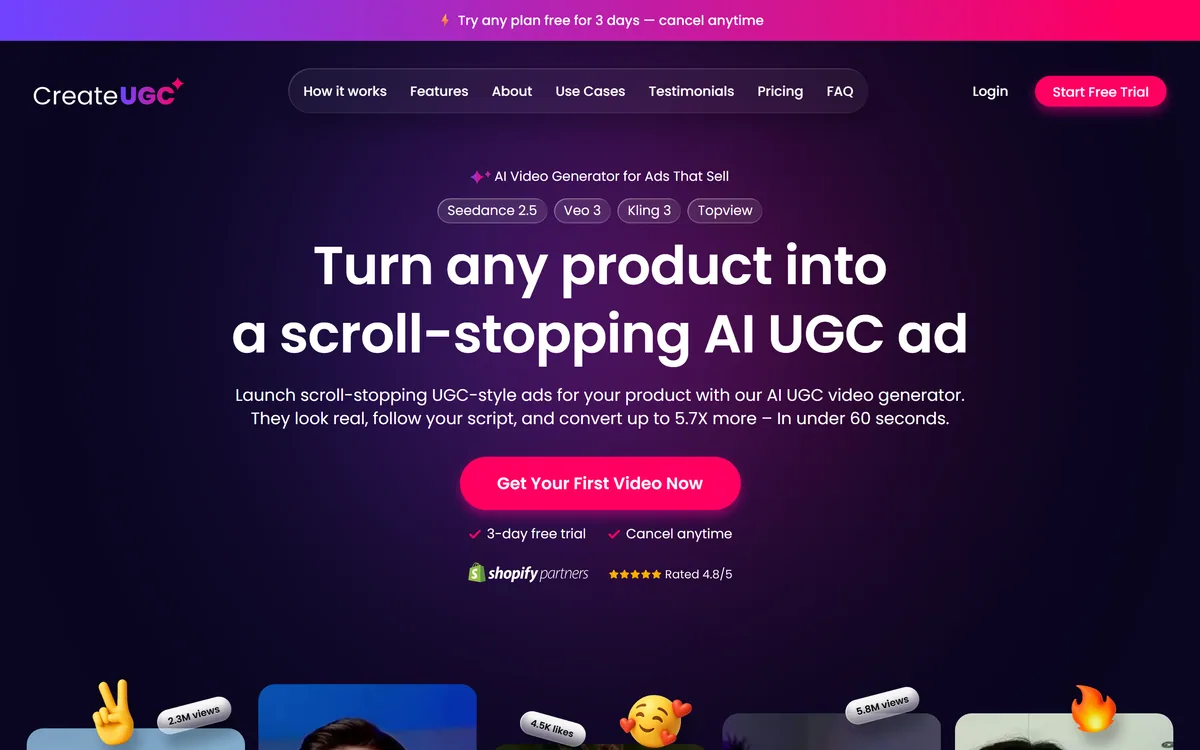
Last checked . createugc.ai returns 403 to automated fetches, so the facts below come from the site as rendered in a browser — the capture shown above — plus the vendor's own published descriptions.
- The models named on the homepage: Seedance 2.5, Veo 3, Kling 3 and Topview
- Positioning as an "AI Video Generator for Ads That Sell", quoted from the site
- The claim that ads "look real, follow your script, and convert up to 5.7X more – In under 60 seconds", quoted from the homepage and treated here as the vendor's own
- A Shopify Partners badge and a 4.8/5 rating displayed on the homepage
- Site navigation covering How it works, Features, About, Use Cases, Testimonials, Pricing and FAQ
- Product-link and script inputs, AI avatars, AI voiceover and lip sync, from the vendor's published product descriptions
- Marketplace use for Amazon, Etsy and eBay listing videos alongside TikTok and Instagram
- No plan prices published here, in line with this site's pricing policy
The conversion multiple and the rating are CreateUGC's own figures and are not independently verified. The section on disclosure describes the general regulatory direction around synthetic endorsement and platform labelling policy; it is not legal advice and not a claim about how this vendor or its customers operate. Rules differ by market — check yours.
Editor's Verdict
3.6/5CreateUGC has an AInexfinder Editor Score of 3.6/5.
CreateUGC pricing
AInexfinder does not list plan prices or billing details. For current pricing, plans, and trials, visit the official CreateUGC website.
Visit official website for pricingVendor pricing, credits, and billing policies change over time. Always confirm on the official site before you buy.
Frequently asked questions
Do I need to disclose that the presenter is AI?
Check your platforms and markets before producing at volume, because the answer is increasingly yes and it varies. Synthetic media labelling policies have tightened, marketplaces set their own terms, and undisclosed AI endorsement is being written into consumer-protection law in more places each year. Settle this first — it shapes the creative.
Which AI models does it use?
Seedance 2.5, Veo 3, Kling 3 and Topview are named on the homepage. CreateUGC is an assembly layer over those rather than a model developer, so raw visual quality is largely what the underlying models produce.
Is it better than hiring real creators?
Cheaper and faster, not better. If you already have creators who perform, this replaces something that works. Its real value is making video advertising possible at all when the alternative is none — fifty variants is a project with humans and an afternoon with this.
What about the 5.7X conversion claim?
That is CreateUGC's own figure, printed on its homepage, and this page does not repeat it as fact. Run a small paid test against a benchmark you already have before assuming any multiple applies to your products.
Can I use it for Amazon or Etsy listings?
The site targets exactly that, and it is arguably the strongest use case — sellers know listing video lifts conversion and most have no way to produce one per SKU. Read each marketplace's own terms on synthetic media before uploading at scale.
What should I watch for in the output?
Lip sync, on a phone, with the sound on — mismatched mouth movement is the tell viewers register without naming it. Then watch it muted, since that is how most people will actually see it, and check the captions carry the message alone.
Are there categories where I should avoid this?
Regulated ones — supplements, cosmetic claims, health, finance — where a synthetic person making a product claim is the highest-risk version of this. Also any brand selling on craft or provenance, where generated creators undercut the positioning itself.
Reviews
Log in to write a review.
User Reviews
No reviews yet. Be the first to share your experience with CreateUGC.
Reviewed by Daniel Reed
Assigned reviewer
Daniel ReedSenior AI Tools Reviewer
Daniel reviews AI tools the slow way — by actually using them on real projects. His reviews cover what works, what breaks, and who each tool is genuinely a good fit for.
Hands-on reviewsProduct testingAI software
Daniel and the AInexfinder editorial team research CreateUGC using public product information, listing evidence, and (when available) hands-on checks. Scores reflect listing completeness and transparency — not paid placement.
- Last verified
- Methodology
- How we review AI tools
- Sources used
- createugc.ai
- AInexfinder listing fields (features, pros/cons, description)
- Public vendor pages when available
- Editorial policy
- Listings may include affiliate or sponsored placements, which are labeled when present. Editorial scores and cons are not sold. See our affiliate disclosure and review methodology.
Related tools

Listomize is an Etsy SEO platform that generates titles, tags, and descriptions within Etsy's own limits, scores listings, optimises 100+ listings from a CSV, tracks competitors and trends, and auto-generates Pinterest pins.
FreemiumBusiness & Marketing

Lahjty (لهجتي) is an Arabic-first marketing platform for MENA campaigns. From one brief it produces dialect-aware ad copy, headlines, campaign images with Arabic text rendered in, dialect-aware voice, and SEO articles grounded in your own brand sources — with a Partner API and an MCP server for teams that want it inside their own workflow.
FreemiumBusiness & Marketing

MaxAEO is an answer engine optimisation platform from HIII PTE. LTD. It tracks how ChatGPT, Gemini, Claude, Perplexity, Copilot, Grok and Google's AI surfaces mention a brand, with sentiment, competitor benchmarking and citation tracing.
Mailjet is a Sinch-owned email platform handling both marketing campaigns and transactional sending from one account. It offers a collaborative drag-and-drop editor, an email API with SMTP relay, AI generation and segmentation, and EU-based data centres.
FreemiumBusiness & Marketing
Outranking is an AI SEO content platform that writes briefs and first drafts and optimises them with real-time scoring, grounding content in live SERP data through its Concepts feature, with keyword clustering, internal linking and content workflows.
FreemiumBusiness & Marketing
Explore More
Embed this listing on your site
Featured on AInexfinder