Flowstep generates editable user interface designs from a text description on an infinite canvas. It produces multiple screens in one pass, accepts PRDs and reference images as input, supports real-time collaboration, and exports both to Figma by ordinary copy-paste and to React, TypeScript and Tailwind code.
flowstep.ai9 viewsAdded December 12, 20251K visitors
Every AI design tool — Galileo, Uizard, Visily, all of them — eventually collides with the same wall: the output has to leave. A generated screen that cannot be edited, handed over, or turned into code is a picture of a design rather than a design.
That is the specific problem Flowstep appears to have organised itself around. The generation is the visible part; the editability, the Figma path and the code export are what determine whether anyone uses it twice.
This review looks at what the canvas model changes, why plugin-free Figma transfer matters more than it sounds, what one-to-one with code actually means in practice, and where a generated interface still leaves the hard part undone.
The interesting claim is not the generation. It is that the output stays editable and leaves cleanly.
Generated Screens That Stay Editable
Flowstep is an AI design tool that generates editable user interface layouts from a text description, placing them on an infinite canvas rather than returning a flat image.
It generates whole flows, not single screens — login, dashboard, profile and the rest in one pass, which is what makes it useful for a real product rather than a demo.
Figma transfer is plain copy and paste. No plugin, no extension, no export dialog — which removes the usual reason these tools get abandoned.
Code export produces React, TypeScript and Tailwind, with the vendor claiming the UI is one-to-one with the code.
It states it does not use your data to train models and does not permit its model providers to either — a claim worth reading before you paste a confidential PRD into it.
The Canvas Is The Design Decision That Matters
Most AI interface tools present a chat box and return a screen. Flowstep puts the output on an infinite canvas and lets you keep talking to it.
That difference is larger than it sounds, because it changes what the tool is for. A chat-and-screen tool answers a question. A canvas holds a project — several attempts side by side, variants of the same screen, a whole flow laid out in sequence, and the space to compare them.
Designers already work this way, and wireframe-first tools like Uizard reach the same conclusion from the opposite direction. Figma, FigJam, Miro and every whiteboard tool are canvases because design is comparative: you rarely know a layout is right until it is next to two that are wrong.
It also changes the interaction model from request-and-receive to conversation. Describing an adjustment and watching it apply on the canvas is closer to directing a collaborator than to filling in a form.
The stated ability to generate a full experience in one go — login screens, dashboards, profile pages together — is the natural consequence. Once you have a canvas, generating six screens is no harder to display than one.
A chat box returns an answer. A canvas holds a project. That is the difference between a demo and a tool someone opens on Monday.
Copy And Paste Into Figma Is The Headline Feature
Flowstep states that designs copy straight into a Figma file with the ordinary keyboard shortcut, with no plugin and no browser extension required.
This is easy to skim past and it is probably the most consequential thing on the page.
The reason is procedural rather than technical. Design teams do not evaluate tools in isolation — they evaluate whether a tool survives contact with the file where the real work lives. Anything requiring a plugin installation faces a small but genuine barrier: someone has to approve it, install it on every machine, and trust it with file access. In organisations with locked-down workspaces that barrier is frequently fatal.
Removing it entirely means an individual designer can try the tool this afternoon without asking anyone. That is how tools actually get adopted inside companies, and it is a distribution decision as much as a product one.
The question to test is what arrives on paste. Layers with sensible names, real auto-layout, and text as text is a design you can work with. A flat image, or a thousand absolutely-positioned rectangles, is not — and the difference decides whether the second hour with the tool is faster or slower than working by hand.
Reading The One-To-One Code Claim Correctly
Code export produces React, TypeScript and Tailwind, and the vendor describes the UI as one-to-one with the code.
That is a strong claim and it is worth being precise about what it can and cannot mean. Visual fidelity — the rendered result matching the design pixel for pixel — is entirely achievable and is presumably what is meant.
What it does not mean is that the code is production-ready. A generated component tree is not the same thing as a component that belongs in your codebase, and the gap contains most of the actual work: your design system's components rather than fresh ones, your state management, your accessibility patterns, your routing, your data layer.
The realistic value is different and still substantial. Generated code is excellent as a communication artefact — a prototype an engineer can run rather than a static file they have to interpret, and a much better starting point for a conversation about feasibility than a picture.
React with TypeScript and Tailwind is also a deliberate stack choice. It is the most common combination in modern product work, which maximises the chance the output is legible to the engineer receiving it, and it means the styling arrives as classes rather than as a stylesheet nobody wants to maintain.
The honest test is whether an engineer on your team would rather start from this output or from a blank file. Sometimes the answer is genuinely the blank file, and it depends heavily on how opinionated your design system is.
Inputs Beyond The Prompt
The tool accepts more than a text description, and the additional inputs are what separate a serious attempt at this category from a novelty.
You can attach a product requirements document, upload images as visual reference, or paste links. Each of these carries information a prompt cannot.
A PRD contains the actual constraints — what states exist, what the edge cases are, what the user is trying to accomplish. A prompt written from memory of a PRD loses most of that. Attaching the document directly means the generated screens can account for the empty state and the error case that a one-line description would never mention.
Image references solve the taste problem, in much the way Visily turns a screenshot into an editable starting point. Describing a visual direction in words is genuinely hard, and every designer has watched a written brief produce something technically compliant and completely wrong. A reference image conveys in one upload what three paragraphs cannot.
The data handling statement matters most here, because attaching a PRD means uploading unreleased product plans. Flowstep states it does not use personal data for model training and does not permit its LLM providers to do so, while noting that aggregated anonymised feedback may be used to improve outputs. Read that whole sentence before uploading anything under NDA.
Text description for the initial generation and for iterative adjustments
Product requirements documents, which carry states and edge cases a prompt omits
Reference images, which communicate visual direction faster than any written brief
Links, for pointing at existing products or patterns
Direct manual editing on the canvas, for everything the model gets wrong
What Generation Does Not Solve
Being clear about the remaining work is more useful than another feature summary, and none of this is specific to Flowstep.
Information architecture. Deciding what screens should exist, what belongs on each, and how someone moves between them is the design work. Generating those screens beautifully once the decision is made is the easy half.
Your design system. Generated UI is generic UI by construction. It will look like a competent modern product because that is what the training data looks like, and making it look like yours is a conversion job.
Accessibility. Contrast ratios, focus order, target sizes, screen reader semantics. None of this is visible in a rendered screen and all of it needs checking.
Real content. Every generated interface is populated with plausible placeholder text at convenient lengths. Real product names are longer, real error messages are uglier, and real data is missing more often than a mockup admits.
Generate a flow you have already designed by hand, so you have a real comparison.
Paste it into Figma and inspect the layer structure before looking at anything else.
Check whether text is editable text and whether auto-layout survived the transfer.
Export the code and have an engineer read it, not run it — legibility is the real question.
Regenerate once with a reference image attached to see how much the visual direction actually shifts.
Generation, Export And Data Handling
Category
AI user interface generation and design
Working surface
Infinite canvas with conversational generation
Output
Editable UI designs, not flat images
Multi-screen
Generates full flows in a single pass
Inputs accepted
Text descriptions, product requirement documents, reference images, links
Figma transfer
Ordinary copy and paste, with no plugin or extension required
Code export
React, TypeScript and Tailwind CSS
Fidelity claim
Vendor describes the UI as one-to-one with the exported code
Collaboration
Real-time multi-user editing with synchronised changes
Manual control
Full manual editing alongside AI generation
Model training
Vendor states personal data is not used for training and that its model providers are not permitted to use it either
Feedback data
Vendor notes aggregated anonymised feedback may be used to improve outputs
Terms This Category Takes For Granted
Three phrases do a lot of work in AI design marketing and are worth pinning down.
Editable output
Designs that arrive as manipulable layers, text and frames rather than as a rendered picture. It is the line between a design tool and an image generator.
Auto-layout
Figma's constraint system for elements that resize and reflow. Whether it survives an import is the single best test of transfer quality.
One-to-one with code
A claim that the rendered design and the generated code match visually. It is a fidelity claim, not a statement that the code is ready for your codebase.
Key features of Flowstep
Conversational UI generation on an infinite canvas
Fully editable output rather than flat images
Multi-screen flow generation in a single pass
PRD attachment as generation input
Reference image upload for visual direction
Link input for pointing at existing patterns
Copy and paste transfer into Figma with no plugin
React, TypeScript and Tailwind CSS code export
Real-time collaborative editing
Manual editing alongside AI generation
Stated exclusion of user data from model training
Pros & cons
Pros
6
Plugin-free Figma transfer removes the usual adoption barrier inside locked-down workspaces
The infinite canvas supports comparison, which is how design decisions actually get made
Generating a whole flow rather than one screen matches how products are designed
Accepting a PRD as input carries states and edge cases a prompt would lose
A clear statement that user data is not used for model training, extended to its model providers
React with Tailwind is the stack most likely to be legible to the engineer receiving it
Cons
6
Generated UI is generic by construction and needs converting to your design system
One-to-one with code is a visual fidelity claim, not a production readiness claim
Accessibility is invisible in a rendered screen and still needs a manual pass
Placeholder content hides the layout problems real data creates
It does not help with information architecture, which is the harder half of the work
Little public detail about the team behind it beyond an about page
Best For
Product designers exploring several directions quickly
Product managers who need something concrete before booking design time
Startup teams without a dedicated designer
Agencies producing early concepts for client review
Engineers who want a runnable prototype rather than a static mockup
Flowstep Beside Other AI Design Tools
They all generate interfaces. What separates them is what happens to the output afterwards.
Canva AI — the general design tool most teams reach for when the output is not a product interface
Flowstep's Claims, Line By Line
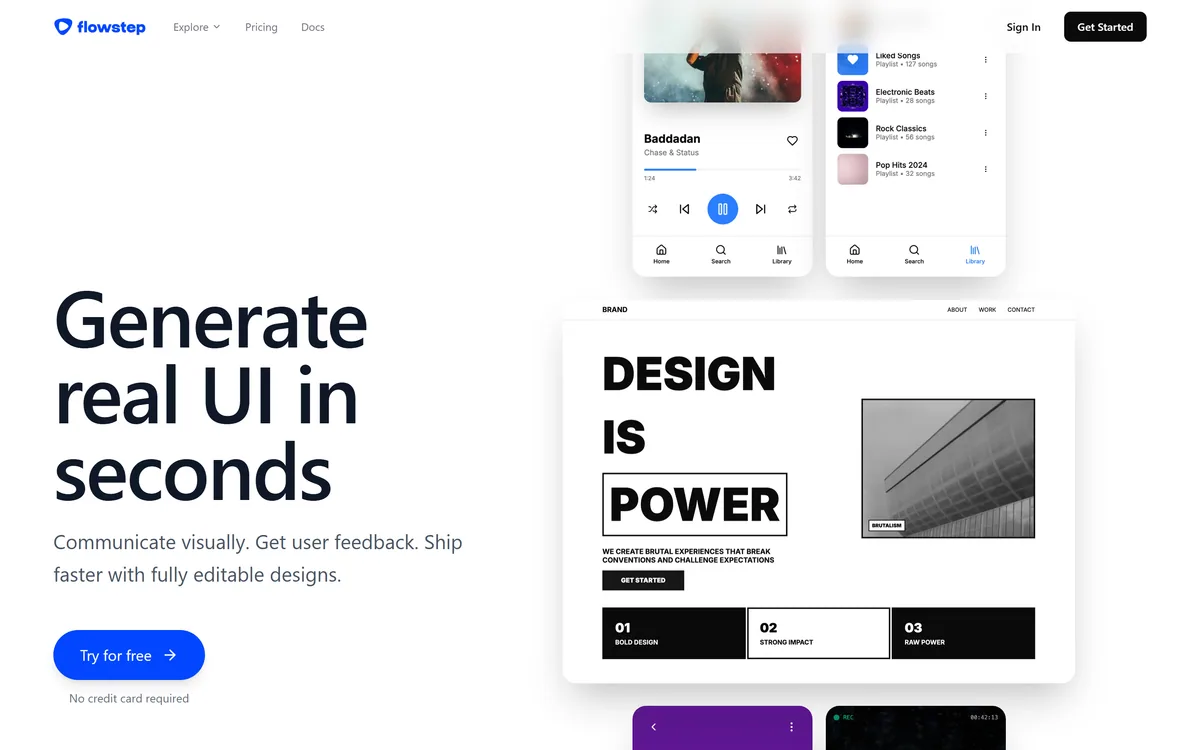
Last checked . Read from flowstep.ai during this check, with the screenshot above captured at the same time.
Product described as generating real, fully editable UI on an infinite canvas
Conversational generation and manual editing both confirmed on site
Figma transfer stated as ordinary copy and paste with no plugin or Chrome extension needed
Multi-screen generation described, with login screens, dashboards and profile pages given as examples
Inputs stated to include PRDs, uploaded images and pasted links
Real-time collaboration with synchronised edits described
Code export stated as React, TypeScript and Tailwind CSS, described as one-to-one with the UI
Data statement on site: personal data is not used for AI model training and LLM providers are not permitted to use it, with aggregated anonymised feedback possibly used to improve outputs
About, privacy and contact pages present in the site footer
No plan prices published here, in line with this site's pricing policy
The one-to-one fidelity claim is the vendor's own and describes visual match rather than production readiness — generated code still needs adapting to your design system, state management and accessibility standards. The data handling statement should be read in full in the privacy policy before uploading confidential product documents.
Editor's Verdict
4.0/5
Flowstep has an AInexfinder Editor Score of 4.0/5.
Flowstep pricing
AInexfinder does not list plan prices or billing details. For current pricing, plans, and trials, visit the official Flowstep website.
Vendor pricing, credits, and billing policies change over time. Always confirm on the official site before you buy.
Frequently asked questions
Does Flowstep work with Figma?
Yes, and unusually well — designs copy into a Figma file with the standard keyboard shortcut, with no plugin or extension to install. That matters because plugin approval is often what kills adoption of tools like this inside larger companies.
Is the UI Flowstep generates actually editable?
The vendor states it is fully editable rather than a rendered image, both on the canvas and after transfer. Test this specifically: paste into Figma and check whether text is real text and whether auto-layout survived, because that decides whether hour two is faster than working by hand.
Can Flowstep generate production code?
It exports React, TypeScript and Tailwind, described as one-to-one with the design. That is a visual fidelity claim rather than a production readiness one — the output still needs your design system components, state management, routing and accessibility patterns before it belongs in a codebase.
Does Flowstep train on my designs?
The site states personal data is not used for AI model training and that its LLM providers are not permitted to use it either, while noting aggregated anonymised feedback may be used to improve outputs. Read the privacy policy in full before uploading confidential product documents.
Can I upload a PRD to Flowstep?
Yes — PRDs, reference images and links are all accepted as inputs alongside a text description. Attaching the document is meaningfully better than describing it, because a PRD carries the states and edge cases a one-line prompt never mentions.
Flowstep vs Uizard — what is the difference?
Uizard is wireframe-first with a longer track record and a project-based editor. Flowstep is built around an infinite canvas, whole-flow generation and a frictionless exit into Figma. If handoff is your bottleneck, Flowstep's transfer path is the more interesting design decision.
Will AI-generated UI look like my product?
No, not initially. Generated interfaces look like competent modern products because that is what the training data contains, so applying your own design system is a conversion job you should budget for rather than a surprise.
Daniel reviews AI tools the slow way — by actually using them on real projects. His reviews cover what works, what breaks, and who each tool is genuinely a good fit for.
Daniel and the AInexfinder editorial team research Flowstep using public product information, listing evidence, and (when available) hands-on checks. Scores reflect listing completeness and transparency — not paid placement.
Listings may include affiliate or sponsored placements, which are labeled when present. Editorial scores and cons are not sold. See our affiliate disclosure and review methodology.
Canva AI is the Magic Studio suite built into Canva — Magic Write for copy, Dream Lab for images, Magic Edit, Expand and Eraser for photos, Magic Switch for reformatting, Magic Charts for data, and Canva Code for interactive widgets.
Magic Patterns is an AI design tool for product teams that turns prompts, requirements and ideas into high-fidelity UI, matching your existing design system so teams can prototype and test directions before committing engineering resources.
UXMagic turns text prompts, sketches or screenshots into Figma-ready UI designs, generating wireframes, sitemaps and multiple screens, importing your design system, and exporting to Figma, HTML, React or Webflow.
Visily generates editable UI designs from screenshots, text prompts, diagrams or templates, aimed explicitly at non-designers who need to convey product ideas, with smart components, auto-prototyping, on-canvas collaboration and a Figma plugin for handoff.
ColorKit is a free set of browser-based colour tools built by andy feliciotti: a palette generator, gradient maker, colour picker, contrast checker, palette from image, SVG colour changer, background maker and colour mixer. The site is ad-funded through Raptive.