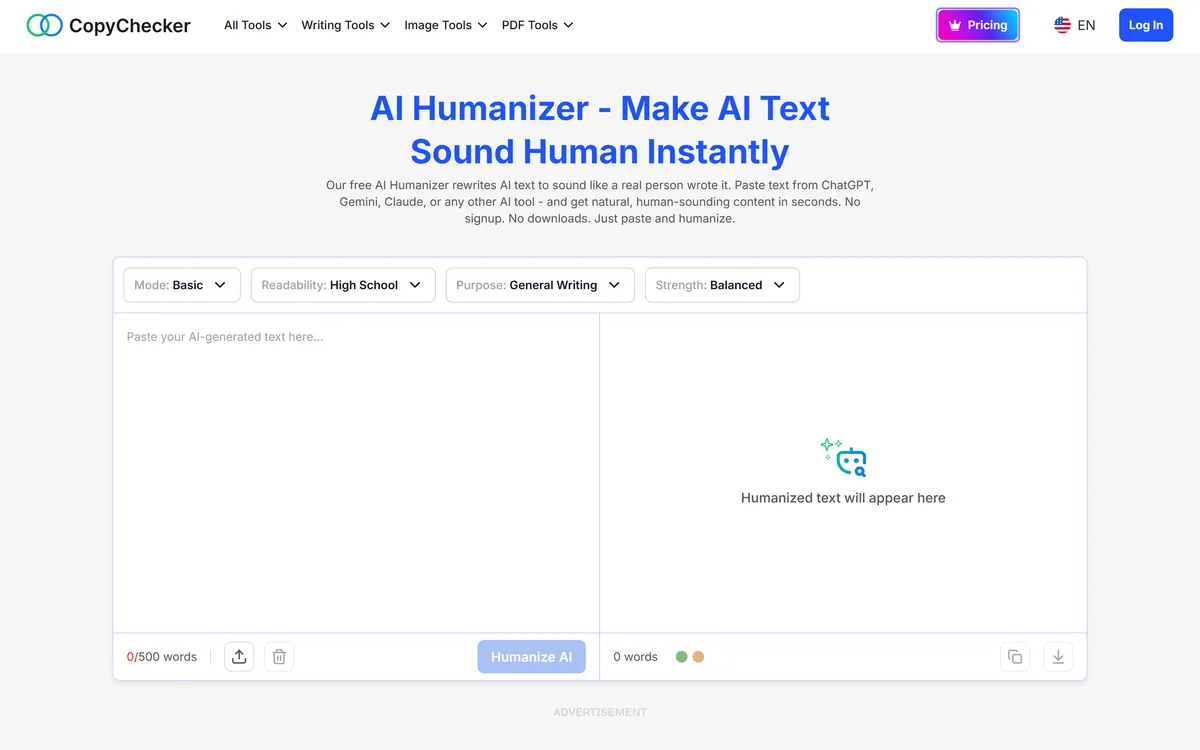
Free AI Humanizer is a tool on CopyChecker that rewrites AI-generated text to read more naturally, with controls for mode, readability level, purpose, and strength, capped at 500 words per run and usable without signup.
copychecker.com17 viewsAdded June 21, 202620K visitors
Free AI Humanizer is one tool within CopyChecker, a wider suite covering writing, image, and PDF utilities. Its job is to take AI-generated text and rewrite it so it reads less mechanically.
The site describes it plainly: paste text from ChatGPT, Gemini, Claude, or any other AI tool, and get more natural-sounding content back, with no signup and no download.
This is a category that deserves a straight review rather than either promotion or hand-wringing. Below: what the controls actually do, where using it is entirely reasonable, where it is not, and the facts about AI detection that most coverage of these tools gets wrong.
The four controls — mode, readability, purpose, strength — are what separate this from a generic paraphraser.
Before You Use This Tool
What it is: a free rewriter on CopyChecker that takes AI-generated text and makes it read more like natural writing.
Four controls — mode, readability level, purpose, and strength — give more direction than a plain paraphraser.
500 words per run, no signup, no download, and the page carries advertising.
Legitimate use: smoothing a draft you generated yourself, which is ordinary editing.
Important context: AI detectors are unreliable in both directions, so neither passing nor failing one proves anything about authorship.
What We Verified And What We Did Not
Last checked . Read from the page as rendered in the screenshot above, captured during this check.
The four controls and their defaults — Basic, High School, General Writing, Balanced — read from the interface itself
The 500-word per-run cap read from the word counter on the page
The no-signup, no-download claim and the parent CopyChecker suite taken from the site's own wording
The page carries advertising, observed directly in the capture
We did not test any claim about defeating AI detectors, and the page we saw does not make one
Statements about detector reliability describe the state of that technology generally. They are not claims about this tool, and they cut against both humanizers and detectors equally.
Free AI Humanizer Controls And Limits
Parent site
CopyChecker
Category
AI text rewriter and humanizer
Controls
Mode, readability level, purpose, and strength
Default settings
Basic mode, High School readability, General Writing purpose, Balanced strength
Word limit
500 words per run
Account required
No — no signup and no download
Input
Paste text, or upload a file
Output
Copy or download the rewritten text
Monetisation
Advertising on the page, with a Pricing section on the wider site
Sibling tools
CopyChecker also offers writing, image, and PDF tools
Why AI Text Reads The Way It Does
Machine-written prose has recognisable habits. Sentence lengths cluster in a narrow band, transitions announce themselves, claims get hedged into vagueness, and the same handful of structural patterns repeat.
None of that is wrong exactly — it is just uniform in a way human writing is not. People vary their rhythm, run a short sentence into a long one, and occasionally commit to a claim without qualifying it.
Rewriting to break that uniformity is what these tools do. Whether you call it humanizing or just editing depends entirely on why you are doing it.
The tell in AI writing is not any single sentence. It is that every sentence is built the same way as the one before it.
The Four Controls
These are what distinguish it from a generic paraphraser, and using them deliberately makes a substantial difference to the output.
Mode — how the rewrite is approached, defaulting to Basic
Readability — the reading level to target, defaulting to High School
Purpose — what the writing is for, defaulting to General Writing
Strength — how aggressively to rewrite, defaulting to Balanced
500-word cap per run, so longer pieces must be processed in sections
Where Using It Is Entirely Reasonable
There are plenty of uses here that raise no questions at all, and they are probably the majority.
Editing Your Own Draft
If you generated a first draft to get past a blank page, rewriting it into something that reads better is ordinary editing. You are working on your own material.
This is no different from running a draft past a thesaurus, a style checker, or a colleague who tightens your prose.
Adjusting Register
The readability and purpose controls make it useful for shifting the same content between audiences — a technical explanation simplified for a general reader, or informal notes made more formal.
That is a legitimate editorial task, and the controls handle it more precisely than a generic rewrite would.
Non-Native Writers
Writers working in a second language often produce prose that is correct but stilted. Smoothing that is exactly the kind of help a good editor provides, and there is nothing dishonest about wanting it.
The Honest Part About Academic Use
The obvious use case for a humanizer is submitting AI-generated work where that is not permitted, and it would be evasive not to address it.
That is an academic integrity issue regardless of which tool did the rewriting. Institutions define what constitutes your own work, and rewriting generated text does not change who wrote it. The risk sits with the student, not the tool.
It is also worth understanding that the arms race framing is weaker than both sides suggest. Detectors do not reliably identify AI text, and humanizers cannot reliably defeat them, because neither problem has a solid technical foundation.
What Is Actually True About AI Detectors
This is the part most coverage gets wrong, and it matters to students and educators alike.
AI detectors produce false positives. Genuine human writing gets flagged, particularly from non-native English speakers whose prose is more uniform.
They also produce false negatives. Carefully written AI text passes routinely, with or without a humanizer.
Scores are probabilistic, not evidential. A percentage is a guess dressed as a measurement.
Detector behaviour changes as models change, so results are not stable over time.
No major detector publishes a validated false-positive rate on realistic student writing.
Consequently, a detector result should start a conversation, never end one — and should never on its own be treated as proof of misconduct.
Practical Limits Of This Tool
Setting the ethics aside, there are ordinary product limitations worth knowing.
The 500-word cap means anything substantial is processed in chunks, and rewriting in sections tends to produce inconsistent voice across a longer piece.
Aggressive rewriting also risks meaning drift. The strength control exists for a reason — pushed hard, rewriters change what sentences actually claim, which matters enormously in anything technical or factual.
The page is ad-supported and free without signup, which is fair enough, but it also means you should not paste anything confidential into it.
Getting Better Output From It
If you are using it for legitimate editing, a few adjustments improve results considerably.
Set purpose and readability deliberately rather than accepting the defaults — General Writing at High School level is a compromise that suits nothing in particular.
Keep strength lower than you expect. Balanced or below preserves meaning; aggressive settings produce text that reads differently and sometimes says something different.
Always read the output against the original. The failure mode is not obvious gibberish; it is a sentence that now claims slightly more, or less, than you meant.
Key features of Free AI Humanizer
Rewrites AI-generated text to read more naturally
Mode control for how the rewrite is approached
Readability control targeting a specific reading level
Purpose control for the type of writing
Strength control for how aggressive the rewrite is
Paste or upload input, with copy or download output
No signup or download required
Part of the wider CopyChecker suite of writing, image, and PDF tools
Pros & cons
Pros
5
Four directional controls, rather than a single blunt rewrite button
Free with no account, so testing costs nothing
Readability and purpose settings make it genuinely useful for register shifts
Helpful for second-language writers whose prose is correct but stilted
Sits within a broader tool suite if you need adjacent utilities
Cons
5
500-word cap forces long pieces into chunks, producing inconsistent voice
Aggressive strength settings can change what a sentence actually claims
Ad-supported free page is not somewhere to paste confidential text
The category's main marketed use raises real academic integrity problems
Defaults are a compromise that suit no specific purpose well
Best For
Writers editing a first draft they generated themselves
Non-native English speakers smoothing correct but stilted prose
Anyone adjusting a piece for a different reading level or audience
Short-form content where 500 words per run is not limiting
People who want rewriting controls without creating an account
How This Compares To Other Rewriting Tools
Rewriting, editing, and detection are three different products that often get discussed as one.
Vendor pricing, credits, and billing policies change over time. Always confirm on the official site before you buy.
Frequently asked questions
What does this AI Humanizer actually do?
It rewrites AI-generated text so it reads less mechanically — breaking up the uniform sentence rhythms, announced transitions, and hedged phrasing that make machine writing recognisable. Four controls direct how it does that.
How much text can it process at once?
500 words per run. Longer pieces have to be processed in sections, which tends to produce an inconsistent voice across the whole document — worth knowing before using it on anything substantial.
Will this let me pass an AI detector?
The page we reviewed makes no such claim, and we would not make it either. AI detectors are unreliable in both directions — they flag genuine human writing and pass careful AI writing — so neither result proves anything about authorship.
Is it acceptable to use this on coursework?
Submitting AI-generated work where your institution prohibits it is an integrity issue regardless of which tool rewrote it. Editing a draft you wrote yourself is ordinary practice. The distinction is who actually produced the thinking.
Are AI detectors accurate?
No, not reliably. They produce false positives — particularly on writing by non-native English speakers — and false negatives on careful AI text. Scores are probabilistic guesses, and no major detector publishes a validated false-positive rate on realistic student writing.
What do the four controls do?
Mode sets the rewriting approach, Readability targets a reading level, Purpose reflects what the writing is for, and Strength controls how aggressively it rewrites. Set them deliberately — the defaults are a compromise that suits nothing in particular.
Is it safe to paste sensitive text into it?
No. It is a free, ad-supported page requiring no account, which is a reasonable model but not one that comes with data protection assurances. Keep client, confidential, and commercially sensitive material out of it.
Daniel reviews AI tools the slow way — by actually using them on real projects. His reviews cover what works, what breaks, and who each tool is genuinely a good fit for.
Daniel and the AInexfinder editorial team research Free AI Humanizer using public product information, listing evidence, and (when available) hands-on checks. Scores reflect listing completeness and transparency — not paid placement.
Listings may include affiliate or sponsored placements, which are labeled when present. Editorial scores and cons are not sold. See our affiliate disclosure and review methodology.
Undetectable AI rewrites AI-generated text so it reads as human-written and is less likely to be flagged by detectors. It also sells detection tools of its own — for text, images, voice, video and deepfakes — plus a suite of writing utilities and a Chrome extension.
RewritePal is a free online writing assistant for paraphrasing, grammar and spelling correction, tone adjustment, and making AI-generated text read more naturally, with a 40,000-character editor and no account required.
Decopy AI is a free suite of writing and study utilities covering text humanizing, AI detection, summarisation of documents, video and audio, speech conversion, a maths solver, flashcard and worksheet creation, and story and article generation — usable without creating an account.
Copy.ai has become an AI-native go-to-market platform: workflows and agents that run prospecting, lead processing, deal coaching, ABM, and CRM enrichment across Salesforce, HubSpot, Gong, Outreach, and 2,000+ integrations.
Writesonic has become an AI search growth platform — tracking whether your brand appears across 10 AI platforms, running optimisation and citation work through an Action Center, and reporting results against traffic and revenue.
Talefy, from AIcberg Labs, is an interactive AI storytelling platform. Readers make choices that change the plot, and creators build characters, worlds and branching narratives across fantasy, sci-fi, romance, horror and comedy.