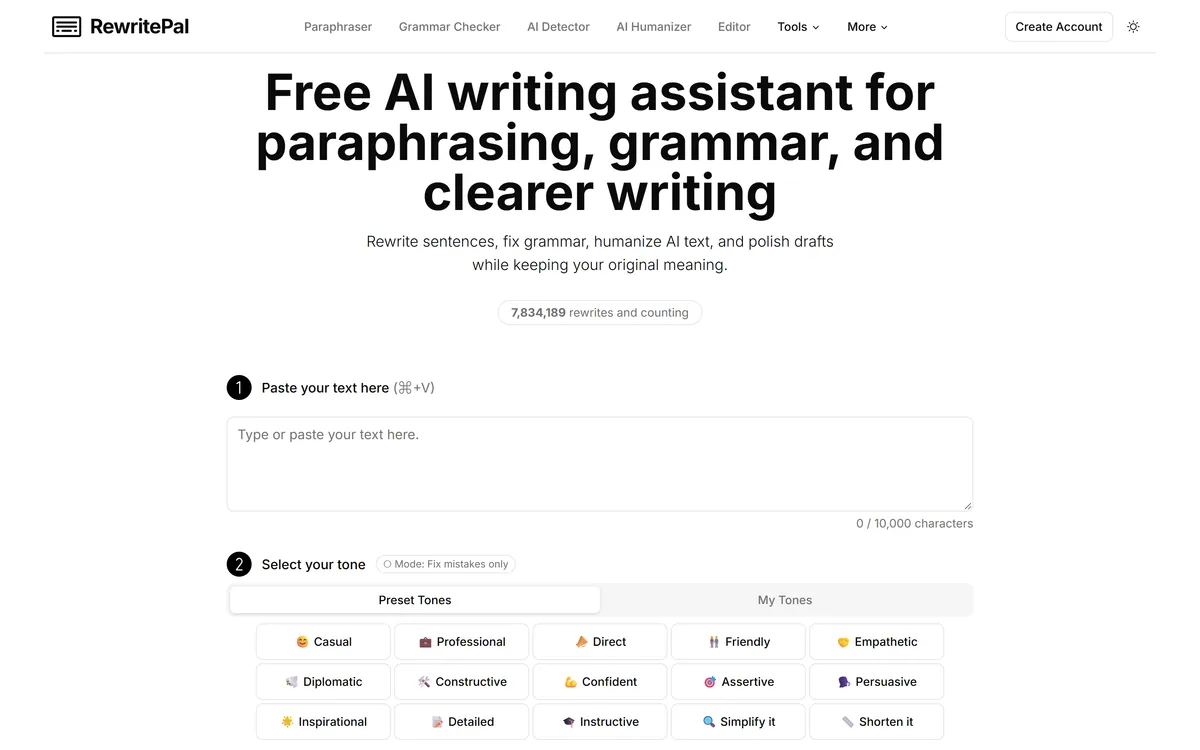
RewritePal is a free online writing assistant for paraphrasing, grammar and spelling correction, tone adjustment, and making AI-generated text read more naturally, with a 40,000-character editor and no account required.
rewritepal.com24 viewsAdded June 25, 202520K visitors
RewritePal is a free browser tool that rewrites text, fixes grammar, adjusts tone, and edits longer documents. There is no account, no onboarding, and no trial to start.
That absence of friction is genuinely the point. The established writing assistants all want an account and most gate their better features, which makes a no-signup tool useful for the specific moment when you just need a paragraph rewritten.
This review covers what it does, where a free tool like this genuinely competes, the AI Humanizer question, and the disclosure gaps worth knowing about before you paste anything into it.
RewritePal opens straight into an editor — no account, no onboarding.
RewritePal Tool Summary
Category
Free online paraphrasing and writing assistant
Core tools
Paraphrasing, grammar and spelling correction, tone adjustment
Additional tool
AI Humanizer for machine-written text
Document handling
Longer document editing in-browser
Editor capacity
40,000 characters shown in the interface
Account required
No
Cost
Free, per the site
Stated audiences
Students, professionals, marketers, and anyone wanting clearer writing
Languages
English displayed; the site says it can work for other languages but lists none
Company
Not named on the site, though Terms and Privacy pages are published
Legal pages
Terms of Service and Privacy Policy published
RewritePal Key Points
What it is: a free browser tool for paraphrasing, grammar and spelling correction, tone changes, and editing longer documents.
No signup required, which is the main practical advantage over the established writing assistants.
Generous editor limit — the interface shows a 40,000-character capacity, enough for a long essay or report.
Includes an AI Humanizer that makes machine-written text read more naturally; it makes no claim about defeating detectors.
Light on corporate detail: Terms and Privacy pages are published, but no company name or language list, which is worth knowing before pasting anything sensitive.
Four Tools, No Account
The feature set is deliberately small, and each item maps to a specific moment in writing rather than to a workflow.
Paraphrasing — rewording a passage while keeping its meaning
Grammar and spelling correction — the standard proofreading pass
Tone adjustment — shifting the same content between formal, casual, or other registers
AI Humanizer — making machine-generated text read less mechanically
Document editing — a 40,000-character editor for working on something longer
The advantage of a tool with no account is not that it is better. It is that it is available in the thirty seconds you actually needed it.
Where A Free Tool Genuinely Competes
Against a full writing platform, RewritePal loses on almost every measure: no integrations, no team features, no style guide, no browser extension following you into other applications.
It wins in exactly one situation, and it is a common one. You have a paragraph that needs rewording, you are on a machine that is not yours or does not have your tools, and you do not want to create an account to solve a two-minute problem.
The 40,000-character editor also matters more than it sounds. Many free rewriting tools cap you at a few hundred words, which makes them useless for anything real. This one can hold an entire essay.
The Humanizer Question
The AI Humanizer needs addressing directly, because tools in this space are often marketed on defeating AI detection and the ethics vary sharply by use.
What The Site Claims
RewritePal describes the humanizer as making AI-generated text sound more natural. Notably, it makes no explicit claim about bypassing detection systems, which is more restrained than much of this category.
That distinction is worth crediting. Tools that advertise detector evasion are selling something quite different from tools that improve readability.
The Legitimate Use
Machine-written first drafts often read stiffly — repetitive sentence lengths, hedged phrasing, transitions that announce themselves. Smoothing that is ordinary editing, and doing it faster is a reasonable thing to want.
If you generated the draft, you are editing your own work. That is not a grey area.
The Use To Avoid
Passing off generated text as your own where that is prohibited — coursework, most obviously — is an academic integrity issue regardless of which tool did the rewriting.
It is also worth knowing that AI detectors are unreliable in both directions. Human writing gets flagged, and careful AI writing passes, so the whole cat-and-mouse framing is built on a shaky foundation.
Using It Sensibly
A free tool with no account has particular considerations that a subscription product does not.
Check the output meaning against the original — paraphrasing tools occasionally change what a sentence claims.
Do not paste confidential material. No company is named on the site, so you cannot assess who handles it.
Work in shorter passages than the 40,000-character limit allows; quality is more consistent on focused sections.
Read the rewrite aloud. Paraphrased text often scans oddly in ways that are invisible on the page.
For non-English text, test a short sample first — the site says other languages work but does not list them.
Treat it as a first pass, not a final edit. It rewords; it does not judge whether the point is worth making.
What Is Not Disclosed
Two gaps stand out, and both matter more than they would for a paid tool.
RewritePal publishes Terms of Service and Privacy Policy pages, so its handling of your text is documented. What is not stated is a company name or jurisdiction, which means you cannot easily establish who stands behind those policies or where they are enforceable.
Language support is also unspecified. The site says the tool can work for other languages without listing any, so anyone working outside English is testing rather than relying.
Neither is disqualifying for casual use on non-sensitive text. Both are reasons not to route work material through it without checking.
The pattern is common among free tools and is not evidence of bad practice. It simply means the usual reassurances are absent, so the sensible policy is to treat the tool as public — fine for a blog paragraph, wrong for anything you would not post openly.
Is RewritePal Useful To You?
Use It When
You need a quick rewrite and do not want to create an account
You are on a shared, public, or locked-down machine
The passage is longer than free rivals allow but not confidential
You want to smooth a draft you generated yourself
You need grammar and tone fixes without installing anything
Do Not Use It For
Confidential, client, or commercially sensitive text
Coursework where submitting rewritten AI output breaches the rules
Writing that needs deep editorial analysis rather than rewording
Work in a language you cannot verify it handles well
Anything requiring a documented data processing arrangement
Key features of RewritePal
Paraphrasing and rewriting of existing text
Grammar and spelling correction
Tone adjustment between registers
AI Humanizer for making generated text read more naturally
In-browser editor holding up to 40,000 characters
No account or signup required
Free to use
Pros & cons
Pros
5
No account needed, so it is usable in the moment on any machine
40,000-character capacity beats most free rewriting tools substantially
Covers the four things people actually want from a rewriting tool
Makes no overblown claims about defeating AI detection
Nothing to install, which suits locked-down or shared computers
Cons
5
Terms and Privacy pages exist, but no company name or jurisdiction is stated
Language support is claimed but not documented
No integrations, extensions, or team features
Paraphrasing can subtly change what a sentence claims
Not appropriate for confidential or client material
Best For
Students and professionals needing an occasional quick rewrite
Anyone on a shared, public, or restricted computer
Writers smoothing a draft they generated themselves
People who want grammar help without another subscription
Editing longer passages that free rivals refuse to accept
RewritePal Versus Established Writing Tools
The trade is friction against depth, and for a two-minute task friction wins.
More capable options, at the cost of an account and usually a subscription.
Grammarly — follows you into every application rather than living on one page
QuillBot — the closest direct competitor, with more paraphrasing modes
ProWritingAid — genuine editorial analysis for long-form work
LanguageTool — stronger multilingual grammar checking with documented language support
Checked And Unverifiable
Last checked . Read from rewritepal.com during this check, with the screenshot above captured at the same time.
Feature list and stated audiences taken from RewritePal's own site
The 40,000-character editor capacity read from the interface itself
The free, no-signup claim confirmed on the site
Terms of Service and Privacy Policy pages are published; a company name and jurisdiction are not stated on the site
The site says other languages can work but lists none, so no language claim is made
The site makes no explicit claim about bypassing AI detection, and none is attributed to it here. Points about detector reliability apply to the category generally.
Editor's Verdict
3.8/5
RewritePal has an AInexfinder Editor Score of 3.8/5.
RewritePal pricing
AInexfinder does not list plan prices or billing details. For current pricing, plans, and trials, visit the official RewritePal website.
Vendor pricing, credits, and billing policies change over time. Always confirm on the official site before you buy.
Frequently asked questions
Is RewritePal free and does it need an account?
It is free and requires no signup, which is its main practical advantage. That makes it useful in the moment when you need a paragraph rewritten and do not want to register for anything.
How much text can RewritePal handle at once?
The editor shows a 40,000-character capacity, which is enough for a long essay or report. That is considerably more than most free rewriting tools, which typically cap you at a few hundred words.
Does RewritePal's humanizer bypass AI detectors?
It makes no such claim — the site describes the humanizer as making AI-generated text sound more natural. That restraint is worth noting, since much of this category markets detector evasion directly.
Is it safe to paste confidential text into RewritePal?
It publishes Terms and a Privacy Policy, so its handling is documented — but no company name or jurisdiction is stated, so you cannot establish who stands behind those terms or where they are enforceable. Keep client and commercially sensitive material out of it.
Does RewritePal work in languages other than English?
The site says it can work for other languages but does not list any. English is what is displayed. If you write in another language, test a short sample before relying on it.
How does RewritePal compare to Grammarly?
Different scope entirely. Grammarly follows you into every application with far deeper features and team controls; RewritePal is one page that rewrites text with no account. For a two-minute task, that lack of friction is the whole point.
Can I use it to rewrite AI-generated coursework?
Submitting AI-generated work where it is prohibited is an academic integrity issue regardless of which tool rewrote it. Smoothing a draft you generated for your own use is ordinary editing; passing it off where that breaks the rules is not.
Daniel reviews AI tools the slow way — by actually using them on real projects. His reviews cover what works, what breaks, and who each tool is genuinely a good fit for.
Daniel and the AInexfinder editorial team research RewritePal using public product information, listing evidence, and (when available) hands-on checks. Scores reflect listing completeness and transparency — not paid placement.
Listings may include affiliate or sponsored placements, which are labeled when present. Editorial scores and cons are not sold. See our affiliate disclosure and review methodology.
Undetectable AI rewrites AI-generated text so it reads as human-written and is less likely to be flagged by detectors. It also sells detection tools of its own — for text, images, voice, video and deepfakes — plus a suite of writing utilities and a Chrome extension.
Free AI Humanizer is a tool on CopyChecker that rewrites AI-generated text to read more naturally, with controls for mode, readability level, purpose, and strength, capped at 500 words per run and usable without signup.
Decopy AI is a free suite of writing and study utilities covering text humanizing, AI detection, summarisation of documents, video and audio, speech conversion, a maths solver, flashcard and worksheet creation, and story and article generation — usable without creating an account.
Copy.ai has become an AI-native go-to-market platform: workflows and agents that run prospecting, lead processing, deal coaching, ABM, and CRM enrichment across Salesforce, HubSpot, Gong, Outreach, and 2,000+ integrations.
Writesonic has become an AI search growth platform — tracking whether your brand appears across 10 AI platforms, running optimisation and citation work through an Action Center, and reporting results against traffic and revenue.
Talefy, from AIcberg Labs, is an interactive AI storytelling platform. Readers make choices that change the plot, and creators build characters, worlds and branching narratives across fantasy, sci-fi, romance, horror and comedy.