

The workspace at www-flux3.com generates 5–20 second AI videos with native audio from text or a starting image, routing across FLUX 3, MiniMax H3, Seedance, Wan 3.0 and Kling 3.0 Pro, at 720p or 1080p with video extension.
FreeVideo & Audio

Gemini Omni is an independent web platform providing access to Google's any-to-any multimodal video generation, with native audio sync, character consistency from reference photos, up to fifteen multimodal references per prompt, in-chat editing, and output up to 4K in four to ten second clips.
Trademark and affiliation: Gemini is Google's product name. Gemini Omni is an independent third-party service that provides access to Google's models; it is not operated by, endorsed by or affiliated with Google. We found no affiliation disclaimer on the site's homepage. Verify who you are contracting with before entering payment details.
There is a category of AI product that deserves to be understood clearly before anything else: the reseller. A company that does not build a model but sells access to someone else's, wrapped in its own interface and its own brand.
That is a legitimate business and it can add real value — a better interface, useful defaults, features the original provider does not offer. It also means you are paying a margin above the underlying cost, and that your service depends entirely on a relationship you cannot see.
Gemini Omni is in that category. The generation capability is Google's; the interface, the credit system and the conveniences are this company's. Judging it fairly means separating those two things, because the model is strong and the question is what the wrapper is worth.
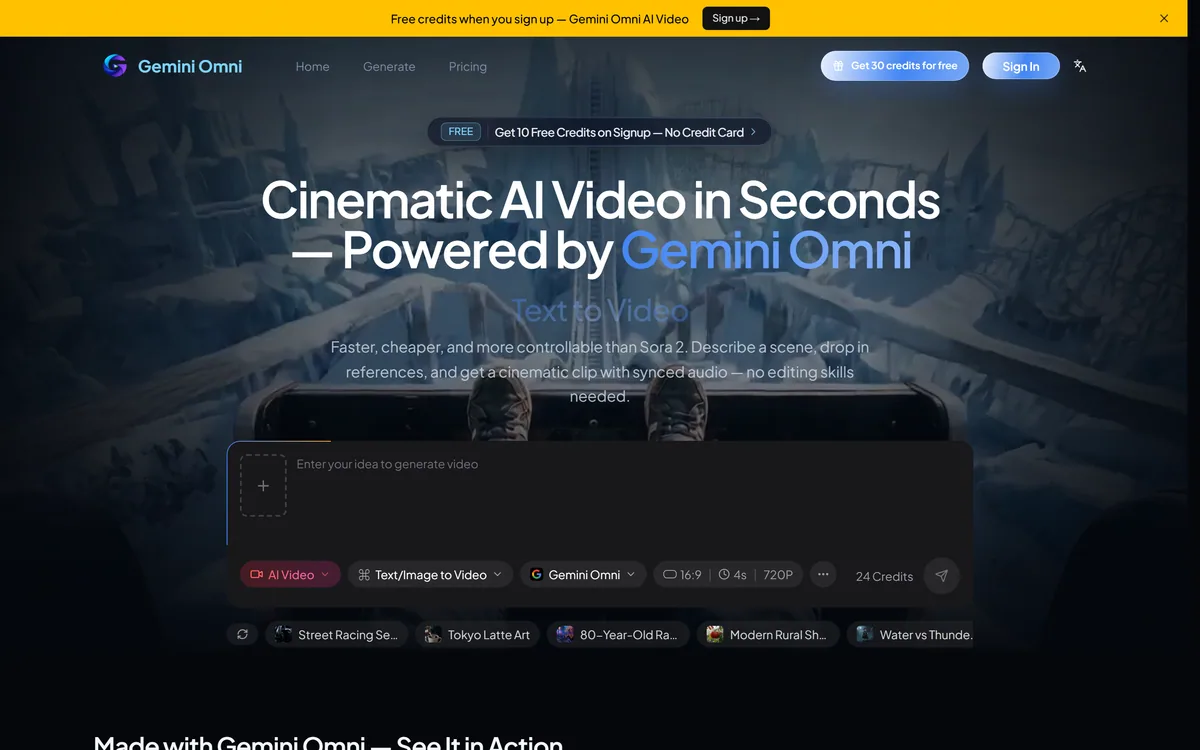
Gemini Omni allows up to fifteen multimodal references per prompt, mixing text, images, video and audio.
This is the most substantive thing the interface adds, and it addresses a genuine constraint. Generating a shot that matches a specific look usually means supplying several inputs — the character, the setting, the style, a motion reference — and most interfaces cap you well below that.
The practical difference shows up in commercial work. A brand video needs the product, the palette, the typography treatment and a tonal reference simultaneously, and each reference you cannot supply is a quality you have to describe in words and hope for.
Character consistency from reference photos works on the same principle and solves the problem everyone hits in generative video: the same person looking like a different person between shots.
The caveat is that reference-conditioned generation is guidance rather than instruction. Supplying fifteen references does not mean all fifteen will be respected equally, and the model resolves conflicts between them in ways you cannot control. Expect strong influence, not obedience.
Reference-image handling is the capability worth comparing directly against going to Gemini yourself, since convenience around exactly this is what you are paying a reseller for.
A reference you cannot supply becomes a quality you have to describe in words and hope for. That is why the count matters.
Editing in the conversation without regenerating is the feature that matters most for anyone paying per generation.
The normal generative video loop is expensive in exactly the wrong way. You produce a clip that is nearly right, want one thing changed, and the only route is a new generation — which costs the same as the first and may lose what you liked about it.
Conversational editing avoids both problems. You keep the parts that worked and adjust the part that did not, and you are not gambling a full generation on a small change.
For a credit-based product this is the difference between a tool you use freely and one you use nervously. It is also worth testing specifically during a trial, because how much can actually be changed without regeneration varies enormously — some systems can adjust colour and pacing but not composition.
This is the central question for any product in this category, and it deserves a direct answer rather than avoidance.
The honest case for a reseller is real. Google's own developer surfaces assume an engineer; a web interface with credits, a gallery and conversational editing does not. For someone who wants to make videos rather than write code, that gap is worth something, and simplifying access to a frontier capability is a genuine service.
The honest case against is equally real. You pay a margin above the underlying model cost, because the reseller has to make money on the difference. You get whatever capability the reseller has implemented rather than everything the model can do. And your access depends on a commercial relationship between two companies that you have no visibility into.
That last point is the one people underweight. If the arrangement changes — pricing, terms, availability — the effect reaches you with no warning, and there is no recourse because your contract is with the intermediary.
The practical guidance: use a reseller for convenience on discretionary work, and go direct for anything a business depends on. And before paying, spend two minutes finding out who the company actually is.
The question generalises. Whenever an interface sits between you and a model, ask what it adds beyond access — the answer for InVideo AI, for instance, is an entire editing workflow rather than a thinner wrapper.
To the site's credit, it publishes specifications that many competitors omit: up to 4K resolution, four to ten second durations, native stereo audio synchronised with the visuals, and fifteen multimodal references.
Clip length is the number to read carefully. Four to ten seconds is standard for current generative video and it constrains what you can make: a social clip, a product shot, an establishing sequence. Anything longer means generating several clips and editing them together, which brings back the consistency problem the reference features exist to solve.
Native audio sync is more valuable than it appears. Video generated silently and scored afterwards has a characteristic disconnection — footsteps that do not land, an impact with no matching sound. Generating audio with the visuals rather than over them is a meaningful quality difference.
4K output is at the top of what current systems produce, and worth treating with the usual caution: highest resolutions are typically slower, more expensive, and sometimes less reliable than mid-range ones.
Publishing these at all is better behaviour than most of this category manages, and it lets you judge fit before spending anything.
Published specifications also make honest comparison possible with platforms like Runway ML, where you can hold resolution and duration claims against each other rather than guessing.
Ten free credits on signup make this testable, and the comparison worth running is not against other resellers but against the underlying model itself.
The bar is step four. If the interface does not save you meaningful effort over direct access, you are paying a margin for nothing.
Signup provides ten free credits, with Lite and Pro plans above; amounts are not disclosed on the page we read. API access is stated for Pro and team plans, and commercial use is confined to Pro.
That last restriction is the one to notice before anything else. Commercial use gated to the top tier means the cheaper plan is effectively for experimentation only — and if you generate something on Lite and use it in client work, you are outside the terms you agreed to.
The free credits are a genuine trial rather than a teaser, which is to the site's credit and lets you assess output quality before spending.
The refund policy is published alongside terms, privacy, cookie, DMCA and disclaimer pages, which is a more complete set than many resellers offer. Read the refund terms specifically, because prepaid credits for generative output are a recurring source of disputes across this category.
We do not publish amounts. The comparison that matters is against direct access to the same capability, since that is what you are paying a margin above.
| Product type | Third-party web interface for multimodal AI video generation |
|---|---|
| Operator | Independent, not operated by Google |
| Underlying capability | Described as Google's any-to-any multimodal AI video generator |
| Model referenced | Gemini Omni Flash |
| Multimodal references | Up to 15 per prompt, across text, images, video and audio |
| Audio | Native stereo audio synchronised with visuals |
| Consistency | Character consistency from reference photos |
| Editing | In-chat conversational editing without regeneration |
| Output resolution | Up to 4K |
| Clip duration | 4 to 10 seconds |
| Free access | 10 credits on signup |
| Paid tiers | Lite and Pro; API access on Pro and team plans |
| Commercial use | Pro plan only |
| Published policies | Privacy Policy, Terms of Service, Refund Policy, Cookie Policy, DMCA Policy, Disclaimer |
Text-to-video and multimodal generation through a web interface
Up to fifteen multimodal references per prompt across text, images, video and audio
Native stereo audio generated in sync with the visuals
Character consistency driven by reference photographs
In-chat conversational editing without full regeneration
Output up to 4K resolution in four to ten second clips
Ten free credits on signup with no payment required
API access on Pro and team plans
The choice here is between going direct to a model, using a multi-model workspace, or paying a single-model reseller for a simpler interface.
| Tool | What it is | Model access | Commercial terms |
|---|---|---|---|
| Gemini Omni | Third-party reseller interface | One provider's video capability | Pro plan only |
| Gemini | Google's own product | Direct, no intermediary | Set by Google's own terms |
| InVideo AI | Multi-model workspace with an agent | 200+ models routed by task | Per underlying model |
| Runway ML | First-party model developer | Its own frontier models | Set by Runway directly |
| Phygital+ | Node-based multi-model workspace | 30+ models in pipelines | Per underlying model |
Before paying a reseller, check what direct access and multi-model workspaces offer for the same work.
Last checked . Read from gemini-omni.pro, including the footer, with the screenshot above captured in the same session.
What we could not confirm: no affiliation disclaimer regarding Google appears on the homepage, despite the site trading on Google's product name; no company legal name, registration or country is published beyond a copyright line; the commercial relationship between this operator and Google is not described; no pricing amounts are disclosed; and we did not generate video, so nothing here reflects tested output quality. Treat the underlying capability as Google's and the interface, credits and terms as this operator's.
Gemini Omni scores low-to-middling not because the underlying capability is weak — it is Google's, and it is strong — but because of what the reseller layer adds and does not add. Fifteen multimodal references per prompt, in-chat editing without regeneration and character consistency from reference photos are genuinely useful conveniences, and ten free credits let you try before paying. But you are paying a margin for a wrapper around a model you could reach directly, commercial use is confined to the top plan, and a site trading on Google's product name carries no affiliation disclaimer where a user would see it. AInexfinder Editor Score: 3.2/5.
AInexfinder does not list plan prices or billing details. For current pricing, plans, and trials, visit the official Gemini Omni website.
Visit official website for pricingVendor pricing, credits, and billing policies change over time. Always confirm on the official site before you buy.
Log in to write a review.
No reviews yet. Be the first to share your experience with Gemini Omni.
Assigned reviewer
Daniel ReedSenior AI Tools Reviewer
Daniel reviews AI tools the slow way — by actually using them on real projects. His reviews cover what works, what breaks, and who each tool is genuinely a good fit for.
Daniel and the AInexfinder editorial team research Gemini Omni using public product information, listing evidence, and (when available) hands-on checks. Scores reflect listing completeness and transparency — not paid placement.
The workspace at www-flux3.com generates 5–20 second AI videos with native audio from text or a starting image, routing across FLUX 3, MiniMax H3, Seedance, Wan 3.0 and Kling 3.0 Pro, at 720p or 1080p with video extension.

Runway is an AI video platform built around generative world models — Gen-4.5, Aleph 2.0, and Act-Two for performance capture — split across Runway Creative for filmmakers, Runway Dev for builders, and Runway Robotics.

Descript is a video and audio editor that works by editing a transcript — delete a sentence and the footage goes with it — plus Studio Sound, Eye Contact, filler-word removal, AI voices, avatars, and the Underlord assistant.
Treblo generates complete songs from a text prompt in any style, with a browsable style library, an Explore feed of what others have made, iOS and Android apps, and a developer section for building on it.

kling3ai.co is an independent interface offering video generation through Kling 3.0 and Seedance models, with multi-shot storyboarding, motion control and 4K output. It is not Kuaishou's official Kling service, which runs at kling.ai.
Vibrantsnap is an AI tool that turns a rough screen recording into a polished walkthrough: it rewrites your narration, reads it in a studio voice in any language, and auto-edits the video with zooms, chapters and captions.