Treblo generates complete songs from a text prompt in any style, with a browsable style library, an Explore feed of what others have made, iOS and Android apps, and a developer section for building on it.
FreemiumVideo & Audio
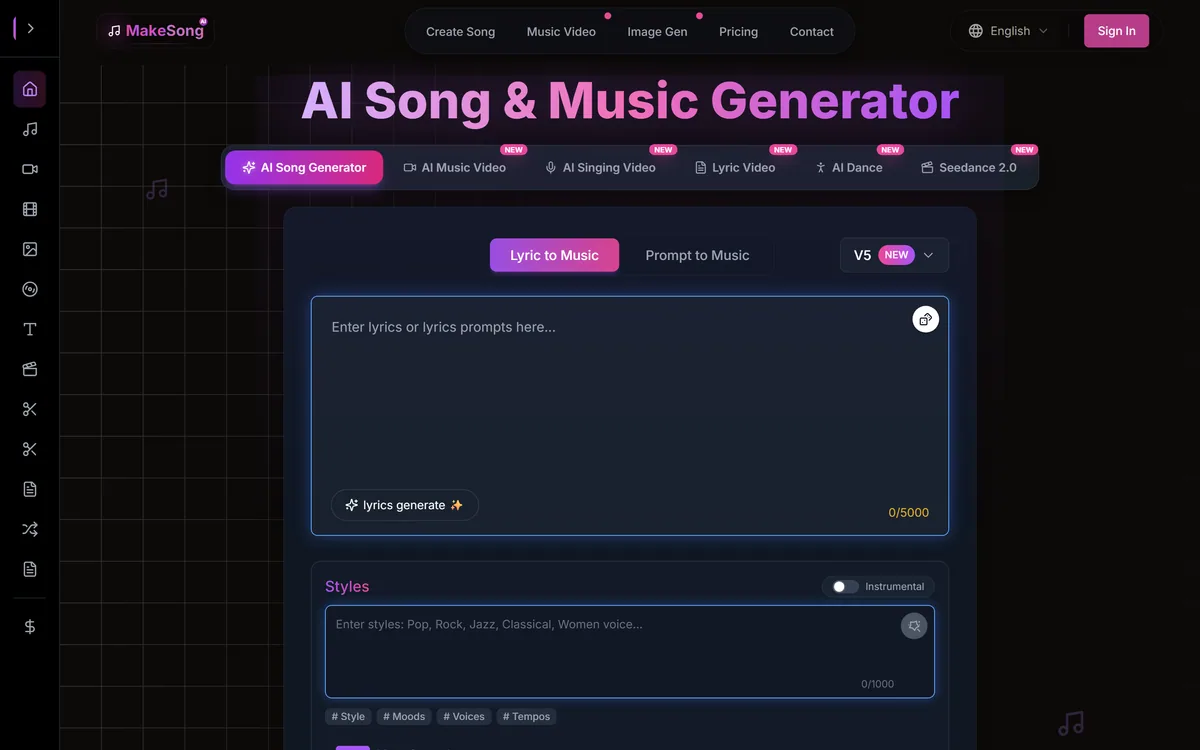
MakeSong turns a text description or your own lyrics into a complete track with vocals across a wide genre range, exports to MP3 and WAV, and includes a fuller-than-usual set of editing tools — stem splitting, vocal removal, section replacement, song extension and video generation.
Music generation crossed a threshold recently that most people have not registered. The output is no longer recognisably synthetic on a casual listen — a generated track with vocals, played once through phone speakers under a video, passes without comment.
That changes who this technology is for. It stopped being a novelty for people curious about AI and became a practical option for anyone who needs a piece of music and has neither a budget nor a library subscription.
MakeSong sits in that market with a broader tool set than most, and Suno is the benchmark it has to be judged against. What makes it worth a closer look is not the generation, which is roughly comparable across the category, but what it lets you do afterwards — and what its licence actually permits, which is the question everyone skips and the one that matters commercially.
Most music generators are one-shot machines. You describe a song, you get a song, and if it is nearly right your only recourse is to generate again and hope.
MakeSong lists a substantially fuller kit: a stem splitter, a vocal remover, section replacement, song extension, cover creation and an acapella extractor.
Stem splitting is the most consequential of these, and it is what separates this from a background-track generator such as Treblo. Separating a mix into vocals, drums, bass and other instruments turns a fixed artefact into material — you can drop the vocal under a different section, use the instrumental behind narration, or rebalance a mix that came back with the vocal too loud.
Section replacement addresses the specific frustration of this category, which is that generation is nearly right more often than it is wrong. A track with a good verse and a weak chorus is a common outcome, and regenerating the whole song to fix one section is both wasteful and likely to lose what worked.
Song extension matters for a duller but very practical reason: video edits do not respect musical structure. A track that ends eight seconds before your video does is unusable, and extending it is far better than looping it clumsily.
The gap between a generator and a tool is whether you can fix the eighty per cent that came out right without regenerating it.
The site references advanced models as V5, V4 and V3. That is all the detail offered.
It is worth being clear about what this does and does not tell you. Version numbers indicate that the product has iterated, which is mildly reassuring. They tell you nothing about architecture, training data, or what changed between generations.
The training data question is the one with commercial weight. Music generation models learn from recordings, and what those recordings were and under what terms they were used is an active and unsettled area in several jurisdictions. A vendor that publishes nothing about its training sources leaves its users unable to assess a risk that ultimately sits with them.
This is not unique to MakeSong — most of the category is equally quiet, and the few vendors who do publish tend to be those licensing catalogues deliberately. It is simply a factor to weigh if the output is going into commercial work, and a reason to read the terms rather than the marketing.
The site states that songs are one hundred per cent royalty-free, that commercial use is supported, and that a downloadable commercial licence is included with paid tiers. This is the most important paragraph on the page and it repays careful reading.
Royalty-free means you do not pay per use. It is a statement about payment structure, not about ownership. It is entirely consistent with the vendor retaining rights, with the licence being revocable, or with the permission being narrower than you assumed.
The questions that actually determine whether you can use a track commercially are different ones. Do you own the output or hold a licence to it? Can that licence be revoked or changed later, and what happens to work already published? Is there any indemnity if a third party later raises a rights claim over the output? Does the permission survive if you stop subscribing?
That last question matters more than people expect. If your licence depends on an active subscription, every video you published with that music becomes a problem the month you cancel.
There is also a separate legal question the licence cannot answer: in several jurisdictions, purely machine-generated output may not attract copyright protection at all. That does not stop you using it, but it may mean nobody can stop others using the same track — which matters if you intended it as a brand asset.
None of this is a reason to avoid the tool. It is a reason to read the actual licence document before the track goes into anything commercial, rather than relying on a phrase on the homepage.
It is worth separating the uses where this technology is genuinely the right answer from the ones where it is a worse version of something else.
The strongest case is background music for content, where you need something that fits a mood and a duration, nobody will listen to it attentively, and the alternative is a library subscription or a copyright strike. Generated audio wins clearly here.
The second strong case is personal and occasional: a song for a wedding, a birthday, a leaving gift. The output does not need to be objectively good, it needs to be about a specific person, and no library track can be.
Songwriting scratchpad is a real third use. Generating four versions of an idea to hear which arrangement works is faster than demoing them yourself, even if nothing generated survives into the final piece.
Where it is the wrong tool is anywhere the music is the product — for that, a vocal synthesiser such as ACE Studio puts the writing back in your hands. Music people will listen to attentively, or that carries your identity as an artist, is not something to outsource to a text prompt — and audiences have become notably quicker at recognising and objecting to generated audio presented as authored work.
The dishonest case is worth naming plainly: uploading generated tracks in volume to streaming platforms to collect fractional royalties. Platforms are actively removing this material, and it is a poor use of anyone's time regardless of the tooling.
Music generators are unusually easy to evaluate badly, because the first generation is often surprisingly good and the fifth reveals the ceiling. This sequence gets you an honest read.
The bar is step five. A generator that cannot do your specific genre is not a generator you can rely on, however good its pop output sounds.
Access is credit-based across several subscription tiers, with the commercial licence and higher-quality output attached to paid plans.
Credits are the right meter for this kind of product, because generation genuinely costs the vendor money per run and a flat-rate offer would either be restrictive or unsustainable. The consequence for you is that iteration has a price, and iteration is how you get a usable track.
That has a practical implication for how you work. Refining a prompt across ten generations is the normal path to a good result, so budget credits for exploration rather than expecting the first output to be the one you use.
Check two things specifically before subscribing: whether credits roll over or expire monthly, and whether WAV export and the commercial licence are available on the tier you are considering or only above it. Those two details decide whether a plan is usable for real work.
We do not publish amounts, since tiers and credit rates change.
Full song generation with vocals from a text description
Music written around lyrics you supply yourself
Instrumental and karaoke variants alongside the vocal mix
Stem splitting into separate instrument and vocal tracks
Vocal removal and acapella extraction from generated tracks
Section replacement and song extension for fitting an existing edit
MP3 and lossless WAV export
Music video, lyric video, singing video and mashup generation
Generation quality across this category has converged. What separates these tools now is what you can do with the output afterwards.
| Tool | Core strength | Post-generation editing | Best suited to |
|---|---|---|---|
| MakeSong | Full songs with vocals from text or your own lyrics | Strong — stems, vocal removal, section replacement, extension | Content creators who need to fit music to an existing edit |
| Suno | The category benchmark for song generation with vocals | Moderate | Anyone judging output quality first |
| Treblo | Music generation for content backgrounds | Limited | Simple background tracks without editing needs |
| ACE Studio | Vocal synthesis with fine control over performance | Deep, but on vocals specifically | Producers who write the music and need a voice |
| ElevenLabs | Voice and speech generation | Not applicable | Narration rather than music — a different job entirely |
| Generation inputs | Text description, or your own lyrics set to music |
|---|---|
| Vocals | Vocal, instrumental and karaoke variants |
| Genres listed | K-Pop, hip-hop, rock, pop, classical, EDM, jazz, house, bachata, Latin, acoustic, world and others |
| Languages | Multilingual, with English, French, German and Greek among the examples shown |
| Export formats | MP3 and WAV |
| Editing tools | Stem splitter, vocal remover, acapella extractor, section replacement, song extension, cover creation |
| Video tools | AI music video, singing video, lyric video, dance video and mashup generators |
| Models referenced | V5, V4 and V3, with no further detail published |
| Licence | Described as 100% royalty-free with commercial use supported; downloadable commercial licence on paid tiers |
| Pricing model | Credit-based subscription tiers |
| Contact | Support email address published on the site |
| Published policies | Privacy Policy and Terms of Service |
Different jobs within audio — generation, vocal synthesis and speech are not interchangeable.
Last checked . Read from makesong.com, including the footer and product pages, with the screenshot above captured in the same session.
What we could not confirm: no detail is published about the models beyond version numbers, including training data sources, which is the open question with commercial weight in this category; maximum song length and per-generation time are not stated; whether the commercial licence survives cancellation of a subscription, and whether any indemnity is offered, are not set out on the marketing pages we read; and we did not generate audio, so nothing here assesses output quality directly.
MakeSong scores moderately because it goes further than most generators in the direction that matters: alongside producing a track it gives you stem splitting, vocal removal, section replacement and song extension, which is the difference between a slot machine and something you can actually work with. WAV export and a stated commercial licence make it usable in real projects. It loses ground because it names its models only as version numbers with no published detail, because ownership and indemnity terms for generated audio are the crucial question in this category and are not set out clearly on the site, and because the breadth of adjacent video features suggests attention spread thin rather than depth in the core. AInexfinder Editor Score: 3.5/5.
AInexfinder does not list plan prices or billing details. For current pricing, plans, and trials, visit the official MakeSong website.
Visit official website for pricingVendor pricing, credits, and billing policies change over time. Always confirm on the official site before you buy.
Log in to write a review.
No reviews yet. Be the first to share your experience with MakeSong.
Assigned reviewer
Daniel ReedSenior AI Tools Reviewer
Daniel reviews AI tools the slow way — by actually using them on real projects. His reviews cover what works, what breaks, and who each tool is genuinely a good fit for.
Daniel and the AInexfinder editorial team research MakeSong using public product information, listing evidence, and (when available) hands-on checks. Scores reflect listing completeness and transparency — not paid placement.
Treblo generates complete songs from a text prompt in any style, with a browsable style library, an Explore feed of what others have made, iOS and Android apps, and a developer section for building on it.
ACE Studio is an AI music production platform built around singing voice synthesis. You give it MIDI and lyrics and it returns an expressive vocal performance, with 140+ voices across 8 languages, voice cloning, AI instruments, stem splitting and a DAW plugin that brings the whole thing into your session.
Loudly is a Berlin-built AI music platform spanning generation across four proprietary models and one partner model, a remix engine for songs you own, genre-aware mastering, stem splitting, and distribution to more than 50 platforms — with output stated as rights-cleared at generation.
MusicCreator AI generates tracks up to eight minutes from text, photos or genre prompts, and surrounds that with eighteen further tools including stem splitting, vocal removal, audio-to-MIDI conversion, a MIDI editor, mastering, key and BPM detection and a singing voice generator, across eleven interface languages.
Boomy is a generative music platform from Boomy Corporation in Berkeley, California. It creates original songs in seconds, states that artists receive full commercial rights, and publishes a running total of songs made — 22,123,440 at the time we checked.

The workspace at www-flux3.com generates 5–20 second AI videos with native audio from text or a starting image, routing across FLUX 3, MiniMax H3, Seedance, Wan 3.0 and Kling 3.0 Pro, at 720p or 1080p with video extension.