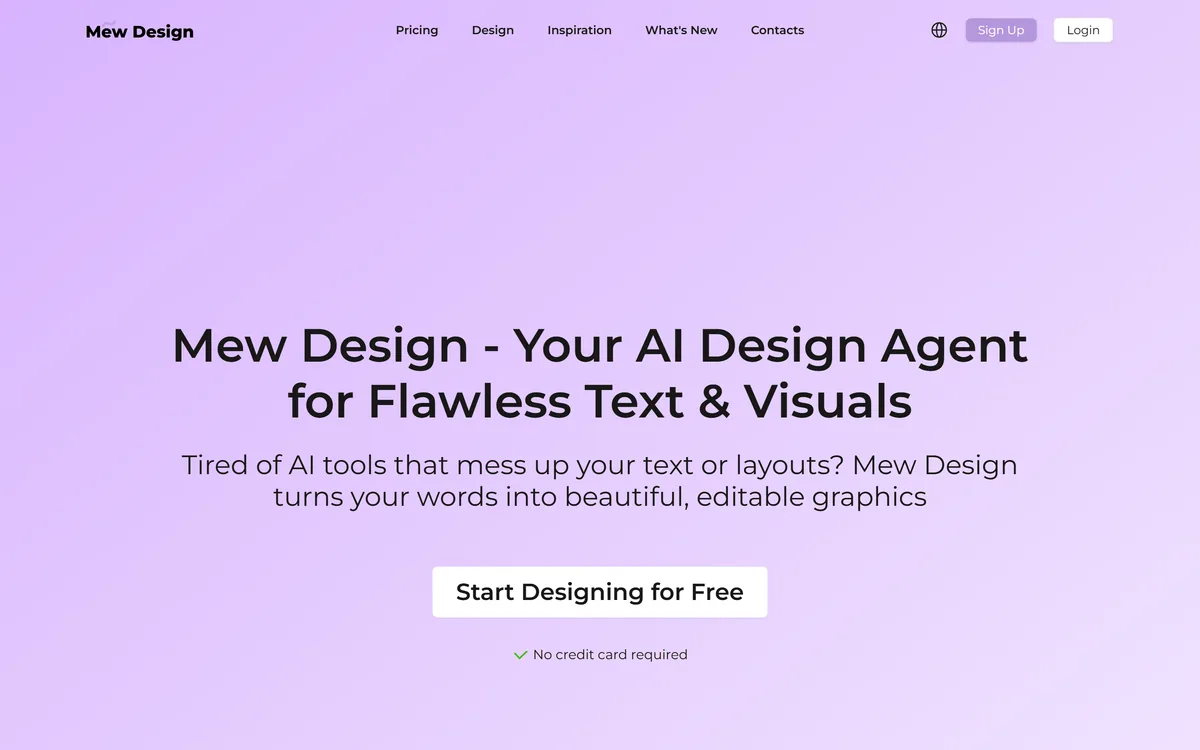
Mew Design is an AI design agent that turns words into editable graphics, aimed specifically at the two things image generators handle badly: rendering text correctly and producing output you can still edit.
Mew Design goes after a specific and genuinely annoying failure. Ask an AI image generator for a poster with a headline on it and you will usually get beautiful artwork with nonsense letters.
Its homepage says so directly: "Tired of AI tools that mess up your text or layouts?" The claim is that it produces correct text and, crucially, graphics you can still edit afterwards.
This review covers why that problem exists, what editable output changes about the workflow, how to test the claims for yourself, and where Mew Design fits against the design tools it actually competes with.
Mew Design's own headline names its competitors' weakness — mangled text and unusable layouts.
Mew Design In Short
The problem it targets: AI image generators produce garbled text and flat images you cannot edit afterwards.
What it outputs: editable graphics rather than finished pictures, so you can fix and adjust rather than regenerate.
Framed as an agent, not a prompt box — you describe what you need and it assembles a layout around it.
Export is PNG today — transparent backgrounds supported, with JPG, PDF and SVG listed as coming soon.
The right comparison is against design tools like Canva rather than against image generators like Midjourney.
Why AI Struggles With Text In Images
Image generation models learn to produce pixels that look like the images they trained on. Letters are shapes to them, not symbols with meaning, which is why generated text so often reads as convincing-looking gibberish.
This has improved substantially, but it remains the most common reason a generated image cannot be used. A poster, a social graphic, a thumbnail, or an advertisement almost always has words on it, and words that are almost right are worse than no words at all.
Approaching the problem as a design task rather than an image task is the sensible fix: render text as text, and generate the visual around it.
An image generator draws a picture of writing. A design tool sets type. Those produce very different results when the words matter.
Editable Output Changes The Workflow
The second claim matters as much as the first, and it is the one people underestimate.
A generated image is finished. If the headline is wrong, the colour is off, or the client wants a different price on the banner, you regenerate and hope — and everything else changes too.
Editable graphics behave like design files. Change the text, move an element, swap a colour, and everything else stays put. That is the difference between a tool you can use on a deadline and one you gamble with.
What An Agent Framing Implies
Mew Design calls itself a design agent rather than a generator, and the distinction shapes what you should expect from it.
You Describe The Job, Not The Picture
A generator wants a description of an image. An agent wants a description of what the graphic is for — the message, the audience, the format — and makes layout decisions on your behalf.
That suits people who know what they need to communicate but not how to compose it, which is most people producing marketing graphics.
Layout Is The Deliverable
Composition — hierarchy, spacing, alignment, where the eye goes first — is what separates a designed graphic from a picture with words on it.
Judging this tool means judging its layouts, not its imagery. Attractive artwork with poor hierarchy is still a failed graphic.
Testing The Claims Yourself
Both headline claims are easy to verify quickly, and the free tier requires no card, so there is no reason not to.
Give it text containing something awkward — a brand name with unusual capitalisation, a long word, or a number and a symbol together.
Check every character in the output. Near-correct text is the exact failure this tool claims to solve.
Now change the text on the result. If editing is genuinely available, this takes seconds and nothing else moves.
Try a format with tight constraints, such as a banner where the text must fit a narrow strip.
Ask for the same message in two different formats and compare whether hierarchy survives the resize.
Export and look at it at final size. Text problems that hide at preview scale become obvious at full resolution.
Export Formats And Company Detail
Export is better documented than most tools in this bracket. Mew Design states that output is currently PNG, with transparent backgrounds supported, and lists JPG, PDF and SVG as coming soon. It also publishes a contact address for format requests.
That matters for planning. PNG covers social and web use comfortably; if you need print-ready PDF or scalable SVG today, they are not there yet, and you would be buying on a roadmap promise.
On corporate detail the site is lighter. About Us, Privacy Policy and Terms of Service pages are published, but no company name or country of operation is stated on them. The extent of editing is also unspecified — whether you get true layered editing or a limited set of adjustable fields is something to confirm during the free trial.
Where It Sits In A Real Workflow
Mew Design is competing with design tools, not with image generators, and that framing sets fair expectations.
Against a template-based design tool, it should be faster to a first draft because you describe rather than choose. Against an image generator, it should be usable where the other is not, because the words come out right.
The realistic use is producing volume graphics where the message matters more than visual distinction — social posts, promotional banners, announcements, and thumbnails. For brand-defining design work, a designer still wins.
Key features of Mew Design
Generates graphics from a written description of what you need
Focus on rendering text correctly rather than as generated pixels
Editable output rather than flat, finished images
Agent-style input — describe the job, not the picture
Inspiration gallery of example designs
Free to start with no credit card required
Pros & cons
Pros
5
Targets the single most common reason generated images are unusable
Editable output means fixing copy does not mean regenerating everything
Describing the job suits people who cannot compose a layout themselves
No card required to test both headline claims properly
Positioned honestly against a real, well-known weakness in rivals
Cons
5
Export is PNG only today, with JPG, PDF and SVG still listed as coming soon
No company name or country of operation stated, despite policy pages being published
The extent of editing is unclear — layered, or just adjustable fields
Competes against far more established design tools
Unlikely to suit brand-defining or distinctive creative work
Best For
Marketers producing social graphics where the copy carries the message
Small businesses making promotional banners and announcements
Creators needing thumbnails with readable, correct text
Anyone frustrated by AI generators mangling words in images
Teams that need to update copy on a graphic without starting again
Mew Design Against Design And Generation Tools
The key question is whether text renders correctly and whether output remains editable.
Not named on the site, though policy and contact pages are published
Export formats
PNG with transparent background supported; JPG, PDF and SVG listed as coming soon
Legal pages
About Us, Privacy Policy, and Terms of Service published; contact address admin@mew.design
Would Mew Design Help You?
Try It If
Your graphics almost always have words on them
AI generators keep producing images with mangled text
You need to change copy on a graphic without regenerating everything
You know your message but not how to compose a layout
You produce volume social and promotional graphics
Do Not Bother If
You need brand-defining or distinctive design work
You need print-ready PDF or scalable SVG today rather than on a roadmap
Your graphics are imagery-led with no text at all
You already work fluently in a full design tool
You need documented company details before adopting a tool
Design Tools To Compare It With
These are the real alternatives, depending on how much control you need.
Canva AI — the established option for AI-assisted design with reliable text and brand controls
Adobe Firefly — generation with commercial safety, feeding into full Adobe editing
Midjourney — far better imagery, but poor at text and not editable afterwards
Pixlr — a free layer editor if you would rather add the text yourself
Evidence Behind This Entry
Last checked . Read from the page as rendered in the screenshot above, captured during this check.
The positioning as an AI design agent for text and visuals quoted from Mew Design's own headline
The claim of editable graphics output taken from the site's own description
Free start with no credit card required confirmed on the page
Site sections — Design, Inspiration, What's New, Pricing, Contacts — read from the navigation
Export formats confirmed from the site: PNG now, with JPG, PDF and SVG listed as coming soon; About Us, Privacy Policy and Terms of Service pages are published, but no company name or country is stated on them
The explanation of why image models mangle text is a general property of how those models work, not a claim made by or about Mew Design.
Editor's Verdict
4.0/5
Mew Design has an AInexfinder Editor Score of 4.0/5.
Mew Design pricing
AInexfinder does not list plan prices or billing details. For current pricing, plans, and trials, visit the official Mew Design website.
Vendor pricing, credits, and billing policies change over time. Always confirm on the official site before you buy.
Frequently asked questions
What problem does Mew Design solve?
Two: AI image generators typically produce garbled text, and they output flat images you cannot edit. Mew Design aims at correct text rendering and editable graphics so you can adjust rather than regenerate.
Why do AI image generators get text wrong?
Because they learn to produce pixels resembling their training images. Letters are shapes to them, not symbols with meaning, which is why generated text often reads as convincing-looking gibberish.
How do I test whether it actually works?
Give it awkward text — a brand name with unusual capitalisation, a long word, a number with a symbol — and check every character at full export size. Then change the text on the result and see whether editing is genuinely available.
Is Mew Design free?
It is free to start with no credit card required, which is enough to test both of its headline claims. Pricing details for continued use are on its own pricing page.
How does it compare to Canva?
Canva is the established option with reliable text, full editing, templates, and brand controls. Mew Design should be faster to a first draft because you describe the job rather than choose a template — but it is competing against a far more mature product.
Can I get vector or print-ready files from Mew Design?
Not yet. Output is currently PNG, with transparent backgrounds supported. The site lists JPG, PDF and SVG as coming soon and publishes admin@mew.design for format requests — so if you need print-ready PDF or scalable SVG today, this is not the tool.
Should I use this instead of Midjourney?
They solve different problems. Midjourney produces far better imagery but handles text poorly and outputs flat images. If your graphic needs readable words on it, that is exactly where Midjourney fails and this category exists.
Daniel reviews AI tools the slow way — by actually using them on real projects. His reviews cover what works, what breaks, and who each tool is genuinely a good fit for.
Daniel and the AInexfinder editorial team research Mew Design using public product information, listing evidence, and (when available) hands-on checks. Scores reflect listing completeness and transparency — not paid placement.
Listings may include affiliate or sponsored placements, which are labeled when present. Editorial scores and cons are not sold. See our affiliate disclosure and review methodology.
krea2.org is a browser image-generation workspace that runs several third-party models side by side, including Krea 2 tiers, FLUX.2, GPT Image 2, Nano Banana and Seedream 5.0, with reference uploads, six aspect ratios and live model switching.
Pet Pic Portraits turns a pet photo into styled artwork — Royal King, Pop Art, Watercolour, Viking, Wizard and more — with an instant preview before ordering. Output is a digital download, a canvas print or framed wall art, and it includes a pet memorial option.
VividManga colourises black-and-white manga while keeping recurring characters on a fixed palette and leaving speech bubbles untouched. It takes ZIP and CBZ archives, offers twelve-plus styles, and exports pages individually or as a packaged chapter.
Canva AI is the Magic Studio suite built into Canva — Magic Write for copy, Dream Lab for images, Magic Edit, Expand and Eraser for photos, Magic Switch for reformatting, Magic Charts for data, and Canva Code for interactive widgets.
Pixlr is a browser-based photo editor from Pixlr Pte Ltd with two editors and a generative AI layer — Generative Fill, Expand and Transform, background and object removal, Super Scale upscaling, face swap, plus image, video, and audio generation.
GenApe is an all-in-one AI platform covering writing, chat, image and video generation, image editing, product photography, translation, and research — with 145 free credits on signup and commercial rights granted to paid users.