What is MyArchitectAI?
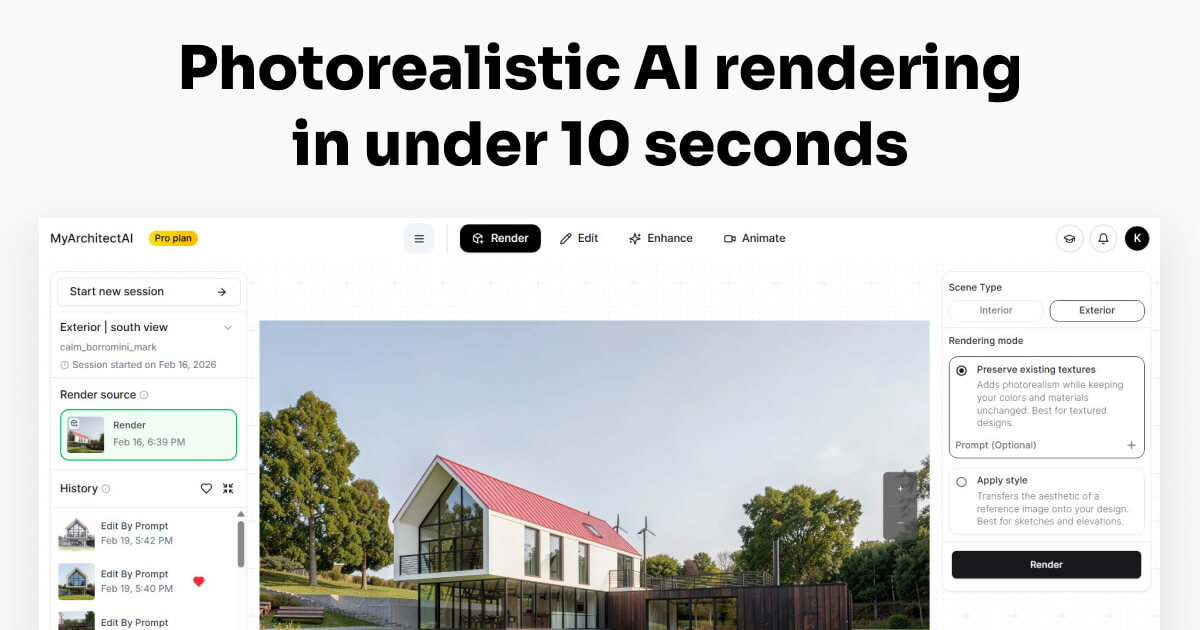
MyArchitectAI is a cloud-based AI rendering platform that transforms architectural and interior design sketches and 3D models into photorealistic visualizations within seconds.
Users upload a design from SketchUp, Revit, Archicad, or any other CAD or 3D modeling software, and the rendering engine produces a realistic visual while aiming to keep the original geometry and textures intact.
The tool offers one-click photorealistic rendering in under ten seconds, AI style transfer for quickly experimenting with different looks, and render editing for changing materials, placing objects, and adjusting lighting.
It also includes an image enhancement tool to upscale low-resolution renders and animation capabilities that convert still images into short cinematic videos, all running in the browser with no software installation required.
The platform serves architects, interior designers, furniture designers, and visualization artists across many countries who need rapid iteration on design concepts.
Strengths are its speed, simple browser-based workflow, and clear annual pricing with commercial rights on premium plans; limitations include that AI rendering can introduce small inaccuracies versus a manual high-end render and that subscription tiers cap render counts.
MyArchitectAI offers tiered annual subscriptions with a free trial that includes a limited number of renders. Pricing changes often, so check the official site for current plans.
MyArchitectAI's core capabilities include One-click photorealistic rendering in seconds, Uploads from SketchUp, Revit, Archicad, and other CAD tools, AI style transfer for design experimentation, Render editing for materials, objects, and lighting, Image enhancement and upscaling and Still-to-video animation.
One-click photorealistic rendering in seconds is built in, Uploads from SketchUp, Revit, Archicad, and other CAD tools is built in, AI style transfer for design experimentation is built in, Render editing for materials, objects, and lighting is built in, so you get a rounded toolkit rather than a single trick.
Each feature is designed to take the manual effort out of the task and help you reach a usable result faster, which is what makes MyArchitectAI worth a place on your shortlist.
On the plus side, users consistently highlight Very fast browser-based rendering with no install, Works with major CAD and 3D modeling software and Free trial renders and commercial rights on premium plans as the reasons they keep using MyArchitectAI.
It isn't perfect, though — AI output can differ slightly from a manual high-end render and Render counts are capped by subscription tier are the trade-offs people most often mention, so weigh those against your own priorities before you commit.
As with any AI tool, the output still benefits from a quick human review, but MyArchitectAI gets you most of the way there with far less effort. MyArchitectAI runs on a subscription pricing model, aimed at users who want the full feature set without free-tier limits.
AI-tool pricing changes often, so always check the current plans, seats and add-ons on the official site for the latest details before you buy. Who is MyArchitectAI for? It's best suited for cloud ai rendering for architecture and interiors.
Whether you're a beginner trying this kind of AI tool for the first time or a professional who'll use it every day, it's a credible option to consider.
If you're still deciding, compare MyArchitectAI against the alternatives and the head-to-head comparisons linked below — looking at features, pricing and real user ratings side by side is the fastest way to find the right fit for your workflow and budget.
Who is MyArchitectAI for?
MyArchitectAI is best suited for cloud ai rendering for architecture and interiors. Whether you are trying this kind of image & design tool for the first time or use one every day, it is a credible option to shortlist — compare it with the alternatives and head-to-head comparisons linked on this page to find the best fit for your workflow and budget.