Wispr Flow is a voice-to-text tool that types polished writing wherever your cursor is, across Mac, Windows, iPhone and Android, and now bundles an AI meeting notetaker into the same subscription.
FreemiumProductivity & Automation
AI household assistant for calendars, tasks, and family life Category: Productivity & Automation.
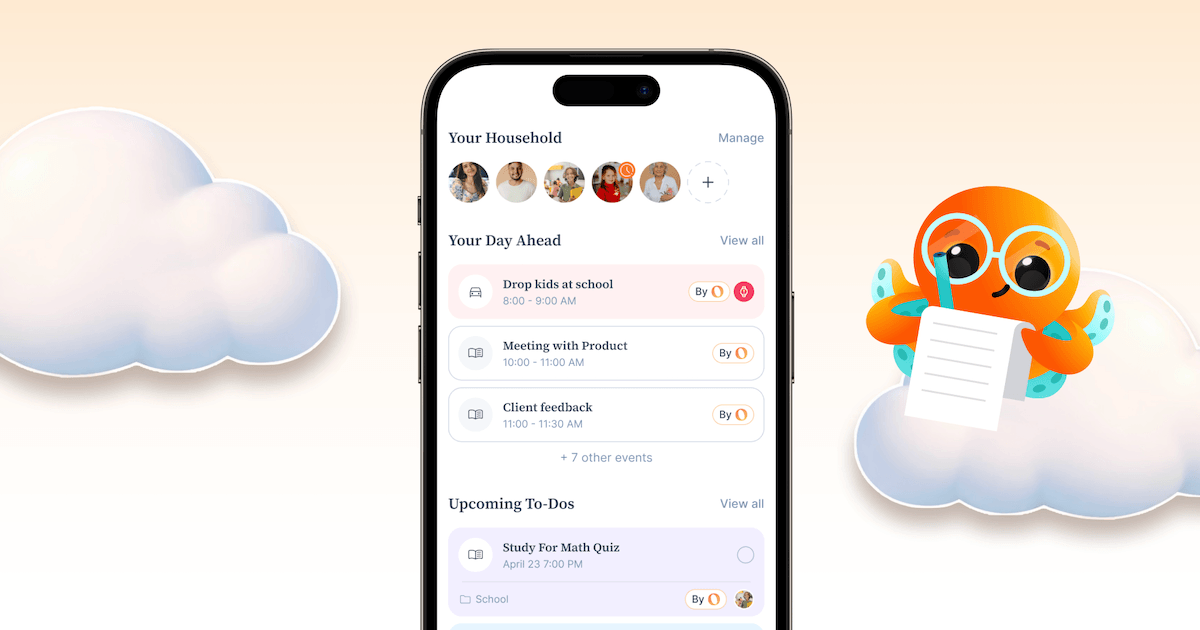
Ohai is an AI-powered personal and household assistant designed to reduce the mental load of coordinating family life, aimed at busy parents, working mothers, and households juggling multiple schedules. It functions largely as a text-based assistant that pulls together calendars, tasks, meals, and communications in one place.
Smart calendar syncing combines Google, Outlook, and Apple calendars into a shared household view, while document scanning processes emails, PDFs, and photos to extract dates and automatically create calendar events.
It manages to-do lists by converting requests into organized tasks, supports meal planning with grocery lists, and enables shared scheduling and task delegation among family members.
The product blends AI automation for routine work with human support that can step in for more complex scheduling needs, and it is available as a mobile app.
Pros include a clear focus on a real and underserved problem of household coordination, helpful automation like turning documents into calendar events, and an ADHD-friendly approach to reducing cognitive load.
Cons are that it is narrowly aimed at household and family management rather than general professional productivity, so it will not suit business workflows, and the most useful shared and coordination features require a premium subscription.
Ohai offers a free version with premium plans starting at a low monthly price. Pricing changes often, so check the official site for current plans.
Ohai's core capabilities include Smart calendar syncing into a household view, Document scanning into calendar events, Task and to-do management, Meal planning with grocery lists, Shared scheduling and task delegation and AI automation with human support backup.
Smart calendar syncing into a household view is built in, Document scanning into calendar events is built in, Task and to-do management is built in, Meal planning with grocery lists is built in, so you get a rounded toolkit rather than a single trick.
Each feature is designed to take the manual effort out of the task and help you reach a usable result faster, which is what makes Ohai worth a place on your shortlist.
On the plus side, users consistently highlight Focuses on the real problem of household coordination, Turns documents into calendar events automatically and ADHD-friendly approach to reducing mental load as the reasons they keep using Ohai.
It isn't perfect, though — Narrowly aimed at family life, not professional work and Best coordination features need a premium plan are the trade-offs people most often mention, so weigh those against your own priorities before you commit.
As with any AI tool, the output still benefits from a quick human review, but Ohai gets you most of the way there with far less effort.
Ohai runs on a freemium pricing model, so you can start for free and only pay once you outgrow the free tier — handy for testing it on a real task before spending anything.
AI-tool pricing changes often, so always check the current plans, seats and add-ons on the official site for the latest details before you buy. Who is Ohai for? It's best suited for ai household assistant for calendars, tasks, and family life.
Whether you're a beginner trying this kind of AI tool for the first time or a professional who'll use it every day, it's a credible option to consider.
If you're still deciding, compare Ohai against the alternatives and the head-to-head comparisons linked below — looking at features, pricing and real user ratings side by side is the fastest way to find the right fit for your workflow and budget.
Ohai is best suited for ai household assistant for calendars, tasks, and family life. Whether you are trying this kind of productivity & automation tool for the first time or use one every day, it is a credible option to shortlist — compare it with the alternatives and head-to-head comparisons linked on this page to find the best fit for your workflow and budget.
Smart calendar syncing into a household view
Document scanning into calendar events
Task and to-do management
Meal planning with grocery lists
Shared scheduling and task delegation
AI automation with human support backup
Ohai has an AInexfinder Editor Score of 4.5/5.
AInexfinder does not list plan prices or billing details. For current pricing, plans, and trials, visit the official Ohai website.
Visit official website for pricingVendor pricing, credits, and billing policies change over time. Always confirm on the official site before you buy.
Log in to write a review.
No reviews yet. Be the first to share your experience with Ohai.
Assigned reviewer
Daniel ReedSenior AI Tools Reviewer
Daniel reviews AI tools the slow way — by actually using them on real projects. His reviews cover what works, what breaks, and who each tool is genuinely a good fit for.
Daniel and the AInexfinder editorial team research Ohai using public product information, listing evidence, and (when available) hands-on checks. Scores reflect listing completeness and transparency — not paid placement.
Wispr Flow is a voice-to-text tool that types polished writing wherever your cursor is, across Mac, Windows, iPhone and Android, and now bundles an AI meeting notetaker into the same subscription.
Ema builds what it calls Universal AI Employees for HR, IT and finance, covering recruiting, onboarding, benefits and performance. EmaFusion combines 100+ models with automatic failover, 1,000+ prebuilt connectors reach existing systems, and the compliance list runs to eight certifications including ISO 42001.
Saner.AI is an AI personal assistant that consolidates notes, tasks, emails and documents into one workspace. Its Skai assistant turns emails and brain dumps into scheduled tasks, and it is explicitly designed around ADHD, with a co-founder who has it.
Simular Inc. builds Sai, an AI agent that operates a private cloud-based virtual desktop — clicking, typing and using interfaces the way a person does, while also able to call APIs, use a terminal and write code. Its research line is the Agent S series.

axess is a free AI job-search tool that scans LinkedIn, Indeed and Glassdoor daily, scores each role against your profile on both relevance and likelihood, researches the employer, and prepares a tailored CV and cover letter for the matches worth pursuing.

Otter.ai transcribes meetings live, writes summaries and action items, and organises everything into searchable Channels — with OtterPilot joining Zoom, Teams, and Google Meet, plus role-specific agents for sales, recruiting, and SDR work.